
What Is Perceptual Hashing?
A perceptual hash is a compact fingerprint of an image based on its visual content rather than its raw file data. A cryptographic hash, the kind used to verify a file has not been altered, changes completely if a single pixel is different. A perceptual hash does the opposite: it produces similar, closely matching values for images that look alike, even if the underlying files are byte-for-byte different. That property is what makes it the right tool for finding near-duplicate photos: frames from a burst sequence, slightly different exposures of the same scene, or a full-resolution image and its resized web export.
This is a foundational piece of technology behind most modern photo culling software, and understanding how it works explains both why duplicate detection is fast even on huge libraries, and why it occasionally makes a grouping decision that looks surprising. It sits alongside the other AI concepts covered across imagic's AI and technology guides, most of which come back to the same underlying idea: reducing an image to a small set of numbers that can be compared quickly, rather than analysing full-resolution pixel data every time.
How Perceptual Hashing Works, Step by Step
Most perceptual hashing algorithms follow a broadly similar pipeline, even though the specific math differs between implementations:
- Resize down aggressively. The image is scaled to a very small size, often 8x8 or 16x16 pixels. This throws away fine detail and keeps only the fundamental structure of the image: where the bright and dark regions sit relative to each other.
- Convert to greyscale. Colour information is dropped so that a shift in white balance between two shots of the same scene does not by itself prevent the images from being recognised as similar.
- Compute a bit-string hash. The simplest method, average hash, compares every pixel in the tiny reduced image against the mean brightness and sets a single bit for each pixel depending on whether it is above or below that average. More advanced methods use a discrete cosine transform to capture the most visually significant frequency components before hashing, which tends to be more robust to compression artefacts and minor scaling.
- Compare hashes using Hamming distance. Two images are compared by counting how many bit positions differ between their hashes. A small Hamming distance means the images are visually similar; a large one means they are not. This comparison is extremely cheap computationally, which is why perceptual hashing scales to libraries of tens of thousands of images without needing to compare full-resolution pixel data directly.
The Main Perceptual Hash Algorithms
Average Hash (aHash)
The simplest and fastest method. It reduces the image to a small greyscale grid, computes the mean brightness, and sets each bit based on whether that pixel sits above or below the mean. This typically produces a 64-bit hash and works well for near-exact duplicates, but is more sensitive to uniform brightness or contrast shifts than the alternatives below.
Difference Hash (dHash)
Rather than comparing each pixel to a global mean, dHash computes the gradient, the difference in brightness, between horizontally adjacent pixels. This makes it noticeably more robust to overall brightness changes, which is useful for burst sequences where auto-exposure may have shifted slightly between frames of the same moment.
Perceptual Hash (pHash)
The most computationally involved of the three, pHash applies a discrete cosine transform to extract the lowest-frequency, most perceptually significant components of the image before hashing. It is the most resilient to scaling, compression, and minor transformations, which makes it the most reliable choice for detecting a resized or re-compressed copy of an image as a duplicate of the original.
Why Perceptual Hashing Beats File Hashing for Photo Libraries
File-level hashing (comparing raw file bytes or a cryptographic checksum like MD5 or SHA-256) only catches exact duplicates: the identical file imported twice, or copied into two different folders. It is fast and completely reliable for that narrow case, but it is blind to anything that changes the file's bytes even slightly. Two frames shot a fraction of a second apart in a burst are different files entirely at the byte level, even though a person looking at them would call them duplicates. A resized JPEG export of a RAW file is also a completely different file from its source, despite depicting the same image.
Perceptual hashing catches both of these cases because it works from visual content, not file bytes. This is the same underlying reason it is described in more general terms in the guide to how duplicate photo detection saves editing hours, and why burst-heavy shooting styles benefit from it most, as covered in the piece on managing burst photography.
Comparing the Hashing Approaches
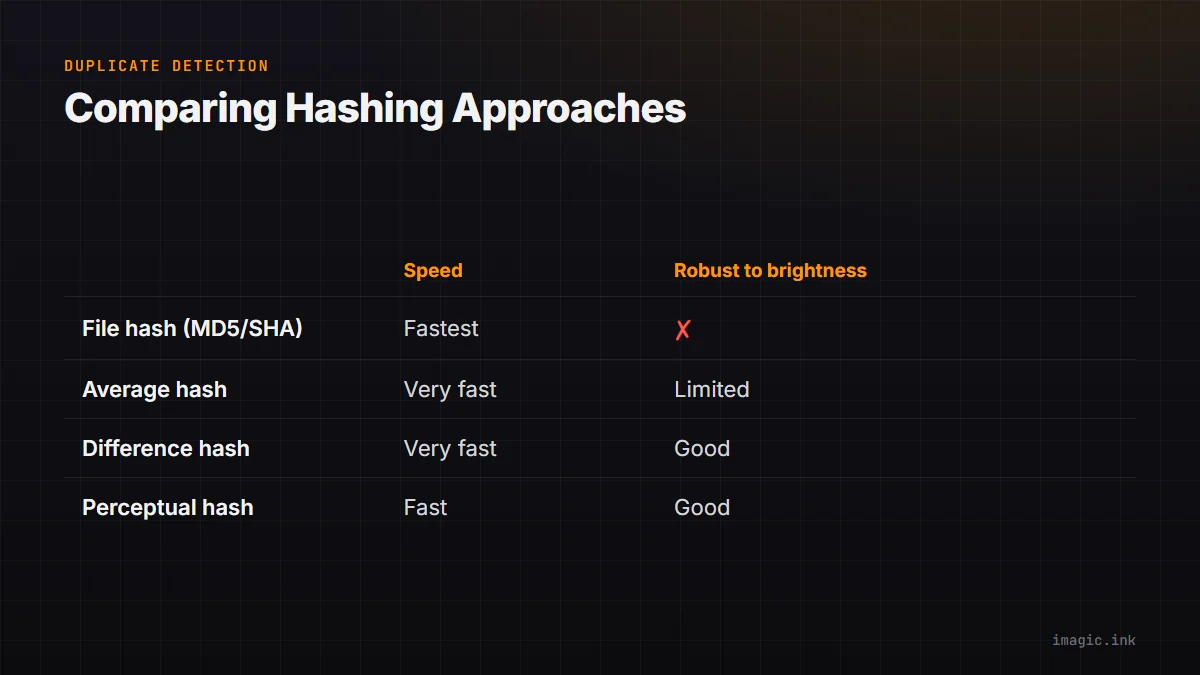
| Method | Speed | Robust to brightness shifts | Robust to scaling/compression |
|---|---|---|---|
| File hash (MD5/SHA) | Fastest | No (any byte change breaks the match) | No |
| Average hash (aHash) | Very fast | Limited | Limited |
| Difference hash (dHash) | Very fast | Good | Moderate |
| Perceptual hash (pHash) | Fast | Good | Best of the three |
A Worked Example
Consider three frames from a single burst: the photographer holds the shutter down for half a second and captures three near-identical images of a subject mid-gesture. Reduced to an 8x8 greyscale grid, the three frames produce hash values that differ in only a handful of bit positions, since the overall light, background, and subject position are almost unchanged between frames captured a fraction of a second apart. A Hamming distance calculation between any two of the three hashes returns a small number, comfortably inside the threshold used to call two images a match, and all three get clustered together.
Now compare one of those burst frames to a completely different photo taken minutes later at a different angle, in different light. The pixel structure of the reduced greyscale grid is substantially different, more bits disagree between the hashes, and the Hamming distance comes back well above the matching threshold. The two images are correctly treated as unrelated, even though a file-hash comparison would have told you nothing useful either way (both files are obviously different at the byte level, whether they are visually related or not). This is the practical difference perceptual hashing makes: it distinguishes "different file, same moment" from "different file, different moment," which is exactly the distinction a photographer cares about when culling a burst-heavy shoot.
Tuning the Matching Threshold
The Hamming distance threshold used to decide whether two hashes count as a match is a tunable parameter, and the choice has real consequences. Set the threshold too tight, and only near-identical frames get grouped, which means more manual scrolling through what are functionally duplicate images that the software failed to catch. Set it too loose, and visually distinct images with a superficially similar structure, two portraits shot against the same plain backdrop, for example, can get merged into a group where a genuinely different keeper frame is now easy to overlook.
There is no universally correct threshold; the right setting depends on how visually similar a photographer's typical burst sequences are and how much manual review time they are willing to trade for catching a few more true duplicates. Software that exposes this as a fixed, non-adjustable pipeline is making that trade-off on your behalf, which is worth knowing when a grouping decision looks unexpected. It is rarely a bug; it is usually the threshold doing exactly what it was tuned to do, just not matching your own intuition about that specific pair of images.
How imagic Uses Perceptual Hashing
imagic computes a perceptual hash for every image during its Analyse step, entirely on your own machine since all processing is local and photos never leave the computer they are stored on. Images whose hashes fall within a small Hamming distance of each other are clustered into groups, which surface in the Review step as burst sequences ready for comparison. Within each group, imagic pre-selects the strongest candidate based on its quality scoring across sharpness, exposure, noise, and detail, so the starting point for review is already the best frame in that cluster rather than whichever one happened to be captured first.
On a shoot with dozens or hundreds of burst sequences, this automated grouping removes a meaningful chunk of manual comparison work, letting you review clusters rather than scroll through every individual frame in sequence. A free 500-export trial with no card required is available at imagic.ink/desktop for photographers who want to see the clustering behaviour against their own library.
Where Perceptual Hashing Falls Short
Perceptual hashing is not a perfect substitute for human judgement, and it is worth knowing where it tends to struggle. Very different exposures of a similar scene, a dramatically underexposed frame next to a correctly exposed one, can produce hash values far enough apart that they are not grouped together despite an obvious compositional similarity to a person looking at both. Conversely, images with overlapping but not identical framing, two frames where the subject moved slightly but the background dominates the hash, may or may not be grouped depending on the specific algorithm and the distance threshold in use. Tighter thresholds catch fewer true duplicates but produce fewer false groupings; looser thresholds do the opposite. Most culling tools tune this threshold to favour recall (catching more real duplicates) since a missed grouping just means slightly more manual review, while a wrongly merged pair is more likely to hide a genuinely different, worthwhile frame inside a cluster you might otherwise skim past.
These edge cases represent a small fraction of images in a typical shoot, and reviewing flagged groups rather than trusting them blindly is standard practice, the same way any automated batch process benefits from a final human check before delivery. Treat the clustering as a fast first pass that removes the bulk of repetitive comparison work, not as a fully automated final decision that skips human review entirely.
Frequently asked questions
Is perceptual hashing the same as facial recognition?
No. Perceptual hashing analyses overall visual structure, brightness patterns across the whole frame, and has nothing to do with identifying faces or people. Facial recognition is a separate technology sometimes used alongside perceptual hashing in photo management tools, but the two solve different problems.
Does perceptual hashing work on RAW files directly?
Most implementations, including imagic's, generate a preview or thumbnail from the RAW file first and hash that, rather than hashing raw sensor data directly. This keeps the process fast and consistent across different RAW formats without needing format-specific hashing logic.
Can perceptual hashing accidentally group two genuinely different photos together?
Yes, occasionally, particularly when two unrelated images share a similar overall brightness and composition pattern, such as two different subjects photographed against a similarly lit plain background. This is why reviewing grouped clusters before deleting anything is important rather than trusting the grouping as a final decision.