The Real Estate Editing Speed Problem
Real estate photography has a turnaround expectation that most other genres do not share. Agents typically want a listing live within a day or two of the shoot, sometimes the same evening, because every day a property sits off the market without photos is a day of lost buyer interest. That expectation collides with the actual volume of a typical shoot: twenty to forty rooms and exteriors, often bracketed for exposure, all needing consistent, clean processing before they can go to MLS or a listing site.
The tension is not really about editing talent. A skilled editor can make any single room look excellent given enough time. The problem is doing that consistently across dozens of rooms, each with its own mix of window light and interior lighting, on a timeline measured in hours rather than days, without the process falling apart into rushed, inconsistent results.
Building a Repeatable Per-Listing Workflow
The real-estate photographers who reliably hit fast turnaround are not editing faster than everyone else frame by frame. They have removed the decision-making from the repetitive parts of the process, so the only real editorial time goes toward the handful of shots that genuinely need it.
- Import and back up immediately. A listing shoot is not usually repeatable on short notice (the agent has already scheduled the listing to go live), so protecting the files with a backup copy before culling starts is worth the few minutes it costs.
- Cull by room, not by the whole shoot at once. Grouping frames by room as they are reviewed, rather than treating the whole take as one undifferentiated pile, makes it much easier to spot which frame in each room's set is the strongest, especially when brackets or near-duplicate framing options were shot for the same room.
- Batch edit by lighting condition, not by room. Rooms that share a similar lighting setup (several bedrooms lit only by ceiling fixtures, for instance, versus a sunlit kitchen with strong window light) usually respond well to the same base adjustment, even though they are visually different rooms.
- Export in the format the destination actually needs. MLS systems and listing sites typically want a specific resolution and file size ceiling; matching that on export avoids a second round-trip to resize afterward.
Culling a Listing Shoot Efficiently
A typical listing shoot produces meaningful volume once every room, exterior angle, and bracketed exposure is counted, and manually reviewing every frame at full size is where a lot of turnaround time quietly disappears. AI-assisted culling helps most with the mechanical part of this: grouping near-duplicate frames from the same room and flagging obviously soft or poorly exposed shots so the photographer's attention goes straight to comparing the two or three real candidates per room rather than scrolling through everything shot there.
imagic's duplicate and burst grouping clusters visually similar frames from the same setup together, and its sharpness and exposure scoring surfaces the strongest candidate in each group. This matters more for real estate than the raw editing speed does, because the actual bottleneck in most listing workflows is deciding which of six nearly identical shots of the same kitchen angle to keep, not how quickly any single one gets edited once chosen.
Consistent Looks Across Rooms and Lighting
Interior real estate shots almost always mix multiple light sources within the same frame: window daylight, warm interior ceiling fixtures, and sometimes mixed-temperature lamps, all competing for the same white balance setting. Getting a consistent, clean look across an entire listing without editing every room from scratch depends on grouping rooms by their dominant light source and applying one adjustment per group rather than one universal setting for the whole property.
A practical grouping for a typical residential listing looks like this: exteriors and any room with strong direct window light in one group, since they share a similar highlight and white-balance challenge; interior rooms lit primarily by ceiling or lamp fixtures in a second group, since they typically run warmer and need a different starting white balance; and any room with a genuinely mixed lighting problem (strong window light plus warm interior fixtures fighting each other in the same frame) set aside for individual attention rather than forced into either batch. Within imagic, RAW files for each group run through imagic's own built-in RAW engine, and an adjustment dialed in on one representative frame in a lighting group can be applied to the rest of that group in a single batch operation, using imagic's batch editing and one-click styles rather than repeating the same white balance and exposure correction by hand across twenty separate rooms.
What Still Needs Individual Attention
Batching handles the bulk of a listing shoot well, but a few situations reliably need a slower, more manual pass, and planning for that upfront keeps the fast parts of the workflow from getting bogged down trying to force everything through the same batch settings.
- Genuinely mixed-light rooms. A room with both strong window daylight and warm interior lighting fighting for the same white balance rarely responds well to a batch setting built for either pure daylight or pure interior light.
- The hero exterior shot. The listing's primary marketing image, usually the front exterior or the best interior shot, is worth the extra few minutes of individual attention since it carries more weight in the listing than any single interior room shot.
- Bracketed exposure rooms. Rooms shot with an exposure bracket to handle a very bright window against a darker interior benefit from a manual look at the histogram of each bracketed frame to pick the one holding the most usable detail, rather than trusting an automated exposure score, since the whole point of a bracket is that adjacent frames are deliberately over and underexposed relative to each other.
It is also worth being clear about what batch RAW editing does not replace. Genuinely extreme dynamic range scenes (a very bright exterior view visible through a dark interior window, for example) are sometimes handled by merging multiple bracketed exposures into a single HDR composite, which is a separate step outside standard batch RAW processing and requires its own tool. Batch processing here covers picking the strongest single frame per room and applying consistent exposure and color, not blending several exposures into one composite image.
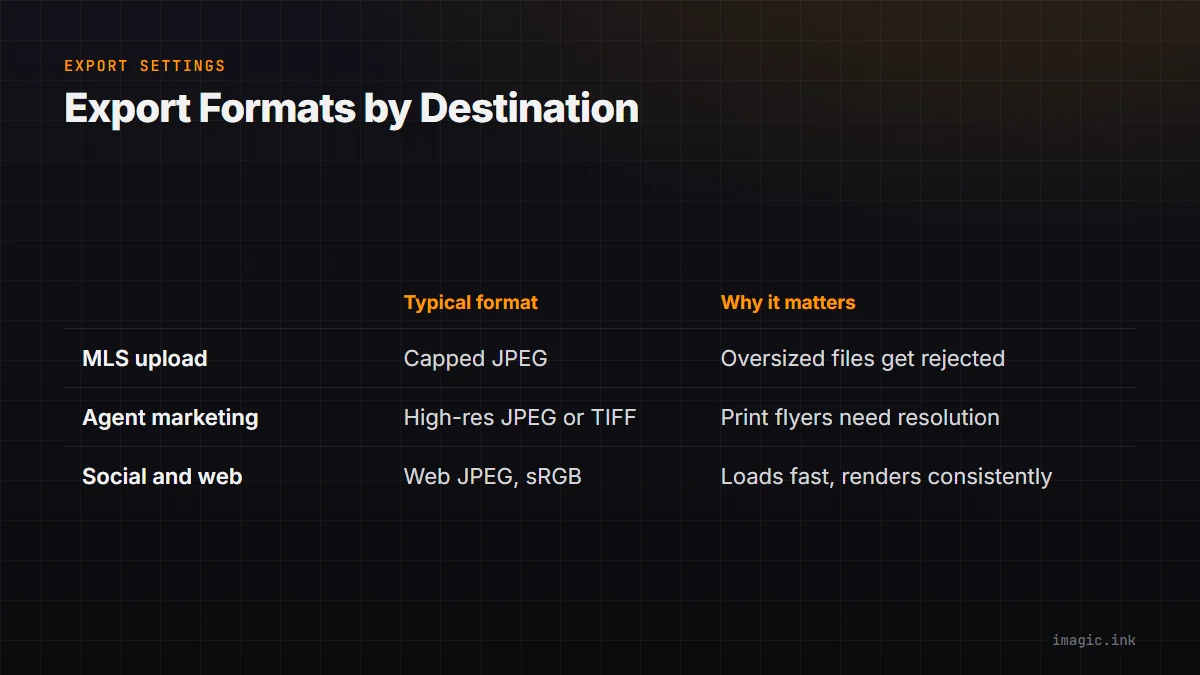
Export Settings for MLS and Agent Delivery
| Destination | Typical format | Why it matters |
|---|---|---|
| MLS listing upload | JPEG, resolution and file size capped by the local MLS system | Most MLS platforms enforce a maximum file size or dimension; oversized files can be rejected or auto-compressed poorly |
| Agent marketing materials | Higher-resolution JPEG or TIFF | Print flyers and larger web use benefit from more resolution than a basic MLS thumbnail needs |
| Social and web sharing | Web-optimized JPEG, sRGB | Smaller files load faster and render consistently across devices for quick sharing |
Exporting by the same lighting groups used during editing, rather than one blanket export pass for the whole listing, keeps file sizes and color rendering consistent across the delivered set. imagic exports to JPEG and TIFF, which covers the common real estate delivery paths (MLS-ready JPEGs and higher-resolution TIFFs for marketing use) without a separate export tool in the middle of the workflow.
Keeping Multiple Listings Organized
Real estate photographers rarely work on a single property at a time. A busy week might mean cards from three or four different listings arriving within days of each other, and mixing them up at the import stage causes exactly the kind of delay a fast-turnaround business cannot afford: a missing or misfiled room shot discovered after the gallery has already gone to the agent.
A simple, consistent naming and folder structure per listing (address or MLS number as the top-level folder, consistent room labeling within it) solves most of this before it becomes a problem. Tagging frames with metadata as they are imported, rather than trying to reconstruct which shots belong to which property later from memory, is worth the small amount of upfront discipline it takes. The broader habits around keeping large photo libraries organized by shoot, covered in a guide to photo metadata management, apply directly to a real estate business juggling several active listings at once, even though that guide is not real-estate specific.
A Realistic Listing-Day Timeline
The exact pace depends on property size and how many rooms were shot, but the general shape of an efficient listing workflow holds regardless of scale: back up the cards immediately, cull room by room using grouped near-duplicates rather than reviewing every frame individually, batch edit by lighting group rather than by room, handle the small set of exceptions (mixed light, brackets, the hero shot) individually, and export by the same groups used for editing. The photographers who consistently deliver listings quickly are the ones who have compressed that sequence into a repeatable routine, not the ones editing each individual frame faster than the next person.
The same batching logic that makes a real estate listing manageable on a tight timeline applies just as directly to other high-volume, fast-turnaround genres. The approach to grouping and batch editing described in a guide to batch processing a landscape shoot uses the same core idea (group by condition, edit once per group) even though the subject matter could not be more different. The same principle shows up again in fast-turnaround sports photography culling, where the volume comes from continuous bursts rather than bracketed rooms, but the fix is the same: group first, then act once per group. For a broader sense of where AI-assisted culling actually saves meaningful time versus where it does not, a look at time savings from AI photo editing breaks down the same tradeoff in more general terms. More workflow habits along these lines are covered across imagic's tips and workflow section.
Frequently asked questions
How many photos does a typical real estate listing shoot need edited?
It varies by property size, but most residential listings run from a dozen interior rooms plus several exterior angles, sometimes with bracketed exposures for high-contrast rooms. The exact count matters less than having a repeatable per-room and per-lighting-group process, since that is what keeps turnaround consistent regardless of property size.
Can batch editing handle a room with both bright window light and warm interior lighting?
Batch settings tuned for either pure daylight or pure interior lighting rarely handle a genuinely mixed-light room well. These rooms are usually worth pulling out for individual attention rather than forcing through a batch pass built for the rest of the listing.
Does fast real estate editing mean lower quality?
Not inherently. Speed comes from removing repetitive manual work (reviewing near-duplicate frames one at a time, re-applying the same correction to every room by hand), not from skipping quality checks. The rooms that genuinely need individual attention, like mixed lighting or the hero exterior shot, still get it; the difference is that the rest of the listing does not require the same individual treatment to look consistent.