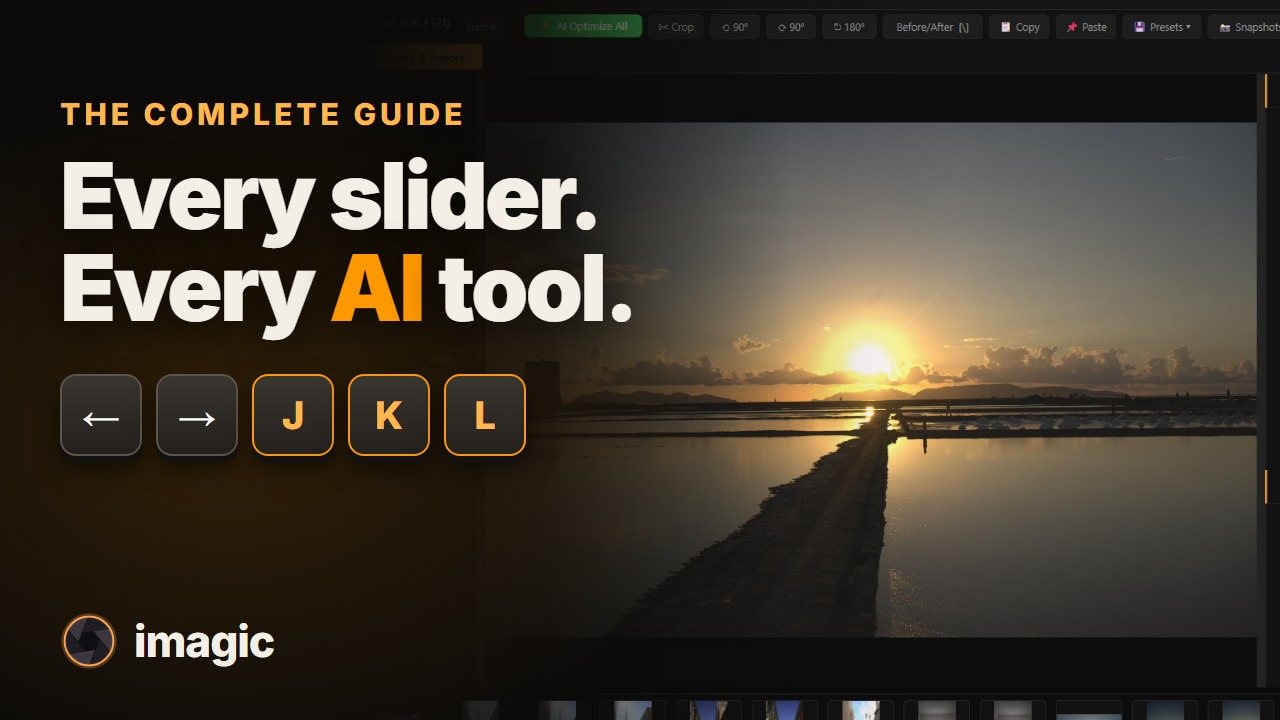
See it on a real shoot
469 RAW files from a week in Sicily, culled and edited in the real app. Nothing in the video is mocked up.
Cull, sort and edit as much as you like, free. The trial only counts exports: your first 500 finished photos are on us, with full imagic Max access. After that, pick a tier and pay once.
Already have a licence key? Download: Windows Windows (ARM) Apple Silicon Intel Mac
imagic runs on Windows & macOS. Drop your email and we'll send the download link plus a free 500-export trial key. Pick it up when you're back at your computer.
Enter your email to get a free activation key that covers 500 exports. Culling and editing are unlimited; only the photos you export count. Download the installer, activate the app, and see how imagic handles your own photos before spending anything. The trial includes full imagic Max: masking, retouch, CLI, and the MCP server.
Save this key, download imagic, and enter it on first launch.
Not sure which? Apple menu > About This Mac: "Apple M…" = Apple Silicon, "Intel" = Intel.
Copy this key, install imagic, and enter it on first launch. We've emailed you a copy too.
Linux: portable .tar.gz. Extract it and run ./imagic. It updates by downloading a new archive rather than from inside the app, and it needs the usual Qt libraries: libgl1 libegl1 libxkbcommon-x11-0 libxcb-cursor0 libxcb-icccm4 libxcb-keysyms1 libxcb-shape0 libxcb-xkb1 libxcb-image0 libxcb-render-util0 libxcb-util1.
View Changelog & Release Notes · System requirements & measured speed
Sorry about that, and it is not you. Since version 1.5.3 our Windows installer is code-signed by Luke Fenech through Microsoft's Artifact Signing, but Windows and some antivirus tools build trust in a new signature gradually as more people download it, so you may still see a warning for a while. Your download is safe to verify: every release's SHA-256 checksum is published on the releases page.
This fixes it for almost everyone, in order:
Your trial key stays valid the whole time. If none of this works, email help@imagic.ink and we'll sort you out personally.
No web quotas, no upload waits, and no image-count ceiling. Point imagic at a folder and let it churn through the job on your own machine.
Histogram, manual controls, color grades, scene-aware presets, and export from the same edit pipeline. What you see is what gets exported.
Crash-resilient batch export is in every tier. imagic Max adds the full headless CLI and MCP server for scripted, agent-driven runs.
True RAW demosaicing for CR2, CR3, NEF, ARW, RAF, ORF, RW2, DNG, PEF and TIFF, built in. Nothing else to install.
Your keep/trash decisions and editing choices feed back into the desktop workflow so the assistant gets closer to your taste over time.
One payment. One product key. No subscription fatigue, no seat dashboard, and no vendor lock-in just to cull and edit your own work.
“Makes my job so much easier. Wish it was a little more strict and I could say only keep my best 30.”
He asked for a keep limit. It shipped as the keep-limit bar in Review.
The product key is saved on the device after activation. If you later activate the same key on another device, the earlier activation stops working. That gives you a clean transfer path without allowing one key to stay active everywhere.
That matches the app-side enforcement already built into the licensing backend and startup gate.
Only exports. Import, cull, compare and edit as many photos as you like: the trial ticks once for each finished photo you export, up to 500. No card, full imagic Max access, and the key carries a 90-day date as a backstop. See how export and the 500-export count work for the full walkthrough.
Nothing is lost. Your imports, culls, edits and collections all stay exactly as you left them, there is nothing to redo and nothing to re-import. Exporting pauses until you pick a tier (Lite, Plus or Max); buying unlocks that same install and the photos you have already worked on, so you pick up right where you left off.
Start with the free 500-export trial, no card required, full imagic Max access included. Culling and editing never count against it, only exported photos do. Then pick a tier (Lite €19, Plus €49, or Max €99) and own the license forever. No monthly charges, annual renewal, or price increases. Buy once, update forever: every licence includes all future imagic versions and new camera support for its tier. Upgrade any time and pay only the difference.
Yes. Buy once, update forever: every licence includes all future imagic versions and new camera support for its tier. This covers Lite, Plus and Max alike, at no extra cost, for the life of the product: no paid major versions and no update plan to renew. Moving up a tier (Lite to Plus, Plus to Max) is the only paid change, and costs just the difference in price.
Your license key and installer download links are emailed automatically once Stripe confirms payment, typically within 1-2 minutes. Check your spam folder if you don't see it. The key is also displayed on the confirmation page.
Your license activates on one machine at a time. When you activate on a new device, the previous device is automatically deactivated. This makes switching to a new computer seamless, with no support ticket required, just activate on the new machine.
imagic Desktop runs on Windows 10 (64-bit, 1809 or later) and Windows 11, and on macOS 14 Sonoma or later on Apple silicon and Intel Macs. The same license key activates on both. 8 GB of RAM is the minimum, 16 GB is recommended, and no GPU is needed. See the system requirements and measured culling speed.
No. imagic renders RAW files with its own built-in engine (LibRaw decode plus imagic's processing pipeline), giving you true RAW demosaicing for CR2, NEF, ARW, and other formats with zero extra setup. There is nothing else to install. Earlier versions bundled RawTherapee; version 1.3 and later do not need or include it.
No Adobe account and no Creative Cloud: imagic is completely independent of Adobe. All processing happens locally on your machine, so your photos are never uploaded and speed is limited only by your hardware. The app checks its license when it starts; offline, it keeps working for up to 14 days since the last successful check, so a shoot away from Wi-Fi is fine.
Payments are processed securely by Stripe. All major credit and debit cards are accepted: Visa, Mastercard, American Express, and more. The checkout is PCI-compliant and your card details are never stored by imagic.
Yes. The free trial covers your first 500 exported photos, with everything in imagic Max unlocked. Importing and culling are unlimited, so you can bring a whole card and only spend the trial on pictures you actually take out. There is no daily clock to waste: the key stays good for 90 days, so it is still there next time you shoot. No credit card is required. Enter your email above, copy the trial key, download the installer, and activate it on first launch.
You already have imagic Max, forever, free. Every license bought before the tiers launched was upgraded automatically, no action needed.
Your download has started. Follow these steps to install and open the app.
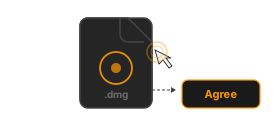
Once the download finishes, double-click the imagic DMG in your Downloads folder. You'll see the EULA; click Agree to continue.
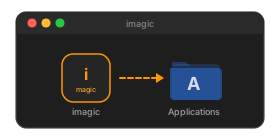
In the window that opens, drag the imagic icon onto the Applications folder shortcut. This copies the app to your Mac.
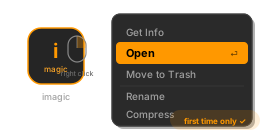
Open Applications in Finder, find imagic, then right-click → Open. macOS may show a warning the first time because the app is from outside the App Store; click Open to confirm.
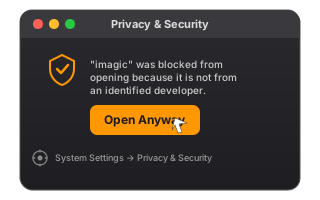
If macOS still won't open the app, go to System Settings → Privacy & Security, scroll down to the Security section and click Open Anyway next to the imagic message. Then try launching the app again.
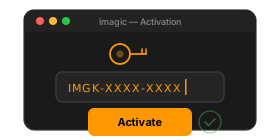
On first launch, enter the product key from your email to activate imagic. Its RAW engine is already built in, no extra setup needed.