Why Faster Delivery Matters to Wedding Clients
Wedding clients wait for their gallery with a level of anticipation few other photography jobs generate. The images document a day they cannot repeat, and the wait between the wedding and delivery is often filled with anxious check-ins, especially in the first two weeks. Industry turnaround times have shifted over the past several years: what used to be considered acceptable at six to eight weeks now reads as slow next to photographers routinely delivering in two to three weeks. Faster delivery does not just satisfy an anxious client, it also shortens the window in which a photographer is still carrying unfinished work into the next booking, and it tends to generate reviews and referrals while the wedding is still fresh in a couple's mind.
Hitting a two-week target consistently is less about working faster under pressure and more about removing the bottlenecks that eat time without adding value. The biggest of those bottlenecks, for almost every wedding photographer, is culling: reviewing thousands of frames one at a time to find the few hundred worth editing. Editing speed matters too, but for most photographers the gap between a rushed six-week delivery and a comfortable two-week delivery is explained almost entirely by how efficiently the selection stage is handled, not by how quickly the actual color and exposure adjustments get made.
Day Zero: Backup Before Anything Else
The clock on delivery should not start until the files are safe. Import every card the night of the wedding or the following morning, copying to a working drive and a separate backup drive or cloud location before doing anything else. Do not begin culling, editing, or even casual browsing of the images until the backup is confirmed complete. A drive failure before backup exists means losing the entire job, along with the two-week delivery promise along with it. This step takes perhaps twenty minutes and it is the only step on this list that has no acceptable shortcut.
Once backup is confirmed, organize the files into a consistent folder structure, something as simple as ClientName then a RAW Originals subfolder, so nothing gets misplaced during the busier stages that follow.
Day One: AI Culling as the First Real Time Save
This is where most of the achievable time savings actually live. A typical wedding produces 2,000 to 4,000 RAW frames, and reviewing each one manually, applying a star rating or flag, comparing near-duplicate burst frames by eye, is the single largest time cost in the entire post-production process. Running the full import through an AI culling tool like imagic before any manual review begins changes the shape of this stage significantly. imagic scores every photo for sharpness, closed eyes, and composition, and groups near-identical burst sequences automatically, so a photographer reviews clusters of similar shots rather than comparing hundreds of individual near-duplicates one at a time. All of this analysis runs locally; photos are not uploaded anywhere as part of the process.
The photographer still makes every final decision. The AI simply removes the mechanical first pass, sorting out what is technically blurry, poorly exposed, or a duplicate of a stronger frame, so review time is spent on judgement calls rather than repetitive comparison. For a 3,000-frame wedding, this generally reduces active review time from two to three hours of manual rating down to something closer to sixty to ninety minutes.
Editing in Focused Sessions Instead of Marathons
Once selects are confirmed, editing itself benefits from structure. Working in focused two-hour sessions rather than long marathon days helps maintain consistent color judgement; perceptual fatigue after several continuous hours of screen time tends to skew color and exposure decisions in ways that show up as inconsistency across a gallery. Grouping images by lighting condition before editing, all indoor reception shots together, all outdoor ceremony shots together, lets a photographer apply one set of base corrections to a whole group and then fine-tune individual outliers, rather than building every adjustment from a blank slate.
Spending roughly thirty to sixty seconds per image on individual fine-tuning after a batch correction is a reasonable target for most wedding work. For a gallery of 500 selects, that works out to four to eight hours of focused editing time spread across several sessions, which is a manageable chunk within a two-week window.
Export and Quality Review
Configure export settings once and reuse them for every wedding rather than rebuilding presets each time. A common baseline is full-resolution JPEG at 90 to 95 percent quality in the sRGB color profile, with consistent sequential file naming. Batch export the whole confirmed set in one operation and let it run unattended rather than exporting in small manual batches throughout the day.
Before uploading anywhere, do a quick pass over the exported files checking for obvious problems: a wrong crop, a color shift that only shows up at full resolution, or a naming gap that suggests a file failed to export. This review step is short, usually well under an hour for a full wedding gallery, but skipping it risks a client-facing error that costs far more time to fix after delivery than it would have taken to catch beforehand.
Delivery and Gallery Handoff
Upload the finished set to whichever gallery delivery platform you use and send the client their link. Delivering within the first week of a two-week target window consistently produces the strongest client response, since it beats the expectation the client came in with rather than merely meeting it. A brief, warm delivery message alongside the gallery link, thanking the couple and inviting them to reach out with questions, costs a few minutes and tends to matter more to the client's overall impression than most photographers assume.
A Repeatable Delivery Timeline
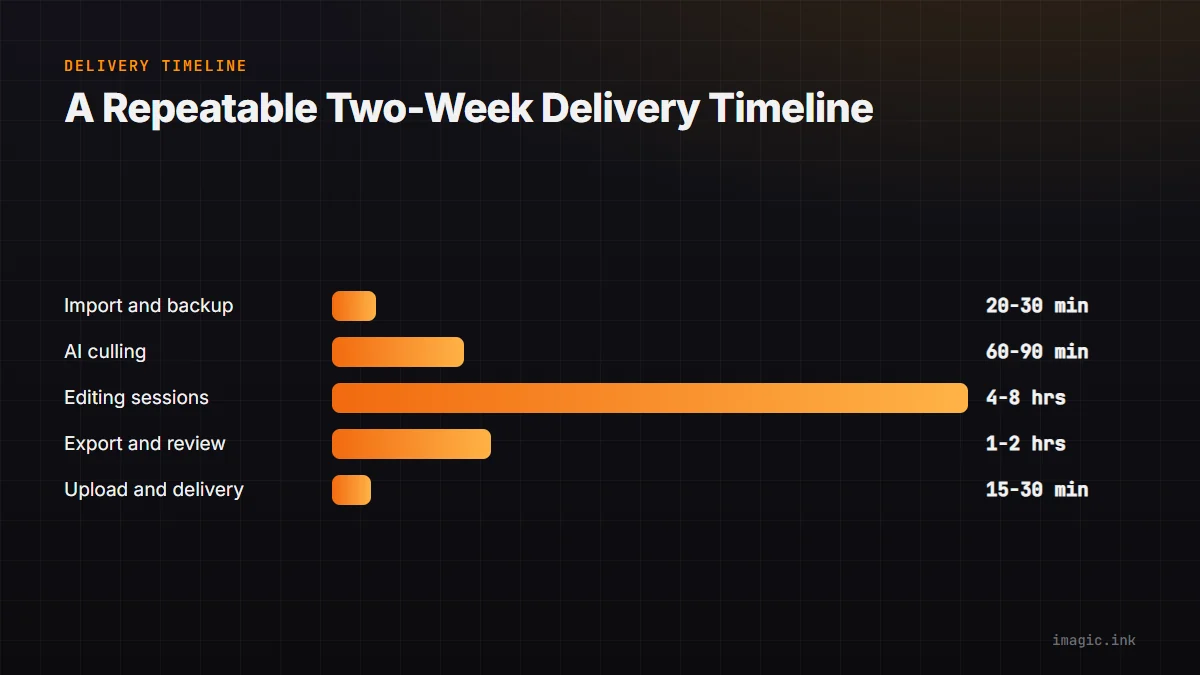
The table below lays out a realistic day-by-day target for a typical wedding, assuming the photographer is not also shooting other jobs during the same window.
| Day | Task | Approximate active time |
|---|---|---|
| Day 0 | Import and confirm backup | 20-30 minutes |
| Day 1 | AI culling and select confirmation | 60-90 minutes |
| Days 2-5 | Focused editing sessions | 4-8 hours total |
| Day 5-6 | Export and quality review | 1-2 hours |
| Day 6-7 | Gallery upload and delivery | 15-30 minutes |
This leaves the second week of the two-week window as buffer for other jobs, unexpected delays, or a more complex edit than usual, rather than assuming every wedding will proceed on a perfectly optimistic schedule. See more approaches to structuring a full shoot-to-delivery pipeline in the wedding photography workflow guide and the general tips for a faster post-processing workflow.
What to Do When a Wedding Runs Long or Complicated
Not every wedding fits the standard timeline. Multi-day weddings, destination shoots with a second shooter's files to merge, or receptions that run well past midnight all add real time to the process, and trying to force an unrealistic two-week promise onto an unusually large or complex job tends to produce rushed, lower-quality editing rather than genuinely faster delivery. Building in a buffer, and communicating a realistic timeline to the client upfront rather than overpromising, protects both the quality of the final gallery and the photographer's relationship with the client if something takes longer than planned.
Second-shooter files deserve particular attention: merging two photographers' cards into a single culled set works best when both sets are run through the same AI culling pass together, rather than reviewed separately and combined afterward, since that avoids duplicate near-identical selects from two different cameras covering the same moment. See the tips and workflow category for more on structuring shoots with multiple shooters and complex delivery requirements, and the guide to duplicate photo detection for more detail on how burst and near-duplicate grouping works.
Common Mistakes That Slow Delivery Down
Several habits quietly add days to a delivery timeline without ever feeling like the cause. Editing directly out of the full RAW Originals folder, rather than culling first and working only from a Selects folder, means every editing session includes time spent scrolling past frames that will never be delivered. Rebuilding export settings from scratch for each wedding, instead of saving and reusing a preset, adds a small but repeated tax to every single job. Reviewing burst sequences frame by frame instead of relying on automatic grouping means comparing near-identical shots dozens of times over the course of a shoot, when a single confirmed choice per burst group would suffice.
Perhaps the most common mistake is treating editing and culling as one continuous task rather than two distinct stages. Photographers who open their RAW editor immediately after import, without first separating selects from rejects, end up making editing decisions on images that get discarded later, which is pure wasted effort. Keeping culling and editing as separate, sequential stages, with culling always completing first, is one of the simplest structural changes available and tends to produce the largest time recovery of any single habit change.
Communicating the Timeline to Clients
A faster workflow only pays off in client satisfaction if the client actually knows what to expect. Setting the delivery timeline explicitly during the booking process, rather than leaving it vague, removes the anxious guessing that otherwise fills the wait. A short note in the contract or welcome guide stating the target delivery window, along with a brief check-in message sent within the first few days after the wedding confirming that editing is underway, does more for perceived speed than shaving another day or two off the actual timeline would.
If a particular wedding is going to run past the usual window, whether due to volume, a multi-day event, or an unexpected delay, telling the client early and honestly is almost always better received than staying silent and delivering late without warning. Clients tend to judge photographers less on the exact number of days and more on whether the communicated timeline was honored.
Frequently asked questions
Is two-week delivery realistic for every wedding photographer?
It is achievable for most single-day weddings with a focused workflow, but multi-day events, very high frame counts, or second-shooter merging can reasonably extend that window. The goal should be a consistent, communicated timeline rather than an arbitrary universal deadline applied to every job regardless of complexity.
What is the single biggest time save in a faster delivery workflow?
Culling. Manual review of several thousand frames is consistently the largest time cost in wedding post-production, larger than editing itself for most photographers. Automating the first pass with AI quality scoring and burst grouping is where the most time is recovered.
Should I deliver a smaller gallery faster or a larger gallery on the original timeline?
Most clients value receiving their strongest images sooner over receiving every possible frame later. A well-culled gallery of your best 400 to 600 images delivered in two weeks is generally received better than a bloated 1,500-image gallery delivered in six, since a smaller curated set is also easier for the client to actually look through and share.