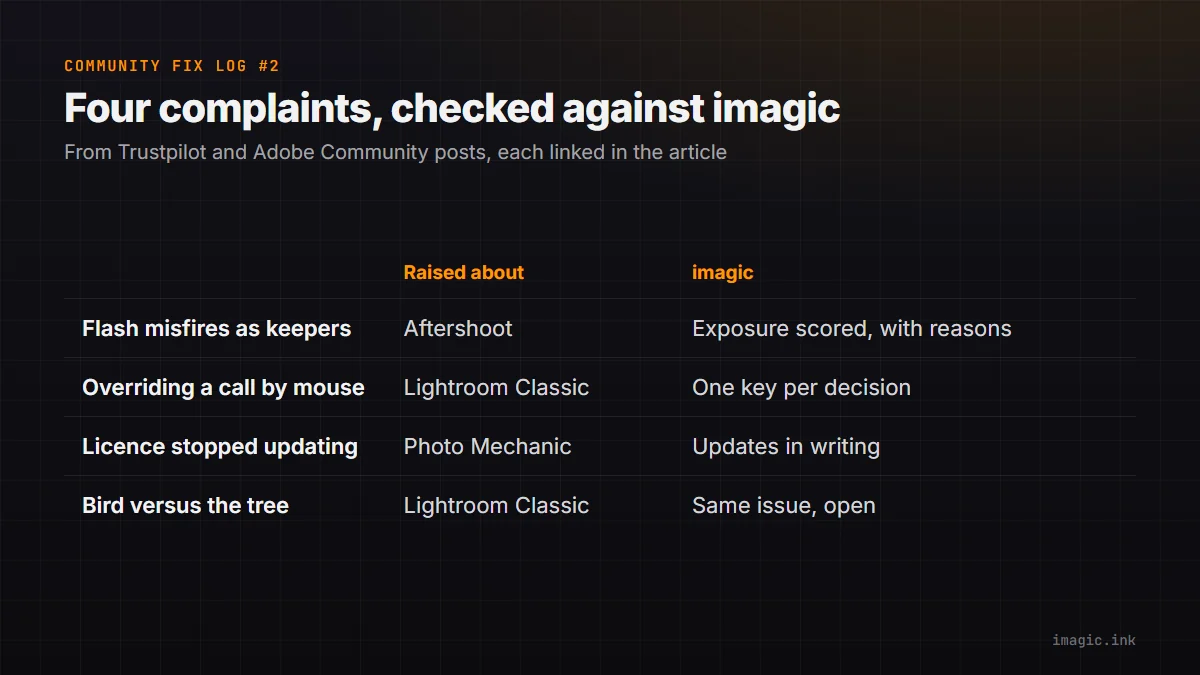
The Community Fix Log reads what photographers post about their software, picks complaints where imagic has something checkable to say, and answers each one with evidence or with an honest "we have this too". Quotes are short, word for word, linked to the original post and credited the way the person named themselves there. Every product here also has plenty of happy users; this is not a ranking. This is the second issue; the first is Community Fix Log #1, and all issues are in the Community Fix Log category. Everything about imagic below was checked against version 1.5.11 on 26 October 2026.
What changed since issue 1
Closed eyes: issue 1 admitted that imagic's eye check was a simple detector that could let a blink into your picks, and promised to say when that changed. Since version 1.4.5, culling checks each eye of the main subject and tells you which one is closed or half-closed (see the changelog). Since version 1.5.0 the model it needs ships inside the app, so the check also works without an internet connection. A wink can still slip through now and then, so keep glancing at the eyes on portraits you deliver.
Speed: issue 1 skipped the speed complaints because we had no measured number. There is one now, on named hardware, on the imagic.ink system requirements page. It was measured on 2 October 2026 with version 1.4.4 plus the per-eye check, on an Intel Core i5-13600KF with 32 GB of memory: the AI cull took 38.5 seconds per 100 RAW files from 24 to 27 MP cameras, and a full-size export took about 6 seconds per photo. Two caveats. It is one Windows PC, and we have not timed a Mac. And export has been made faster since that run: version 1.5.5 exports 60 MP RAW files two to three and a half times faster, and version 1.5.11 speeds up RAW exports on Apple silicon Macs. So treat the page's figures as dated, not current; measuring again is on our board.
1. Flash misfires rated as keepers
"The algorithm rates severely underexposed frames ... as 5-star keepers"
Stewart Leishman, reviewing Aftershoot on Trustpilot, 27 September 2026 (original review; Aftershoot replied publicly underneath).
What the reviewer describes: after about 30 weddings, nearly black frames from flash misfires and blown-out frames still came back with top ratings.
What imagic does: exposure is scored on its own, with the reason written next to the score. A nearly black frame is marked down hard as an Extremely dark image, a dark one as a Very dark image, a blown one as Severely overexposed, and heavy clipping at either end costs more on top. Open any photo in the culling preview to see the reasons behind its score. How exposure scoring works in general is covered in exposure scoring: how AI rates photo exposure quality.
Where we still fall short: the check works from overall brightness, so a photo that is dark on purpose (a low-key portrait, a night street) is marked down too. On a night shoot, look through the trash pile before you empty it.
Status: different by design (exposure scored separately, with reasons).
2. Overriding a call without the mouse
"It needs keyboard shortcuts to override SELECT and REJECT when manually reviewing photos."
andym47466498, in the Lightroom Classic Assisted Culling feedback thread on Adobe Community, 29 September 2026 (original thread).
What the poster describes: fixing a wrong Select or Reject takes a right-click and a menu choice, two clicks per photo across a 2,000-image wedding.
What imagic does: in the culling preview, K marks a photo Keep, L marks it Trash, J or H sends it to Review, and the arrow keys move to the next photo. The key list is printed under the photo. Since version 1.1.3 the keys keep working while analysis finishes in the background, and a manual decision is never overwritten by the AI.
Where we still fall short: imagic has no Lightroom-style star ratings or colour labels during the cull; it sorts into Keep, Review and Trash.
Status: different by design (one key per decision).
3. A lifetime licence that stopped working
"they stop updating the software so the program (Photo Mechanic) no longer works"
Lucas Majgaard, reviewing Camera Bits on Trustpilot, 14 April 2026 (original review).
What the reviewer describes: a licence that looked like it was for life stopped getting updates a few years later, and using the program again meant paying for it again.
The competitor's model: Camera Bits' purchase page (home.camerabits.com, checked 26 October 2026) lists a perpetual Photo Mechanic licence at USD 299 that includes one year of updates and support and can be used perpetually on compatible operating systems. It also lists monthly and yearly subscriptions that include updates while you subscribe.
What imagic does: the update policy is written down on the imagic fact sheet and in the terms: every licence includes all future imagic versions and new camera support for its tier. Lite is EUR 19, Plus EUR 49 and Max EUR 99, paid once. The imagic and Photo Mechanic comparison lays out what each one does.
Where we still fall short: moving up a tier (Lite to Plus, say) costs the difference. And a promise is only as good as the company behind it; imagic is a small, young company, which is exactly why the policy is in writing.
Status: different by design (written lifetime updates).
4. The bird, not the tree
"Like figuring out the bird needs to be in focus not the tree!"
JES1005, in the Lightroom Classic Assisted Culling feedback thread on Adobe Community, 27 September 2026 (original thread, a reply further down the thread).
The problem in general: most AI culling is tuned for people. Adobe's own notes at the top of that thread say Assisted Culling is tuned for people-focused photography and may be less reliable on other kinds of photos, wildlife included.
We have this problem too. With Subject set to Action and sports: ignore faces, imagic skips faces and judges whether the subject is sharp. But it finds "the subject" by looking for the part of the frame with the most fine detail. A sharp branch in front of a slightly soft bird can win that contest, and the frame can pass. The optional Smarter picks re-rank (since version 1.5.3) orders photos by how appealing they are; it does not replace the focus check described here.
What to do today: for birds and wildlife, use imagic to group bursts and throw out the clearly blurred frames, then check the keepers at 100%: since version 1.5.10, double-click a photo in Review and press Z or Space to jump between fit and 100%. The wildlife page covers the burst workflow. The fix we are looking at is to judge focus inside a proper subject outline, which imagic already draws for masking in the editor, and this log will say when it ships.
Status: same issue, open.
What this issue did not answer
Memory use on very large catalogues came up in posts about other tools too, for example in this Adobe Community bug report about Lightroom Classic Assisted Culling, where Adobe has since posted an update. imagic has had its own out-of-memory crash on a large library (version 1.4.0). Since version 1.5.0 a very large library loads in smaller pieces and stays open with a warning if memory runs short. We have not yet measured memory use over a long cull on both Windows and Mac, so we are not claiming to be better there. Support and billing complaints were left out too, because no code can prove them.
If you want to check any claim above yourself, the free trial on the desktop page is 500 exports with no card, and importing, culling and editing never count against it.
Frequently asked questions
Did imagic fix the closed-eyes problem from issue 1?
Mostly. Since version 1.4.5 imagic checks each eye of the main subject and names the closed or half-closed one. Winks are still the weak spot, so a quick look at the eyes on delivered portraits is still worth it.
Does imagic work for bird and wildlife culling?
For grouping bursts and rejecting clearly blurred frames, yes. It can be fooled when a sharp branch or fence sits in front of a soft animal, which this issue admits above, so check wildlife keepers at 100%.
Why quote people by their usernames?
We credit each post exactly the way the person chose to post it, and link the original so you can read it in full. We never contact reviewers on review sites, and quoting someone does not mean they use or recommend imagic.