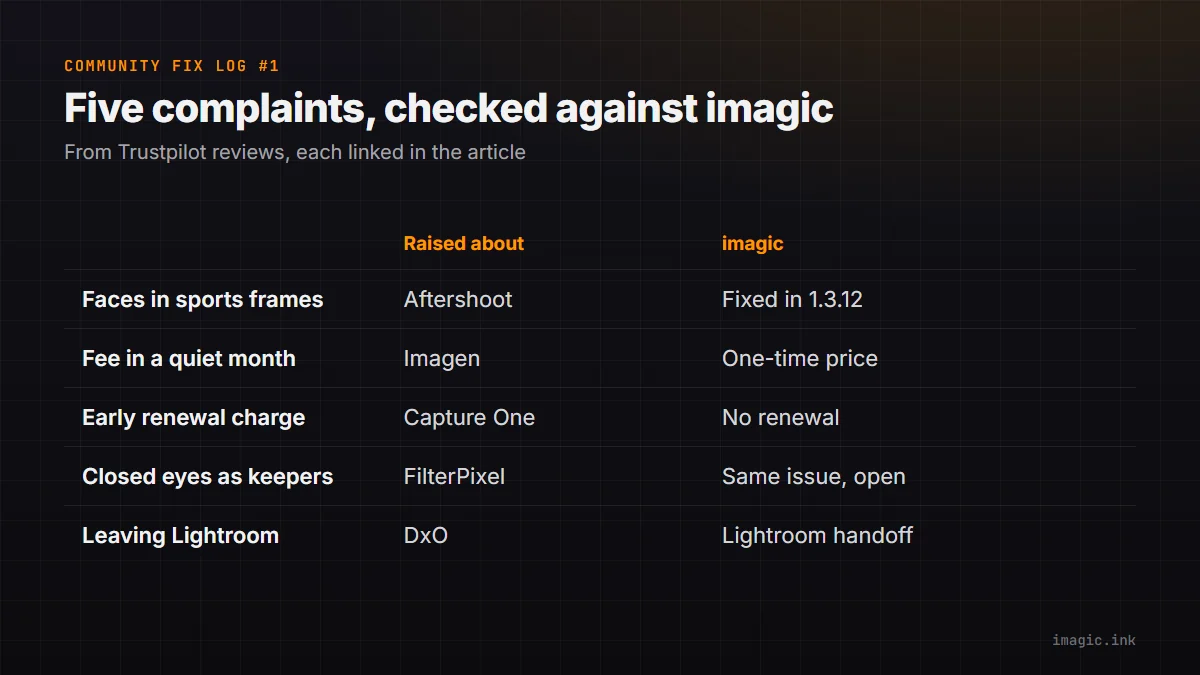
Photographers are generous with feedback about their software. They post it on review sites and forums, in their own words, usually right after something went wrong. The Community Fix Log reads those posts every week, picks complaints where imagic has something checkable to say, and answers each one with evidence: a setting you can open, a release you can read in the changelog, or a limit we have not fixed yet. Every quote below is short, word for word, linked to the original post, and credited the way the person chose to name themselves there. Every product mentioned here also has plenty of happy users; this is not a ranking.
1. Faces in sports frames
"Absolutely useless for sports like American Football or soccer"
Andy, reviewing Aftershoot on Trustpilot, 2 June 2026 (original review).
The problem in general: many culling tools are tuned for people photos and reward a visible face with open eyes. In a sports frame the athlete is often turned away or mid-motion, so the warm-up and the podium can outrank the actual play.
What imagic does: open File > Settings, go to the AI Culling tab and set Subject to Action and sports: ignore faces. Face detection is skipped and the score leans on sharpness and whether the subject is in focus. Since version 1.3.12, imagic also reads the athlete's pose in every frame, splits a burst into its phases (approach, contact, flight, landing) and marks the peak frame of each one. The step-by-step version is in how to cull sports photos in imagic, and the wider workflow is on the sports page.
Where we still fall short: the default Subject is People, so you have to switch it for a sports shoot. Pose grouping needs a one-time model download and is not available in the Intel Mac build, which ships without the runtime it uses.
Status: fixed in imagic 1.3.12.
2. Paying in a month you did not edit
"They keep charging you even when you don't do any editing."
Yorge Soren, reviewing Imagen on Trustpilot, 2 March 2026 (original review; Imagen replied publicly underneath).
The competitor's model: Imagen's pricing page lists pay-as-you-go editing starting at EUR 0.045 per photo plus a EUR 7 monthly base fee that rolls over as editing credit (imagen-ai.com/pricing, checked 1 October 2026). A base fee is charged in a quiet month too, which is what this reviewer objected to.
What imagic does: one payment, then nothing recurring. Lite is EUR 19, Plus EUR 49 and Max EUR 99, and there is no monthly fee, no per-photo fee and no renewal. The free trial is 500 exports with no card, and culling and editing never count against it.
Where we still fall short: Imagen learns a personal editing style from your past Lightroom edits. imagic does not import an editing style from Lightroom; it learns from the photos you keep and reject while you cull, and its editing starts from its own defaults and your presets.
Status: different by design (one-time price).
3. A renewal charged before you expected it
"$300 for a 9 month subscription is beyond excessive"
William P, reviewing Capture One on Trustpilot, 23 June 2026 (original review).
What the reviewer describes: an annual subscription bought for one event renewed automatically, about a month earlier than they expected, and was not refunded once the new key was active.
What imagic does: there is no subscription to renew. You pay once and keep the licence, and the trial takes no card, so there is nothing to remember to cancel.
Where we still fall short: a licence is active on one computer at a time. Activating it on a new machine deactivates the old one, so a desktop and a laptop cannot both run it at once.
Status: different by design (no renewal).
4. Closed eyes rated as keepers
"marking images with closed eyes as 5 stars, or including duplicates"
Stuart Hendricks, reviewing FilterPixel on Trustpilot, 4 October 2025 (original review).
We have this problem too. imagic's eye check is a simple detector: when it finds a large face with no visible eyes, it lowers the face score. It cannot tell a blink from a head turned away, and a single closed eye passes. So a blink can still reach your picks.
What to do today: on portraits, open your picks in the culling preview, which lists the verdict behind each score including a Faces line, and give the eyes a look before you export. Replacing the check with a proper eye-openness model is on our list, and this log will say when it ships.
Status: same issue, open.
5. Twenty years of Lightroom habits
"after 20 years of Lightroom and Photoshop was taking me too long"
Valued Wix User, reviewing DxO on Trustpilot, 26 September 2026 (original review).
The problem in general: switching editors means rebuilding a workflow you have refined for years, and the reviewer gave up on the switch for that reason.
What imagic does: you do not have to leave Lightroom. Cull in imagic, make your edits, and tick Lightroom handoff in the export dialog (since version 1.1.3). imagic writes a sidecar file next to each RAW that Lightroom Classic reads on import, carrying crop, rotation, white balance, tone, colour and effects, so you finish in the tool you know.
Where we still fall short: sidecars work for proprietary RAW files (CR3, NEF, ARW and so on), not DNG, TIFF or JPEG, which Lightroom reads differently. Masks, healing and clone work, and lens distortion settings do not carry over, and the result is a faithful starting point rather than a pixel-identical copy.
Status: different by design (works alongside Lightroom).
What this issue did not answer
The most common complaint this week was speed: AI culling that crawls through a big shoot. We do not publish a measured speed for imagic yet, so we have not answered those posts. When there is a timed run on named hardware, it will be here, with the machine it ran on. Several other complaints were about support and ease of use, which no code can prove; we left them out rather than claim we are better.
If you want to check any of the claims above yourself, the free trial on the desktop page is the quickest way.
Frequently asked questions
Where do the quotes in the Community Fix Log come from?
From public reviews and forum posts, linked so you can read the whole thing. Quotes are short and word for word, credited with the name the person posted under on that site. We never contact reviewers on review sites.
Do you only pick complaints that imagic wins?
No. When imagic has the same problem, the issue says so, as with closed eyes above. Complaints we cannot answer with evidence are left out rather than spun.
How often does the Community Fix Log come out?
Once a week, with three to five complaints per issue. Each issue says what changed in imagic since the last one, including fixes to problems we admitted earlier.