Aftershoot and Narrative Select are two of the most-searched AI culling tools competing for the same job: getting through a memory card of RAW files faster with automated quality scoring instead of a fully manual first pass. Checked directly against each vendor's own pricing page and support documentation on 16 September 2026, here is how they actually compare, with neither tool getting the benefit of the doubt.
Both companies have grown well beyond their original single-purpose culling pitch since launch, adding AI-assisted editing and, in Aftershoot's case, retouching on top of the original scoring engine. That matters for this comparison specifically because "which culling tool is better" is no longer quite the right question for either product at its higher tiers; the more useful question is which company's broader platform fits how a specific photographer or studio actually delivers finished work.
What both tools are built to do
Aftershoot and Narrative Select both start from the same premise: run AI scoring over a full shoot to flag sharp versus soft frames, detect closed eyes, and group near-duplicate or burst shots, so a photographer reviews a curated set instead of every single frame individually. Both also process locally rather than in the cloud, per each company's own documentation, which matters for anyone handling client-sensitive images. Aftershoot's own support article states plainly that the software "works locally on your device, occupies minimal space, and you decide how much processing power it can use." Narrative's own help center is equally direct: "All processing of the images happens locally on your computer, we do not upload your images to the cloud and we have no way of viewing your images."
How the two products are actually structured
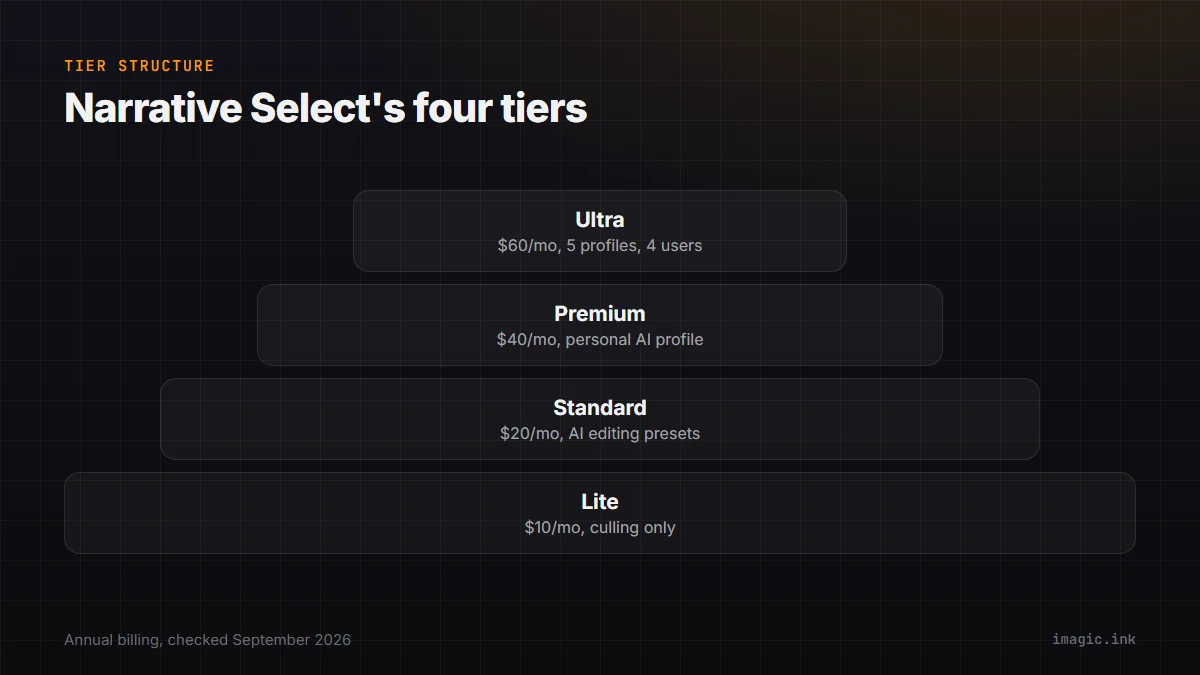
The biggest real difference is not features, it is how each company packages them. Aftershoot sells culling, editing, and retouching as three separate modular subscriptions that can be bought individually or bundled. Narrative Select instead sells one app across four tiers, Lite, Standard, Premium, and Ultra, where each higher tier unlocks more AI editing capability on top of the same core culling engine. If you only want culling and nothing else, Aftershoot's standalone Select plan and Narrative's Lite plan are the directly comparable products; if you want AI-assisted editing bundled in too, the comparison shifts toward Aftershoot's Complete bundle against Narrative's Standard tier and above.
Pricing, tier by tier
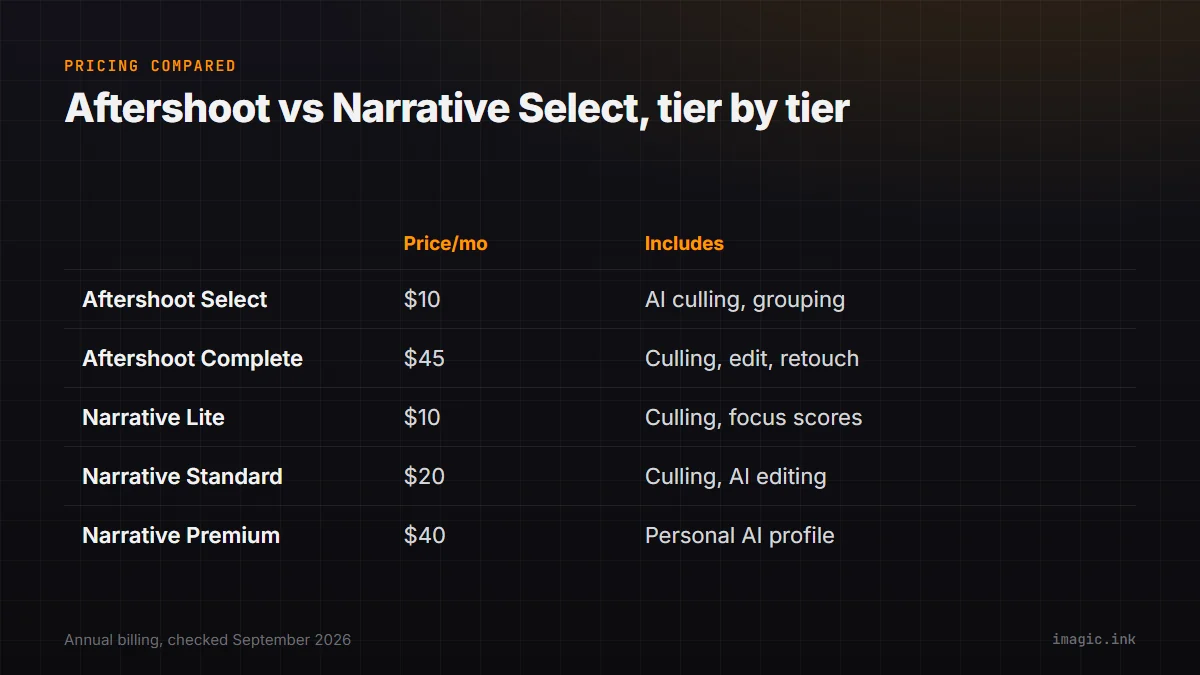
Figures below come directly from Aftershoot's own pricing page and Narrative Select's own pricing page, both checked 16 September 2026, USD, annual billing unless noted.
| Tool and tier | Price (annual billing) | What it includes |
|---|---|---|
| Aftershoot Select | $10/month | AI culling, duplicate grouping, key face detection only |
| Aftershoot Complete | $45/month | Select, plus AI-assisted editing and portrait retouching bundled |
| Narrative Select Lite | $10/month | Fast culling with focus scores, ships to Lightroom, Photoshop, Capture One |
| Narrative Select Standard | $20/month | Advanced AI culling plus unlimited editing with preset-based AI profiles |
| Narrative Select Premium | $40/month | Adds a personal AI editing profile trained on your own past edits |
At the pure-culling entry point, the two tools are priced identically: $10 a month billed annually. Above that, the products diverge in shape rather than in raw price. Aftershoot's Complete bundle at $45 a month adds dedicated portrait retouching (blemish, glare, flyaway hair, and background removal in one tool, per its own site) alongside culling and editing, which Narrative does not offer as a distinct feature at any tier. Narrative's Premium and Ultra tiers instead go deeper on a personally trained AI edit profile, learned from your own past edits rather than a marketplace preset, topping out at $60 a month (annual) for Ultra with up to five separate color and black-and-white profiles.
Aftershoot's own bundling math is worth spelling out, since it is easy to miss on a quick read of the pricing page. Buying Select ($10), Edit ($30), and Retouch ($20) separately would total $60 a month; the Complete bundle covering all three costs $45 a month instead, a saving of $180 a year over buying the same three modules individually, per Aftershoot's own pricing page. That only matters if you actually want all three modules; a photographer who only ever wants culling gets no benefit from the bundle discount and should stay on the standalone Select plan.
Culling method: how each one actually scores a shoot
Both tools group duplicate and burst frames and flag likely rejects automatically, but the interaction model differs. Aftershoot's own feature comparison highlights a "Survey and Spray Can Mode" for bulk multi-select actions across a batch of flagged images, plus dedicated key face detection and scoring. Narrative Select's Standard tier and above add what its own pricing page calls "Scenes View and Close-Ups Panel," grouping visually similar frames together for faster side-by-side comparison. Both approaches solve the same underlying problem, reducing the number of individual frame-by-frame decisions a photographer has to make, through slightly different interface metaphors.
Export and ecosystem integration
Aftershoot's own site lists direct export to Lightroom, Capture One, Lightroom CC, Adobe Bridge, and Adobe Camera Raw, noting that Bridge and ACR support specifically is less common among competitors. Narrative Select's own pricing page lists shipping selects to Lightroom, Photoshop, and Capture One starting at its entry Lite tier. Both tools are built to hand off to a separate RAW editor rather than replace one outright, Aftershoot through its Edit add-on and marketplace AI styles, Narrative through its own increasingly capable in-app editing at higher tiers.
Trying either one before paying
Both companies offer a genuine free trial with no card required, per their own sites. Aftershoot's own pricing page lists a free 30-day trial. Narrative's own help center states the trial covers "a trial of our highest-tier plan, get full access to our best features," meaning a new account can test Ultra-level AI editing profiles and every culling feature before deciding which paid tier actually matches real usage, rather than being limited to testing the entry Lite tier alone. That is worth knowing before assuming Narrative's cheaper tiers are the only ones worth trying: the trial itself does not gate you to them.
What happens if you need to pause, not cancel
Aftershoot's own FAQ specifically allows pausing a subscription for up to three months a year with data retained, which is a genuinely useful option for a seasonal wedding or event photographer who does not shoot year-round and does not want to lose settings and history by fully canceling during an off season. Narrative's own pricing page does not document an equivalent pause feature, only the standard monthly or annual subscription and cancellation terms; a photographer with strongly seasonal volume may find Aftershoot's explicit pause option a meaningful practical difference beyond the headline price comparison above.
Platform support and system requirements
Both run on Windows and macOS. Aftershoot's own technical documentation lists Windows 10 or later and macOS 11 or later, with a minimum of 8GB of RAM recommended and a caution that preview rendering and retouching "may not work reliably" on integrated graphics or GPUs with less than 2GB of VRAM. Narrative is documented as available on both Mac and Windows as well, with third-party benchmarks generally reporting faster local preview rendering on Apple Silicon hardware specifically, though neither company publishes a directly comparable official benchmark against the other.
Multi-user studio pricing
For a studio with more than one shooter or editor, seat structure matters as much as the headline monthly price. Narrative's own pricing page specifies exactly how many active users each tier covers: 1 user on Lite and Standard, up to 2 on Premium, and up to 4 on Ultra, so a small team splitting one subscription has a documented, first-party ceiling to plan around. Aftershoot's own pricing page does not list a per-tier user count in the same explicit way, describing its plans around usage volume rather than named seats; a studio weighing either tool for a multi-person team should confirm current seat terms directly with each vendor before assuming either one scales the same way.
Where imagic fits, as a third option
Neither Aftershoot nor Narrative Select is imagic, and this comparison is deliberately about the two of them. Worth one honest mention: imagic covers similar ground, AI quality scoring plus duplicate and burst grouping, but sells as a one-time EUR license (Lite 19, Plus 49, Max 99) rather than either tool's ongoing monthly subscription, and processes entirely on-device as well. It does not offer a marketplace of AI editing styles or a personally trained edit profile the way Narrative's higher tiers do, so photographers who specifically want that kind of AI-assisted editing depth are better served by Aftershoot or Narrative; photographers whose priority is avoiding a recurring subscription for the culling step specifically have a genuine third option worth trialing.
Which one actually fits which photographer
Aftershoot's modular pricing rewards photographers who want to pay only for what they use, culling alone at $10 a month, or bundle in retouching specifically because portrait and wedding delivery includes heavy skin retouching work. Narrative Select's tiered structure rewards photographers who want one app that grows with them, starting at pure culling and stepping up to a personally trained editing profile without switching tools. A high-volume wedding studio delivering heavy retouching on every gallery leans toward Aftershoot's dedicated retouch module; a solo photographer who wants their own editing style learned and reapplied automatically, without a separate retouching step, leans toward Narrative's higher tiers instead. Neither preference makes the other tool wrong, since they are optimizing for genuinely different delivery workflows rather than one simply doing more than the other.
Both are subscription-only, so the ongoing cost compounds the longer you use either one; for the same math applied across a full career horizon, this earlier three-year cost comparison runs the numbers on both tools plus imagic and a couple of other culling products side by side.
For a closer look at either tool against imagic specifically, see imagic vs Aftershoot and imagic vs Narrative Select. The Software Comparisons category has more head-to-head breakdowns like this one.
Frequently asked questions
Is Aftershoot or Narrative Select cheaper?
At the pure-culling entry tier, they are priced identically: $10 a month billed annually for Aftershoot Select or Narrative Select Lite. Above that tier, the two products diverge in what they add rather than in being straightforwardly cheaper or more expensive.
Do both tools process images locally, or does either upload to the cloud?
Both process locally on the photographer's machine, per each company's own documentation. Aftershoot's support site and Narrative's help center both state directly that images are not uploaded to the cloud during processing.
Does either tool do RAW development, or only culling?
Both extend beyond pure culling into AI-assisted editing at higher tiers, Aftershoot through a separate Edit subscription and marketplace styles, Narrative through in-app editing from its Standard tier upward. Neither is a full manual RAW editor in the way Capture One or Lightroom Classic is.