
Camera Bits made it official on 2 March 2026: Photo Mechanic Plus is no longer available for purchase. If you have been putting off a decision about your ingest and culling tools because you assumed Plus would still be there when you got around to it, that assumption is no longer true, and the standard version's future is worth a straight answer too.
What Camera Bits actually announced
The announcement, published on Camera Bits' own site, is specific about what changed and what did not. Photo Mechanic Plus, the catalog-oriented edition Camera Bits launched in 2020, is no longer sold to new buyers. The company's stated reason is narrow and technical rather than a general retreat from the product line: Camera Bits' own announcement states that "the catalog feature in Photo Mechanic Plus relies on a 3rd-party technology that is now unsupported." Operating system changes made that underlying technology unstable, and after the engineer who built the catalog architecture left the company, the remaining team could not resolve the issues affecting most users.
Existing Photo Mechanic Plus subscribers are not being cut off immediately. Camera Bits says it "will continue to provide customer and technical support for your existing Photo Mechanic Plus software for as long as it remains stable," and that it is exploring ways to help affected users migrate their catalog data elsewhere. That is a meaningfully softer landing than a hard end-of-life date, but it is also not a long-term guarantee: a tool built on unsupported third-party technology tends to get less stable over time, not more, as operating systems keep moving forward.
Standard Photo Mechanic is a separate story
The part of the announcement worth reading twice if you only skimmed it: "the standard edition of Photo Mechanic is completely unaffected by this and is continuing to be developed and supported." Plus and standard Photo Mechanic are different products under one name, and only the catalog-heavy Plus edition is affected. If your workflow already runs on standard Photo Mechanic for ingest, culling, and captioning, nothing in this announcement changes what you own or what it does.
What Plus actually added over standard Photo Mechanic
It helps to be precise about what is actually being lost here, because it is narrower than "Photo Mechanic Plus" as a whole. Both editions share the same underlying culling engine and metadata tools, so day-to-day ingest and review speed was never the differentiator. What Plus specifically added on top was a searchable image database: the ability to keep multiple catalogs, browse or search across more than one of them at the same time, and even edit a catalog's entries while the source photos themselves sat offline on a disconnected external drive. That is a genuinely useful feature for anyone managing years of archived work, and it is also, precisely, the feature built on the now-unsupported third-party technology Camera Bits' announcement points to. If you never used Plus for that cross-shoot cataloging, and only bought it for the standard culling and ingest workflow, the discontinuation changes essentially nothing about your day-to-day use.
What standard Photo Mechanic is actually for
Camera Bits positions Photo Mechanic around one job: getting through a large number of photos fast. Its own site describes the workflow as helping photographers "ingest, cull, rate, and organize for a quicker, more efficient workflow," with rapid captioning, keywording, and copyright tagging built for photographers "under the world's most extreme deadlines." It is not, and has never marketed itself as, a RAW development tool; most Photo Mechanic users pair it with a separate editor such as Lightroom or Capture One for the actual develop step, using Photo Mechanic purely as the fast front-end for ingest, selects, and metadata.
What standard Photo Mechanic costs now
Checked on Camera Bits' own pricing page as of September 2026, standard Photo Mechanic is sold three ways: a monthly subscription, an annual subscription, and a one-time perpetual license.
| License type | Price (as of September 2026) | What you get |
|---|---|---|
| Monthly subscription | $14.99/mo | Updates, full support, and new features while active |
| Annual subscription | $149.00/yr | Same as monthly, billed yearly |
| Perpetual license | $299.00 one time | Updates and support for one year, then usable indefinitely on the last compatible OS |
Camera Bits also offers a 30-day free trial that does not require a payment method. Source: Photo Mechanic pricing and information on Camera Bits' own support site.
Worth noting for anyone comparing the perpetual license against the subscription: the $299 one-time price only guarantees updates and support for the first year. After that, the software keeps working indefinitely on whatever operating system it was last compatible with, but you stop receiving new features, camera-support updates, and technical support unless you pay again to extend it. That is a genuinely different shape of commitment than a straightforward one-time purchase with lifetime updates, and it is worth reading the fine print on Camera Bits' own pricing page before assuming "perpetual" means "forever supported."
If you are still on Plus, what to actually do next
Camera Bits' own statement that it will keep supporting existing Plus installations "for as long as it remains stable" is a real commitment, but it is also not a timeline. The practical, low-risk move for anyone whose catalog still depends on Plus is to export or back up whatever that catalog holds that lives nowhere else, captions, keywords, collections, and search metadata, sooner rather than after an operating system update breaks it further. Camera Bits has said it is exploring migration paths for catalog data, but nothing has shipped yet as of this announcement, so treating your existing catalog as something that could stop opening without warning is the safer assumption for now.
What a Photo Mechanic-only workflow still does not cover
None of this changes what standard Photo Mechanic was ever built to do. It renders fast previews for manual culling, but the culling itself is a keyboard-and-eyeball job: no automatic scoring for sharpness, closed eyes, or composition, and no built-in duplicate or near-duplicate grouping. RAW files display through embedded previews rather than a full develop engine, so an editing pass still needs a second application. For a photojournalist or sports shooter whose entire job is speed under deadline, that division of labor has always been the point, and Plus's disappearance does not change it.
Weighing the three realistic options
Strip away the noise and there are really three paths open to someone who was relying on Plus, and they are worth laying out side by side rather than treating the decision as a single yes-or-no on Camera Bits.
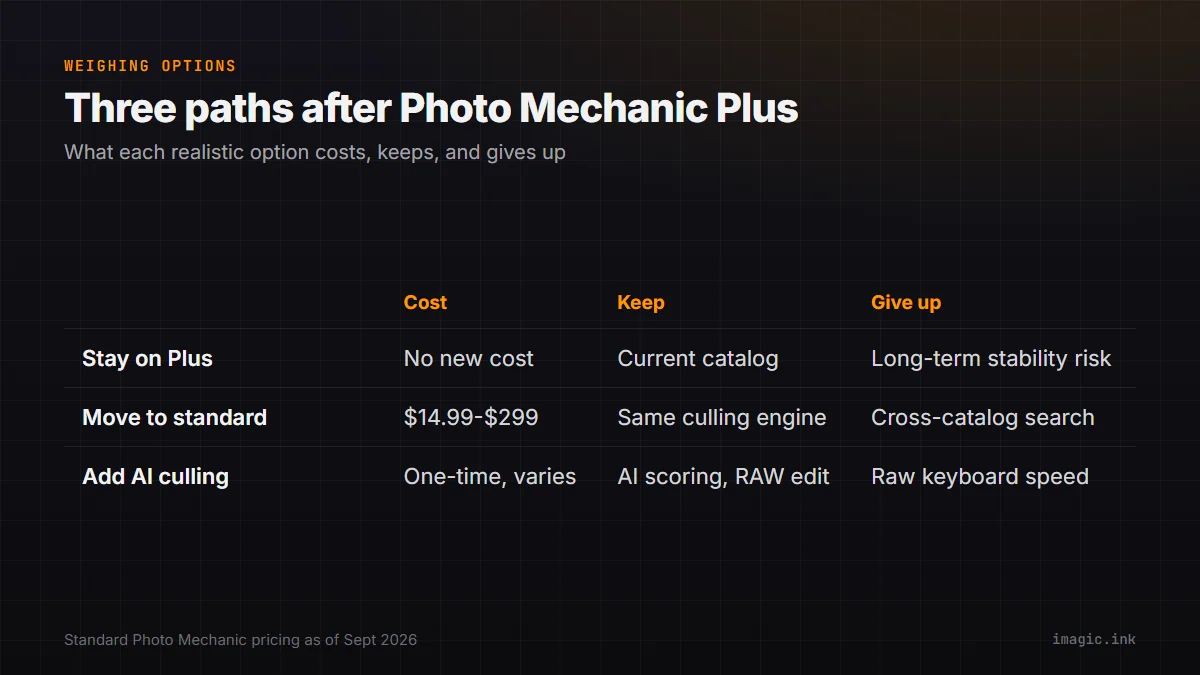
| Option | What it costs | What you keep | What you lose or change |
|---|---|---|---|
| Stay on Plus as-is | Existing subscription, no new purchase | Current catalog and workflow, unchanged | No guarantee of long-term stability as the OS keeps updating |
| Move to standard Photo Mechanic | $14.99/mo, $149/yr, or $299 one time | Same fast ingest and culling engine | The cross-catalog search and offline-catalog browsing Plus added |
| Add an AI-scored culling tool | Varies by tool; imagic is a one-time purchase | Automated quality scoring and RAW editing in one app | Photo Mechanic's raw keyboard-driven preview speed and any tethering setup |
None of these is strictly correct for every workflow. A photojournalist filing from a stadium under deadline has different priorities than a hobbyist trying to get through a weekend's worth of travel photos, and the right call depends more on how you actually spend your review time than on what any one piece of software claims to do. If most of a session's time goes into fast, keyboard-driven selects and metadata on deadline, staying with Photo Mechanic in some form is the lower-risk move. If more of it goes into slowly scrolling near-identical frames deciding which are sharp enough to keep, that is the part automation actually saves time on, and it is worth trying against a real shoot rather than deciding from a feature list alone.
Where an AI-scored workflow fits if you are not going back to Plus
If part of what drew you toward Plus was wanting more automation than standard Photo Mechanic's manual keyboard workflow offers, and you would rather not rebuild a catalog on technology Camera Bits itself just described as unsupported, that is a reasonable moment to look at what an AI-scored culling tool actually adds. imagic runs sharpness, closed-eye, and composition scoring locally on your own machine, with nothing uploaded anywhere, and groups visually similar frames so a burst gets reviewed as a set instead of frame by frame. It also does the RAW develop step in the same app, through its own built-in RAW engine, covering CR2, CR3, NEF, ARW, RAF, ORF, RW2, DNG, and PEF files, rather than needing Photo Mechanic plus a second editor for the develop stage. Batch editing and one-click styles handle getting a full shoot to a consistent look quickly once the culling pass is done, which is a step standard Photo Mechanic was never built to do at all.
It will not match Photo Mechanic's raw preview-rendering speed for someone who has spent years building muscle-memory keyboard shortcuts around it, and it has no live tethering, so a studio built around tethered capture still needs Photo Mechanic or a comparable ingest tool for that specific job. It is also not a captioning or IPTC-stamping specialist the way Photo Mechanic is; wire-service style metadata workflows built around Photo Mechanic's variables and code-replacement fields do not have a direct equivalent in imagic. For a working photographer weighing whether to renew Plus, migrate to standard Photo Mechanic, or simplify to fewer tools entirely, that is the honest tradeoff: manual speed and a deadline-proven ingest workflow on one side, against AI-assisted review and RAW editing combined into a single app on the other. Neither replaces the other outright; they solve genuinely different parts of a shoot day.
For a fuller side-by-side of what each tool does and does not do, see imagic vs Photo Mechanic, and the existing writeup of how the two tools actually differ day to day covers the ingest-versus-editing split in more detail. The Software Comparisons category has more of these head-to-head breakdowns if you are actively shopping.
Frequently asked questions
Is Photo Mechanic Plus completely dead?
It is no longer sold to new buyers as of the 2 March 2026 announcement. Existing subscribers keep support "for as long as it remains stable," per Camera Bits, but the company has not guaranteed the catalog technology will keep working indefinitely as operating systems change.
Does this affect standard Photo Mechanic?
No. Camera Bits states standard Photo Mechanic "is completely unaffected" and continues to be developed and supported, with the same subscription and perpetual license pricing available today.
Does imagic replace Photo Mechanic for a fast ingest workflow?
Not entirely. imagic adds AI quality scoring and does RAW development in the same app, but it has no live tethering and is not built around the same raw keyboard-driven preview speed Photo Mechanic is known for. Photographers who need tethered capture still need a dedicated ingest tool.