
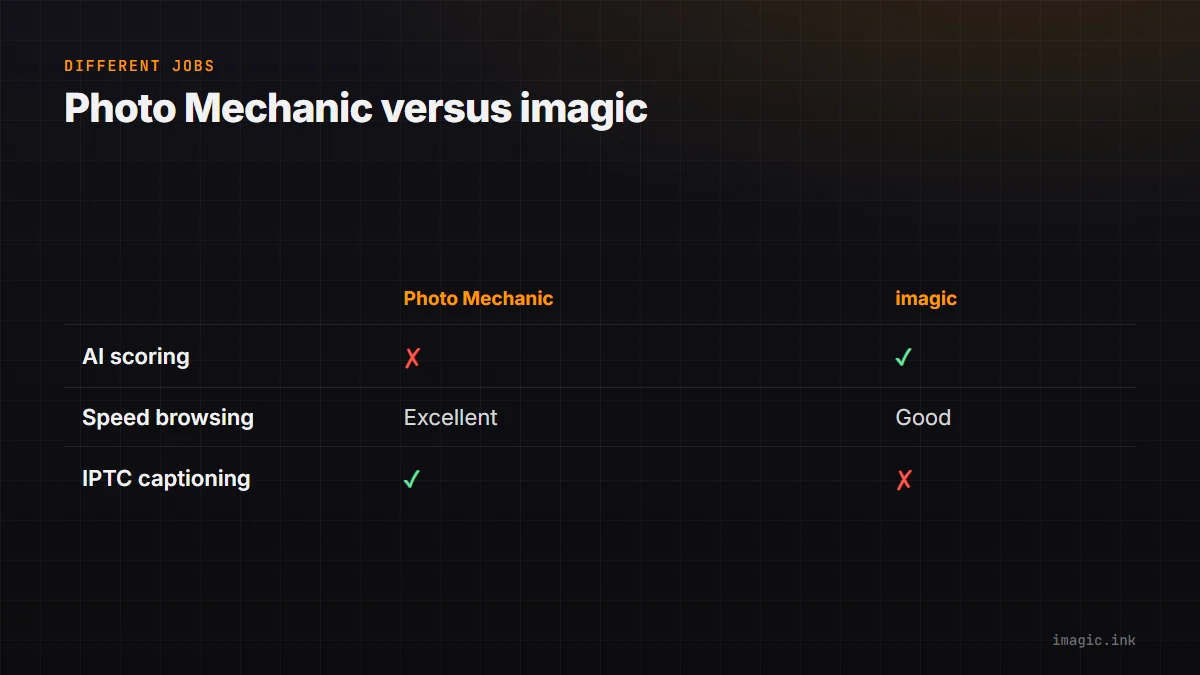
Photo Mechanic is not really imagic's competitor in the way most software comparisons frame it, and it is worth saying that plainly before anything else. Photo Mechanic is the sports-desk and photojournalism standard for loading, browsing, and captioning RAW files at speed, with no AI scoring layer at all. imagic is an AI-scoring culling tool with batch editing built in. If you are weighing a photo mechanic alternative, the real question is not which tool wins, it is which job you are actually trying to solve.
What Photo Mechanic Is Built For
Photo Mechanic's entire design is aimed at raw speed: near-instant thumbnail loading even on huge memory cards, one-keystroke flagging and tagging, and IPTC metadata tools built for wire deadlines where a caption has to be accurate and attached before the file goes out the door. For photojournalists and sports shooters filing on a deadline measured in minutes, nothing in this comparison beats that specific workflow, and it is not close.
What Photo Mechanic Does Not Do
Photo Mechanic does not score images for sharpness or exposure, does not detect closed eyes, does not group near-duplicate bursts automatically, and does not edit photos. Every one of those calls is manual. That is a deliberate design choice, not an oversight, but it means a 2,000-frame wedding or event shoot still gets reviewed frame by frame if Photo Mechanic is the only tool in the loop.
Where imagic's AI Scoring Changes the Math
imagic scores sharpness, exposure, and closed eyes, groups duplicate and burst sequences, and lets you set a target keep count that re-ranks instantly as you adjust it, all running locally on every tier. For high-volume shoots where the bottleneck is review time rather than caption speed, that AI layer removes hours of manual scrubbing that Photo Mechanic was never built to remove. imagic then continues into batch editing and one-click styles, taking the shortlist straight to export without a second app.
When Manual Speed Beats AI, and When It Does Not
For sports shooters filing from a stadium press box under a wire deadline, or a photojournalist filing hourly, Photo Mechanic's speed and IPTC workflow are the right tool, and AI scoring adds little in that specific moment. For a wedding, event, or portrait shoot where the deadline is days rather than minutes and the real cost is thousands of frames to review, AI culling changes the actual time spent far more than raw browsing speed does. Some photographers reasonably use both: Photo Mechanic for same-day wire selects, imagic for the full-shoot cull and edit afterward. See imagic for sports photography for how AI culling handles high-frame-rate bursts specifically.
Pricing and Platform
Photo Mechanic is sold as a one-time purchase with an optional Plus subscription tier for extra features. imagic is one-time across the board: Lite EUR 19, Plus EUR 49, Max EUR 99, with a free 500-export trial and no card required. Both run on Windows and macOS. See the fuller imagic vs Photo Mechanic comparison for a feature-by-feature table, and more software comparisons on the blog.
Deciding Which One You Actually Need
Track a real shoot for a week and note where the minutes actually go: captioning and getting files out the door, or scrolling through frames deciding what is sharp and usable. That single observation, more than any feature comparison, points to whether Photo Mechanic's speed or imagic's AI scoring solves the bottleneck you actually have.
Frequently asked questions
Can Photo Mechanic replace AI culling entirely?
Not directly, since it has no scoring or duplicate-detection layer; any culling in Photo Mechanic is manual, flag-and-filter work.
Does imagic have IPTC captioning like Photo Mechanic?
imagic is built around AI culling and batch editing rather than wire-speed captioning workflows; if IPTC metadata under deadline is your primary need, Photo Mechanic remains the specialist tool for that job.
Is it reasonable to use both tools in one workflow?
Yes, some photographers use Photo Mechanic for immediate selects and imagic for the full AI-assisted cull and batch edit afterward; there is no technical conflict in running both.
Try imagic free for 500 exports, no card required, and see how AI culling handles your next high-volume shoot. Start the free trial.