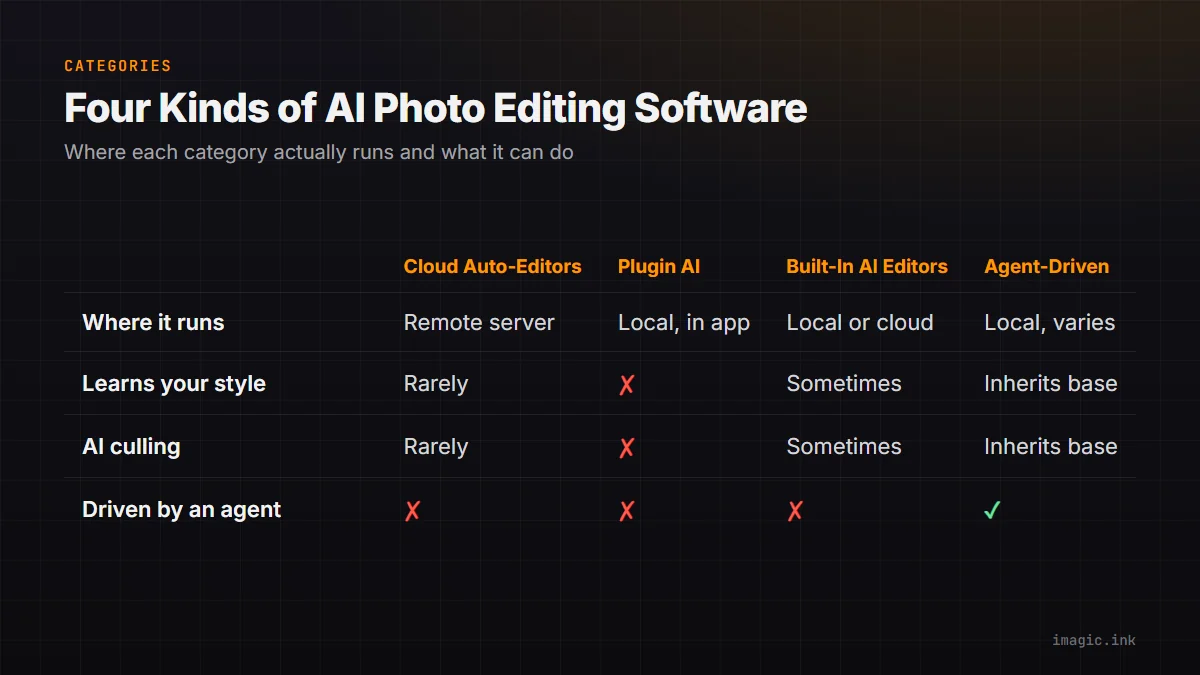
AI photo editing software in 2026 splits into a handful of genuinely different categories, not a single spectrum from "less AI" to "more AI." Picking the right one depends on which category solves your actual problem. This is a tour of the categories and the capability classes inside each, not a spec-sheet shootout against named competitors: no benchmark numbers are invented here, only capabilities that are publicly true of each category.
Cloud Auto-Editors
These are the apps and web tools where you upload a photo and get back an automatically enhanced version: exposure fixed, color balanced, sometimes a stylistic filter applied. The processing happens on a remote server. Strengths: fast to use, no local hardware requirements, usually free or cheap for casual volume. Limits: your photos leave your device, the "enhancement" is typically a generic recipe rather than anything tuned to your style, and there is rarely any culling or batch-organization layer, just single-image enhancement.
This category is a reasonable fit for a handful of casual photos where speed matters more than a specific look. It stops being a good fit once you have a shoot large enough to need triage, a wedding, an event, a client session, because there is no ranking or duplicate-collapsing step, just one image processed at a time.
Plugin AI
AI features bolted onto an existing editor as a plugin, sky replacement, subject masking, noise reduction, layered into Lightroom or Photoshop workflows. Strengths: you keep your existing catalog and muscle memory, and plugin AI is often very good at the one narrow task it was built for. Limits: each plugin is a separate purchase and a separate integration point, and none of them touch culling or whole-shoot automation; they operate on one image at a time inside a workflow you are still driving manually.
Built-In AI Editors
Standalone desktop editors with AI capabilities built into the core product rather than bolted on: AI culling, AI-assisted adjustments, sometimes a learned personal style, running locally or via the vendor's own cloud. imagic sits in this category: local AI culling and quality scoring in every tier, neural editing models and a style calibration system (learn from up to 8 guided edits) in imagic Max. Strengths: a single coherent tool instead of a stack of plugins, and local processing options that keep shoots off third-party servers. Limits: switching from an established editor has a learning curve, and the preset/plugin ecosystem is smaller than a decade-old incumbent's.
Agent-Driven Editing
The newest category: editors that expose their functionality to AI agents through a protocol like MCP or a scriptable CLI, so a tool like Claude Code, Claude Desktop, Cursor, or Codex CLI can drive the editor directly from a natural-language prompt instead of a mouse. imagic is a built-in example, part of imagic Max: a real session looks like claude mcp add imagic -- imagic-mcp to register the server, then a prompt such as "scan D:/shoots/session-42, cull to my best 200, apply my style, export" runs the whole pipeline. Command-line automation works the same way without an MCP client: imagic --headless --scan DIR --analyse --export. See the imagic MCP page for the client setup details. Codex CLI supports local MCP servers directly, which makes it a concrete path if you are already working from OpenAI's tooling; ChatGPT's own native MCP connector support varies by plan and version, so treat that path as "it depends on your setup," not a guarantee. Strengths: this is the only category that removes the mouse-driven review loop from high-volume shoots entirely. Limits: it assumes comfort with a command line or an MCP client, which is a real barrier for photographers who have never used either.
It is worth being clear about what agent-driven editing is not. It is not a way to generate photos that were not taken, and imagic does not claim HDR merge, panorama stitching, or AI captioning as capabilities, those are simply not shipped features. What it does do is chain existing steps, scan, cull, style, export, into one instruction instead of four separate manual sessions. The value is in orchestration, not in any single step being magic on its own.
AI Photo Editing Software: Capability Comparison
| Capability | Cloud Auto-Editors | Plugin AI | Built-In AI Editors | Agent-Driven Editing |
|---|---|---|---|---|
| Processing location | Remote server | Local (inside host app) | Local or vendor cloud, varies | Local, varies by tool |
| Learns your personal style | Rarely | No, task-specific only | Sometimes (imagic Max) | Sometimes, inherits from the base editor |
| AI culling / duplicate detection | Rarely | No | Sometimes (imagic, every tier) | Sometimes, inherits from the base editor |
| Driven by an external AI agent | No | No | No, unless it exposes one | Yes, by definition |
| Typical pricing model | Free or ad-supported | One-time or subscription per plugin | One-time or subscription | One-time or subscription |
How to Choose Between Categories
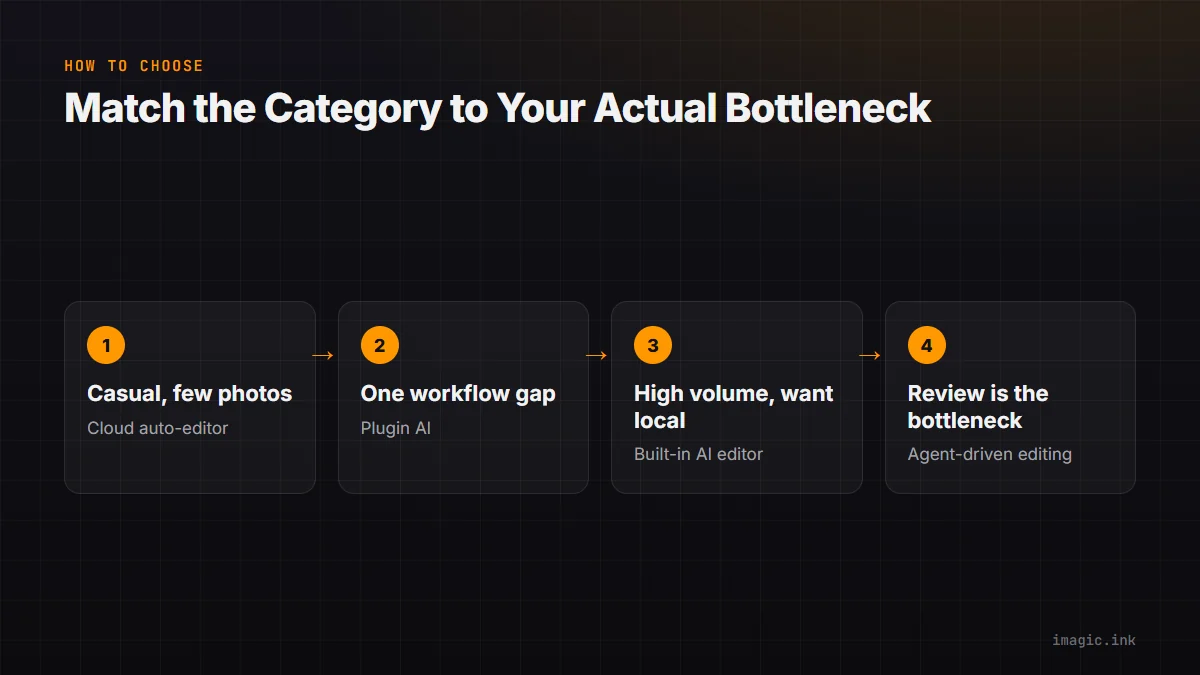
Start from volume and privacy, not from feature lists. A handful of casual photos a month favors a cloud auto-editor for pure convenience. An established Lightroom or Photoshop workflow with one specific gap, sky replacement, noise on high-ISO files, favors a plugin. A full-time or high-volume shooter who wants culling and editing under one roof, with the option to keep everything local, favors a built-in AI editor. And once shoot volume gets high enough that manual review itself is the bottleneck, not the editing, agent-driven editing is the only category built to remove that step rather than speed it up.
Where imagic Sits
imagic is a built-in AI editor with an agent-driven layer on top, not two separate products: AI culling and quality scoring ship in every tier (Lite EUR 19, Plus EUR 49, Max EUR 99), and style calibration, the MCP server, and the CLI are part of imagic Max. The 500-photo free trial includes everything in Max, so you can test the agent-driven category specifically before deciding whether it fits your workflow. For a narrower comparison against the specific case of Lightroom, see The Lightroom Alternative Built for Automation; for a buyer's-checklist approach across all four categories, see AI Photo Editor: What Actually Matters.
A Note on Fair Comparison
It is tempting for any vendor writing this kind of comparison to quietly stack the categories in their own favor. To be direct about the tradeoff here: agent-driven editing is genuinely more capable at scale, and it is also genuinely less approachable on day one than a cloud auto-editor you can use in a browser with zero setup. Choosing the "most advanced" category is not automatically the right choice; choosing the category that matches your actual shoot volume and comfort level is.
FAQ
Which category is fastest to start with, no learning curve?
Cloud auto-editors, by a wide margin, since there is nothing to install or configure beyond an upload.
Which category is best for a high-volume shoot, weddings or events?
Built-in AI editors with culling, and agent-driven editing on top of them, since both remove manual review time as shoot size grows.
Do I need to know how to code to use agent-driven editing?
Not code exactly, you need an MCP client (Claude Code, Claude Desktop, Cursor, or Codex CLI) and the willingness to type a prompt or a command instead of clicking through a UI. See Photo Editing with CLI for a plain walkthrough.
Is agent-driven editing only useful for professionals?
It pays off most at volume, but anyone comfortable with a command line can use it on a small shoot too; the benefit scales with how many photos you are processing.
Try imagic's free 500-photo trial, no card required, the trial includes AI culling, style calibration, and full agent access via MCP and CLI. Start the free trial.