
Most searches for a filterpixel alternative are not really about features. They are about three practical questions: how accurate is the AI culling in practice, how long does a real shoot take to come back, and where do the photos actually go while that happens. FilterPixel processes in the cloud, which is a real design choice with real tradeoffs, not a flaw to be talked around. This is a checklist for what to verify before switching, plus the honest differences between FilterPixel and its main local-processing alternatives.
What FilterPixel actually does
FilterPixel is a cloud-processed AI culling service: photos are uploaded, processed on FilterPixel's infrastructure rather than the photographer's own computer, and returned as a culled selection that exports to Lightroom or Capture One. Because the processing runs remotely, turnaround does not depend on the photographer's own hardware, a genuine advantage for anyone on an older laptop. As of September 2026, published plans start at a Standard tier around 14.99 dollars a month billed annually, up through Pro and Studio tiers for higher volume and team use, each bundling a set number of its higher-accuracy DeepCull passes alongside unlimited basic AI culling. Check the current tier breakdown directly, since photo-culling subscription pricing across this category changes more often than most software.
Accuracy: what to verify, not assume
FilterPixel publishes its own accuracy testing, reporting 94.7 percent correctly flagged keepers and 96.1 percent correctly flagged rejects on a standardized internal test gallery. That is a company reporting on its own benchmark, not an independently audited figure, so it is worth treating as a starting claim to verify on your own gallery rather than a settled number. The practical test that matters more than any published percentage is running one of your own recent shoots, ideally one with a mix of easy and genuinely borderline frames, through a trial and counting how many results you would overrule by hand. That number, not a marketing percentage, is what your actual review time depends on.
Turnaround time: cloud speed versus upload time
FilterPixel's own documentation states roughly 1,000 photos process in about 60 seconds once uploaded. The number that matters in practice is total elapsed time including the upload itself, which depends entirely on your connection and file sizes; a few thousand RAW files on a slow upload link can spend more time in transit than in processing. A local tool has the opposite profile: no upload wait, but processing speed tied to the photographer's own hardware. Before switching, time an actual upload of a representative shoot on your own connection rather than trusting the processing-time figure alone.
Where your photos actually go
Cloud processing means files leave the local machine during the culling pass. FilterPixel states it encrypts photos in transit and at rest and deletes files after processing, which is a reasonable privacy posture for a cloud service, but it is a materially different data-handling model than a tool that never uploads originals at all. Anyone shooting under a client contract, NDA, or venue agreement that restricts where images can be transmitted should check that clause against FilterPixel's terms before committing a workflow to it, since that is a contractual question a features comparison will not answer.
Aftershoot: the closest local-processing alternative
Aftershoot's Select module runs AI culling locally, with an offline mode for working without an internet connection and files staying on the photographer's machine except when explicitly exported. That solves the where-do-my-photos-go question directly, at the cost of processing speed being tied to local hardware rather than cloud GPUs. Aftershoot sells culling, editing, and retouching as separate modules that can be bundled, so check current published pricing for the specific combination you would actually use, since a culling-only comparison against a FilterPixel tier that includes editing is not comparing the same thing.
Narrative Select: a local subscription with editing built in
Narrative Select runs as a native desktop application for Mac and Windows, processing locally rather than in the cloud, with tiers from a basic Lite culling plan up through Premium and Ultra tiers that add AI editing presets and multiple user seats. It is subscription-only as of September 2026, with no perpetual license offered, so anyone switching from FilterPixel specifically to escape a recurring bill should check that before assuming local processing also means a one-time cost. Where it directly answers the FilterPixel comparison is the same way Aftershoot does: no upload step, and files stay on the machine running the culling pass rather than being sent anywhere.
DeepCull mode and what genre-aware culling actually means
FilterPixel's higher tiers include a mode it calls DeepCull, which the company describes as reasoning about a selection based on the photography genre rather than applying one generic sharpness-and-exposure pass to every image. In practice this means a wedding gallery and a sports gallery get different weighting for things like eyes-open-but-blurred-motion frames, where a sports shot might be a keeper despite motion blur that would sink a portrait. That is a genuinely different approach from most local AI culling tools, which generally apply the same sharpness, exposure, and duplicate logic regardless of subject matter. Whether that genre-aware distinction is worth paying for depends heavily on how varied your own shoot types are; a photographer who only ever shoots one genre gets less benefit from mode-switching than one who moves between portraits, events, and sports across a working month.
imagic: local AI culling at a one-time price
imagic runs its sharpness scoring, closed-eye detection, and duplicate-burst grouping locally on Windows or macOS, with nothing uploaded during the culling pass, and is sold as a one-time license (Lite, Plus, or Max) rather than a subscription. That answers the where-do-my-photos-go question the same way Aftershoot and Narrative Select do, but with a different pricing shape: one purchase instead of a recurring charge. Being fair to FilterPixel here, imagic has no dedicated team-seat or agency workflow the way FilterPixel's higher tiers offer, and nothing resembling FilterPixel's DeepCull genre-specific reasoning mode; its scoring applies the same sharpness and closed-eye checks across a shoot regardless of subject. For a solo photographer or small studio comparing a subscription against a one-time cost over a few years, the math is worth running with real numbers rather than assumed ones, and Max tier adds an MCP server and command-line interface for anyone scripting their own review pipeline, a use case none of the cloud tools above are built to support directly.
FilterPixel alternatives compared
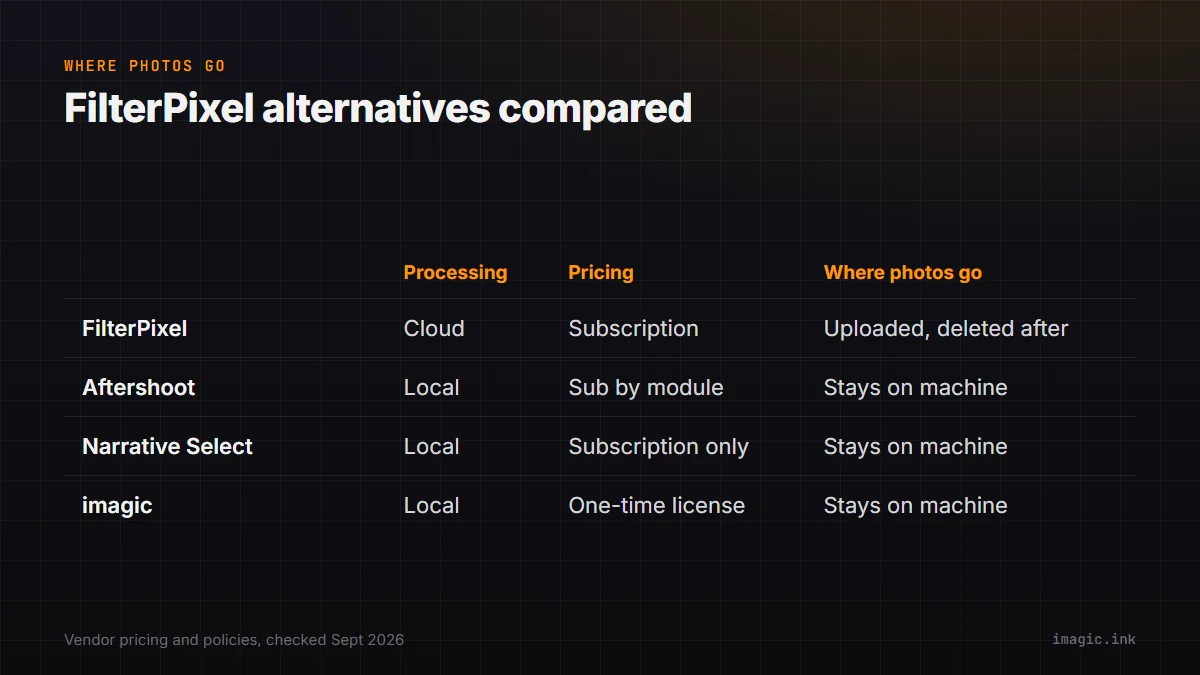
| Tool | Processing | Pricing model | Where photos go |
|---|---|---|---|
| FilterPixel | Cloud | Subscription | Uploaded, encrypted, deleted after processing |
| Aftershoot | Local | Subscription, sold by module | Stays on the local machine |
| Narrative Select | Local | Subscription only | Stays on the local machine |
| imagic | Local | One-time license | Stays on the local machine |
Exporting selects into your actual edit
Culling is only the first step of a shoot; what happens after the selection matters just as much when comparing tools. FilterPixel exports selects to Lightroom or Capture One in one step, which keeps whatever editing habits and presets you already have in either of those programs unchanged, since FilterPixel is not trying to replace your editor, only the review pass before it. Aftershoot and Narrative Select both take a different approach, bundling AI editing presets alongside their culling modules so the same tool can carry a shoot from raw import through a first edit pass. imagic sits closer to that second model: its batch editing and one-click styles apply after culling, inside the same application, rather than handing off to a separate editor. None of these approaches is strictly better, it depends on whether you already have an editing workflow you like in Lightroom or Capture One and only want the review step replaced, or want one tool carrying the whole process end to end.
What FilterPixel is genuinely good at
None of the above is a reason to avoid FilterPixel outright. A studio running culling across several photographers on different laptops, some old and some new, gets a consistent turnaround time regardless of whose machine submitted the job, which a local tool cannot promise since processing speed there is tied directly to whatever hardware each person owns. A photographer who shoots on the road without a powerful editing laptop, relying on a lighter travel machine, also avoids needing local processing power at all since the work happens on FilterPixel's servers instead. The team-seat structure on its higher tiers is built for exactly the multi-shooter studio case that a single-user local license was not designed to solve as cleanly. That combination, consistent turnaround independent of hardware plus a genuine multi-seat structure, is the real reason to stay on FilterPixel rather than switch, separate from any accuracy claim.
Before you switch: a short checklist
Run one real, recent shoot through a trial of any tool you are considering, not a demo gallery the vendor curated. Time the full round trip, upload included if it is a cloud tool, not just the processing step. Check what the tool's terms say about where files are stored and for how long, against any client or venue agreement you are bound by. Compare pricing for the modules or tiers you would actually use, not the cheapest tier listed, since culling-only pricing and culling-plus-editing pricing are different products. If your shoots vary a lot by genre, weigh whether a genre-aware mode like DeepCull is solving a real problem for you or one you would not otherwise notice, since that feature carries a real cost difference between tiers. The imagic vs FilterPixel comparison page lays out the local-versus-cloud tradeoff in more detail, and the imagic vs Aftershoot comparison covers the other local-processing option side by side. None of this checklist is really about which company deserves your business, it is about matching a tool's actual architecture, cloud or local, subscription or one-time, generic or genre-aware, to the specific constraint that is pushing you to look for an alternative in the first place, since that constraint is different for almost every photographer searching for one. More tool-by-tool breakdowns are in the software comparisons section, and imagic's own pricing and trial details are on the desktop app page.
Frequently asked questions
Is FilterPixel's accuracy claim independently verified?
No. The 94.7 percent keeper and 96.1 percent reject accuracy figures are FilterPixel's own reported results on its own standardized test gallery, not an independent audit. Treat them as a starting point and verify against your own shoot before relying on them.
Do FilterPixel's alternatives also process in the cloud?
Aftershoot, Narrative Select, and imagic all process locally on the photographer's own computer rather than uploading files to a server, which is the main structural difference from FilterPixel across this category.
Is a one-time license actually cheaper than FilterPixel over time?
It depends on how many years you keep using the tool and which FilterPixel tier you would need. Compare imagic's current one-time price against FilterPixel's published monthly cost for the tier that matches your actual shoot volume, over the number of years you expect to keep shooting, rather than comparing list prices alone.