digiKam has quietly existed for over two decades as a free, open-source answer to Lightroom's cataloging half, and it still has no dedicated blog coverage on this site despite an existing comparison page. Checked directly against digiKam's own site and its latest release notes on 16 September 2026, here is a straight look at what it does well in 2026, where it is genuinely slower than a commercial tool, and who it actually suits.
What digiKam actually is
Per its own about page, digiKam describes itself as "an advanced open-source digital photo management application that runs on Linux, Windows, and macOS," covering importing, organizing, editing, and sharing photos, RAW files, and videos. It is part of the KDE software family, and its own site states it includes "no tracking, analytics, or telemetry features," with all data stored locally on your device. It is licensed under GPL-2.0-or-later, meaning it is free to download, use, and modify, with no purchase price at any tier.
Where it actually earns its reputation: tagging and metadata
digiKam's real strength is organization at scale. Per its own site, it supports album-based organization, tagging, star ratings, and labels, plus advanced search combining tags, ratings, dates, locations, and embedded EXIF, IPTC, and XMP metadata. For a photographer managing tens of thousands of images across years of shoots, that depth of searchable metadata is the actual selling point, not any single editing tool inside it. A built-in duplicate finder is included as well, which is a genuine convenience most paid RAW editors do not bundle at all.
The natural-language search digiKam's own site describes is worth a specific callout, since it is a genuinely modern feature for a two-decade project: rather than building a manual filter from separate tag, date, and rating fields, a plain-English query can combine those same conditions in one search box. Paired with the multi-collection support digiKam's own documentation describes, hosting several separate photo collections on local drives, removable media, or network storage and searching across them together, this is the feature set that actually justifies calling digiKam a full digital asset management tool rather than a simple photo browser with an editor attached.
What version 9.1 actually changed
digiKam's latest release, version 9.1.0, shipped 7 June 2026 per its own release announcement, three months after the 9.0.0 line. The concrete changes are mostly under the hood rather than headline features: an updated database schema to properly handle time zones on photo timestamps, a smoother MariaDB migration path for larger libraries, better handling of Google Pixel "motion photo" files, and a "Clear All Groups" button added to the search interface. Under the hood, the release bumped its LibRaw decoding library to a build dated 23 May 2026, which is what keeps RAW support current for newer camera models, along with updated Qt 6.11.0 and KDE Frameworks 6.26.0 for the Windows and macOS installers. None of this is dramatic, which is itself informative: digiKam in 2026 is a mature, maintenance-paced project rather than one rapidly adding new capability.
What setting it up actually involves
digiKam's own download page offers a different installation path per platform, and none of them require a package manager or command-line step by default. On Linux, the primary option is a self-contained AppImage, a single downloadable file that needs nothing installed and no system sandboxing, alongside separate Snap and Flatpak packages for users who prefer a sandboxed install. On macOS, digiKam ships as a self-contained package, with Apple Silicon Macs needing macOS Big Sur (11.3) or later and Intel Macs needing macOS High Sierra (10.15) or later. On Windows, it installs through a standard installer requiring Windows 10 or later, with a portable, no-install archive version also available for anyone who wants to run it without touching the system install path at all. The first real time cost comes after installation, not during it: pointing digiKam at an existing photo library and letting it build its metadata database is a one-time process that can take a while on a large collection, though it only needs to happen once.
The plugin system, and why it matters more than it first appears
Beyond its core feature set, digiKam extends through a plugin architecture its own documentation calls DPlugins, covering export targets to remote web services, additional editing tools, and batch processing actions. This is the same extensibility model that lets a maintenance-paced core application keep adding capability without every feature needing to ship in the main release. For a photographer who only needs digiKam's core cataloging and does not go looking for plugins, this is mostly invisible; for anyone hitting a specific missing feature, it is worth checking the plugin ecosystem before assuming digiKam cannot do something, since a fair number of edge-case needs turn out to already have a community-built plugin.
RAW support and basic editing
digiKam decodes RAW files through the LibRaw library, the same decoding engine several other open-source tools rely on, giving it coverage across a very wide range of camera models without needing camera-specific plugins. Its built-in editing tools cover the basics, color and exposure adjustment, cropping, sharpening, curves, and more advanced additions like panorama stitching and GMic-Qt filter support for users who install that plugin. It is a capable general editor for straightforward corrections, though it was never built to compete with a dedicated RAW processor's fine-grained tone and color tools the way darktable or RawTherapee are.
Video handling is worth a specific mention too, since it separates digiKam from most photo-only catalogers. Per its own site, digiKam catalogs and manages video files through FFmpeg integration alongside still photos, treating both as part of the same searchable library rather than requiring a separate video-specific tool. For a photographer whose camera also shoots video clips during a shoot, most mirrorless bodies today, that means one catalog covers the whole card instead of splitting video files out into a different piece of software entirely.
What digiKam does not do: AI-scored culling
digiKam includes face detection and some automatic tagging assistance, plus, per its own site, natural-language search over your metadata. What it does not have is a dedicated quality scorer built for the specific job of culling a shoot: no sharpness scoring, no closed-eye detection, and no composition scoring to flag which of several thousand frames are actually worth keeping. Its duplicate finder helps with exact or near-exact repeats, but reviewing a shoot for quality, rather than for redundancy, is still a fully manual, frame-by-frame task in digiKam.
Where it genuinely feels slow
The honest tradeoff for digiKam's depth is interface complexity. It exposes a large number of panels, menus, and configuration options built up over roughly two decades of incremental development, and its interface has not had the kind of ground-up modernization pass that a newer, narrower tool can afford to invest in. Photographers coming from a streamlined commercial app often describe an adjustment period getting comfortable with where digiKam keeps its more advanced features, and first-time database setup and large-library imports can take real time to work through, especially when migrating an existing library into digiKam's database structure.
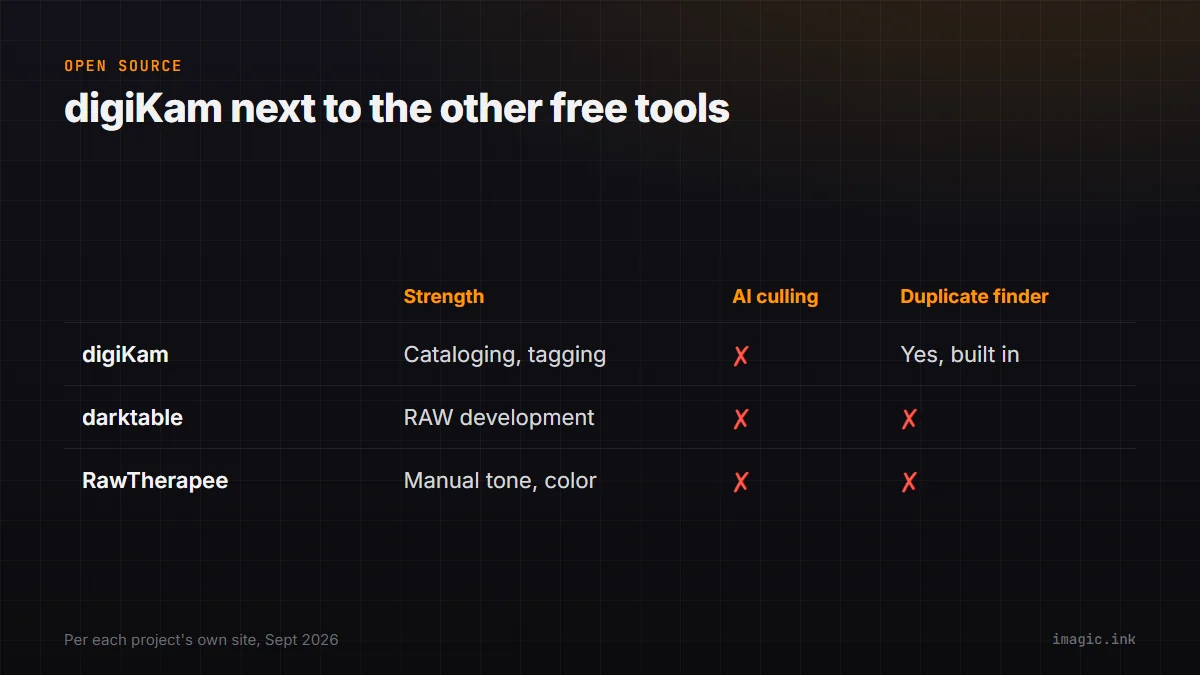
digiKam next to the other free, open-source options
| Tool | Primary strength | AI culling | Duplicate finder |
|---|---|---|---|
| digiKam | Cataloging, tagging, metadata search | No | Yes, built in |
| darktable | Non-destructive RAW development | No | No |
| RawTherapee | Fine-grained manual RAW tone and color control | No | No |
None of the three established free, open-source tools include AI-scored culling; that gap is consistent across the entire free RAW-and-catalog category, not specific to digiKam. What separates them is where each one puts its actual engineering effort: digiKam into search and metadata at library scale, darktable and RawTherapee into the RAW development pipeline itself. A photographer who wants both cataloging and deep manual RAW development for free typically ends up running two of these tools together, exporting a catalog's finished picks from digiKam into darktable or RawTherapee for the actual develop pass, since none of the three free tools was built to be the single, complete answer to both jobs on its own.
Who this actually suits in 2026
| You are | digiKam fits if |
|---|---|
| Managing a very large, multi-year archive | Yes; deep tagging and metadata search are its core strength |
| On Linux specifically | Yes; it is one of the few full-featured options with native Linux support |
| Looking for AI-scored culling of a single shoot | No; there is no dedicated quality-scoring tool built in |
| New to photo software and want a simple interface | No; the learning curve is real |
What being part of KDE actually means for its future
digiKam's status as part of the KDE software family is worth understanding beyond the license line. It means development is driven by a volunteer and contributor community rather than a single company with a commercial roadmap to protect, which is both the source of its free price and the reason its release pace looks the way it does: steady, maintenance-focused releases roughly every few months rather than a company-funded marketing push around major version launches. It also means long-term continuity is not tied to one vendor's business decisions the way a commercial tool's future can be; a community-maintained, GPL-licensed project does not disappear because a company changes strategy or gets acquired, even if its pace of new features stays modest in the meantime.
Where imagic fits alongside it, not instead of it
digiKam and imagic solve different halves of a photo workflow rather than competing directly. digiKam is built to be the long-term home for a library: tagging, searching, and organizing years of images after they are finished. imagic is built for the narrower job right after a shoot: AI-scored culling for sharpness, closed eyes, and composition, duplicate and burst grouping, and RAW development through its own built-in engine, all for a one-time price rather than digiKam's free-but-manual review process. A common pairing is imagic for the fast triage-and-edit pass right after a shoot, with digiKam handling the long-term cataloging of the finished files that come out the other end.
For the fuller side-by-side feature comparison, see imagic vs digiKam. Photographers weighing digiKam against other free, open-source options can also check the darktable vs Lightroom comparison and this roundup of free Lightroom alternatives, both of which cover adjacent free tools in more depth. The Software Comparisons category has more reviews like this one.
Frequently asked questions
Is digiKam actually free, with no paid tier?
Yes. digiKam is licensed under GPL-2.0-or-later, free to download, use, and modify, with no purchase price or paid tier at any level.
Does digiKam have AI-assisted culling like imagic?
Not a dedicated quality scorer. It has face detection and some auto-tagging, plus a built-in duplicate finder, but no sharpness, closed-eye, or composition scoring built specifically for culling a shoot.
Does digiKam work on Windows and Mac, or only Linux?
All three. Per its own site it runs on Linux, Windows, and macOS, though it originated in and remains especially popular within the Linux community.