Five names turn up in nearly every search for AI-assisted photo culling: Aftershoot, FilterPixel, Imagen AI, Narrative Select, and imagic. They get compared constantly because they solve the same first problem, cutting a shoot's worth of RAW files down to the keepers, and then diverge sharply on almost everything else: how the AI pass actually runs, what it costs over a season rather than a month, what happens to a photo after it is scored, and what each tool deliberately does not do. This guide is the hub for that whole comparison. It works through the five tools criterion by criterion rather than tool by tool, so the differences that actually decide a purchase, architecture, pricing model, format support, and platform fit, sit next to each other instead of buried inside five separate marketing pages.
This is also the entry point to a small cluster of narrower guides that go deeper on single pieces of this decision: a Windows-specific breakdown of the same five tools, a full three-year cost comparison with the arithmetic shown, a checklist for verifying upload and privacy claims, a look at training a personal editing style locally, and a direct Narrative Select alternative comparison for Windows photographers. Each is referenced in context below, with enough of its own material here that this page stands on its own even without clicking through.
How This Comparison Was Checked and What Counts as Evidence Here
Checked 15 August 2026. Every pricing figure, system requirement, and processing claim below traces to a vendor's own product page, pricing page, or support article, linked at the point it is used. Software pricing and feature gating change often enough in this category that a number copied from memory, or from someone else's older comparison, is a real risk; where a page could not be confirmed directly, that gap is stated rather than filled in with a guess.
A distinction runs through the whole piece and is worth naming up front: a vendor's own description of its product, "processes locally," "your files never leave your machine," "GDPR compliant," is a claim the vendor is making about itself, not an independently verified test of that product's actual network behavior. None of the sources cited here include a third-party audit of any of these five tools' traffic. That does not make the claims false; a specific, repeated statement on a company's own pricing and product pages is meaningfully different from an unsupported adjective in a headline. But it is still the vendor's word, and it is presented as such throughout rather than repackaged as independent confirmation.
One more scoping note: Adobe Lightroom shows up briefly for context later, not as a sixth full entry, because Lightroom is a RAW editor and library with manual flag and reject keys, not a product built around an automated first culling pass. The five tools compared in depth here all share that specific job.
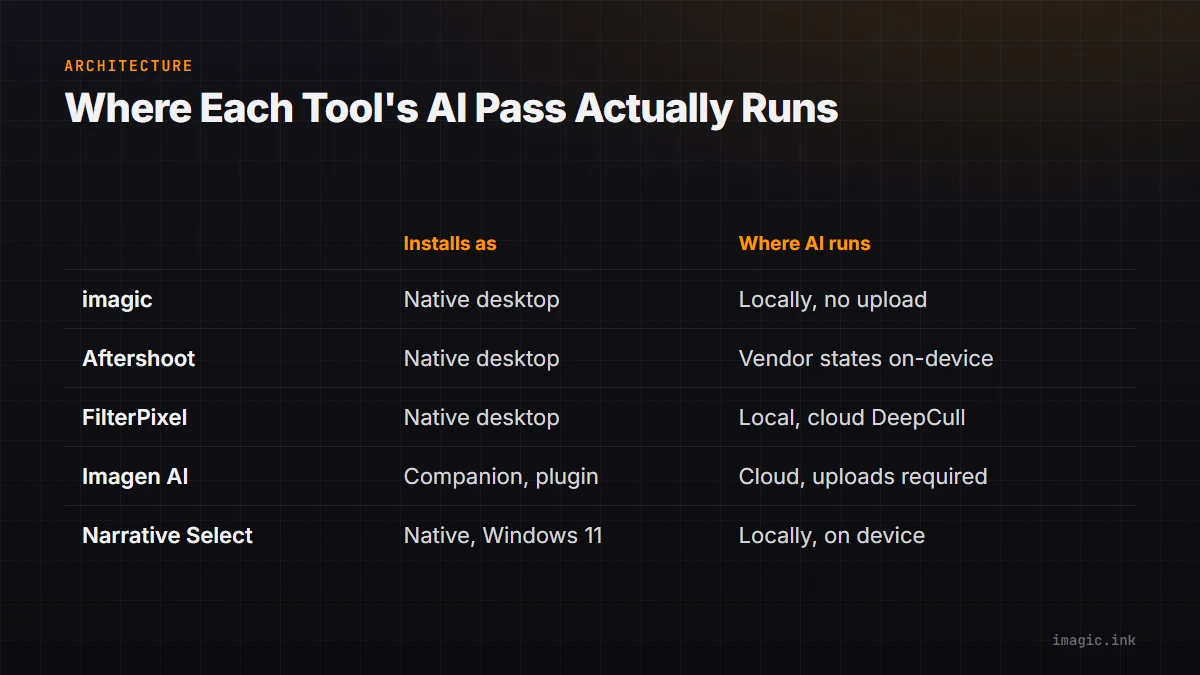
Architecture First: Where Each Tool's AI Pass Actually Runs
The single question that predicts more about a culling tool's day-to-day feel than any other is where the AI scoring actually executes: on the machine in front of the photographer, or on a server somewhere else once a batch has been uploaded. "Desktop application" and "fully local processing" are not the same claim, and several products in this category are proof of that gap, a downloadable app can still depend on a network round trip for its actual AI work.
| Tool | Installs as | Where the AI culling pass runs | Basis |
|---|---|---|---|
| imagic | Native Windows and macOS desktop app | Locally, on the machine holding the photos; no upload step in the culling or editing pipeline | Product architecture, confirmed directly |
| Aftershoot | Native Windows and macOS desktop app | Vendor states on-device processing for culling, editing, and retouching | Vendor claim, stated on Aftershoot's own site |
| FilterPixel | Native Windows and macOS desktop client | Local client; its metered "DeepCull" AI scoring pass and priority cloud processing are described as cloud-involved features | Vendor's own pricing page |
| Imagen AI | Companion app and Lightroom plugin, not a full local client | Cloud; photos or proxies are uploaded and an editing profile is applied on Imagen's own infrastructure | Product model, per Imagen's support site |
| Narrative Select | Native Windows 11 and macOS desktop app | Locally; the First Pass AI assessment runs against frames within a scene on-device | Product documentation and published system requirements |
Two of the five, imagic and Narrative Select, keep the actual culling computation on the machine as a matter of product design, with no upload step required to score a batch. Aftershoot makes the same claim through its own marketing copy across more than one page, which is a consistent, specific claim worth more weight than a single unverifiable line, but it remains something the vendor states about itself rather than something this comparison independently measured. FilterPixel sits in the middle: its site states plainly that original images are not uploaded, while its own pricing page separately describes DeepCull, the actual AI scoring pass, as a metered resource with "priority cloud processing" sold as a paid upgrade on higher tiers, which only makes sense if some part of that pass touches FilterPixel's own infrastructure. Imagen AI is the one product here that is cloud-first by design rather than by exception: its editing profile is applied on Imagen's servers, and a shoot's files or proxies have to reach that service before any result comes back, on Windows or Mac alike.
Why this axis matters more than it first appears: it is the one variable that determines whether upload bandwidth becomes part of the workflow at all. A locally processed tool's speed is bound by the machine's own CPU, GPU, and drive; a cloud-dependent tool's speed is bound by whatever the internet connection is doing that day, which is a much less predictable number to plan a workflow around. The full checklist for testing any vendor's local-processing claim against its actual behavior, not just its marketing language, including a worked storage-and-bandwidth calculation for a real shoot size, lives in the dedicated cloud upload privacy checklist, which applies the same five questions to these tools and to whatever launches next in this category.
Pricing Models: One-Time License, Metered Subscription, or Cloud Credits
The five tools split into three genuinely different pricing philosophies, and conflating them, treating a monthly number as directly comparable to a one-time number, is the most common mistake in a quick side-by-side. imagic is a one-time EUR license across three tiers: Lite at 19, Plus at 49, and Max at 99, backed by a 500-export free trial that does not require a card (imagic's desktop page). Narrative Select is a four-tier recurring subscription, billed monthly or with an annual discount: Lite runs 15 a month or 10 a month billed annually, Standard runs 29 or 20, Premium runs 59 or 40, and Ultra runs 79 or 60, all in dollars, with unlimited images and projects on every tier and the difference between tiers mostly coming down to seat count (Narrative's current pricing page). FilterPixel is a metered subscription: Standard runs 14.99 a month billed annually or 19.99 month to month, Pro runs 34.99 annual or 49.99 monthly, and Studio runs 64.99 annual or 99.99 monthly, with the culling allowance itself capped by DeepCull "shoots" per month rather than an unlimited pass at every tier (FilterPixel's pricing page). Aftershoot bills per module, culling, editing, retouching, or a bundle, as a subscription that scales with monthly image volume rather than a flat number, detailed on its own pricing update page. Imagen AI's current plan structure lives on its own support site and is worth reading directly rather than summarized here, since it mixes subscription and credit-based options that vary by how a studio expects to use it (Imagen's pricing and plans article).
A rough way to make a one-time price and a subscription price comparable is to pick a time horizon and divide both by it. Assume, as one illustrative example, that a photographer expects to keep using whichever tool they choose for three years. A one-time license's effective annual cost is simply its price divided by three: imagic's Max tier at 99 works out to 33 a year across that window, less again if the software stays useful for a fourth or fifth year. A subscription's three-year cost is roughly its monthly price times 36, before folding in whatever discount a vendor offers for annual billing, which every one of the four subscription tools above does to some degree. That calculation deliberately ignores real variables that change the answer for a specific photographer: how many photos actually get shot in a typical month, which tier that volume requires, whether new features arrive during the subscription window that a one-time license would not receive, and whether the tool actually still gets used three years from now at all. Swap in a shorter or longer horizon, a studio's real monthly shoot volume, and a specific tier's real price before treating any total as a decision. The full version of this math, worked with assumptions a reader can substitute their own numbers into rather than a single flat verdict, is in the dedicated photo culling software three-year cost comparison.
RAW Formats, Editing Depth, and Where the Keepers End Up
Culling is only half the job; what happens to the selected frames afterward varies as much between these tools as the culling step itself does. imagic decodes nine RAW formats through its own built-in RAW processing engine: CR2, CR3, NEF, ARW, RAF, ORF, RW2, DNG, and PEF, covering Canon, Sony, Nikon, Fujifilm, Pentax, and other bodies that write one of those formats. Culling, batch editing, and one-click styles all run inside the same application, and export goes straight to JPEG or TIFF, so a finished set of files leaves the tool without depending on a second editor being installed. FilterPixel's own pricing page lists a comparably broad RAW list, NEF, CR3, CR2, DNG, ARW, ORF, RW2, PEF, and RAF alongside JPEG, but FilterPixel's job ends at a curated selection and light AI-driven edits with built-in profiles; its documentation points toward Lightroom and Capture One integration for the deeper development pass. Narrative Select follows a similar shape: its Loupe, Grid, Scenes, and Survey views handle inspection and comparison, and its SHIP feature exports selects directly into Lightroom Classic or another editor, writing star ratings and color tags as XMP sidecar files next to the source images rather than locking them inside a proprietary catalog, a detail worth noting because those tags survive an uninstall or a lapsed subscription even though the software itself does not (Narrative's quickstart guide). Aftershoot and Imagen AI both extend further into finished-image territory than a pure culling tool: Aftershoot bundles editing and portrait retouching alongside culling as separate paid modules, and Imagen AI's entire product is built around applying a trained editing profile during that same cloud pass rather than treating editing as a downstream step.
Neither format list nor editing depth alone settles which tool fits a given workflow. A studio already anchored to Lightroom Classic for RAW development gets more immediate value from a tool built to hand off into it, FilterPixel or Narrative Select, than from one that exports finished files and expects to be the last stop, imagic's shape. The reverse is also true: a workflow that does not want a Lightroom dependency at all benefits from a tool that completes the RAW-to-export pipeline on its own.
Platforms, Accounts, and the Windows Question Specifically
All five tools install on Windows in 2026, which closes off a search that used to have a real answer: older forum threads and out-of-date roundups describing Narrative Select as Mac-only have not been accurate for some time. Narrative's own help center confirms a native Windows build downloadable through the account portal (help.narrative.so), and Narrative is also the only tool among the five that publishes an explicit Windows minimum spec rather than a general system note: Windows 11, a quad-core CPU at 2GHz or faster, 8GB of RAM, a GPU with 2GB of vRAM and DirectX 12 support, and 1GB of free disk space. The DirectX 12 and dedicated-vRAM requirement is a genuinely Windows-specific detail worth planning around, since a very old integrated GPU, or a virtual machine without GPU passthrough, is a real reason that specific tool might not run well even though it installs without error. The full breakdown of what changes for a Windows-based photographer across all five tools, hardware planning included, is in the dedicated Windows culling software guide.
Because Narrative Select's Windows availability is no longer the open question it once was, the more useful comparison for a Windows photographer already looking at Narrative is not "does it run" but "does its subscription and account model fit better or worse than a local, one-time alternative." That specific comparison, Narrative Select against imagic and against FilterPixel as a third, cloud-based option, with a full cost table and a look at what happens to ratings and picks if a subscription lapses, is worked through in the dedicated Narrative Select alternative for Windows guide.
Account requirements are worth a separate mention because they are easy to overlook until installation day. Narrative Select requires signing in through its account portal before the first project, per its own quickstart material. FilterPixel requires an account to download the application at all. Imagen AI's entire model depends on an account, since the editing pass happens on Imagen's own infrastructure. Aftershoot's desktop application, per its own site, works offline for culling, editing, and retouching once installed, though its optional Galleries feature for client delivery is by definition a connected, cloud-hosted product. imagic does not require an account to install or run the core desktop application; the Max tier's optional MCP server and command-line interface run locally as well and do not require signing in to a separate service to function.
A Short Decision Framework Instead of a Single Winner
None of the five sections above name a single best tool, on purpose: the right choice depends on which constraint is actually non-negotiable for a specific photographer, and that constraint is different from one workflow to the next. What follows is a short sequence of questions, in the order that tends to eliminate the most options fastest, rather than a scored ranking.
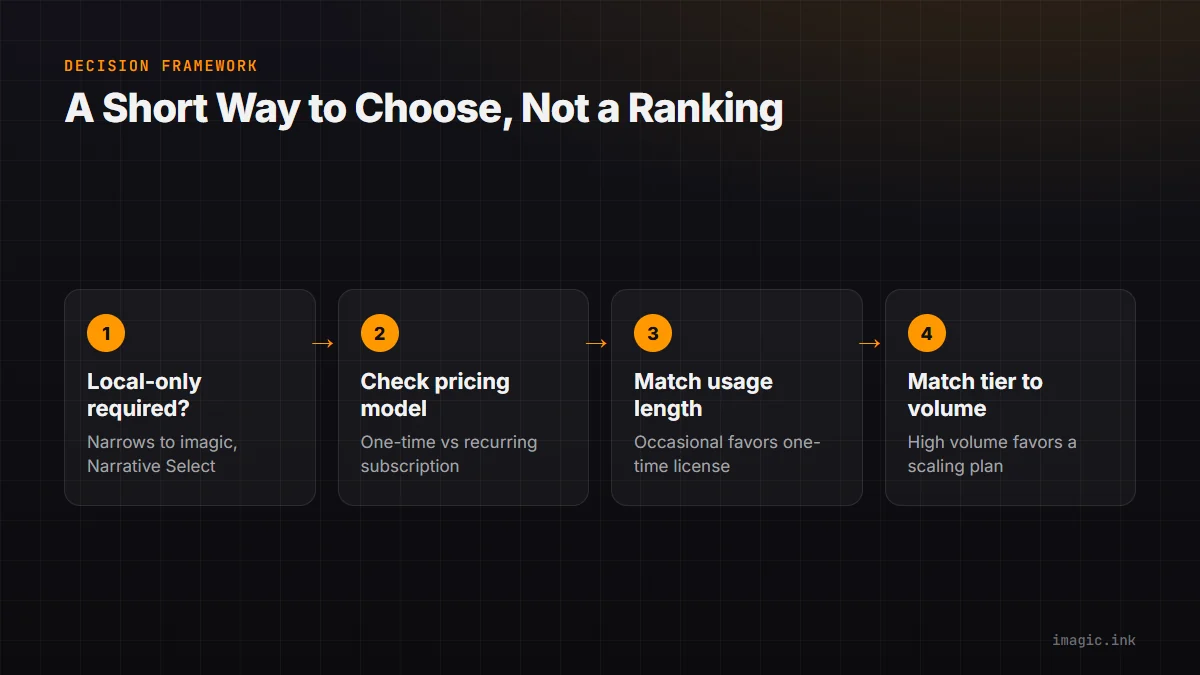
Start with whether local-only processing is a hard requirement, not a preference. A photographer under contract to keep client files off any third-party server, common in commercial and some wedding work, narrows the field to imagic and Narrative Select immediately, since those are the two tools whose AI culling pass runs on-device by product design rather than by a marketing claim that has not been independently tested. If local processing is a preference rather than a contractual requirement, Aftershoot's stated on-device model for culling and editing is worth weighing too, with the caveat that it is a vendor claim rather than a confirmed architecture.
Next, weigh the pricing model against how long the software is actually expected to stay in use. A photographer who shoots occasionally, or who wants to avoid a recurring line item entirely, tends to favor a one-time license; imagic is the only tool of the five priced that way. A studio that shoots at high, steady volume and wants ongoing feature updates without waiting for a paid upgrade may prefer a subscription instead, in which case the deciding factor becomes which vendor's tier structure matches the studio's actual monthly output without paying for headroom that never gets used, which is exactly what FilterPixel's and Narrative Select's tiered plans are built around.
Then check what happens after culling. A workflow already built around Lightroom Classic benefits from a tool designed to hand off into it, FilterPixel's or Narrative Select's export path, rather than one that expects to be the final stop. A workflow that wants culling, RAW development, and export in a single application without a second piece of software in the loop points toward imagic instead. Imagen AI answers a different question again: it fits a studio that wants an editing profile applied automatically as part of the same step that culls, and is comfortable with that profile being computed on Imagen's own servers rather than the local machine.
Finally, weigh account requirements against how the software gets used. A solo photographer working offline at a remote location, with unreliable or metered internet, gets more practical value from a tool that runs and licenses without a live connection, imagic's core desktop app, or Narrative Select and Aftershoot once already signed in and downloaded, than from FilterPixel or Imagen AI, both of which depend on an account and, for at least part of their pipeline, a working connection to function as designed.
Five Tools, Five Honest Limits
Every product below does something well. None of them does everything, and pretending otherwise would make this comparison marketing rather than a decision aid. Each entry states plainly who the tool is not built for, imagic included.
imagic
imagic processes photos entirely on the machine they are already stored on: AI culling scores sharpness, closed eyes, and composition, groups duplicates and bursts, and hands off into batch editing and one-click styles, all without an upload step. Licensing is one-time rather than recurring, and nothing in the culling or editing flow deletes an original file. Not for you if the workflow needs cloud sync between a desktop and a phone, tethered capture, a printing integration, plugin support inside another editor, layers, generative fill, HDR or panorama merging, or a full digital-asset-management catalog with keyword search across a multi-year archive; imagic is a local culling and editing tool for one machine at a time, not a DAM or a creative suite, and does not attempt to be either.
Aftershoot
Aftershoot bundles AI culling, batch editing, and portrait retouching into one downloadable Windows and Mac application, with its own marketing stating an offline processing model for that core engine across more than one of its pages. Not for you if a flat, predictable one-time cost matters more than a subscription with monthly image allowances, or if the deciding factor is a stated Windows hardware minimum to plan a machine purchase around; Aftershoot's public pricing material centers on tiered monthly plans rather than a published spec floor, and its client-facing Galleries feature is a separate, cloud-hosted product layered on top of the offline core.
FilterPixel
FilterPixel installs locally on Windows and Mac and states directly that original images are not uploaded, while offering broad RAW format support and Lightroom and Capture One integration for the development pass after culling. Not for you if a fully unmetered monthly workload matters, or if avoiding any cloud-involved step in the AI scoring pass itself is a hard requirement; FilterPixel's own pricing page describes its DeepCull scoring as capped in monthly "shoots" per tier and lists priority cloud processing as a paid feature, which sits underneath the locally installed client rather than outside it.
Imagen AI
Imagen AI applies a trained editing profile to a shoot through its own cloud infrastructure, syncing results back through a Lightroom plugin or its companion app, which means Windows and Mac users get essentially the same experience since the heavy processing never touches local hardware. Not for you if keeping every original file on the local machine through the entire culling and editing pass is a hard requirement, or if the shoot volume routinely gets processed somewhere with slow or metered upload bandwidth; Imagen's model depends on that upload step by design, not as an optional feature.
Narrative Select
Narrative Select is a native Windows and Mac application with a First Pass AI assessment that runs on-device, a published hardware minimum for planning a machine purchase, and ratings stored as XMP sidecars that travel with the image files rather than a proprietary database. Not for you if a one-time purchase matters more than a confirmed Windows-native hardware guarantee, or if the culling machine's GPU cannot meet the published 2GB vRAM and DirectX 12 floor; Narrative Select remains a recurring subscription with an account requirement rather than a locally licensed, offline-by-default tool.
Lightroom, for context
Lightroom Classic and the cloud-based Lightroom app remain the RAW development and library standard several of the tools above hand off into, and Adobe has published a specific pricing notice covering its 1TB storage plan alongside a full plan-comparison page for anyone checking current Creative Cloud photography tiers (Adobe's 1TB plan FAQ and Adobe's plan comparison page). Not for you, specifically as an answer to the culling problem this comparison is about, if reviewing thousands of frames by hand with flag and reject keys is the actual bottleneck; none of Lightroom's subscription tiers add an automated first-pass quality-scoring model the way the five dedicated tools above do.
Style Training and Client Data: Two Places This Comparison Runs Deeper
Two features come up constantly in follow-up questions about these five tools, and both deserve more room than a comparison table can give them, which is why each has its own dedicated guide in this cluster rather than a rushed paragraph here.
The first is trained editing profiles. A generic preset applies the same fixed recipe to every photo that matches a rough condition; a trained profile is built from photos a specific photographer already finished editing and tries to reproduce that pattern of choices on new work. At least three tools in this category ship a named version of that idea: FilterPixel calls it a custom trainable AI profile, gated to two profiles on its Pro plan and five on Studio; Narrative Select calls it Personal Style, described in its own quickstart material as learning from corrections made during editing; imagic ships the same underlying idea as a set of local commands, learn_style_from_library, match_style_from_examples, and a calibration flow for a cold start, all running on the machine rather than through a subscription add-on. Where that training data goes, and what a trained profile does and does not touch, is covered in full in training a personal AI editing style locally.
The second is what actually leaves the machine, and when. "Local-first," "offline," and "your files never leave your machine" are close to universal marketing language across this category by 2026, and the honest answer is usually more layered than a single claim on a homepage suggests: a tool can be genuinely local for culling and still cloud-hosted for a bundled client-gallery feature, or local for storage while a specific AI scoring pass still touches a server. The dedicated cloud upload privacy checklist runs five specific questions against each of these tools, plus a worked storage-and-bandwidth calculation for a real shoot size, so the answer is grounded in gigabytes and a vendor's own published statements rather than in an adjective.
The Rest of This Local-First Culling Cluster
This page is the hub for a small set of guides built around the same five-tool comparison, each answering one narrower question in more depth than a single page could hold. Reading this far covers the whole comparison at a survey level; the five links below are where to go for the specific question that actually matters for a given decision.
- Best photo culling software for Windows: the same five tools narrowed specifically to what changes once the operating system is Windows rather than macOS, including Narrative Select's published hardware minimum and what it means for planning a machine purchase.
- Narrative Select alternative for Windows: a focused look at when Narrative Select's confirmed, working Windows build is still worth switching away from, comparing it directly against imagic and FilterPixel with a full cost table.
- Train a personal AI editing style locally: how a trained editing profile actually works across imagic, FilterPixel, and Narrative Select, where the training data lives, and what a profile will never touch, like retouching or generative fill.
- Photo culling software: the real three-year cost: the one-time-versus-subscription math from the pricing section above, run in full with assumptions a reader can substitute their own shoot volume and prices into.
- Does photo culling software upload your photos?: a five-point checklist for reading any vendor's privacy claims, applied to five real tools with a worked bandwidth calculation for a real-sized shoot.
Together with this page, those five guides cover the local-first culling category from the angle that matters for each specific decision: platform fit, direct alternative shopping, the style-training feature specifically, long-term cost, and data handling. None of them requires reading this hub first, and none of them repeats this page's tables wholesale; each goes narrower and deeper on its own slice of the same underlying comparison.
Frequently Asked Questions
Which of these five tools keeps photos fully local, with no upload step at all?
Based on each vendor's own product and documentation pages, imagic and Narrative Select both run their primary AI culling pass on the local machine with no upload required to score a batch. Aftershoot states on-device processing for its culling, editing, and retouching engine across more than one of its own pages, though that remains a vendor claim rather than an independently tested result. FilterPixel installs locally but describes its DeepCull AI scoring and priority cloud processing as metered, server-involved features on its own pricing page. Imagen AI is built around uploading images or proxies for a cloud-applied editing profile by design, on both Windows and Mac.
Is a one-time license or a subscription actually cheaper for AI culling software?
It depends on shoot volume and how many years the software stays useful before something forces a switch, so there is no single universal answer. A starting method: divide a one-time license's price by the number of years it is expected to stay in use, then compare that per-year figure against twelve months of whichever subscription tier actually covers the real monthly shoot volume, adjusted for any annual-billing discount the vendor offers. That comparison ignores feature differences and whether a subscription's ongoing updates matter to a specific workflow, so treat it as a starting point; the dedicated three-year cost guide in this cluster runs the fuller version with assumptions built in to swap out.
Does Narrative Select actually run on Windows, or is that outdated?
It runs on Windows natively, and has for some time. Narrative's own help center states directly that the application is available on Windows, with a published minimum spec of Windows 11, a quad-core 2GHz CPU, 8GB of RAM, and a GPU with 2GB of vRAM and DirectX 12 support. Descriptions of Narrative Select as Mac-only reflect outdated information rather than the current product, so the question worth asking about a specific Windows machine is whether it clears that published spec, not whether a Windows build exists at all.
Do any of these tools support the same RAW formats imagic does?
FilterPixel's own pricing page lists a comparably broad set to imagic's nine formats: NEF, CR3, CR2, DNG, ARW, ORF, RW2, PEF, and RAF alongside JPEG. Aftershoot, Imagen AI, and Narrative Select do not publish an equally detailed RAW format list on the pages cited in this comparison, so checking each vendor's current supported-format documentation directly is worth doing before switching, particularly for a recently released camera body, since format support for a new RAW variant typically lags a camera's launch by weeks or months across the industry as a whole.
Can a trained AI editing style from one of these tools do retouching or generative edits?
No, not in any of the tools this comparison covers. A trained style profile, whether it is imagic's locally learned profile, FilterPixel's custom trainable profile, or Narrative Select's Personal Style, adjusts whole-image tone, white balance, contrast, and color response based on examples it learned from. None of them perform retouching, add layers, generate content that was not captured in the frame, or merge exposures into an HDR or panorama image. The training step changes how existing adjustment tools get applied automatically; it does not add new kinds of edits to what a tool could already do.
Is it possible to trial more than one of these tools before committing to a season's edits?
Yes, and doing so on a folder of already-delivered work, rather than a live job, is the safer way to run that comparison. imagic offers a 500-export free trial that does not require a card. FilterPixel's own product page states the software can be downloaded free to run a limited number of projects before a plan is needed (filterpixel.com). Narrative's current pricing page states that new signups receive a full trial of its top Ultra tier with no card required (narrative.so/pricing). Aftershoot's and Imagen AI's current trial terms are not detailed on the pages cited in this comparison, so confirming directly on each vendor's own pricing page before relying on a specific trial length or feature set is worth the extra step.