Narrative Select Runs on Windows Already, So the Real Question Is Different
Checked 15 August 2026: a common assumption drives a lot of "Narrative Select alternative Windows" searches, and it is wrong. According to Narrative's own help center, the culling app runs on Windows alongside its macOS build. There is no missing Windows release to work around and no beta waitlist to join first.
So the search is really about something else: what Narrative Select costs over a few seasons of shooting, what hardware it expects a Windows machine to have, whether it needs a signed-in account to open, and whether it does more than culling. Those are fair questions, and answering them honestly means naming a specific alternative rather than pretending Narrative does not work on Windows at all. This article compares Narrative Select's current Windows offering against imagic, a local one-time-purchase culling and RAW editor, and against FilterPixel, a cloud-based culling service, so the comparison covers three different approaches rather than one product against a myth.
What Narrative Select Actually Costs and Requires on Windows
Narrative's published minimum system requirements put a real floor under a "just try it" decision. On Windows, Narrative asks for a quad-core 2GHz processor, 8GB of RAM, a GPU with at least 2GB of vRAM and DirectX 12 support, and Windows 11 as the operating system baseline, with 1GB of free SSD space. Windows 10 machines, and anything below a dedicated-GPU tier, sit below that stated minimum, which matters for a photographer running an older editing rig that has otherwise been fine for Lightroom or Capture One.
Pricing is subscription-only. Narrative's current pricing page lists four tiers billed monthly or annually: Lite at $10/month on annual billing ($15/month billed monthly), Standard at $20/month annual ($29/month), Premium at $40/month annual ($59/month), and Ultra at $60/month annual ($79/month). Every tier includes unlimited images and projects; the difference between tiers is mostly seat count, with Lite and Standard covering one user, Premium up to two, and Ultra up to four. New signups get a full trial of the Ultra tier with no card required, per the same pricing page.
Getting into the app requires an account. Narrative's own quickstart guide has new users sign in through the account portal before the first project, and the AI culling pass, called First Pass, sorts each shot into blue, grey, or red categories by comparing frames within a scene rather than issuing an absolute score for a single image. The guide does not state whether that comparison runs on-device or against a hosted service, only that a signed-in account is the starting point, which is worth confirming directly with Narrative if that distinction matters for a particular studio's data policy.
Why Photographers Still Look Past a Tool That Technically Works
None of the above makes Narrative Select a bad product. It makes it a specific one, and the gap between "specific" and "what a given photographer needs" is where alternatives get considered. Four reasons come up repeatedly:
- Recurring cost. A subscription that looks small monthly compounds over several seasons of shooting, and the tier that fits a solo wedding photographer today may not fit a two-person studio next year.
- The hardware floor. Windows 11 plus a dedicated GPU is not a given on every machine that still handles RAW files acceptably in an editor with lighter local processing demands.
- Culling without editing. Narrative Select's quickstart guide ends its workflow by exporting selects to Lightroom, which means a second paid tool is still doing the actual RAW development.
- An account for a desktop app. Signing in before culling a shoot is a small friction, but it is friction a fully offline tool does not add.
None of these is disqualifying on its own. Together, they explain why alternative-search demand persists even though the Windows build itself is real and functional.
imagic as a Local, One-Time-Purchase Windows Alternative
imagic runs on both Windows and macOS and processes photos entirely on the machine it is installed on; nothing is uploaded as part of culling or editing. The AI culling pass scores sharpness, detects closed eyes, and evaluates composition, then groups near-duplicates and burst sequences so a shoot narrows down to keepers without a manual first pass through every frame. From there, batch editing and one-click styles apply adjustments across the selected photos, and its own built-in RAW engine handles RAW development directly, without handing the files to a separate app. Supported RAW formats are CR2, CR3, NEF, ARW, RAF, ORF, RW2, DNG, and PEF, covering the major camera brands a Windows-based studio is likely to shoot. Export targets are JPEG and TIFF.
Licensing is a one-time EUR purchase rather than a subscription: Lite at 19 EUR, Plus at 49 EUR, or Max at 99 EUR, with a 500-export free trial that does not require a card. No account is needed to install and run the core desktop app. The Max tier adds an MCP server and command-line interface, documented at imagic's tool reference, so an AI agent or script can drive the culling and export pipeline through explicit, logged commands. That MCP server runs locally too; it does not upload RAW files to a model provider on its own, and every export still writes to a folder the user names.
imagic is not a complete replacement for every workflow. It has no cloud sync, no mobile companion app, no tethered-shooting support, and no printing integration. There are no layers, no generative fill, no HDR or panorama merge, and no full digital-asset-management cataloging across multiple drives. Culling and editing are non-destructive throughout: no command in imagic deletes an original file, rejected frames stay on disk, and a status can be reversed at any point before export.
Narrative Select vs FilterPixel vs imagic: A Side-by-Side Look
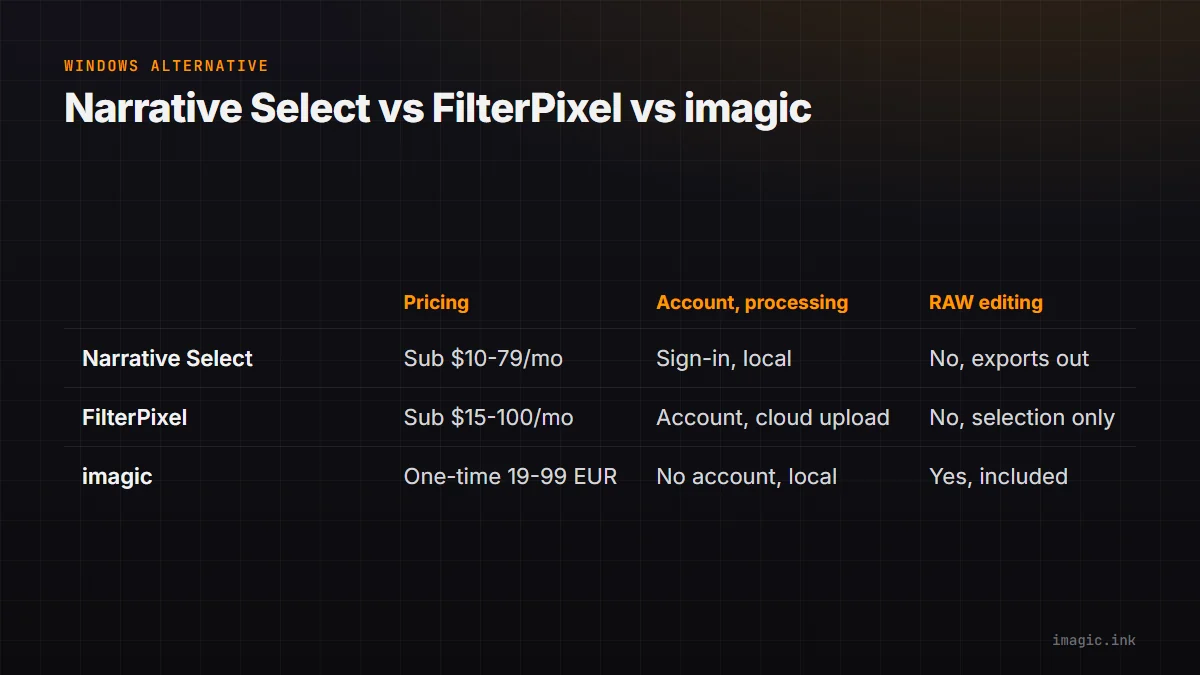
FilterPixel takes a third approach worth naming alongside Narrative Select and imagic: it is a browser-based service rather than a desktop app, so there is nothing to install on a Windows machine at all. Photos are uploaded and culled in the cloud, and results come back as a curated selection rather than finished exports.
| Tool | Pricing model | Processing and account | RAW editing included |
|---|---|---|---|
| Narrative Select | Subscription, $10 to $79/month depending on tier and billing cycle | Account sign-in required; processing location not stated in vendor docs | No; exports selections to Lightroom |
| FilterPixel | Subscription, roughly $15 to $100/month depending on tier and billing cycle | Account and photo upload required; cloud processing | No; culling and selection only |
| imagic | One-time purchase, 19 to 99 EUR | No account required; processing is local to the machine | Yes; RAW development, batch editing, and JPEG/TIFF export included |
The FilterPixel figures come from its published pricing page, which prices its Standard, Pro, and Studio tiers by a monthly "DeepCull" shoot allowance rather than a flat image count, with a free trial covering one full DeepCull project plus three basic ones.
Three-Year Cost Math: Subscription vs One-Time License
The following is a calculation from published prices, not a claim about what any individual photographer will actually spend; substitute a real tier choice, currency, and billing cycle before treating it as a decision. Using Narrative's Standard tier on annual billing ($20/month, or $240/year per the pricing page) as a mid-range example, three years of that subscription totals $720. Narrative's Premium tier on the same annual billing ($40/month, $480/year) totals $1,440 over three years. Neither total includes a separate RAW editor subscription, which the quickstart workflow still requires downstream.
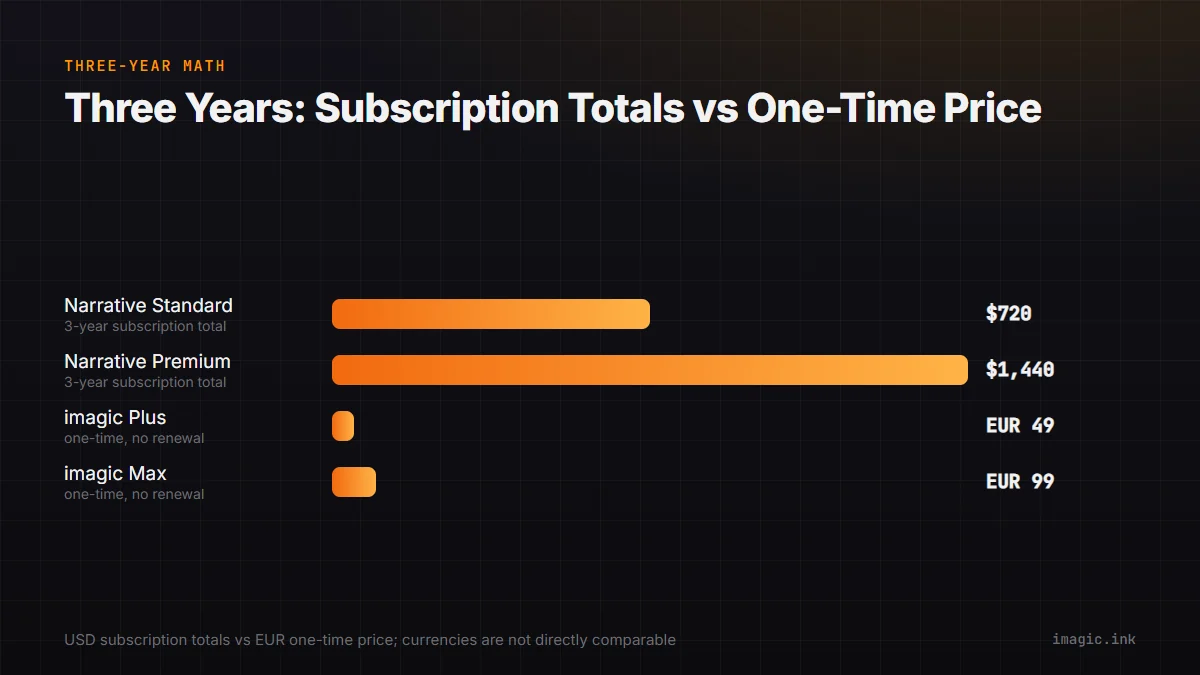
Against either figure, imagic's one-time Plus license (49 EUR) or Max license (99 EUR, which adds the MCP/CLI surface) is paid once, with no renewal due in year two or three. The comparison is not apples-to-apples on currency (EUR versus USD) or on feature set (Narrative's Premium tier adds a second user seat that imagic's single desktop license does not), so the honest version of this math is: check the tier that actually matches the studio's team size and the current EUR/USD rate, then run it again including whatever RAW editor cost sits downstream of Narrative Select today. A longer breakdown of this kind of calculation, with more tiers and more assumptions spelled out, is in the three-year culling software cost comparison.
Switching From Narrative Select Without Losing a Culling Workflow
A studio already paying for Narrative Select does not need to cancel anything before checking the alternative. imagic's 500-export trial runs without a card, so it is reasonable to point it at a recent shoot's RAW files, run the same culling pass Narrative Select would have run, and compare the two sets of keepers side by side before any subscription gets cancelled. Confirming the camera's RAW format is on imagic's supported list (CR2, CR3, NEF, ARW, RAF, ORF, RW2, DNG, PEF) takes a minute and avoids a wasted trial.
One workflow difference is worth planning around rather than discovering mid-shoot: Narrative Select's quickstart guide ends by exporting selects into a Lightroom catalog for editing, while imagic edits and exports finished JPEG or TIFF files directly, without writing into a separate catalog. A studio that has built years of Lightroom collections and catalog structure around that export step should treat this as a workflow change, not a drop-in replacement. For a single photo that needs a quick edit without installing anything first, imagic's free single-photo web editor is a lighter starting point than committing to the desktop trial.
Which of These Actually Fits
Narrative Select is not for you if a subscription is the wrong shape for the business, if the editing rig is a Windows 10 machine without a dedicated GPU, or if paying for a second RAW editor on top of the culling tool is not appealing.
FilterPixel is not for you if uploading client photos to a third party's cloud is a hard no, if a reliable fast connection is not available on shoot days, or if the goal is one integrated app for culling and editing rather than a culling service that hands back a selection.
imagic is not for you if cloud sync across devices, a mobile companion app, tethered capture, layers, generative fill, or full multi-drive cataloging are part of the required workflow; none of those exist in imagic today. It is a fit for a Windows or macOS photographer who wants culling and RAW editing in one local app, paid once.
The full field is wider than these three. Aftershoot and Imagen AI are two more subscription AI culling tools worth knowing about, and all five are placed side by side, with the same not-for-you-if treatment, in the AI photo culling software comparison, which is the right starting point for a studio still narrowing the full list down before committing to any single trial.
Frequently Asked Questions
Does Narrative Select actually not work on Windows?
It works on Windows. Narrative's help center confirms Windows support directly, and its own system requirements page lists a Windows 11 baseline, a quad-core 2GHz processor, 8GB of RAM, and a GPU with 2GB of vRAM and DirectX 12 support. Anyone searching for a Windows alternative because of a supposed missing release should look at cost, hardware requirements, and workflow scope instead, which is what this article compares.
Is imagic cheaper than Narrative Select?
Over a single month, Narrative Select's cheapest annual-billed tier is less expensive than any imagic license. Over several years, a one-time imagic purchase can total less than a running Narrative subscription, depending on which tier is actually needed and how long the subscription keeps running; the three-year cost math section above shows the calculation with its assumptions stated so a reader can substitute real numbers.
Does imagic require an account or internet connection to cull photos?
No account is required to install and run imagic's core desktop app, and culling and RAW editing both run locally on the machine, with nothing uploaded. An internet connection is only relevant for downloading the installer, checking for updates, or activating a license.
Can imagic replace Narrative Select and Lightroom together?
For studios whose editing needs stop at RAW development, batch adjustments, one-click styles, and JPEG or TIFF export, imagic covers both the culling step and the editing step in one app. It does not replicate Lightroom's catalog system, cloud sync, or plugin ecosystem, so a studio relying on those specific Lightroom features would still need it alongside imagic rather than instead of it.