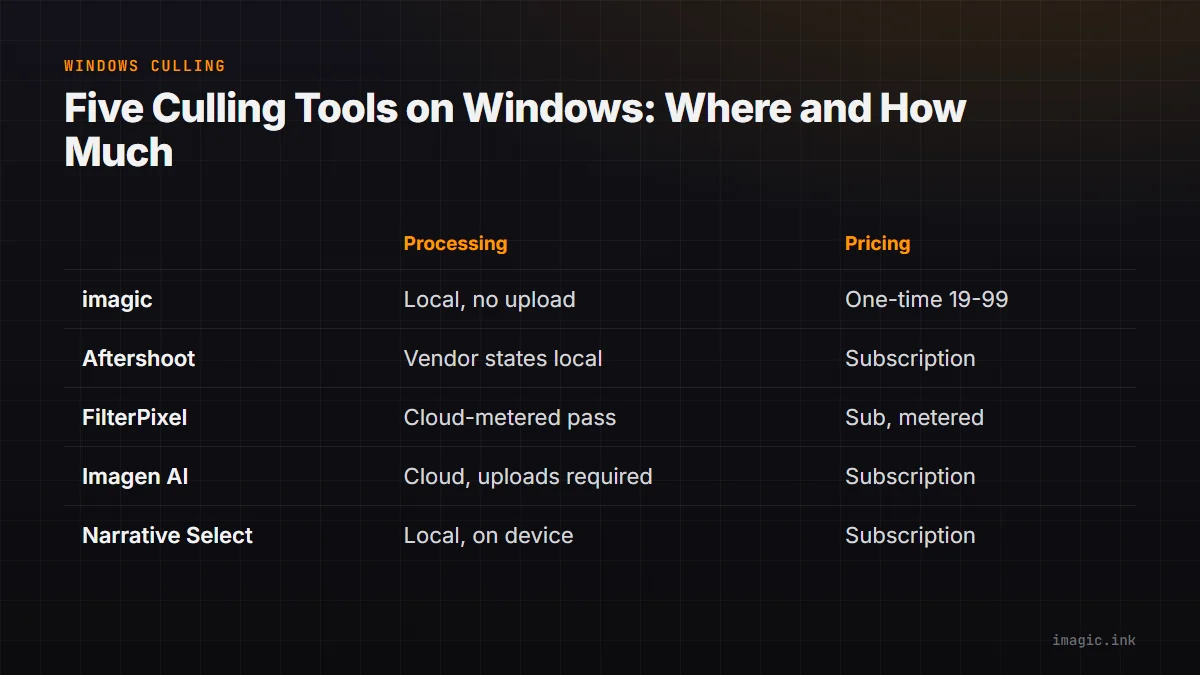
Most "best culling software" roundups get written on a Mac, tested on a Mac, and then get a line added near the bottom noting that a couple of the tools also happen to run on Windows. That ordering matters more than it looks. Windows and macOS handle GPU acceleration, driver support, and file-system behavior differently, and for an AI culling tool that has to decode hundreds of RAW files quickly, those differences show up as real launch times and hardware requirements rather than a footnote. This guide starts from the Windows side of the question and works through five tools that photographers actually compare against each other: imagic, Aftershoot, FilterPixel, Imagen AI, and Narrative Select, the same five lined up feature by feature in imagic's wider AI photo culling software comparison. This piece narrows that same lineup to one question: what changes, in practice, once the operating system is Windows rather than macOS.
What actually matters when choosing culling software for Windows in 2026
Five variables decide whether a culling tool is a good fit on a Windows machine, and none of them are simply "does it have a Windows build," because by 2026 every product in this comparison technically does. The first is where the AI culling pass physically runs: on the machine in front of the photographer, or on a server that the RAW files, or proxies of them, have to reach over an internet connection first. The second is the pricing model, since a one-time license and a monthly subscription answer very different questions about long-term cost. The third is which RAW formats the tool actually decodes, because a Windows body from Canon, Nikon, Sony, Fujifilm, or a Micro Four Thirds system produces a different file extension, and vendor support for new formats lags by different amounts. The fourth is what Windows itself specifically requires to run the software well, something only one of the vendors below publishes as an explicit minimum-spec page rather than a general system note. The fifth is what happens to the output afterward: does the tool hand off into Lightroom or another editor, does it export directly, and do the picks and star ratings survive if the software gets uninstalled or a subscription lapses.
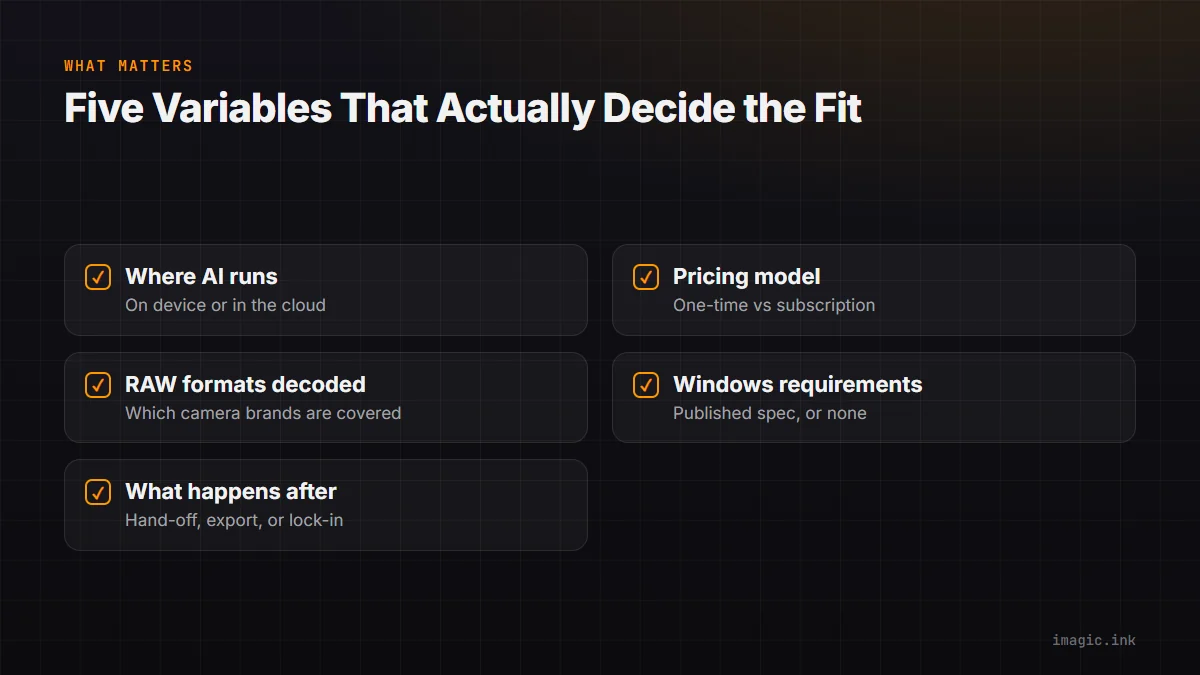
Those five questions are the spine of everything below. None of them get answered with a benchmark, because a fair, independent benchmark across five different AI culling models, run on comparable Windows hardware, does not exist in public form as of this writing, and a single-machine timing test would not generalize past that one machine's CPU, GPU, and drive speed anyway. What follows instead is what each vendor states about itself, checked directly against its own site, with a "not for you if" line for every product so the gaps are as visible as the strengths.
How this comparison was checked and built
Checked 15 August 2026. Every pricing figure, system requirement, and platform claim below is attributed to the vendor's own product page, pricing page, or support article, linked at the point it is used. Where a vendor's current page could not be confirmed directly during this check, that is stated outright rather than filled in from memory, because software pricing changes often enough that a stale number is worse than no number at all. Nothing here is presented as an independent lab result: statements like "processes locally" or "does not upload your files" are vendor claims, attributed as such, not verified by inspecting each application's actual network traffic.
The five tools compared are limited to products that do AI-assisted culling as a primary function, which is why Adobe Lightroom shows up only as context later rather than as a sixth full entry: Lightroom is a RAW editor and catalog with flag and reject keys, not a tool built around an automated first pass. Every product mentioned, including imagic, gets a stated limitation, because a comparison that only lists strengths is a marketing page wearing a review's clothes.
The quick answer for Windows users
For a photographer who wants the short version before the detail: imagic and Narrative Select are the two tools in this group whose primary culling pass runs on the machine itself rather than depending on an upload step, and they take opposite approaches to pricing, one-time license against subscription. Aftershoot is a downloadable Windows and Mac application sold as a subscription, with vendor-stated on-device processing that is worth re-confirming directly given how often vendor language shifts. FilterPixel and Imagen AI both depend on a cloud step for their AI culling or editing pass, even though FilterPixel installs as a desktop client; the practical effect for a Windows user is similar either way, since the real bottleneck becomes upload bandwidth and service availability rather than local CPU or GPU. None of that makes one option universally best. It depends on whether local-only processing, one-time pricing, or an existing Lightroom catalog is the deciding factor, which is exactly what the next five sections work through.
Aftershoot on Windows
Aftershoot ships a downloadable application for both Windows and Mac built around AI culling, batch editing, and portrait retouching in one product (aftershoot.com). It is sold as a tiered subscription rather than a one-time license, with published tiers that scale by monthly image volume; the exact current dollar figures are best read directly from Aftershoot's own pricing page rather than repeated here secondhand, since AI culling vendors tend to revise per-image allowances and tier boundaries more often than they revise a stable list price (Checked 15 August 2026: aftershoot.com/blog/aftershoot-pricing).
Aftershoot's own marketing has for some time framed on-device processing as a differentiator from browser-upload competitors, describing its AI culling model as something that runs on the photographer's own computer rather than through a browser session. That is a vendor claim about architecture, not an independently verified test of network traffic during a culling pass, and it is worth treating it that way: read the current wording on Aftershoot's own site before relying on it for a specific privacy requirement, since exact phrasing on any vendor's pages is the kind of detail that gets revised without much notice.
Not for you if a one-time purchase with no recurring bill is a hard requirement, or if the deciding factor is a published Windows minimum-spec page to plan a machine purchase around; Aftershoot's public materials center on subscription tiers and monthly image allowances rather than a stated hardware baseline.
FilterPixel on Windows
FilterPixel installs as a desktop application on both Windows and Mac, and its site states directly that original images are not uploaded anywhere and remain private, encrypted, and under the photographer's control (filterpixel.com). At the same time, FilterPixel's own pricing page describes its "DeepCull" culling pass as a metered resource: the Standard tier includes 2 DeepCull shoots a month, Pro includes 6, and Studio includes 12, with a single extra DeepCull shoot available for $7.99 and covering up to 5,500 photos, and "priority cloud processing" listed explicitly as a paid feature on the Pro and Studio tiers (Checked 15 August 2026: filterpixel.com/blog/filterpixel-pricing). Those two statements are not automatically contradictory. A desktop front end can hold the source RAW files locally while still sending image data to a server for the AI-scoring pass itself, and FilterPixel's copy never states outright where that scoring runs. What is stated outright is that DeepCull is metered per shoot and that cloud processing is a paid upgrade, which means the useful question for a Windows user is not "is this local," but "does the culling allowance and cloud queue fit how many shoots get delivered a month."
Pricing as published: Standard runs $14.99 a month billed annually ($180 a year) or $19.99 month to month; Pro runs $34.99 a month billed annually ($420 a year) or $49.99 month to month and adds same-night JPEG export plus two custom AI profiles; Studio runs $64.99 a month billed annually ($780 a year) or $99.99 month to month and adds up to five team seats and five custom profiles. All tiers include unlimited basic culling, genre-specific scoring modes, AI editing with built-in profiles, and integration with Lightroom and Capture One, and the software reads a broad list of RAW formats including NEF, CR3, CR2, DNG, ARW, ORF, RW2, PEF, and RAF alongside JPEG (filterpixel.com/blog/filterpixel-pricing).
Not for you if a predictable, unmetered monthly workload matters, or if every AI-scored culling pass needs to avoid touching a vendor's servers entirely; FilterPixel's own pricing language makes clear that DeepCull is a cloud-metered feature layered under a locally installed Windows or Mac client, not a fully offline pipeline.
Imagen AI on Windows
Imagen AI's current plan structure is documented on its own support site (Checked 15 August 2026: support.imagen-ai.com). Imagen is a useful contrast to the rest of this list because it is a genuinely cloud-first product rather than a downloadable Windows or Mac application in the same sense as the others: photos are uploaded to Imagen's service, an AI editing profile gets applied on Imagen's infrastructure, and the results sync back through a Lightroom plugin or Imagen's own companion app. Windows and Mac users get functionally the same experience, because the processing weight sits on Imagen's servers rather than on the local machine's CPU or GPU, which also means local hardware specification matters far less to Imagen than it does to a tool doing the heavy lifting on-device.
That architecture is also the tradeoff. A cloud-first tool depends on Imagen's service being reachable and on the local connection's upload speed for every batch, since a shoot's worth of RAW files or proxies has to leave the machine before any editing profile can be applied. For a Windows workstation on a fast, symmetric business connection that is a non-issue; for a laptop tethered to a phone hotspot at a venue, upload time can end up being the actual bottleneck rather than anything the software itself controls.
Not for you if keeping every original file on the local machine through the entire culling and editing pass is a hard requirement, or if the shoot volume routinely gets edited somewhere with slow or metered upload bandwidth; Imagen's editing model depends on that upload step by design.
Narrative Select on Windows
Narrative Select is available on Windows, directly and without qualification. Narrative's own help center states it plainly: Narrative is available on Windows, with the current build downloadable through the account portal (Checked 15 August 2026: help.narrative.so). That is worth stating clearly because older forum threads and out-of-date roundups sometimes describe Narrative as Mac-only, which has not been accurate for some time; the real question for a Windows photographer is not whether it runs, but whether the Windows build holds up against tools built Windows-first.
Narrative is one of the only tools in this comparison that publishes an actual minimum-spec page rather than a general system note, which makes it genuinely useful for planning a machine purchase around. The published Windows minimum is Windows 11, a quad-core CPU at 2GHz or faster, 8GB of RAM, a GPU with 2GB of vRAM and DirectX 12 support, and 1GB of free disk space; the Mac minimum is macOS 12, a dual-core Intel i5, and the same 8GB RAM and 1GB storage figures, with a note that macOS 11 and earlier stop receiving support from December 2025 even though the app may continue running on those systems (Checked 15 August 2026: help.narrative.so). The DirectX 12 and vRAM requirement is a genuinely Windows-specific detail: it means a very old integrated GPU, or a virtual machine without GPU passthrough, is a real reason Narrative might not run well, a consideration most of the other tools in this list do not force onto the table.
The workflow itself uses Loupe, Grid, Scenes, and Survey views for inspecting and comparing frames, star ratings and color tags on standard keyboard shortcuts, and a First Pass AI assessment that marks images with a colored hexagon, blue for a likely pick, grey for unlikely, red for undesirable, so a large take can be filtered before manual review starts. Ratings are written as XMP sidecar files next to the source images rather than locked inside a proprietary catalog, and the SHIP button exports selects directly into Lightroom Classic or another editor, optionally applying an AI-driven Edit Style from Narrative's own Artist Styles collection or from a personal style trained on 2,500 or more consistently edited images (narrative.so/select/lessons/quickstart-guide). That sidecar-file detail matters on Windows specifically: if the software gets uninstalled, the machine gets rebuilt, or a subscription lapses, the star ratings and rejects travel with the image files themselves rather than disappearing along with an app-specific database.
Pricing is a four-tier monthly subscription: Lite at $15 a month ($10 billed annually), Standard at $29 a month ($20 annually), Premium at $59 a month ($40 annually), and Ultra at $79 a month ($60 annually), with each tier adding more custom presets and, from Premium up, additional user seats (Checked 15 August 2026: narrative.so/pricing).
Not for you if a one-time purchase matters more than a confirmed Windows-native minimum-spec guarantee, or if the culling machine's GPU cannot meet the published 2GB vRAM and DirectX 12 requirement; Narrative Select's Windows build is real, current, and specific about its hardware floor, but it remains a recurring subscription rather than a bundled fallback tool.
imagic on Windows
imagic is a desktop application for Windows and macOS that processes photos locally: culling and editing both run on the machine the photos are already stored on, with no upload step required to score a batch or apply an edit. Pricing is a one-time EUR license rather than a subscription, sold in three tiers, Lite at 19, Plus at 49, and Max at 99, each backed by a 500-export free trial that does not require a card up front (imagic's desktop app page).
The AI culling pass scores images on sharpness, closed eyes, and composition, and groups duplicates and bursts so a 40-frame burst collapses into a shortlist to review instead of 40 separate frames to click through one at a time. RAW processing runs through its own built-in RAW engine covering nine formats: CR2, CR3, NEF, ARW, RAF, ORF, RW2, DNG, and PEF, spanning Canon, Sony, Nikon, Fujifilm, and Pentax bodies among others. Batch editing and one-click styles apply a consistent look across a whole shoot at once, and export goes to JPEG or TIFF; nothing in the culling or editing flow deletes an original file, so a rejected pick stays on disk and recoverable rather than gone for good.
Readers who want to try the underlying edit engine on a single photo before installing anything can do that at imagic's free single-photo web editor (imagic's web editor), which runs the same edit engine on one image at a time directly in the browser.
The Max tier adds a local MCP server and command-line interface, which is a narrower feature than it sounds. It means an MCP-capable AI agent, such as Claude, can call the same functions the desktop app already exposes, things like scanning a folder, requesting a quality score, or applying a previously trained style, across a set of registered tools spanning library management, culling, editing, and style-learning (imagic.ink/mcp/tools). The server itself runs on the same Windows or Mac machine as the photos; it does not upload RAW files to a model provider on its own, and it does not edit anything by itself outside of an explicit, approved tool call from whatever MCP client is connected to it. It is an automation layer on top of local processing, not a second, separate cloud pipeline.
Not for you if the workflow needs cloud sync between a desktop and a phone, tethered capture, printing integration, plugin support, or a full digital asset management catalog with keyword search across years of archives; imagic is a local culling and editing tool for one machine at a time, not a DAM, and it does not try to be one.
Where Lightroom still fits, and what changed about its price
None of the five tools above fully replace Lightroom Classic or the cloud-based Lightroom app for photographers who still want a complete RAW development suite, keyword search across a multi-year archive, or print and book layout. Several are explicitly built to hand off into Lightroom rather than compete with it: FilterPixel's culling results integrate with Lightroom and Capture One, and Narrative's SHIP button exports directly into Lightroom Classic. imagic sits slightly apart, since it exports finished JPEG or TIFF files rather than plugging into a Lightroom catalog, which suits a delivery pipeline that does not depend on Lightroom being installed at all.
Adobe has published a formal notice specifically about pricing on its 1TB Lightroom storage plan, and its plan-comparison page lists the current Creative Cloud Photography tiers side by side (Checked 15 August 2026: helpx.adobe.com and adobe.com/creativecloud/photography/compare-plans). Exact regional pricing is worth reading directly from those pages rather than repeated here, since Creative Cloud pricing varies by currency and changes on Adobe's own schedule, independent of anything in this comparison.
What none of Lightroom's plans include, at any storage tier, is an automated first-pass culling model: flagging and rejecting frames in Lightroom still means working through them by hand with keyboard shortcuts, which is precisely the step the five tools above exist to shorten. For a photographer whose real bottleneck is the culling pass rather than RAW development itself, Lightroom alone does not solve the problem that started this comparison.
Not for you, specifically as a culling solution, if reviewing thousands of frames by hand with flag and reject keys is the bottleneck being solved for; Lightroom remains a capable RAW editor and library tool, but none of its subscription tiers add an automated quality-scoring pass the way the five dedicated culling tools above do.
Five tools side by side
The sections above go deep on each vendor's own claims and caveats; the table below compresses the same five, plus Lightroom for context, into something scannable. Read it as a starting shortlist rather than a final verdict, since the right answer still depends on shoot volume, whether local-only processing is a hard requirement, and how many years the software needs to stay useful to justify its price.
| Tool | Windows install | Where AI culling runs | Pricing model | Format notes |
|---|---|---|---|---|
| imagic | Native Windows and macOS app | Locally, on the machine holding the photos | One-time license: Lite 19, Plus 49, Max 99 EUR | 9 RAW formats via its own built-in RAW engine |
| Aftershoot | Native Windows and macOS app | Vendor states on-device; confirm current wording | Tiered subscription, scales with monthly volume | Check aftershoot.com for the current format list |
| FilterPixel | Native Windows and macOS app | Local client; DeepCull scoring is metered and cloud-involved | Tiered subscription (Standard, Pro, Studio) plus per-shoot add-on | NEF, CR3, CR2, DNG, ARW, ORF, RW2, PEF, RAF, JPEG |
| Imagen AI | Companion app and Lightroom plugin, not a full local client | Cloud; images are uploaded for AI editing | Subscription or credit plans, see Imagen's support site | Depends on the upload and proxy pipeline; check current docs |
| Narrative Select | Native Windows 11 and macOS app, published minimum spec | Locally; First Pass AI assessment runs on-device | Four-tier monthly subscription (Lite through Ultra) | XMP sidecars; SHIP exports to Lightroom Classic |
| Lightroom Classic | Native Windows and macOS app | Local edits; cloud sync optional depending on plan | Creative Cloud subscription, storage-tiered | Not an AI culling tool; manual flag and reject only |
Windows-specific technical considerations before switching
Two Windows-specific factors change how any of these tools actually feels to use day to day, and neither one is about which vendor's marketing sounds more confident. The first is that AI culling, whether it runs on-device or in the cloud, is a CPU- and IO-heavy operation the moment it has to decode a large batch of RAW files, and a fast NVMe drive with enough free RAM to hold thumbnails and previews in memory changes total sweep time more than most people expect, independent of which vendor's model is doing the scoring. A culling tool sitting on a slow spinning hard drive, or reading directly off a card through a bargain USB 2 reader, can spend more wall-clock time waiting on disk and card I/O than it spends running the AI pass itself.
The second factor is upload bandwidth, and it only matters for the tools in this comparison whose culling or editing step depends on a cloud round trip: FilterPixel's DeepCull scoring and Imagen AI's editing pipeline both need a shoot's worth of image data to reach a server before anything comes back. Most consumer internet connections are asymmetric, with upload speeds well below download speeds, so a fast-feeling connection for browsing can still be a real bottleneck for uploading a few hundred RAW files or high-resolution proxies. A locally processed tool, Narrative Select's First Pass AI pass, imagic's culling and editing engine, and Aftershoot's stated on-device processing, is bound by the Windows machine's own CPU and GPU instead, which is a more predictable number to plan around since it does not depend on what the internet connection happens to be doing that day.
Narrative Select is the only tool here that publishes an explicit Windows minimum spec (Windows 11, a quad-core 2GHz CPU, 8GB RAM, 2GB vRAM with DirectX 12), which is genuinely useful if a machine purchase is being planned around the software rather than the other way around (help.narrative.so). The rest of the field does not publish an equivalent number, which is not necessarily a red flag, but it does mean a general rule of thumb, a current-generation CPU, a dedicated GPU where available, and at least 16GB of RAM for comfortable multitasking with a photo library open, is the safer planning assumption when a vendor has not stated a floor.
How to trial a new tool without risking a season's edits
Every vendor above offers some form of free trial, credit, or free tier, which makes an actual side-by-side test possible without committing to a year of subscription first. The safer way to run that test is on a folder of photos that has already been delivered, a past season's wedding or shoot rather than a live, active job, so nothing about the current workload depends on the trial going well. That also removes the pressure to make a permanent tool decision under deadline, which is when photographers are most likely to accept a tool's default settings without checking whether the picks it makes actually match their own judgment.
Before trusting a tool with a real deadline, it is worth checking two things specifically: whether ratings and picks are stored in a format that survives the tool being uninstalled, and how the pricing actually compares over a realistic multi-year window rather than a single introductory month. Narrative Select's XMP sidecar files travel with the source images regardless of subscription status; a cloud tool's picks may live inside that vendor's own account and database instead, which is worth confirming directly with the vendor rather than assuming. On the cost side, a one-time license and a monthly subscription answer different questions depending on how many years the software stays useful without a forced upgrade; imagic's dedicated three-year cost comparison walks through that math with assumptions a reader can substitute their own shoot volume and prices into, rather than offering a single flat verdict.
For anyone whose deciding factor is specifically whether a tool keeps photos on the machine at all, rather than pricing or platform, imagic's cloud-upload privacy checklist is a narrower, more direct read than this comparison, and the wider AI photo culling software comparison covers feature depth across all five tools beyond the Windows-specific angle this guide focuses on.
Frequently Asked Questions
Is Narrative Select actually available on Windows, or is it Mac software with a compatibility layer?
It is a native Windows build, not a compatibility wrapper. Narrative's help center states directly that Narrative is available on Windows, with its own published minimum spec: Windows 11, a quad-core 2GHz CPU, 8GB RAM, and a GPU with 2GB vRAM and DirectX 12 support. Older claims that Narrative is Mac-only have not been accurate for some time; the question worth asking now is whether a specific Windows machine meets that published spec, not whether the software exists for the platform.
Do any of these Windows culling tools keep every photo fully local, with no upload step at all?
imagic and Narrative Select both run their primary culling pass on the local machine rather than uploading files to run the AI scoring, based on their own product and documentation pages. FilterPixel installs locally but describes its DeepCull scoring and priority cloud processing as metered, server-involved features on its own pricing page. Imagen AI is built around uploading images for cloud-based editing by design. Aftershoot states on-device processing on its own marketing pages, which is a vendor claim worth re-confirming directly rather than assuming it carries over unchanged from an older description of the product.
Is a one-time license or a monthly subscription actually cheaper for culling software?
It depends on shoot volume and how many years the software stays useful before something forces an upgrade or a switch, so there is no single correct answer. A rough way to compare: divide a one-time license's price by the number of years it is expected to stay useful, then compare that per-year figure against twelve months of a subscription's price at the tier that actually covers the monthly shoot volume. Neither side of that math accounts for feature differences between tools, so treat it as a starting comparison rather than a final verdict; imagic's three-year cost guide runs the full calculation with assumptions a reader can swap out for their own numbers.
Which RAW formats do these Windows culling tools actually support?
imagic decodes nine RAW formats through its bundled processing engine: CR2, CR3, NEF, ARW, RAF, ORF, RW2, DNG, and PEF. FilterPixel's own pricing page lists a similarly broad set, including NEF, CR3, CR2, DNG, ARW, ORF, RW2, PEF, and RAF alongside JPEG. Aftershoot, Imagen AI, and Narrative Select do not publish an equally detailed format list on the pages cited in this comparison, so it is worth checking each vendor's current supported-format documentation directly before switching, especially for a recently released camera body, since coverage for new RAW formats typically lags a camera's launch by weeks or months across the whole industry.