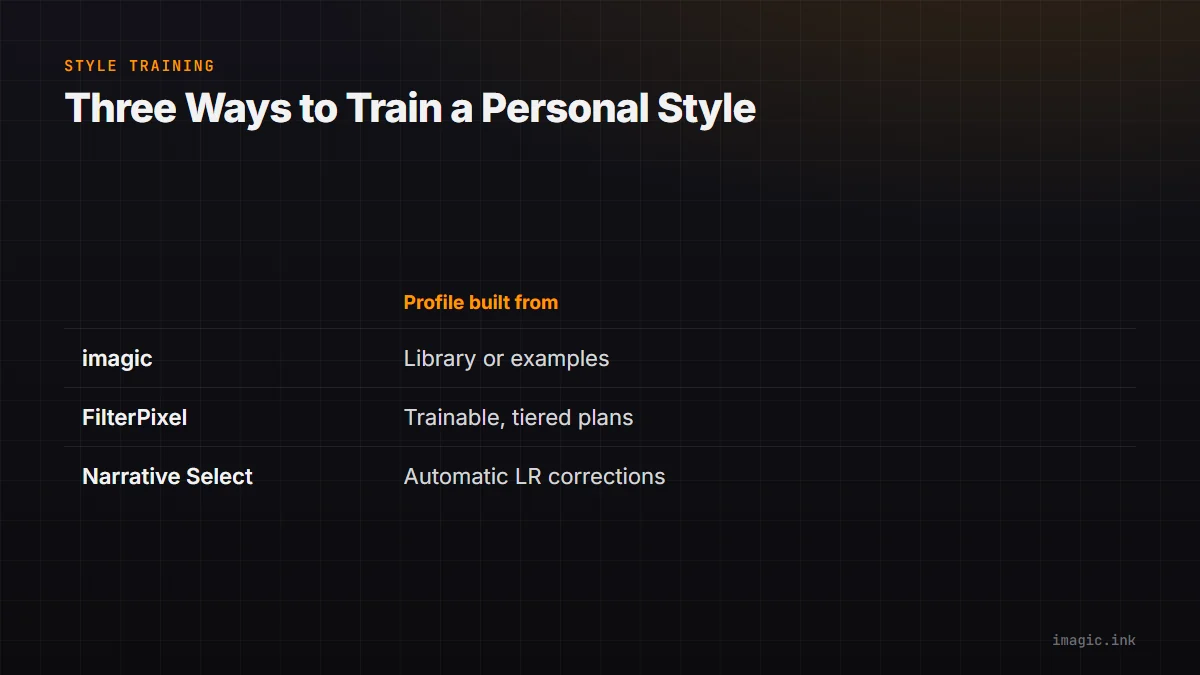
A generic preset applies the same recipe to every photo that matches a rough condition: warm this, lift that, add a curve. A trained editing profile is different. It is built from photos a specific photographer already finished, and it tries to reproduce the pattern in those choices on new work. Several culling and editing tools now offer some version of this, and the differences between them come down to three questions: where does the training data go, what does the resulting profile actually control, and what happens to it when the subscription lapses or the account changes.
This guide covers how that training step works, using imagic's own local tool set as the walkthrough, and where it sits next to a couple of tools that ship a comparable idea. For the full five-way comparison of pricing, account requirements, and processing location across the category, see the AI photo culling software comparison, which this article treats as the deeper reference rather than repeating.
What a trained style profile actually is
Inside a culling or editing tool, a "style" or "profile" is a compact model of tone, white balance, contrast, and color decisions, fitted to a set of before-and-after examples rather than typed in by hand. It is not a single preset with a name; it is closer to a weighted average of hundreds of small choices, applied to the tonal and color range of a new photo rather than copied pixel for pixel. That is the distinction worth holding onto through the rest of this article: a preset is fixed and portable between photographers, while a trained profile is specific to the person and even the season of work it was built from.
Checked 15 August 2026: at least three tools in this category currently ship a version of that idea as a named feature. FilterPixel calls it a custom trainable AI profile, gated to two profiles on its Pro plan and five on its Studio plan according to its published pricing page. Narrative Select calls it Personal Style, and its own quickstart material states that "any corrections you make in Lightroom are automatically gathered and added back into your Personal Style so it learns from you with every shoot." imagic ships the same underlying idea as a small group of local commands rather than a subscription add-on, described below.
Two ways to build the profile, and a third for a cold start
imagic's tool surface, documented in its agent reference at imagic.ink/mcp/tools, groups style work under six commands: start_style_calibration, record_style_calibration, learn_style_from_library, match_style_from_examples, get_style_profile, and apply_my_style. Between them they cover three starting points.
- Learn from a library that already has edits in it.
learn_style_from_libraryreads the adjustments already stored on photos that have been edited inside imagic and derives a profile from that history. This is the natural route for anyone who has been using the app's batch editing and one-click styles for a while and wants the tool to start generalizing from that work instead of repeating a manual pass every time. - Match a smaller set of reference examples.
match_style_from_examplestakes a narrower, hand-picked set of before-and-after pairs rather than an entire library. This suits a photographer who wants one profile for weddings and a different one for travel work, built from a deliberately chosen sample rather than everything that happens to be sitting in the library. - Calibrate from nothing.
start_style_calibrationandrecord_style_calibrationexist for the case where no edited library exists yet: a fresh install, or a photographer who has always edited inside a different tool and is starting the profile from scratch inside imagic.
get_style_profile checks whether a profile exists at all, and apply_my_style is the command that uses it. None of this requires typing adjustment values by hand; the profile is the output of the training step, not an input to it.
Running the full pipeline on one machine
The style commands sit inside a longer pipeline that starts with ingest and ends with export, and every step of it runs on the machine doing the editing. A typical sequence looks like this:
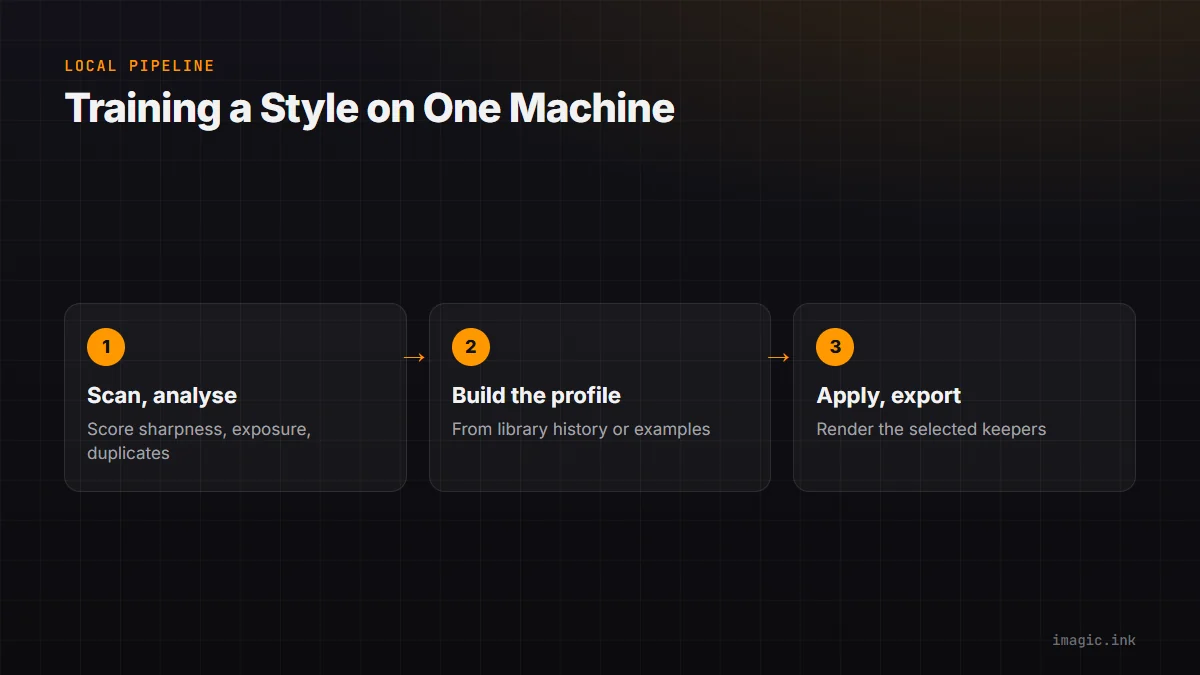
- Scan a folder to bring new RAW files into the library.
- Run the quality and duplicate analysis that scores sharpness, exposure, closed eyes, and composition, and groups bursts and near-duplicates.
- Build or refresh the style profile from library history or example pairs.
- Apply the profile to the selected keepers.
- Export to JPEG or TIFF.
The command-line and MCP surface that lets an AI agent script that sequence end to end needs imagic Max, or the 500-export trial, which includes Max; on Lite and Plus those specific commands explain that rather than running, per imagic's own agent documentation. The trial requires no card and is available at imagic.ink/desktop. Photo processing for RAW conversion runs through imagic's own built-in RAW engine locally in every case, whether the workflow is driven by hand in the desktop app or scripted through the MCP surface. A locally hosted MCP server exposing these tools does not upload anything by itself; it only runs commands a connected client or model explicitly calls, and each call still executes on the same machine as the rest of the pipeline.
What the profile controls, and what it will never touch
A trained style profile in this category adjusts the kind of thing a colorist or a second-pass editor adjusts: exposure, white balance, contrast, and color response, translated from the examples it learned into a new photo's own tonal range. It does not do retouching, does not add layers, does not generate content that was not in the frame, and does not merge exposures into an HDR or panorama. imagic in particular has no generative fill, and its Heal / Remove brush in Plus and Max is a separate tool that neither the calibration flow nor the library-learning route uses; a trained profile only ever adjusts the whole-image tone and color settings that were already part of its editing surface.
Culling decisions made earlier in the same pipeline never delete a file; a rejected photo keeps its place on disk and its status can be reversed. Editing, including edits applied through a trained profile, is stored per photo and rendered only at export, so the original RAW is never rewritten. That non-destructive design matters specifically for a trained profile, because the whole point of training one is to keep adjusting it over time as taste changes, and a system that overwrote source files on every apply would make that a one-way decision instead of a reversible one.
Why the training step is the part most worth keeping local
Culling and editing tools split roughly into two groups: software that installs on a desktop and processes locally, and software that installs on a desktop but still uploads photos, thumbnails, or edit metadata to build features like a personal profile. A desktop installer is not proof of local processing on its own; the meaningful question is whether the files, or the edit data derived from them, leave the machine at any point in the pipeline. That distinction matters more for a trained profile than for almost any other feature in this category, because the training data is not a generic photo, it is a record of a specific person's editorial judgment, built up across real client deliveries.
imagic's processing, including the style commands, runs entirely on the local machine; photos are not uploaded as part of scoring, culling, learning a profile, or applying one. That is a straightforward product fact rather than a claim about any competitor's architecture, and the checklist for evaluating any tool's actual upload behavior, not just its marketing language, is covered in more depth in the cloud upload privacy checklist. Narrative Select's own documentation describes gathering Lightroom corrections back into a Personal Style automatically, which implies at minimum a working Lightroom install and an active account tied to the feature; it runs on Windows as well as Mac, confirmed directly in Narrative's own Windows support article, so choosing a different tool is a workflow decision rather than a platform-availability one, a distinction covered in the Narrative Select alternative guide. FilterPixel's marketing describes images as private and encrypted without stating outright whether the analysis and profile-training steps run locally or on FilterPixel's own servers as of the pricing page checked above.
A worked example, with the assumptions shown
The value of a trained profile depends entirely on how much manual correction it removes and how large the batch is, so any number here is only useful as a template to substitute local figures into, not as a measured result. Take a delivery of 600 keepers from a full shoot. Assume a manual pass, adjusting exposure, white balance, and basic tone on each photo individually, averages 45 seconds per photo once a photographer is warmed up; that is 450 minutes, or 7.5 hours, of hands-on correction. Now assume a trained profile, applied as a batch, gets roughly 80 percent of those photos close enough that they need no further correction, with the remaining 20 percent, about 120 photos, still needing the same 45-second manual pass because the profile does not generalize to that particular lighting or subject. The batch apply itself is not free either; processing time scales with file count and resolution rather than being instant, so it is worth timing on a representative batch of 50 to 100 photos on the actual machine before assuming a number for the full set.
Under those specific assumptions, the manual-correction time drops from 7.5 hours to roughly 1.5 hours for the 120 photos still needing attention, plus whatever the batch-apply step itself takes. Change the 80 percent match rate to 50 percent, or the 45-second average to 90 seconds for a photographer doing finer color work, and the number moves substantially. The full cost comparison, including how a one-time license price amortizes against a per-shoot or per-month subscription over three years of the same workflow, is worked through with its own stated assumptions in the three-year cost comparison.
Where a trained profile sits in the wider tool category
Every tool below ships some version of "learn from what I already do," but the shape of the feature and what it costs to use differ enough that the right choice depends on the workflow around it, not just whether the feature exists.
| Tool | How the profile is built | Not for you if |
|---|---|---|
| imagic | Local commands (learn_style_from_library, match_style_from_examples, or calibration) build a profile from photos already edited in the library; applied locally, one-time license | Not for you if the workflow needs cloud collaboration, mobile capture, or plugin-level integration with an existing Lightroom or Capture One catalog, since imagic is a standalone desktop app without those |
| FilterPixel | Custom trainable AI profiles, gated to a plan tier; works alongside Lightroom or Capture One integration | Not for you if a fixed monthly cost per profile is unwelcome, or if keeping raw files entirely off a vendor's infrastructure is the priority and that point is not clearly answered on the current pricing page |
| Narrative Select | Personal Style gathers Lightroom corrections automatically into a profile that improves shoot over shoot | Not for you if Lightroom is not already part of the workflow, since the automatic-gathering behavior is described as reading Lightroom corrections specifically, or if a subscription with per-tier preset limits is a poor fit for the delivery volume |
Aftershoot and Imagen AI both include a comparable personal-profile idea inside their own plans as well; their current pricing, account requirements, and processing details are broken out alongside these three in the full five-tool comparison, which is the better starting point for choosing between all five rather than just the three profiled in depth here.
Keeping a profile current instead of training it once
A trained profile reflects the edits it was built from, and taste changes: a wedding photographer's color grade six months into a business rarely matches the grade three years in, and someone shooting a second genre, travel work alongside portraits, usually wants the two kept apart rather than blended into one average. The practical answer is more than one profile rather than one profile edited by hand. Building a second profile through match_style_from_examples from a smaller, deliberately chosen set of recent edits, and checking which one is active with get_style_profile before a batch apply, keeps the two from bleeding into each other. There is no single command that automatically retires an old profile; treating retraining as a deliberate, occasional step, the same way a photographer would revisit a Lightroom preset library, fits the tool better than expecting the profile to drift on its own.
Culling scores in the same pipeline have their own version of this problem: a score saved once is never silently recomputed, so photos analyzed before a scoring improvement keep their original verdict until a freshness check is run and a re-analysis requested. Style profiles work the same way in spirit, if not in the exact mechanism: the profile reflects the edits available at the moment it was built, and getting a profile that reflects six months of newer work back out of the tool means rebuilding it, not waiting for it to update itself.
Frequently Asked Questions
Does building a personal style profile require an account or an upload step?
Not with imagic. The commands that build and apply a profile, learn_style_from_library, match_style_from_examples, the calibration pair, and apply_my_style, run against the local library and do not upload photos as part of that process. Whether a particular competing tool requires an account or uploads any data to build its version of the feature depends on that tool's own architecture; check its current documentation directly, since a desktop installer alone does not settle the question either way.
How many edited photos does a profile need to learn from?
Neither imagic's public documentation nor the vendor sources checked for this article state a specific minimum photo count for a usable profile. As a general pattern across this feature category, more consistent examples tend to produce a more reliable profile than a small, varied set, which is exactly why match_style_from_examples exists as a separate, smaller-sample alternative to learning from an entire library.
Can separate profiles exist for different types of work?
Yes. Building a profile from a specific, hand-picked set of examples through match_style_from_examples, rather than the whole library through learn_style_from_library, is the way to keep a wedding grade and a travel grade from averaging into one another. get_style_profile confirms which profile is active before a batch apply runs.
Will a trained profile ever change the original RAW file?
No. Editing in imagic, including edits applied through a trained style profile, is stored per photo and rendered only when a photo is exported to JPEG or TIFF; the source RAW file is never rewritten, and no command in the pipeline deletes an original.
Is a trained profile the same thing as an AI preset pack?
No. A preset pack is a fixed recipe written once and sold or shared as-is, applied the same way to any photo that fits its rough conditions. A trained profile is fitted to a specific set of a photographer's own prior edits and is not portable to someone else's work without retraining it on a different set of examples.