"Darktable presets" has posted one of the sharpest search-interest rises in the free-RAW-editor space recently. Before reading anything into that number, it is worth being precise about what actually shipped in darktable recently that could plausibly be behind it, and where the honest answer is simply that the cause is not confirmed by any source worth citing.
What a darktable style or preset actually is
darktable's own documentation is specific about the mechanics: a style is
built from the history stack of an edited image, the sequence of module
adjustments applied to it, and can be saved to disk as a .dtstyle
file. That file format is what makes styles shareable: export one from your
own edit, and it can be imported by anyone else running darktable, applied
to a completely different photo through the styles panel or a keyboard
shortcut. Presets work at a narrower scope, saved settings for a single
module rather than an entire edit chain. Both are genuinely different from a
one-click "filter": they are recorded module adjustments, editable and
removable after the fact, not a baked-in effect.
What actually shipped in darktable 5.6
darktable's own release announcement dates version 5.6.0 to 21 June 2026, followed by a 5.6.1 maintenance update in August 2026. The headline addition is an AI object-mask tool in the darkroom's mask manager, built on a SAM2.1 or SegNext segmentation model, letting a single click generate a precise subject mask with foreground and background refinement. The same release adds a neural restore module for AI-based denoising and upscaling, a color harmonizer module built around a UCS color space, and HEIF export with both lossless and lossy options, alongside GPU acceleration for the AI features across NVIDIA, AMD, and Intel hardware. On the styles and presets side specifically, the release notes describe two apertures added to the presets dialogue, a fix for style migration bugs around module ordering, and a database restructuring that splits image data from the general library holding styles, presets, and tags. None of that is a marketing-driven "presets" feature launch; it is incremental, technical refinement to how styles are stored and applied, alongside a genuinely significant AI feature set that has nothing directly to do with presets at all. The release notes describe 1,561 commits and 705 pull requests since version 5.4, which is a useful, verifiable measure of how much changed under the hood even where the changelog entry itself is a single line.
Where darktable's styles actually circulate
Unlike a paid preset marketplace, darktable has no single official store for styles. What it has instead is a longstanding open-source photography community, pixls.us among the most established forums for open-source RAW workflow discussion, where users have shared .dtstyle files, workflow writeups, and module settings for years. That decentralized distribution model is part of why "darktable presets" as a search phrase does not point to one obvious destination the way "Lightroom presets" points toward a handful of well-known marketplaces: the files are scattered across forum threads, personal blogs, and GitHub repositories rather than a single storefront, which is a genuinely different discovery problem for someone new to the software even though the underlying files themselves cost nothing.
What darktable itself costs and runs on, for anyone new to it
For anyone arriving at this piece without already using darktable, the baseline facts are worth stating plainly. It is free, open-source software licensed under GPL-3.0, with no purchase price and no subscription, and it runs on Windows, macOS, and Linux, with GPU acceleration available via OpenCL on supported hardware. That combination, genuinely capable RAW development plus a mature styles system plus, as of 5.6, real AI-assisted masking, at no cost, is a large part of why it keeps showing up in "Lightroom alternative" searches independent of any single release's specific news.
Being honest about what is not confirmed
It would be easy to write a tidy story here: a hot new AI feature drove a wave of new users, who then went looking for presets to speed up their learning curve. That is a plausible narrative. It is also not something any first-party source documents. darktable's own site does not publish download or user-growth numbers tied to the 5.6 release, and no verifiable source ties the "darktable presets" search rise to a specific community, video, or event. The honest position is that the search interest is real and measurable, and the specific cause is not confirmed. Treat any confident explanation you read elsewhere, including a plausible-sounding one, with that gap in mind.
How a style actually gets built, saved, and applied
Because styles are just portable .dtstyle files, sharing them
does not require an official marketplace: a style file passed between two
users works the same as one built from scratch. The mechanics, per
darktable's own documentation, are straightforward. First, develop one image
the way you want it to look, adjusting exposure, color, and tone through
darktable's normal module stack. Second, from the lighttable view's styles
panel, or from the history stack module in the darkroom, save that image's
current history stack as a new named style. Third, export it to a
.dtstyle file on disk if the goal is sharing it, or leave it in
the local styles panel if it is only for personal reuse. Applying a saved
style to a new image is a double-click in the styles panel, or a keyboard
shortcut assigned to that specific style, and darktable temporarily merges
the style's settings with the image's own history stack to generate the
output, without permanently overwriting whatever history the image already
had. Importing someone else's shared style is the reverse of exporting:
point darktable at the .dtstyle file, and if a style with that name already
exists locally, darktable asks whether to overwrite it. That local,
file-based model is a meaningfully different distribution mechanism than a
paid preset pack sold as a product, and it is a large part of why sharing
edit "looks" costs nothing beyond finding a file and importing it.
The search spike in context of what else is happening in free RAW tools
"darktable presets" is not rising in isolation. imagic's own research into the broader "lightroom alternative" search cluster around the same period found RapidRAW, a newer open-source, GPU-accelerated RAW editor, posting the single largest rise of any related term tracked, and darktable itself shipped its own AI object-mask tool in version 5.6, the same release discussed above. Interest in free and open-source RAW tools broadly appears to be climbing across several names at once during this window, not just darktable, which is a useful piece of context against reading too much into any single term's number in isolation. A rising related-query score describes relative search interest against other terms in the same cluster, not an absolute count of new users, and a whole category trending together is a different story than one product's isolated breakout.
What a preset actually saves you, and what it does not
A well-built style is a genuine time-saver for a consistent look across a batch: apply the same tone curve, color grade, and contrast treatment to every image in a set with two clicks per photo instead of manually rebuilding the same adjustments each time. What it does not do is anything related to selecting which photos get that treatment in the first place. Presets and styles operate entirely inside the RAW development step, after the culling decision has already been made by a human looking at each frame; darktable has no AI-assisted scoring or duplicate detection to help with that earlier step.
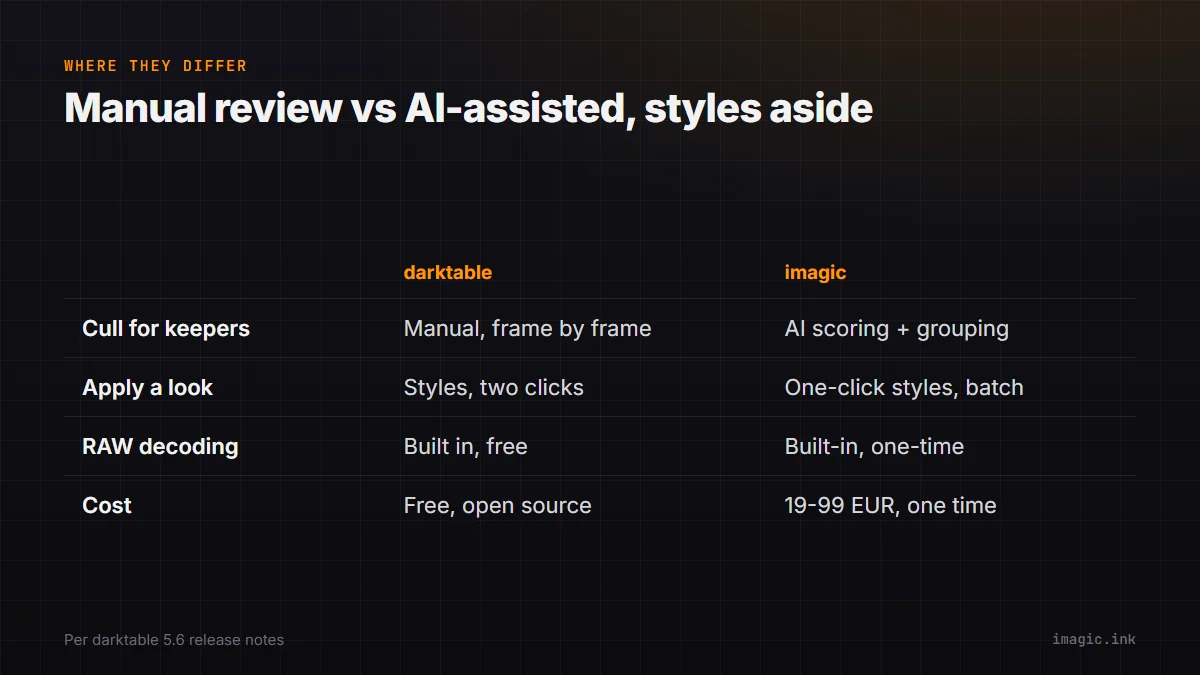
Manual RAW development, styles and all, versus an AI-assisted workflow
| Step | darktable | imagic |
|---|---|---|
| Cull a shoot for keepers | Manual, frame by frame | AI quality scoring plus duplicate/burst grouping |
| Apply a consistent look to a batch | Styles (.dtstyle files), two clicks per image | One-click styles and batch editing |
| RAW decoding | Built in, GPL-3.0 licensed, free | Built-in engine, one-time purchase |
| Cost | Free, open source | EUR 19/49/99, one time |
The real difference is not styles versus no styles, both tools apply a repeatable look to a batch reasonably well. It is what happens before that step: darktable asks a human to look at every frame of a shoot and decide what is worth developing, while an AI-scored workflow does a first pass on that decision automatically. For a photographer who already enjoys the manual review, or is working small enough sets that the review step is not the bottleneck, darktable's free price and mature styles ecosystem are a genuinely strong combination with nothing to trade off. For someone drowning in a shoot day's raw take specifically, the gap is earlier in the workflow than styles address at all.
Who the new AI masking feature actually suits, versus who came for presets
It is worth separating two different audiences that "darktable is trending" might be pulling in at once. Someone drawn by the 5.6 masking feature specifically wants a free alternative to paid AI-masking tools for detailed local adjustments, dodging and burning a specific subject, sky replacement-adjacent work, selective color, and that person is looking for exactly what shipped: a real, substantive new capability. Someone drawn by "darktable presets" as a search phrase more likely wants a fast way to get a consistent, appealing look without learning the full module stack from scratch, closer to how a Lightroom preset pack is marketed and sold. Both are legitimate reasons to try darktable, but they lead to different first sessions: the masking feature rewards someone willing to learn the darkroom's module system in depth, while a downloaded style rewards someone who mostly wants to double-click something in the lighttable and move on. Knowing which of those two you actually are before opening the software for the first time avoids a frustrating first hour.
For a closer look at how darktable compares against a paid, AI-assisted tool, see imagic vs darktable, and the existing darktable vs Lightroom comparison covers the free-versus-subscription side of that decision. The AI & Technology category has more on where AI-assisted editing tools actually help.
Frequently asked questions
What is the actual difference between a darktable style and a preset?
A style captures an entire history stack, the full sequence of edits applied to an image, and can be saved as a shareable .dtstyle file. A preset is narrower: saved settings for a single module, not a whole edit chain.
Do darktable styles cost anything?
No. darktable itself is free, GPL-3.0 licensed software, and its style files are plain files that can be shared between users at no cost; there is no official paid marketplace built into the application.
Does using presets or styles in darktable replace the need to cull a shoot first?
No. Styles and presets apply to RAW development after keepers have already been chosen. darktable has no built-in AI quality scoring or duplicate detection, so picking which frames to develop in the first place stays a manual, frame-by-frame task.