darktable and RawTherapee are both open-source RAW developers, but they organize the work differently. darktable combines a database-backed lighttable with a darkroom and export system. RawTherapee centers on file browsing, detailed RAW processing, profiles, and a processing queue. Choosing between them is less about finding a universal rendering winner and more about deciding how much library state, image-management structure, and processing control should live inside the application.
Official project pages checked on 15 August 2026 describe both applications as cross-platform, non-destructive, floating-point RAW processors released under GPL terms. Features, camera support, interface details, and operating-system packages continue to evolve. Verify the current release notes and exact camera files before committing a production archive.
Start with the workflow model
darktable describes itself as a photography workflow application and RAW developer with a virtual lighttable and darkroom. It imports information into a database, builds cached previews, supports filtering and ratings, and records processing history. This can suit a photographer who wants selection and development in one structured environment.
RawTherapee presents folders through its file browser and sends selected images through a processing queue. Its processing profiles can store adjustment instructions. This can suit a photographer who already maintains folders elsewhere, wants a developer without adopting a central catalog, or prefers to stage outputs through a queue.
Neither model removes the need for an external folder and backup policy. A database is not the only copy of the originals, and a file browser is not an archive system. Decide how projects are named, where camera originals live, which sidecars travel with them, and how the application state is backed up.
Compare database state and sidecars
darktable stores image information and processing state in its library database and can also write XMP sidecars. The project describes those sidecars as a backup for metadata and editing settings. Recovery and portability depend on preserving the database, sidecars, originals, and compatible application versions.
RawTherapee uses PP3 processing-profile sidecars to describe adjustments associated with files. Profiles can be copied, applied, and queued without modifying the original RAW. The sidecar format and behavior belong to RawTherapee; an XMP from darktable and a PP3 from RawTherapee do not translate the same processing history.
Test a folder move, rename, backup restoration, and transfer to another workstation. Confirm ratings, color labels, edits, variants, and queue state according to the functions actually needed. Do not assume that seeing a sidecar beside a RAW guarantees every database relationship can be reconstructed.
Evaluate RAW support with difficult files
Camera support is not a single yes-or-no row. Normal RAW may open while compressed variants, pixel-shift files, multiple-frame formats, unusual aspect metadata, or new lens profiles behave differently. RawTherapee's official feature page highlights advanced demosaicing, pixel-shift composition, dark-frame subtraction, flat-field correction, and defect correction. darktable documents support for many RAW and standard formats through its workflow and underlying libraries.
Build a test set from every production camera mode. Include underexposure, saturated color, fine foliage, high ISO, backlight, skin, moire risk, and a lens needing correction. Confirm orientation, crop, black levels, highlight behavior, white balance, metadata, and export dimensions. A clean sample from one camera cannot validate another body or special mode.
Check the supported-camera and release documentation for the installed version. If a body is new, avoid converting all originals to another format before determining whether a current update or a temporary vendor converter provides a safer bridge. Preserve untouched camera files regardless.
Compare the editing mental models
darktable exposes processing modules that can be enabled, ordered within allowed constraints, blended, masked, and applied through styles. Its modern workflow rewards understanding scene-referred tone and color concepts, module order, and the difference between global and local operations. Older tutorials may recommend modules or sequences that current documentation no longer emphasizes.
RawTherapee organizes detailed controls in tool panels and processing profiles, with a strong emphasis on RAW conversion, color, tone, detail, and correction. It offers many choices that can be technically powerful but initially dense. The best learning route is the manual for the installed release plus a small set of repeatable exercises.
Do not compare default appearances without first identifying the input profile, auto options, tone mapping, sharpening, noise reduction, and display color management. Defaults express project choices; they are not a neutral scientific reference. Establish a controlled baseline in each application.
Inspect local adjustments and masks
A production editor often needs more than global exposure and color. Test subject isolation, gradient-like control, drawn or parametric masks where available, spot correction, edge refinement, and the ability to revise a local change later. Use portraits, architecture, and backlit detail rather than a simple landscape with one bright sky.
Measure usability by the required edit. Can an operator darken a bright doorway without a halo, lift a face without flattening the room, and copy only the appropriate parts of that correction to neighboring frames? Does the mask remain understandable after reopening the project? How does a crop or rotation affect it?
Complex local retouching may still belong in a pixel editor. Define the handoff format, bit depth, color space, naming, and return path. Avoid repeatedly rendering and reopening a lossy derivative.
Compare selection and batch behavior
darktable's lighttable can filter, rate, tag, compare, and organize imported images in its database-backed workflow. RawTherapee's file browser supports browsing, ratings and labels, profiles, and queue-oriented processing. The practical difference appears when a job contains thousands of files, nested folders, variants, and repeated exports.
Run a selection exercise. Ingest or open a copied project, inspect at the target zoom, compare a burst, rate it, filter the result, reopen after a restart, and export only the chosen files. Count steps and note preview waits, but do not turn one operator's first session into a universal speed claim.
If another application owns culling, test metadata handoff. Ratings and labels can be interpreted differently, and not every sidecar field crosses cleanly. Define which system is authoritative and verify a round trip before using it on an active archive.
Assess color management and output
Both projects describe color-managed processing, but a correct result depends on input profiles, display calibration, working assumptions, soft proofing where available, output profile, rendering intent, bit depth, and the viewing application. Configure the monitor path before comparing subtle color.
Export the same approved image to the formats the studio actually delivers. Check embedded profiles, dimensions, metadata, sharpening, transparency where relevant, and appearance in a second color-managed viewer. Include print-oriented TIFF if that is part of production and web JPEG if that is the everyday output.
Be cautious with side-by-side screen captures found online. Browser color management, compression, display, and unknown settings can overwhelm the software difference. A local controlled export is more useful than a dramatic sample without source files.
Consider automation and surrounding tools
darktable documents Lua scripting for many repetitive tasks and offers command-line components in its ecosystem. RawTherapee provides queue and command-line-oriented possibilities through its project tools. Exact invocation, platform packaging, and supported parameters should be taken from current manuals. Avoid building a production script from an old forum snippet.
Automation should validate input and output paths, record application version and profile, preserve originals, and stop on an unknown file. Test headless rendering against the interactive result. A color-managed GUI preview and a scripted export should produce the expected relationship under the same settings.
imagic can occupy a focused local culling and non-destructive batch-editing role before another RAW developer when that division suits the studio. Its documented status changes do not delete originals, and its tools can be driven from the shell. The desktop page explains that scope; it should not be represented as darktable or RawTherapee with a different interface.
Plan migration and coexistence
Neither application can be expected to reproduce another editor's proprietary adjustments. Preserve original RAW files, source catalog or sidecars, and final approved derivatives. For completed projects, a rendered master may be the most reliable record of appearance, while the original and old edit environment preserve future options.
Migrate one copied project first. Reconcile file count, dates, ratings, keywords, color labels, orientation, crops, variants, and representative edits. Time the cleanup. Keep the old system read-only until the new workflow has completed ingest, edit, export, backup, and restore.
Coexistence can be sensible. RawTherapee may be used for a specialist conversion while darktable manages a broader library, or either may pair with a separate digital asset manager. Define handoff ownership and avoid two applications writing conflicting sidecars to the same folder without a tested rule.
Use a practical decision matrix
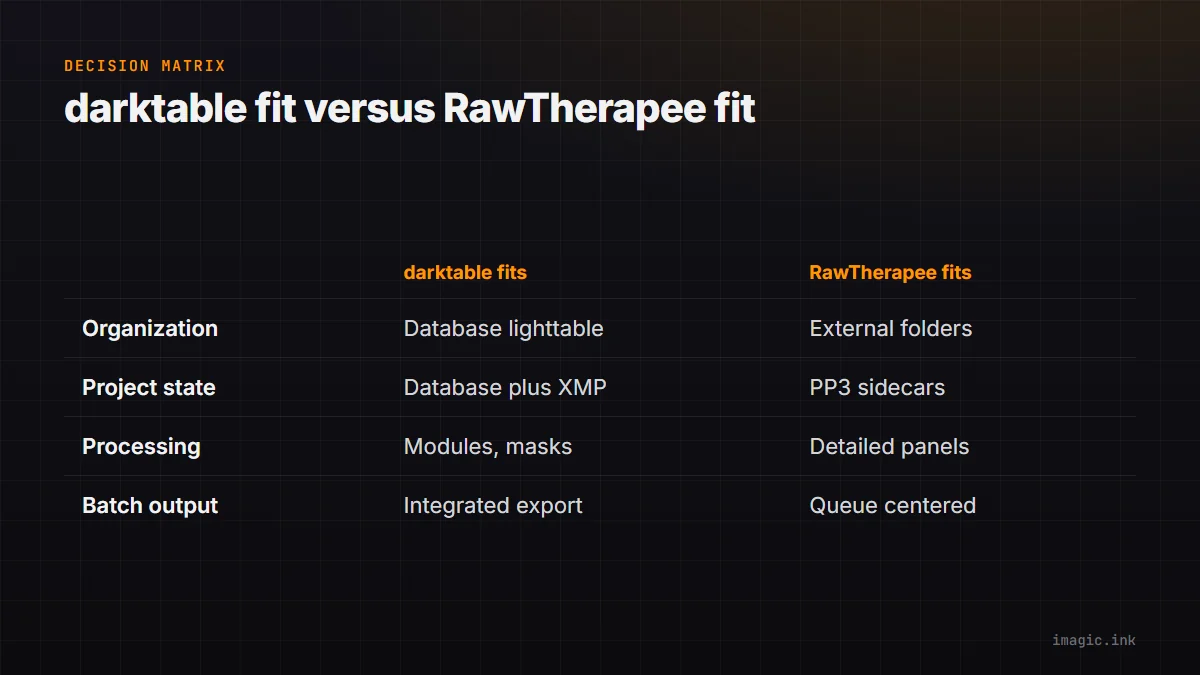
| Priority | darktable deserves first evaluation | RawTherapee deserves first evaluation |
|---|---|---|
| Integrated photo organization | Database lighttable and darkroom fit | External folder system remains primary |
| Project state | Database plus XMP workflow is acceptable | PP3 profile sidecars fit the handoff |
| Processing approach | Module and mask workflow appeals | Detailed conversion panels appeal |
| Batch output | Integrated selection-to-export desired | Queue-centered processing desired |
| Special RAW controls | Test required files and modules | Test highlighted demosaic and correction tools |
Install both from official sources and complete the same copied assignment. Use current manuals, configure color correctly, and keep a record of every blocking requirement. The better choice is the one whose mental model, file state, support, and output fit can be maintained by the actual operator. The Software Comparisons section can support a broader shortlist.
Evaluate release maintenance and support capacity
Open-source access does not mean every release should be installed immediately on a production workstation. Read current release notes for database migrations, sidecar changes, deprecated controls, camera support, and known issues. Test a copied catalog or folder first, and keep a recoverable backup of application state. Confirm whether rolling back is supported after a database has been upgraded.
Judge support by the operator's ability to use it. Official manuals, issue trackers, forums, translation quality, diagnostic logs, and community tutorials can be valuable, but old advice may describe a different processing model. When reporting a problem, retain a lawful sample file, exact version, operating system, settings, and reproducible steps without exposing client data.
Performance also deserves a local test. Preview generation, masks, noise processing, export, database scale, OpenCL or other acceleration, and memory use vary by hardware and configuration. Run the same copied assignment, record settings and failures, and avoid turning one machine's timing into a broad speed claim. Stability and recoverability under the normal batch can matter more than a short export win.
Finally, decide who owns maintenance. A solo photographer may accept manual updates and community troubleshooting. A studio with several operators may need a frozen version, deployment note, profile bundle, and one responsible maintainer. The license price can be zero while operational support still requires planned time.
Frequently asked questions
Are darktable and RawTherapee free to use?
Both projects describe themselves as free and open-source software under GPL licensing. Download from official sources and review current license and package information for the intended use.
Do either applications modify the original RAW file?
Both describe non-destructive processing. Adjustments are stored as application state or sidecars and applied during output, but originals and sidecars still require independent backup.
Can edits move perfectly between darktable and RawTherapee?
No. Their processing engines and sidecar formats differ. Preserve finished exports and rebuild important edits after a controlled migration test rather than expecting identical rendering.