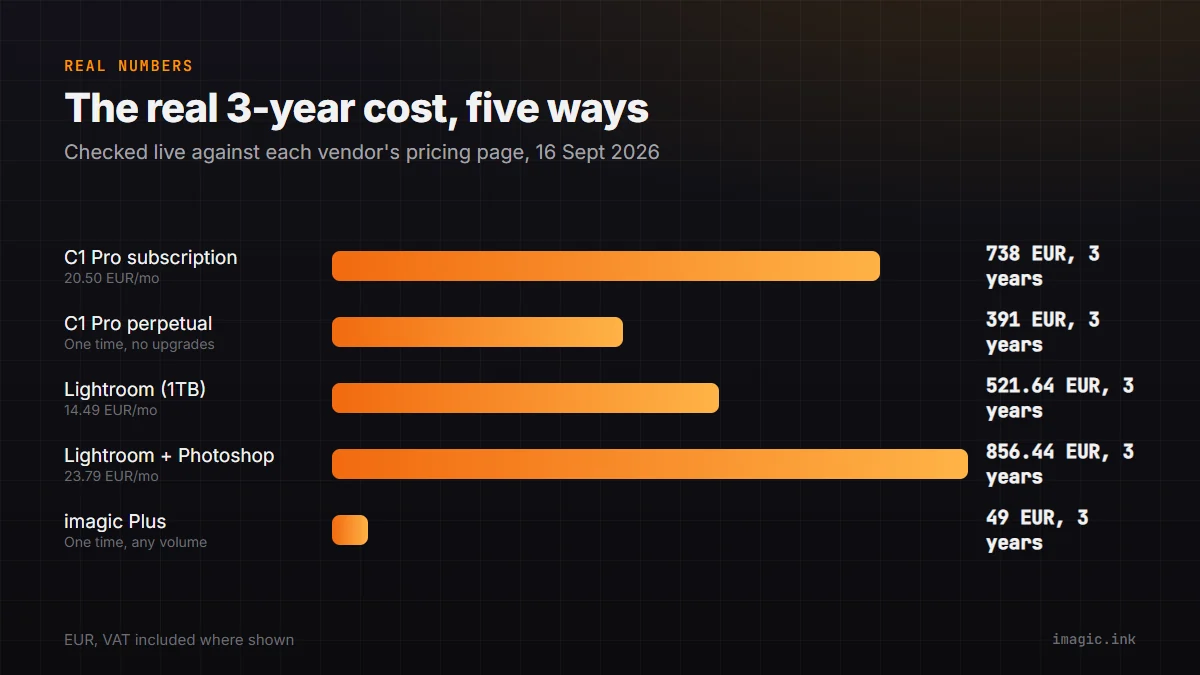
Capture One and Adobe Lightroom are the two subscription RAW editors most working photographers actually weigh against each other, and both pricing pages are built around a small monthly number. Checked directly against each vendor's own pricing page on 16 September 2026, here is what the real three-year total looks like for each, plan by plan, with the arithmetic shown so you can redo it yourself once prices move again.
What was checked, and how
Every figure below came from Capture One's own pricing page and Adobe's own Lightroom plans page, both loaded live on 16 September 2026. Capture One's page priced its plans in EUR; Adobe's EU pricing page showed EUR figures marked "inkl. MwSt." (VAT included). Both vendors' pricing pages are region-aware and can show different currencies or promotional rates depending on where you load them from, so treat the numbers here as a dated snapshot, not a permanent price, and confirm the live figure on your own account before buying either tool.
Capture One's current pricing
Capture One sells access to its desktop editor, Capture One Pro, three ways. On the annual subscription (paid monthly across the year), Pro costs 20.50 EUR a month, which comes to 246.00 EUR across a year. The pricing page also shows what committing to that annual plan saves versus paying month to month with no commitment: 138.00 EUR a year, which works out to roughly 32.00 EUR a month for the no-commitment option. A one-time Pro perpetual license costs 391.00 EUR. Two higher subscription tiers, All in One (28.00 EUR a month, annual) and Studio (52.92 EUR a month, annual), add collaboration and client-viewer features most solo photographers do not need for a straight editing workflow, so this piece focuses on the base Pro tier as the fair comparison point against a single Lightroom subscription.
What the higher Capture One tiers actually cost over 3 years
Since the collaboration-heavy tiers are the ones Capture One markets hardest, it is worth showing their three-year totals too rather than quietly dropping them from the comparison. All in One, at 28.00 EUR a month on the annual plan, comes to 336.00 EUR a year and 1,008.00 EUR across three years; it adds a mobile iOS app, cloud shared settings, and priority support on top of Pro. Studio, at 52.92 EUR a month annual, comes to 635.04 EUR a year and 1,905.12 EUR across three years, adding offline collaboration tools, automated cropping, and multiple viewer screens aimed at high-volume, client-facing production rather than a single photographer's editing desk. Neither tier is a fair comparison against a solo Lightroom subscription, since neither Lightroom plan offers an equivalent studio-collaboration feature set at any price; they are listed here so the full Capture One pricing ladder is visible rather than only its cheapest entry point.
The no-commitment monthly option, if annual billing is the issue
Both vendors' headline prices assume a year-long commitment paid in monthly installments, and both charge more if you are not willing to commit that far ahead. Capture One's own pricing page states the annual Pro plan saves 138.00 EUR a year compared with its no-commitment monthly option, which works out to roughly 32.00 EUR a month, or 1,152.00 EUR across three years of month-to-month billing with no annual lock-in. Adobe similarly documents a flexible, cancel-anytime monthly plan priced above its annual-billed figure, though this piece does not have a first-party EUR number for that specific plan to put beside Capture One's. If you are not sure you will stick with either tool for a full year, that flexibility premium is worth weighing against the savings locked in by the numbers above.
Lightroom's current pricing
Adobe's entry Lightroom plan, which bundles the cloud-based Lightroom app with desktop Lightroom Classic and 1TB of cloud storage, costs 14.49 EUR a month on the annual, billed-monthly option, per Adobe's own EU pricing page. The Photography plan, which adds Photoshop to the same Lightroom and Lightroom Classic bundle, costs 23.79 EUR a month on the same billing structure. Both figures are the standard "annual plan, billed monthly" price Adobe shows by default; a flexible month-to-month plan with no annual commitment also exists and typically costs more per month, though this piece sticks to the annual-commitment figure to match how the Capture One numbers above were calculated.
What a perpetual license actually buys you
Before doing the three-year math, the Capture One perpetual license needs a precise explanation, because "one-time purchase" undersells how it actually works. Per Capture One's own support article on licensing, buying a perpetual license activates a specific major version, for example Capture One 17, and "you'll receive all related service updates like 16.6.x, including bug fixes and improvements," but "new features and functionality are delivered in major versions only," and upgrading to the next major version requires a separate, discounted "Upgrade Pricing" purchase. In plain terms: the 391.00 EUR perpetual license is not a lifetime ticket to every future Capture One release, the way an imagic license is. It permanently owns the version line you bought and its own bug fixes, and nothing more, until you decide whether a future major version is worth paying to unlock.
The three-year math
| Option | Monthly (annual billing) | 3-year total | What it covers |
|---|---|---|---|
| Capture One Pro (subscription) | 20.50 EUR | 738.00 EUR | Desktop editor plus tethering, active subscription required |
| Capture One Pro (perpetual license) | n/a | 391.00 EUR one time | Current major version plus its own bug-fix updates only |
| Adobe Lightroom (plus Classic, 1TB) | 14.49 EUR | 521.64 EUR | Cloud Lightroom, desktop Lightroom Classic, cloud storage |
| Adobe Photography plan (plus Photoshop) | 23.79 EUR | 856.44 EUR | Same as above, adds Photoshop |
| imagic Plus (one-time license) | n/a | 49.00 EUR one time | AI culling and RAW editing, no tethering or color-grading suite |
The entry-level Lightroom plan actually comes out cheaper than Capture One's base subscription over three years, which is worth stating plainly since it cuts against the usual "Adobe is the expensive one" assumption. Capture One's real cost advantage only shows up if you go perpetual and skip every major-version upgrade for three straight years, which is a real option Capture One offers but not one every working photographer actually takes, since skipping upgrades also means missing new camera support and new features for that entire window.
What the price difference does not tell you
None of this math says which tool is better for your actual work. Capture One's reputation rests on its color science and its tethered capture workflow, both of which cover 550-plus camera models per Capture One's own pricing page, and neither Lightroom nor imagic tries to match that depth of manual color control. Lightroom Classic's advantage is scale: a decade-plus ecosystem of presets, plugins, and tutorials, plus the cloud sync and mobile editing that come with a Lightroom subscription and that Capture One's desktop-first model does not offer in the same way. A three-year total is one input into that decision, not the whole decision.
It is also worth being honest about switching cost, which neither total above accounts for. Moving years of edits, keywords, and ratings out of a Lightroom Classic catalog into a Capture One session, or the reverse, is real work, and third-party plugins built for one tool rarely have an exact equivalent in the other. A three-year price gap of a few hundred euros can be erased quickly by the hours spent rebuilding a workflow around a new tool, which is a real cost even though it does not show up on either vendor's pricing page.
Where a one-time license fits into this
imagic sits outside this specific comparison rather than inside it. It is not a Capture One or Lightroom Classic replacement for deep manual color grading or tethered studio capture, both of which it does not do. What it offers instead is AI-scored culling, quality scoring for sharpness, closed eyes, and composition, plus duplicate and burst grouping, and its own built-in RAW engine for the edit and export step, all for a one-time EUR price (Lite 19, Plus 49, Max 99) with no renewal ever. For a photographer whose real bottleneck is getting through a memory card fast rather than fine-tuning color curves, that is a genuinely different job than either subscription editor is built around, and worth trying against the free 500-export trial before assuming either Capture One or Lightroom is the only path forward.
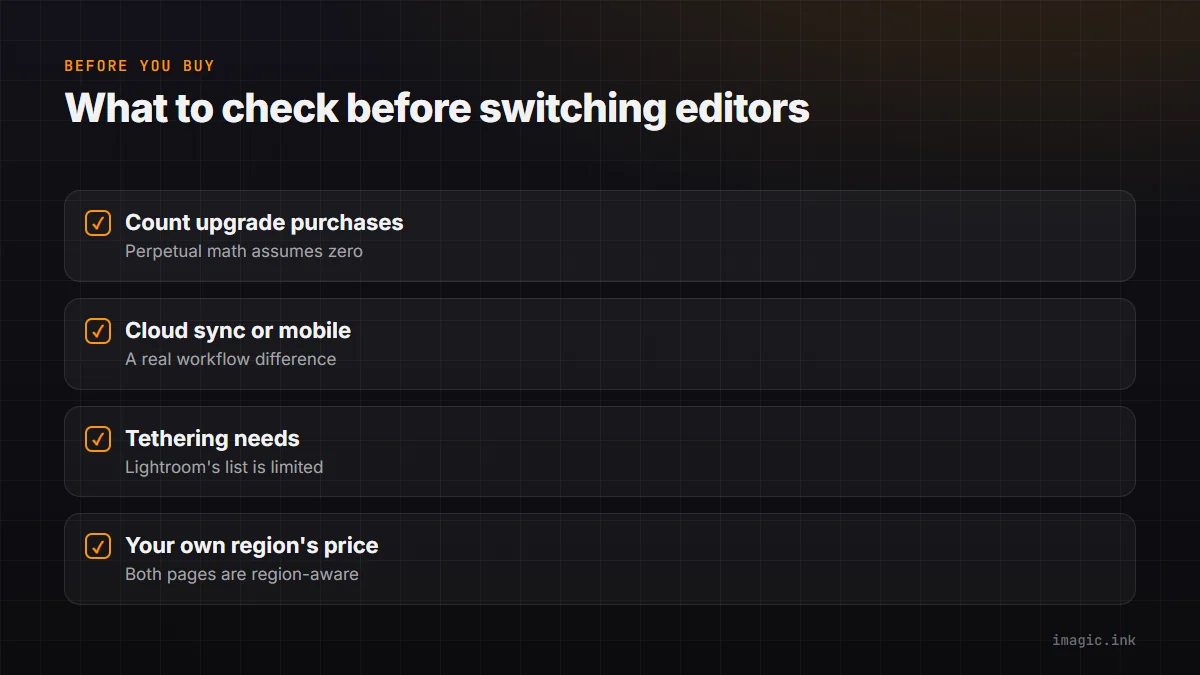
What to actually check before switching
- How many major-version upgrades you would actually buy: the Capture One perpetual math above assumes zero upgrades across three years; price in at least one if you expect to want new camera support.
- Whether you use cloud sync or mobile editing: a straight subscription-price comparison ignores this, and it is a real workflow difference if you rely on it today.
- Tethering needs: Capture One's subscription and perpetual license both include full tethering support; Lightroom Classic's native tethering is limited to a specific list of camera models, covered in more detail in a separate piece on tethering alternatives.
- Your own region's price and currency: both vendors' pricing pages are region-aware; confirm the number in your own currency and account before treating any figure above as final.
If you have not settled on which editor fits your working style at all, an earlier piece on this site walks through the gentler learning curve question for someone just starting out. An even earlier comparison, Capture One vs Lightroom in 2026: Cost, Catalog, and Exit Plan, deliberately avoided pinning down exact numbers, reasoning that pricing pages change too often to trust a snapshot. That is still a fair concern, which is why every figure above is dated to the day it was checked rather than presented as permanent. For the full picture of both tools, see imagic vs Capture One and imagic vs Lightroom Classic, and the Software Comparisons category has more pricing breakdowns like this one.
Frequently asked questions
Is Lightroom actually cheaper than Capture One?
On the entry subscription tier, yes: Adobe's Lightroom plan (14.49 EUR a month, including Lightroom Classic) came in cheaper over three years than Capture One's base Pro subscription (20.50 EUR a month) as checked on 16 September 2026. Capture One's cost advantage only appears with a perpetual license and no major-version upgrades.
Does a Capture One perpetual license ever need to be paid again?
Not to keep using the version you bought; you own that major version and its own bug-fix updates permanently. A future major version with new features requires a separate, discounted upgrade purchase, which is optional.
Is imagic a direct substitute for either tool?
Not for tethering or deep manual color grading, which imagic does not offer. It is a one-time-purchase alternative specifically for AI-assisted culling and RAW editing, worth considering if that is the actual bottleneck rather than color control or live tethered capture.