Ask ten wedding photographers how long culling takes and you will get ten different answers, mostly guesses. A real time budget needs actual numbers: frame counts, seconds per frame, and where the time goes when you speed it up. Here is the math, worked through honestly.
The Frame Count You Are Actually Working With
A typical full-day wedding runs 3,000 to 5,000 frames across getting-ready, ceremony, portraits, and reception. Photographers shooting in continuous burst during the ceremony or first dance can push that number higher; a single 8-second burst at 10 frames per second is 80 near-identical frames from one moment. The culling job is not reviewing 4,000 unique images, it is reviewing several hundred moments, many of them represented by a cluster of near-duplicates.
The Manual Math
Manual culling, opening each frame, judging focus and expression, deciding keep or reject, runs somewhere between 2 and 5 seconds per frame for an experienced editor working carefully, longer if you are second-guessing yourself on close calls. At a conservative 3 seconds per frame, 4,000 frames is 12,000 seconds, exactly 3 hours and 20 minutes of continuous, focused review before a single edit is applied. In practice it runs longer, because nobody culls 4,000 frames without breaks, and fatigue slows judgment in the back half.
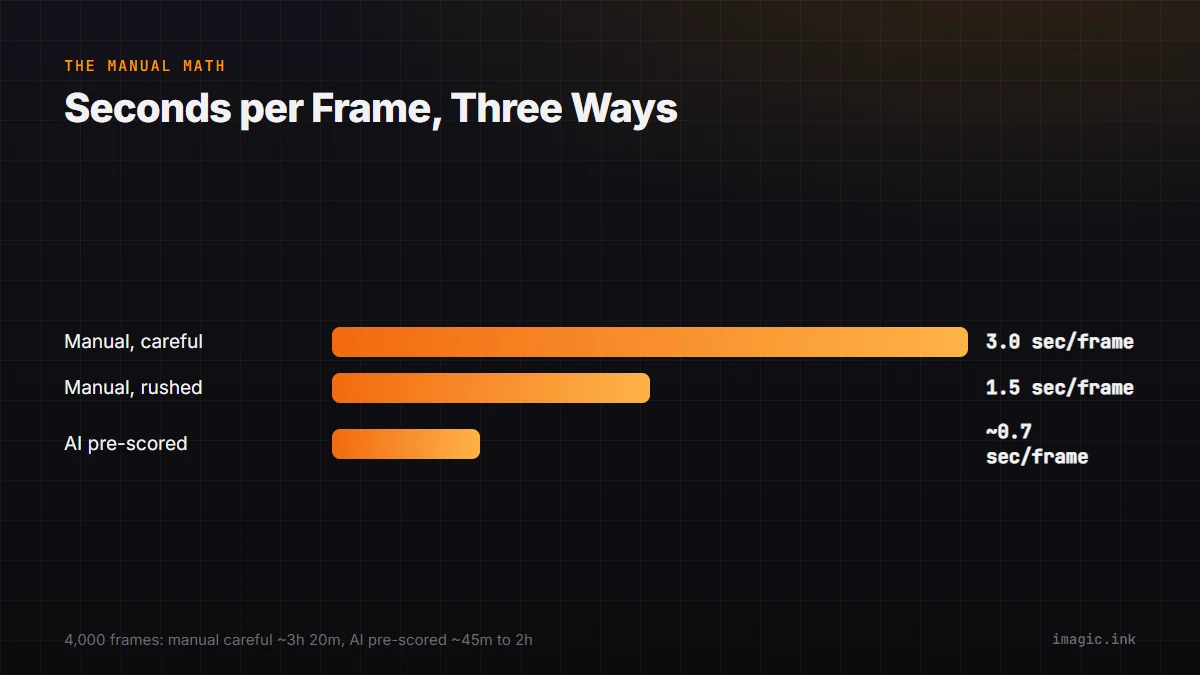
| Method | Frames | Seconds/frame | Total time |
|---|---|---|---|
| Manual, careful | 4,000 | 3.0 | ~3h 20m |
| Manual, rushed | 4,000 | 1.5 | ~1h 40m |
| AI pre-scored, manual review of top tier | 4,000 | ~0.7 avg | ~45m to 2h |
Where AI Pre-Scoring Changes the Math
AI quality scoring does not remove the human decision, it removes the scanning time before the decision. Instead of opening every frame cold, you open a shoot already ranked by sharpness, exposure, and closed-eye detection, with near-duplicate bursts grouped together. imagic's AI culling runs this scoring locally on import, so by the time you sit down to review, the bottom tier is already separated from the frames worth a real look. That collapses the review from "judge 4,000 frames" to "confirm the AI's top tier and spot-check the middle," which is where the realistic 2-hour target for a full wedding comes from, down from 3 to 4 hours manual.
For the deeper mechanics of how that scoring works, see how AI photo culling works, and for a full walkthrough of turning a wedding shoot into delivered galleries, see the wedding photography workflow guide.
Where the Saved Evening Actually Goes
Photographers who cut culling time rarely just stop earlier. The time usually moves to one of two places: a same-night sneak peek delivered to the couple, or an earlier start on the full gallery edit the next day, both of which improve client experience without adding hours to your week. If culling was your bottleneck, closing that gap is the highest-leverage change in a wedding workflow. For more on wedding photography workflow specifically, imagic's culling and batch editing run on the free trial with no card required, and more time-budget breakdowns like this one live in the tips and workflow archive.
Frequently asked questions
Is 2 hours realistic for every wedding?
It is a reasonable target for a typical 3,000 to 5,000 frame day with AI pre-scoring, but very burst-heavy shooters or multi-photographer weddings with more total frames should budget more.
Does AI culling replace the final decision?
No, it removes the scanning time before the decision, not the decision itself; you still confirm keepers, especially on close expression calls the AI cannot judge.
Should I count second shooter frames in the same budget?
Count them separately at first since a second photographer's exposure and framing habits differ, then merge the keeper sets once each has been culled to its own standard.