
What "Automate Photo Culling" Actually Means
To automate photo culling is to let software do the first pass of sorting a shoot: scoring every frame on measurable technical criteria and separating the keepers from the rest, before you ever open an editor. It's not the same as automating your edits. Culling automation makes no aesthetic or creative judgment, it measures things a computer can measure reliably, sharpness, exposure, noise, and duplication, and leaves the subjective call, which frame captures the moment, to you.
That distinction matters because it's also the honest limit of what culling automation can do. It won't tell you which of two technically identical frames has the better expression. It will tell you, correctly and fast, which 400 of your 3,000 frames are even in contention.
The Scoring Metrics, Explained Honestly
imagic's AI culling, included in every tier, Lite, Plus, and Max, scores each frame across a handful of measurable signals:
- Sharpness. Detects focus accuracy and motion blur at the pixel level, catching frames that look fine at thumbnail size but fall apart at full resolution.
- Exposure. Flags frames that are meaningfully over- or underexposed, beyond what a quick highlight or shadow recovery could fix.
- Noise. Measures sensor noise, most relevant at high ISO or in underexposed frames pushed in post.
- Duplicate and burst detection. Groups visually similar frames, continuous shooting bursts, near-identical retakes, so you review one representative per group instead of the whole burst.
What this scoring does not do: judge composition creatively, recognize whether someone's eyes are open (though sharpness and detail scoring often correlates with this in portraits), or know which frame has "the moment." Those calls stay with you. Automated culling narrows the field, it doesn't replace the edit.
Thresholds vs Keep-at-Most-N
Once frames are scored, you need a rule for what survives. Two approaches cover most real shoots:
- Threshold culling keeps every frame above a quality score, regardless of how many that turns out to be. Good for shoots where quality is the constraint and count doesn't matter, a personal trip, a portfolio session.
- Keep-at-most-N keeps a fixed number of your highest-scoring frames regardless of the score spread. Better for client work where you've promised a number, "at least 400 edited images" from a wedding, and need predictable delivery counts.
Neither is universally correct. A lot of working photographers set a threshold as a quality floor and a keep-best cap as a ceiling, so a shoot never delivers fewer than expected or more than the client agreed to.
There's a third case worth naming: relative culling within a burst. Rather than scoring every frame against a fixed bar, relative culling compares frames only to their own group, so out of an 8-frame burst of the same handshake, it surfaces the one sharpest, best-exposed frame from that specific group rather than applying a global cutoff that might reject the whole burst or keep more of it than you need. This is what duplicate and burst detection is doing underneath threshold and keep-best rules: it groups first, scores within the group, and lets you review one representative rather than eight near-identical frames.
Instant Re-Cull: Why Re-Ranking Without Re-Analysis Matters
The AI scoring pass, running sharpness, exposure, noise, and duplicate detection across a full shoot, is the slow part. Changing your mind about the threshold or the keep-best number shouldn't require running it again. That's what instant re-culling solves: once a shoot has been analysed, imagic can re-rank the same scored frames against a new threshold or a new "keep my best N" instantly, no re-analysis required. Decide 400 selects feels tight and you'd rather see 500? Change the number, not the wait.
This matters more than it sounds like it should. Culling decisions are rarely right the first time, you almost always want to loosen or tighten the cut once you see the shortlist. Software that forces a full re-analysis for that adjustment punishes exactly the iteration that makes culling useful.
Manual Picks Always Win
No automated culling system should have the final word. imagic's scoring narrows a shoot and surfaces the technically strongest candidates, but any frame you manually flag as a keeper stays a keeper regardless of its score, and any frame you manually reject stays rejected. Automation sets the shortlist, you set the exceptions. This matters for the frames that break the rules on purpose, an intentionally soft-focus shot, a grainy low-light frame that's the best one in the set emotionally despite a low noise score. Automated culling is a first pass, not a verdict.
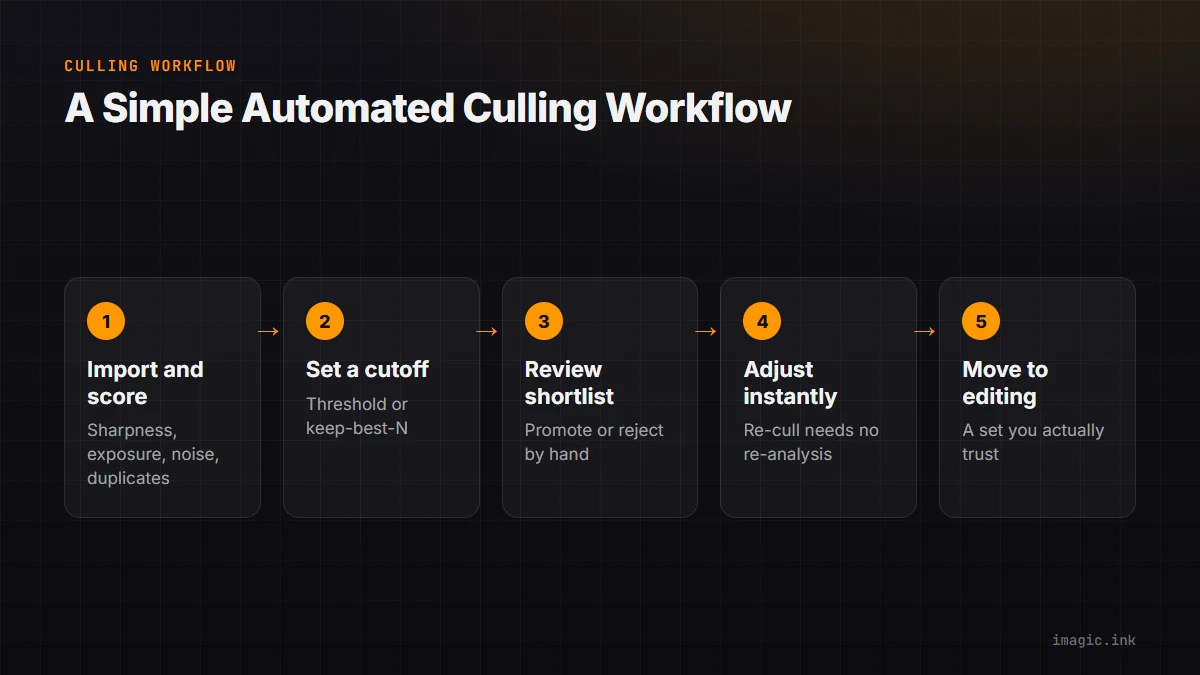
A Simple Culling Workflow
- Import the shoot and let imagic's AI scoring run across sharpness, exposure, noise, and duplicates.
- Set a threshold or a keep-best-N based on the type of shoot and any delivery commitment.
- Review the shortlist, not the full shoot, and manually promote or reject individual frames.
- Adjust the threshold or count with instant re-cull if the shortlist feels too tight or too loose, no re-analysis needed.
- Move to editing with a set you actually trust.
For the command-line version of this workflow, including the exact flags, see Photo Editing with a CLI. For how culling fits into a broader automated pipeline, see the automation guide.
A Common Mistake: Culling Too Aggressively
The most frequent mistake photographers make when they first automate culling is setting the threshold too high because a high number feels like quality control. In practice, an aggressive threshold on a shoot with naturally soft light, an overcast portrait session, a dim reception, can reject frames that are perfectly usable after a small exposure lift in editing. Start with a moderate threshold, review what got cut, and loosen it with instant re-cull if good frames are missing from the shortlist. The whole point of re-ranking without re-analysis is that this correction costs seconds, not another hour of scoring.
FAQ
Does AI photo culling delete my rejected photos?
No, culling sorts and scores, it doesn't delete anything by default. Rejected frames stay on disk until you choose to remove them yourself.
Is AI culling accurate enough to trust without review?
Treat it as a first pass, not a final decision. It's reliably accurate on the measurable criteria, sharpness, exposure, noise, duplicates, but it can't judge expression or composition, so a quick human review of the shortlist is still worth doing.
What's the difference between threshold culling and keep-best-N?
Threshold culling keeps everything above a quality score, so the count varies by shoot. Keep-best-N keeps a fixed number of your top-scoring frames regardless of score spread, which suits client work with a promised delivery count.
Do I need to re-run analysis every time I change my culling settings?
No. imagic's instant re-cull re-ranks already-scored frames against a new threshold or count immediately, without repeating the analysis pass.
Can I automate culling from the command line instead of the desktop app?
Yes, the same scoring engine is available headless through imagic's CLI, part of the Max tier, so a threshold or keep-best cull can run unattended as part of a larger import pipeline. See Photo Editing with a CLI for the exact commands, or the MCP server page if you'd rather drive the same cull through an agent conversation.
AI culling is included in every imagic tier, Lite, Plus, and Max, and you can try it on a real shoot during the 500-photo free trial, no card required. Import a folder you've been dreading and see how much of it survives the first pass.