The Problem: 3,000 RAWs and a Two-Week Deadline
A full wedding day, ceremony, portraits, reception, easily produces 2,500 to 3,500 RAW files across two cameras and a long shooting day. The client expects a gallery in two to three weeks. Automated wedding photo editing is what makes that timeline survivable without an all-nighter the week it's due, not by editing worse, but by moving the mechanical stages of the pipeline off your evenings and onto software that does them the same way every time.
Here's what that pipeline actually looks like end to end, stage by stage, with what's realistic to automate and what isn't.
Stage 1: Import and Backup
Cards get copied to two locations, a working drive and a backup, before anything else happens. This stage doesn't benefit much from AI, it's file transfer, but it's worth scripting into the same pipeline so it happens consistently: a watched-folder sync or a scheduled copy job means the files are safely backed up before you've even had coffee. Time cost: 20 to 40 minutes depending on card speed and file count, largely unattended.
Stage 2: AI Culling, the Biggest Time Save
This is where automation earns its keep. Running imagic's AI scoring across 3,000 RAWs, sharpness, exposure, noise, duplicate and burst detection, takes well under an hour, compared to 6 to 10 hours of manual review at a careful pace. A keep-best-N setting, say 400 to 500 selects, a typical delivery count for a full wedding, narrows the shoot to a shortlist automatically. See How to Automate Photo Culling for how the scoring and thresholds work in detail.
Bursts from the ceremony processional, guests photographed mid-blink, and the inevitable near-duplicates from reception dancing all get grouped so you're reviewing one representative frame per moment, not every frame.
Weddings also produce a wider lighting range than almost any other shoot type in one day: bright outdoor ceremony light, dim indoor reception lighting, and harsh on-camera flash during dancing. Scoring handles this because sharpness, exposure, and noise are measured per frame against that frame's own conditions, not against a single global exposure target, so a correctly-exposed reception shot at high ISO isn't penalized just for looking different from a bright ceremony shot. See How to Automate Photo Culling for how the scoring model handles that variation.
Stage 3: Style Consistency Across the Whole Day
A wedding gallery reads as unprofessional fast if the ceremony looks warm and the reception looks cool, or if 400 images each got a slightly different manual white balance call. imagic's style calibration learns your own editing choices from up to 8 guided edits, so the color and tone you apply reflects how you actually edit, not a generic preset. Once calibrated, that style applies across the full 400-image shortlist in minutes rather than a full day of frame-by-frame matching. This is part of imagic Max, included in the 500-photo free trial. If you'd rather trigger the whole culling-and-style pass with a plain-language request than a saved script, the imagic MCP server lets an agent run the same operations from a single prompt.
Stage 4: Batch Export and Delivery
A finished gallery usually needs at least two exports: a web-resolution set for the online client gallery and a print-resolution set for album design or printing. Scripting this with the CLI, imagic --headless --export jpg --output ~/Delivered/Web alongside a second pass for print resolution, turns what used to be a manual re-export chore into one command run twice with different flags. See Photo Editing with a CLI for the exact syntax.
If you also do same-week sneak peeks, a smaller batch, the ceremony's best 20 to 30 frames, culled and styled the same way but exported the morning after, gives clients something quickly without touching the full 400-image edit. Since the culling and style steps are already scripted, generating a sneak peek is the same pipeline pointed at a smaller keep-best number rather than a separate manual process.
What the Photographer Still Reviews by Hand
Automation gets you from 3,000 RAWs to a consistently styled 400-image shortlist. What it doesn't do, and shouldn't:
- Picking the actual hero shots. The first kiss, the ring exchange close-up, the cover image, these get individual attention regardless of how the automated scoring ranked them.
- Fine retouching. Skin retouching, distraction removal, anything requiring a trained eye and manual masking stays manual.
- Catching what scoring can't measure. A technically soft frame with a genuine, unrepeatable expression can outrank a sharper, blander one, and only a human catches that.
- Final sequencing for the album. Story order and pacing through an album spread is a creative decision automation isn't built to make.
Automated wedding photo editing narrows and prepares, it doesn't replace the parts of the job that made you a photographer in the first place.
Automated Wedding Photo Editing: The Full Time Comparison
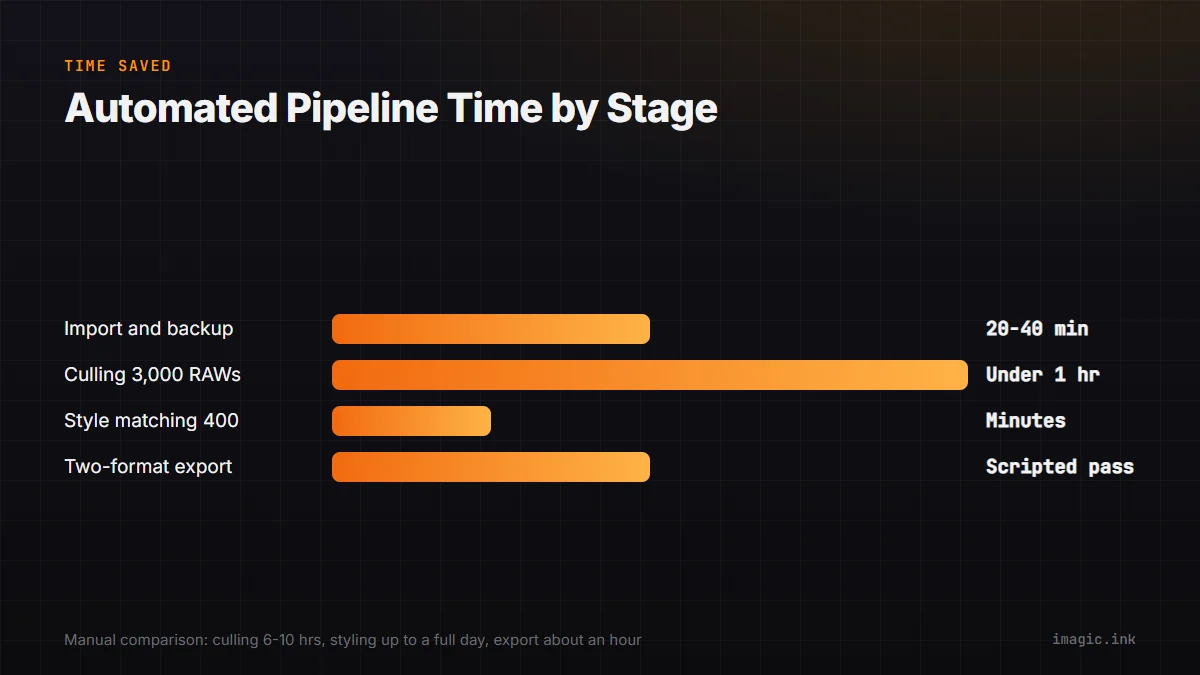
- Import and backup: 20 to 40 minutes, largely unattended either way.
- Culling 3,000 RAWs: 6 to 10 hours manual versus well under an hour automated.
- Style matching 400 selects: up to a full day manual versus minutes with a calibrated style profile.
- Export for two delivery formats: an hour of manual re-exporting versus a scripted pass that runs unattended.
Total manual time for the mechanical stages alone can run two to three full working days. Automated, the same mechanical stages complete in an afternoon, leaving the rest of your two-week window for the hero-shot selection and retouching that actually needs you. That's the real value of an automated wedding photo editing pipeline: not less editing time overall, but time spent where it actually matters instead of on repetitive scoring and file handling. For the broader math across shoot types, see Photo Editing Automation: A Photographer's Guide.
FAQ
How long does AI culling actually take on a full wedding shoot?
Scoring 3,000 RAWs for sharpness, exposure, noise, and duplicates typically finishes in well under an hour, versus 6 to 10 hours reviewing manually at a careful pace.
Will an automated pipeline make every wedding gallery look the same?
Only if you use a generic preset. imagic's style calibration learns your own edits from up to 8 guided examples, so the consistency it applies is your look, not a stock one.
Do I still need to review the shortlist before delivering it?
Yes. Automation produces a strong shortlist and a consistent base style, but hero shot selection and any fine retouching still deserve a human pass before a gallery goes out.
What tier of imagic do I need for a full automated wedding pipeline?
AI culling is in every tier. Style calibration, the CLI, and the MCP server for agent-driven workflows are part of imagic Max, which is fully included in the 500-photo free trial, no card required.
How does this pipeline change for a second shooter or a two-camera setup?
The mechanics don't change, you just point the scan at both camera folders, or run the import and analysis pass on each card separately before combining the culled shortlists. Duplicate detection still catches near-identical frames shot by two photographers covering the same moment from different angles, which is worth checking before you finalize a keep-best count for delivery.
If a two-week wedding deadline has been eating your evenings, the 500-photo free trial includes AI culling, style calibration, and the CLI, everything in this pipeline, at the Max tier, no card needed to start. Run your next shoot through it before the next deadline lands.