
Nearly every Capture One versus Lightroom comparison online assumes the reader already knows which features they need and is really asking about price or camera support. That is not most beginners. Most people typing capture one vs lightroom for beginners into a search bar have never used either one and want to know which will make more sense on day one. This is that comparison, plus a quieter third option for anyone who finds both intimidating before they have even imported a photo.
The honest starting point: both have a real learning curve
Neither Capture One nor Lightroom Classic is designed primarily for a first-time user. Both are built around a catalog system, where the software tracks references to photo files on your disk rather than simply opening whatever folder you point it at, and understanding that catalog model is the single biggest conceptual hurdle for anyone coming from a phone's camera roll or a plain folder of JPEGs. Get the catalog concept wrong early, moving or renaming files outside the software, and both tools can lose track of where your photos are. That is not a beginner-unfriendly design flaw exactly, it is the tradeoff both applications make for handling large, long-term photo libraries well, but it is real friction in week one for anyone who has not used a cataloging tool before.
Lightroom's interface: more tutorials, more familiar layout
Lightroom Classic's panel-based layout, with the Develop module's slider stack, has become something close to an industry-standard layout that countless other editing tools imitate, which means a beginner is more likely to already have seen something like it, and there is a much larger volume of beginner-focused tutorial content built specifically around Lightroom's exact interface. Adobe also offers a separate, cloud-native Lightroom app (distinct from Lightroom Classic) built around a simpler, more mobile-first interface with fewer panels visible by default, which some total beginners find less overwhelming to open for the first time, at the cost of some of Lightroom Classic's deeper local-catalog control.
Capture One's interface: steeper first hour, strong color tools
Capture One's interface exposes more tools and panels by default and uses different terminology in places (sessions versus catalogs, for instance) that has no direct Lightroom equivalent, which tends to make the first hour feel busier for someone with no prior RAW-editor experience. What Capture One offers in return is generally considered stronger, more precise color grading and tethering tools once a user has climbed that initial curve, strengths that matter far more to a working professional's day-to-day output than to someone editing their first fifty photos. For a true beginner whose main goal is understanding basic exposure, white balance, and crop adjustments, Capture One's deeper color tools are not yet the differentiator they will become later.
Pricing shapes the decision too
Both are primarily subscription products today, which matters for a beginner deciding whether to commit before they know if RAW editing is even a habit they will keep. As of September 2026, Adobe's standalone Lightroom plan runs 11.99 dollars a month for 1TB of cloud storage, while the Photography plan that adds Lightroom Classic and Photoshop runs 19.99 dollars a month, both billed annually; see Adobe's current photography plans for the live pricing. Capture One's Pro subscription runs roughly 18 dollars a month on annual billing following a price increase in mid 2026, alongside higher All in One and Studio tiers that add mobile and collaboration features a beginner does not need yet; see Capture One's current pricing directly, since it has changed more than once recently. Capture One Pro also offers a one-time perpetual license as an alternative to the subscription, which Lightroom Classic does not.
Comparison for a first-time RAW editor
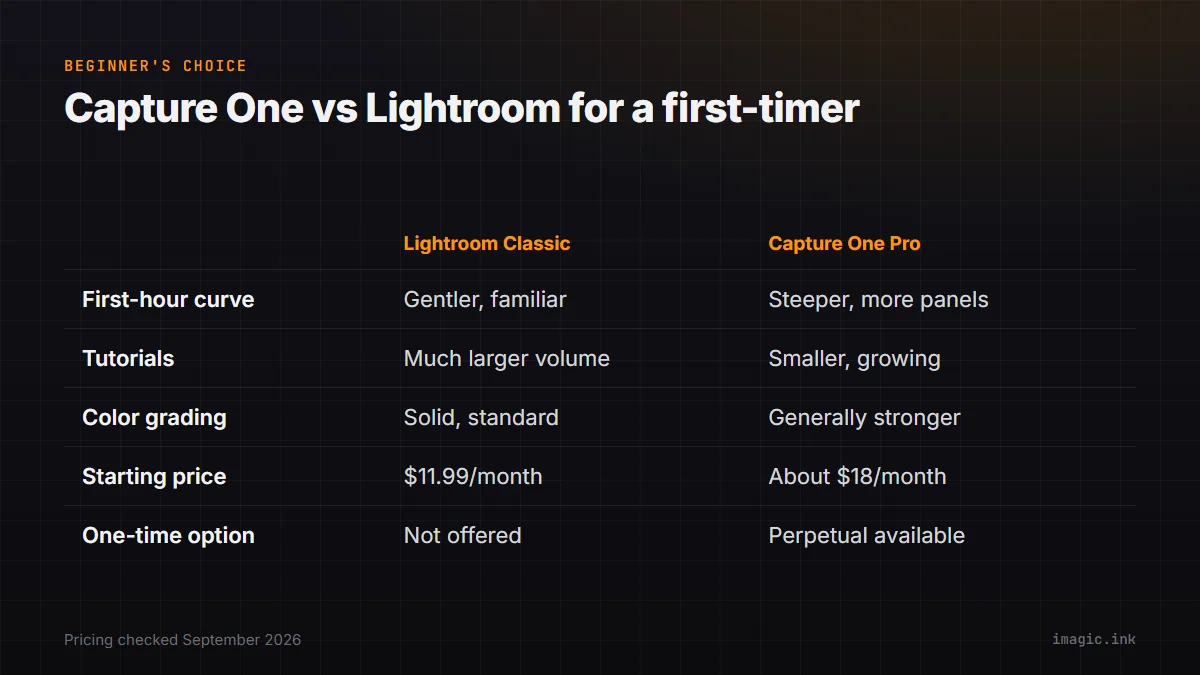
| Lightroom Classic | Capture One Pro | |
|---|---|---|
| First-hour learning curve | Gentler, more familiar layout | Steeper, more panels by default |
| Tutorial content available | Much larger volume | Smaller but growing |
| Color grading depth | Solid, standard tools | Generally considered stronger |
| Starting price (Sept 2026) | 11.99 dollars/month (Lightroom only) | About 18 dollars/month (Pro, annual) |
| One-time license option | Not offered | Perpetual Pro license available |
Where beginners actually get stuck in month one
The catalog concept covered above causes most of the early confusion, but two more specific snags come up repeatedly for people new to either tool. The first is understanding that edits are non-destructive: neither application changes the original RAW file on disk, it stores adjustment instructions separately and renders them on export, which trips up anyone expecting a Photoshop-style destructive edit where the file itself changes. The second is import settings, both tools ask upfront whether to copy, move, or simply reference files already on disk, and picking the wrong option in week one can leave photos duplicated across folders or, worse, referenced from a location that later gets renamed or moved. Reading through the first-run import dialog carefully, rather than clicking through it the way most software installs get clicked through, avoids most of this category of beginner frustration in both tools.
Camera and RAW support for a first camera
Camera compatibility rarely surfaces as a beginner problem with either Lightroom or Capture One, since both maintain broad RAW support across current Canon, Nikon, Sony, and Fujifilm bodies and add new camera support on a regular release cycle; a genuinely new camera released in the last few weeks is the one case worth checking against the current supported-camera list before buying either one. Where the two diverge is less about which cameras are supported and more about how each renders color and detail from the same RAW file, a difference professional colorists debate at length but one a beginner comparing their first few processed photos side by side will mostly not notice yet. That difference becomes more relevant later, once an editing style has developed enough to have real preferences about it.
A quieter third option for a genuine first photo
Someone who has not committed to RAW editing yet does not have to start with either application's full catalog model at all. imagic's free web editor at /editor handles a single RAW or JPEG photo directly in a browser, with no catalog, no subscription, and no account required, which is a lower first step for understanding basic exposure and crop adjustments before deciding whether a full desktop editor is worth learning. For someone who does move on to regularly culling and editing a full shoot, imagic's desktop app adds local AI culling and batch editing at a one-time price rather than a subscription, though it does not attempt Capture One's tethering or Lightroom's mobile-cloud sync, since those solve a different, more advanced problem than a beginner's first import. There is also no catalog to misunderstand on day one this way, since a single-photo web editor has nothing to track between sessions, which makes it a genuinely lower-stakes place to learn what a highlights slider or a white balance eyedropper actually does before either catalog-based application's more permanent structure enters the picture.
Mobile access and where you will actually be editing
For a beginner who expects to review or edit photos away from a desktop computer, mobile access is a real practical difference between the two. Adobe's cloud-native Lightroom app syncs across desktop, tablet, and phone as part of the standard plans above, so a photo edited on a laptop shows up already adjusted when opened later on a phone. Capture One's mobile app is sold as a separate product from Capture One Pro rather than bundled into the desktop subscription automatically, and its tethering and studio features are aimed more at a working setup than casual phone-based review. Someone who mostly wants to glance through and lightly adjust photos on a phone between desktop sessions will find Lightroom's cross-device sync a more built-in fit; someone planning to work almost exclusively at a desktop loses little by ignoring the mobile question for now. Neither imagic's desktop app nor its free web editor currently offers a phone or tablet app, worth knowing upfront if mobile review across an entire workflow, not just a first practice photo, is a firm requirement rather than a nice-to-have.
Getting help when you are stuck
How easily you can find an answer to a specific question matters more in month one than almost any feature comparison. Lightroom's much larger, longer-established user base means a search for nearly any specific error message or confusing dialog usually turns up an existing forum thread or video walking through the exact same situation, simply because so many more people have hit it first. Capture One's community is smaller but active, concentrated more around its own official forums and the studio and commercial photographers who rely on it professionally, so answers tend to be more experience-based and less beginner-phrased, since fewer total beginners are posting questions there. Neither company's own documentation is bad, but the surrounding community content is where most beginners actually get unstuck, and that volume gap is real and worth factoring in alongside the interface itself.
Which to actually pick first
If the goal is following along with the largest pool of beginner tutorials and getting comfortable with a standard RAW-editing layout quickly, Lightroom Classic is the more forgiving first choice. If color work is the part that excites you most, or you already know you want tethered shooting eventually, spending the extra learning time on Capture One from day one avoids relearning a different color model later. Either way, trying a single photo in a free tool first, before subscribing to anything, is a reasonable way to learn what you actually want from a full editor before paying for one. More RAW-workflow explainers are in the guides section, and the full running-cost breakdown between these two is in Capture One vs Lightroom in 2026: Cost, Catalog, and Exit Plan. The imagic vs Capture One and imagic vs Lightroom Classic comparison pages cover feature differences in more depth once you know what you are looking for.
Frequently asked questions
Which is genuinely easier for a complete beginner, Capture One or Lightroom?
Lightroom Classic has a gentler first hour for most beginners, mainly because its panel layout is more widely imitated and it has a far larger library of beginner tutorials. Capture One's interface is busier by default but rewards the extra learning time with stronger color grading tools.
Do I need to pick a subscription right away to learn RAW editing?
No. A free single-photo editor, such as imagic's browser-based /editor, lets you practice basic exposure, white balance, and crop adjustments on real RAW or JPEG files before committing to either subscription.
Does Capture One or Lightroom offer a one-time purchase instead of a subscription?
Capture One Pro offers a perpetual one-time license alongside its subscription plans. Lightroom Classic is subscription-only through Adobe's Creative Cloud plans as of September 2026, with no comparable one-time option currently sold to new subscribers.