Capture One and Adobe Lightroom are not interchangeable versions of the same editor. Both can organize and adjust RAW photographs, but their licensing choices, catalog models, collaboration paths, and dependence on surrounding services lead to different long-term commitments. A useful comparison therefore begins with the working system: how images enter, where masters live, how assistants collaborate, which camera files must open, and what remains usable if payments stop.
Official product and licensing pages were checked on 15 August 2026. Adobe markets Lightroom through subscription plans, with Lightroom and Lightroom Classic serving different cloud-centered and desktop-centered workflows. Capture One offers subscription licensing and a perpetual option for Capture One Pro, with entitlement details tied to the purchased version. Offers, included storage, upgrade terms, and app bundles can change, so current first-party checkout and license terms should be reviewed before purchase. This article avoids a price snapshot that could become misleading.
Separate Lightroom from Lightroom Classic
Adobe uses the Lightroom name for a cloud-oriented application across devices, while Lightroom Classic is the desktop catalog application built around locally managed files. That distinction changes nearly every comparison. The cloud-oriented Lightroom experience emphasizes synchronized originals, edits, and device access within the purchased storage allowance. Lightroom Classic can keep original folders on local or attached storage while still using selected Adobe services and synchronization features.
A photographer who wants a conventional workstation catalog should compare Capture One Pro with Lightroom Classic, not only with the cloud-oriented Lightroom interface. A photographer who wants originals available across a laptop, tablet, browser, and phone should examine the cloud Lightroom model directly. Mixing the names can produce the wrong conclusion about storage cost, offline behavior, backups, and feature location.
Write down which application is actually in use today. Record where originals reside, where previews and catalogs reside, which collections synchronize, and which device is authoritative. This simple map prevents a license comparison from overlooking the cost and operational value of an existing cloud library.
Compare subscriptions by total dependency
A subscription is not merely a monthly or annual line item. It can include application updates, cloud storage, mobile access, sharing, portfolio services, and integration with other creative tools. Its value depends on whether those services replace costs elsewhere. It also creates a recurring dependency that should be included in multi-year budgeting and account-continuity planning.
Evaluate the exact plan term, renewal behavior, storage allowance, overage path, cancellation consequences, regional tax, and number of permitted activations. Do not multiply a promotional month by several years and call that the total. Introductory terms and bundles can change. A studio should retain the invoice, license terms, and a dated screenshot or PDF of the offer it accepted.
Then document the exit state. Can existing edits still be exported? Can originals be downloaded in bulk? Which sharing links stop working? What happens to cloud originals above a free allowance? Are catalogs and sidecars readable by another application? The best plan is not necessarily the cheapest; it is the one whose dependency is understood and acceptable.
Understand what a perpetual Capture One license buys
A perpetual license generally grants continued use of the purchased major version under its license conditions. It should not be interpreted as a promise that every future camera, operating system, feature, or service will be supported forever. Capture One's official licensing material distinguishes perpetual entitlement from subscription access, and the exact upgrade or service benefits should be confirmed at purchase.
The financial case depends on upgrade behavior. A photographer who keeps the same cameras and operating system for several years may value a stable version. A studio that adopts new bodies quickly, relies on current tethering support, or updates its operating system at release may need paid upgrades often enough that a subscription becomes simpler. There is no honest break-even point without assumptions about upgrade cadence and required compatibility.
Perpetual software still needs a continuity plan. Keep installers where licensing permits, preserve activation information, note supported operating systems, and avoid an untested system update before critical work. The ability to launch an old version is less useful if a new camera's RAW files, a replacement computer, or an updated operating system cannot be handled.
Choose between catalogs, sessions, and cloud libraries
Capture One offers both catalogs and Sessions. A Session is attractive for a self-contained assignment with defined capture, select, output, and trash locations. It can travel with the job and fits tethered or project-based work. A catalog supports broader cross-job searching and centralized organization. Lightroom Classic also uses a catalog, with original files stored in folders chosen by the photographer and metadata held in its database plus optional sidecars for supported information.
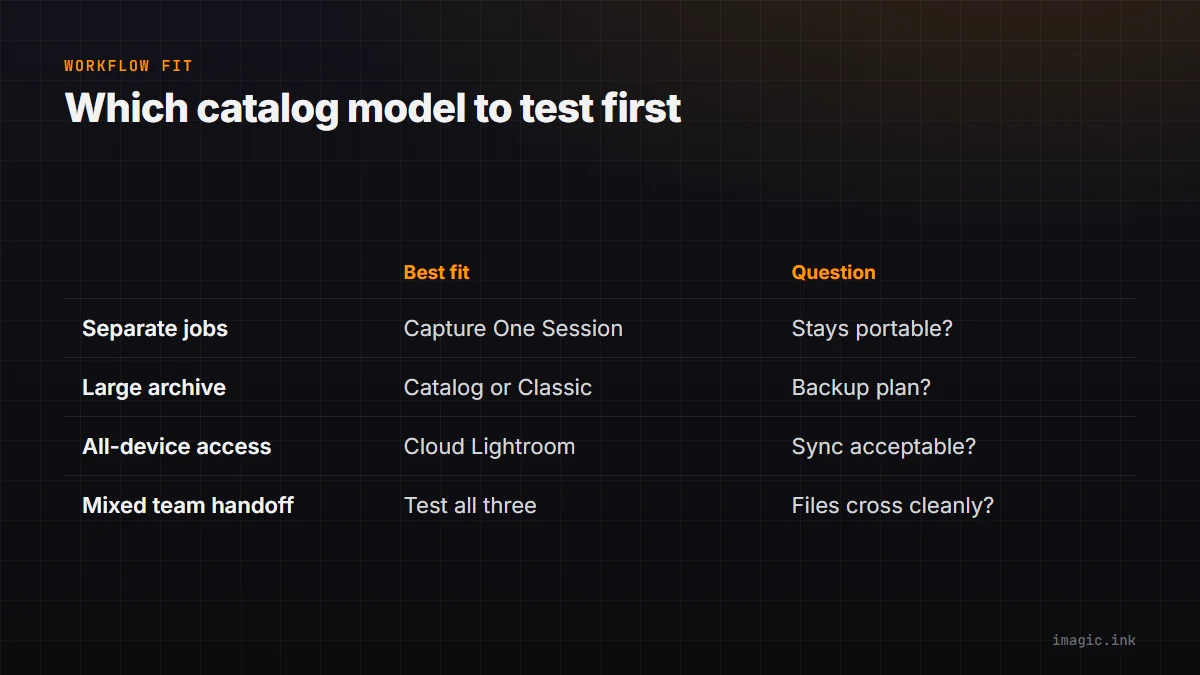
The cloud-oriented Lightroom model changes the center of gravity. Originals and edits are designed to synchronize through Adobe's cloud, subject to storage and network constraints. This can simplify device access and client-facing selection, but it requires a clear understanding of upload volume, local copies, bandwidth, and account access.
| Workflow need | Model to examine first | Main question |
|---|---|---|
| Separate commercial jobs | Capture One Session | Can each assignment remain portable and self-contained? |
| Large local archive | Capture One catalog or Lightroom Classic | How will folders, backups, and catalog repair be managed? |
| All-device access | Cloud-oriented Lightroom | Are storage and synchronization dependencies acceptable? |
| Mixed team handoff | Test all candidates | Which files, edits, and permissions cross the boundary? |
No model replaces backup. A synchronized cloud library is not automatically a versioned independent copy, and a local catalog is not protected merely because originals sit on another drive. Define recovery for originals, edit metadata, catalog databases, exports, and credentials separately.
Test the photographic tools that define the job
Feature checklists hide differences in rendering and interaction. Build a small evaluation set from difficult real files that may be used for internal testing: mixed skin tones, saturated fabric, deep shadow, clipped-looking highlights, high ISO, fine foliage, moire risk, local corrections, and a lens needing profile support. Include the exact cameras and lenses in current service.
For each application, establish a neutral baseline before applying a familiar style. Compare default profile behavior, white-balance response, highlight transitions, color editing, masking, noise treatment, sharpening, lens corrections, and output resizing. The objective is not to declare one rendering universally accurate. It is to find which starting point reaches the approved output with predictable work.
If tethering matters, test it with the production body, current firmware, cable, hub, and workstation. Confirm reconnection after a cable interruption, naming, backup destination, live view, and assistant permissions. If mobile review matters, test the real network and the client's browser. A website's feature label cannot expose every operational edge.
Verify camera support before migrating
RAW support is version-specific. A camera listed by a vendor may require a newer application release than the one covered by a perpetual license or installed on an older computer. Lens profiles, tethering, compressed RAW variants, and special capture modes may have separate limitations. Check first-party compatibility lists using exact model names and file variants.
Create files in every mode that will enter production: normal RAW, compressed options, high-resolution modes, pixel shift, burst containers, and dual-pixel or other special formats where relevant. Copy them through the intended ingest path and confirm that previews, metadata, adjustments, and exports work. Unsupported special modes can remain hidden until a critical assignment if evaluation uses only ordinary single-frame RAW files.
Operating-system support is equally important. A stable editor on an unsupported system can become a security or hardware risk, while a required system upgrade can strand an older application. Plan camera, computer, operating system, and editor updates as one compatibility chain.
Price the migration work, not just the license
Moving applications can preserve originals and basic metadata while losing or changing proprietary edits. Complex masks, local adjustments, virtual copies, collections, ratings, color labels, crop interpretation, plug-in output, and print layouts may not translate cleanly. Exported TIFF or JPEG derivatives preserve appearance but not full editability. Original RAW plus sidecar preserves source data but cannot guarantee identical rendering in a new engine.
Run a pilot on one completed project and one active project copy. Export metadata according to the source application's guidance, import into the candidate, and reconcile file count, ratings, keywords, dates, orientation, crops, and representative edits. Keep the original catalog untouched. Time each human step, including cleanup and retraining, because labor can exceed the license difference.
Document a rollback point. The new system should not become authoritative until originals, metadata, current deliverables, and backups have been verified. If a migration needs several phases, define which application owns new jobs during the transition so edits do not split silently.
Consider focused tools outside the main editor
A photographer does not have to force every task into one catalog. Open-source editors such as darktable and RawTherapee can provide non-subscription RAW development, with their own learning curves and compatibility considerations. Fast ingest, local culling, tethering, retouching, printing, and cloud delivery can also be assigned to separate tools when that division is clearer and supportable.
imagic's documented role is a local photo workflow that can scan a directory, analyze and status a cull without deleting originals, apply stored non-destructive edits, and export. It is not necessary to present it as a replacement for every catalog or retouching function. The desktop page explains its scope, and the Software Comparisons section helps place focused applications beside broader editors.
A modular workflow requires explicit handoff rules. Decide which application owns ratings, final color, derivatives, and archive metadata. Avoid round-tripping a lossy file merely because two applications can both open it. The simplest chain that meets the brief is usually easier to recover and teach.
Use a decision worksheet instead of a winner
Score each candidate against required camera support, local or cloud storage preference, tethering, mobile access, catalog scale, team permissions, adjustment tools, output needs, license predictability, and exit effort. Mark a requirement as mandatory, useful, or irrelevant. A mandatory failure should outweigh several attractive extras.
Capture One is a strong candidate when Sessions, its rendering controls, tethered workflows, or a perpetual-version option align with the job. Lightroom Classic is a strong candidate when an established local catalog, Adobe ecosystem integration, or familiar desktop workflow matters. Cloud-oriented Lightroom is a different answer when cross-device synchronization is central. The final choice should be tested with a complete job, not selected from a feature matrix alone.
Frequently asked questions
Can Capture One be bought without a subscription?
Capture One's official store currently presents a perpetual option for Capture One Pro alongside subscriptions. Verify the version entitlement, upgrades, activation conditions, and regional offer at the time of purchase.
Will Lightroom edits transfer perfectly to Capture One?
No. Originals and some metadata can move, but proprietary rendering and complex local edits do not translate identically. Preserve the source catalog and export finished derivatives for critical completed work.
Is Lightroom Classic a cloud-only editor?
No. Lightroom Classic is centered on a desktop catalog and locally managed originals, although it can use Adobe services and synchronization. It should be distinguished from the cloud-oriented Lightroom application.