Evoto and imagic both show up when photographers search for "AI photo editing software," but they solve almost opposite halves of a workflow. Evoto is built around AI retouching, smoothing skin, removing blemishes, and adjusting faces on portraits and wedding photos, processed in the cloud. imagic is built around culling and RAW processing, deciding which frames from a shoot are worth keeping and getting them through a basic edit, entirely on your own machine. Photographers who need one of these jobs done well very often need the other one too, just at a different stage of the same shoot. Neither company currently publishes a direct comparison page against the other, so every claim below is checked against each vendor's own site rather than either one's framing of the other. Here is what each one verifiably does, as of September 2026.
What Evoto is actually built for
Evoto describes itself as an AI platform for professional photography workflows, and its strongest, most specific claims are about retouching. Per Evoto's own site, its per-face AI retouching handles skin smoothing and blemish removal, glasses glare and stray hair removal, and wrinkle or acne reduction while aiming to preserve real skin texture rather than producing an obviously plastic look. Evoto also offers broader workflow tools beyond retouching: photo culling and selection, color grading and matching, background adjustment and replacement, batch processing, and gallery delivery, spread across desktop, mobile, iPad, browser-based, and tethered-shooting product variants. The tethered variant, Evoto Instant, is aimed specifically at studio sessions where a client wants to see retouched previews shortly after a shot is taken, rather than at post-shoot batch review. Beyond the published credit tiers, Evoto also offers custom Enterprise plans for large teams and studios with high-volume editing needs, priced separately from the standard tier table and negotiated directly with Evoto rather than published as a flat rate.
On processing location, Evoto's own materials state that images are uploaded to its cloud servers and "deleted immediately once processing is complete," with longer-term storage retained only for features like cloud sync or AI color match, and only with consent. That is a cloud-based architecture by design, not an incidental detail: Evoto's retouching models run on Evoto's infrastructure, not on the photographer's own machine. Evoto's documentation also states it will not use customer images to train its models without explicit permission, which is a separate claim from whether images are uploaded at all; uploading for processing and training on the uploaded data are two different things, and Evoto's stated policy addresses the second, not the first.
What imagic is actually built for
imagic runs entirely on the photographer's own Windows or macOS machine. Its AI scores photos for technical quality, sharpness, closed eyes, and composition, groups duplicates and burst sequences, and applies batch edits and one-click styles through its own built-in RAW engine, supporting CR2, CR3, NEF, ARW, RAF, ORF, RW2, DNG, and PEF files, exporting to JPEG or TIFF. What it explicitly does not do is retouching: no skin smoothing, no blemish removal, no generative fill, no body or face reshaping. That gap is intentional and listed plainly among imagic's known limits, not an oversight discovered by comparison.
The practical shape of an imagic session is upload nothing, open a local folder, let the quality scoring pass run, review the flagged duplicates and low scorers, then apply a batch style or export. There is no step where a photo is queued for upload, no wait for a cloud job to finish, and no per-photo credit deducted from an account balance as the folder processes; the cost is fixed at the license price regardless of how many photos or how many sessions follow. That also means imagic's processing speed is bound only by the machine running it, not by upload bandwidth or a queue of other customers' jobs waiting on the same cloud infrastructure.
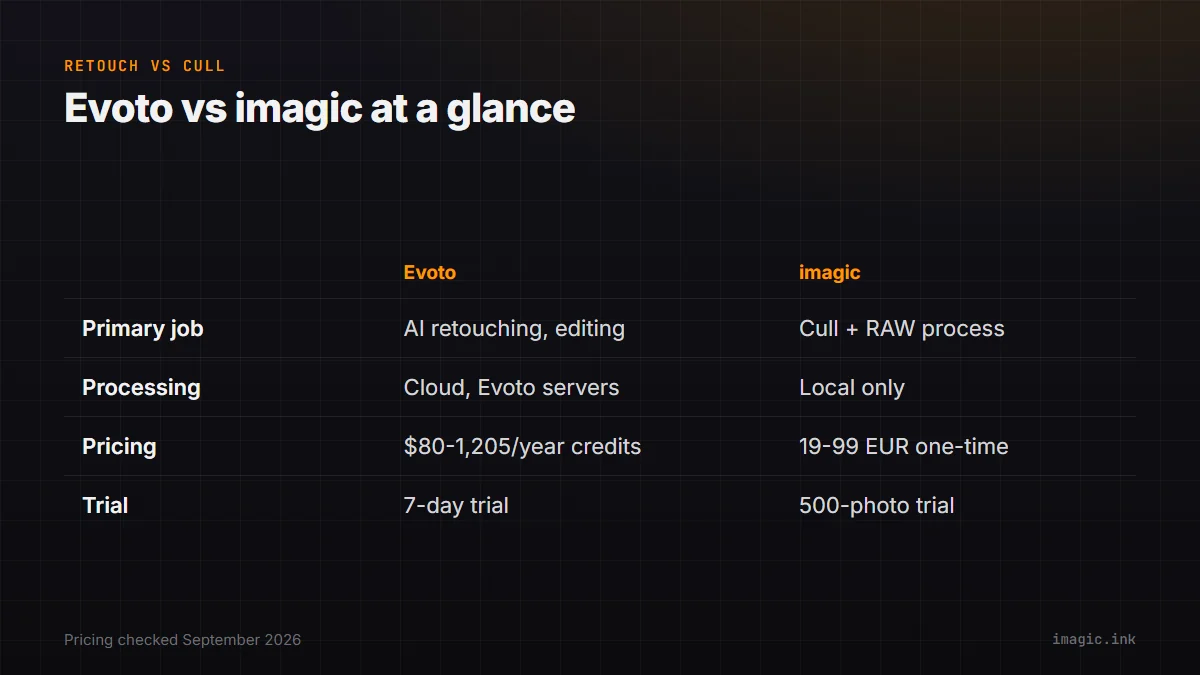
Evoto vs imagic at a glance
| Category | Evoto | imagic |
|---|---|---|
| Primary job | AI retouching (skin, blemishes, background) plus broader editing tools | AI culling and RAW processing for a fresh shoot |
| Processing location | Cloud (Evoto's own servers) | Local only; nothing leaves the machine |
| Platforms | Desktop (Mac and Windows), iPad, mobile app, browser, tethered "Instant" mode | Windows and macOS desktop app |
| Pricing model (Sept 2026) | Credit-based: annual plans from USD 80/year (800 credits) up to USD 1,205/year (24,000 credits), plus pay-as-you-go from 1 credit per photo | One-time license: Lite EUR 19 / Plus EUR 49 / Max EUR 99 |
| Trial | 7-day free trial | 500-export free trial, no card required |
Source for Evoto pricing and processing details: Evoto's official payment and plans page, checked September 2026.
What Evoto's credit pricing costs at real volume
Evoto's published annual tiers run from a Starter plan at USD 80 for 800 credits up to a Standard Plus plan at USD 1,205 for 24,000 credits, with the per-credit rate improving at higher tiers (roughly USD 0.10 per credit at the smallest tier down to USD 0.05 at the largest). Exactly how many credits a given retouching or editing action consumes was not stated on the pages checked for this piece, so that part is left out rather than estimated. What is verifiable is the shape of the pricing: it is consumption-based and renews annually, unlike imagic's flat one-time license. A studio doing enough volume to need the Standard or Standard Plus tier is paying over USD 500 to more than USD 1,200 every year for retouching capacity alone, and that figure recurs annually rather than being a one-time cost. Evoto's add-on credit packs, purchasable mid-term at a lower per-credit rate than pure pay-as-you-go pricing, soften that somewhat for studios that occasionally exceed their tier, but the underlying model stays consumption-based year over year, unlike a license fee paid once.
What Evoto does that imagic does not
Retouching is the clear, specific gap. imagic's own limits list is explicit that it has no retouching or generative fill, no layers, and no HDR or panorama merge, and Evoto's per-face skin and blemish work sits squarely in that gap. For portrait and wedding photographers who need faces cleaned up before delivery, that is not a feature imagic will ever add casually; it is a different job requiring a different kind of model than technical quality scoring. Evoto's background adjustment and replacement tools, and its gallery delivery feature for sending finished sets directly to clients, are similarly outside anything imagic attempts; imagic exports finished files locally and stops there, with no built-in client gallery or delivery mechanism.
What imagic does that Evoto does not
imagic's local processing means client photos never touch a third-party server at any point, which matters for photographers with contracts that restrict where client images can be transmitted or stored. imagic's one-time pricing also means there is no recurring cost tied to shoot volume: a slow year and a busy year cost the same license fee, unlike a credit balance that has to be topped up or a subscription tier that has to be upgraded once a busier season pushes past the current plan's credit allotment. And imagic's core strength, scoring raw technical quality (sharpness, closed eyes, composition) and grouping bursts, is not what Evoto's retouching tools are built to evaluate; Evoto's culling feature exists but its primary, most detailed capability by far is retouching, not technical triage. imagic's nine supported RAW formats, run through its own built-in processing engine rather than a third-party conversion step, also means the file handling stays consistent regardless of which camera system shot the files, without depending on a network connection to process any of it.
Where the two tools fit together instead of competing
In practice, a wedding or portrait photographer's realistic pipeline often runs through both kinds of tool at different points: cull the raw take down to a real edit set first, then send the keepers through retouching before delivery. Doing retouching before culling wastes processing on photos (and, on Evoto's credit-based pricing, actual money) that will get discarded anyway; doing culling well first is what makes a retouching pass efficient, and it keeps the credit spend focused only on the frames that are actually going to a client. A wedding photographer who shoots 2,500 frames and culls down to 400 keepers before retouching is spending Evoto credits on 400 photos instead of 2,500, a real cost difference on a per-credit pricing model. Photographers weighing where imagic fits into a portrait or wedding workflow specifically can look at imagic's wedding photography workflow guide and portrait photography guide for how the culling stage is meant to sit ahead of an editing and retouching pass, and the wider Software Comparisons category for how imagic stacks up against other culling-focused tools. Anyone who wants to see the culling side of that pipeline on their own files can start with imagic's free 500-export trial.
What neither tool will do for you
It is worth being plain about the boundaries on both sides rather than implying either tool covers the full job end to end. Evoto's retouching is not a substitute for a real first pass on technical quality: it will smooth skin and adjust a background, but it is not described anywhere in its own materials as scoring sharpness or flagging closed eyes across a full shoot the way a dedicated culling model does. imagic, for its part, will not touch a face at all. Neither tool books galleries with clients, handles contracts, or manages a delivery timeline; both sit inside a larger workflow that a photographer still has to assemble themselves, and neither vendor claims otherwise on the pages checked for this piece. A photographer building a full delivery pipeline should expect to combine at least a culling step, a retouching step, and some kind of client delivery method, whether that final piece comes from Evoto's own gallery feature, a separate service, or a manual export and upload. Treating either tool as a complete, one-stop replacement for the other steps in that pipeline is the mistake worth avoiding, since neither one's own materials actually claim to cover the full path from raw memory card to delivered gallery.
Frequently asked questions
Is Evoto a culling tool or a retouching tool?
Evoto's own materials describe both, but its most detailed, specific capability is AI retouching (skin, blemishes, background). It also offers photo culling and selection features, though with less public detail than its retouching tools.
Does imagic do skin retouching like Evoto?
No. imagic explicitly does not have retouching or generative fill; its AI is built for technical quality scoring, duplicate and burst grouping, and batch RAW editing, not for smoothing skin or removing blemishes.
Is Evoto cloud-based or local like imagic?
Evoto processes images on its own cloud servers and states that images are deleted immediately after processing unless a feature like cloud sync is explicitly enabled. imagic processes everything locally and never uploads photos anywhere.