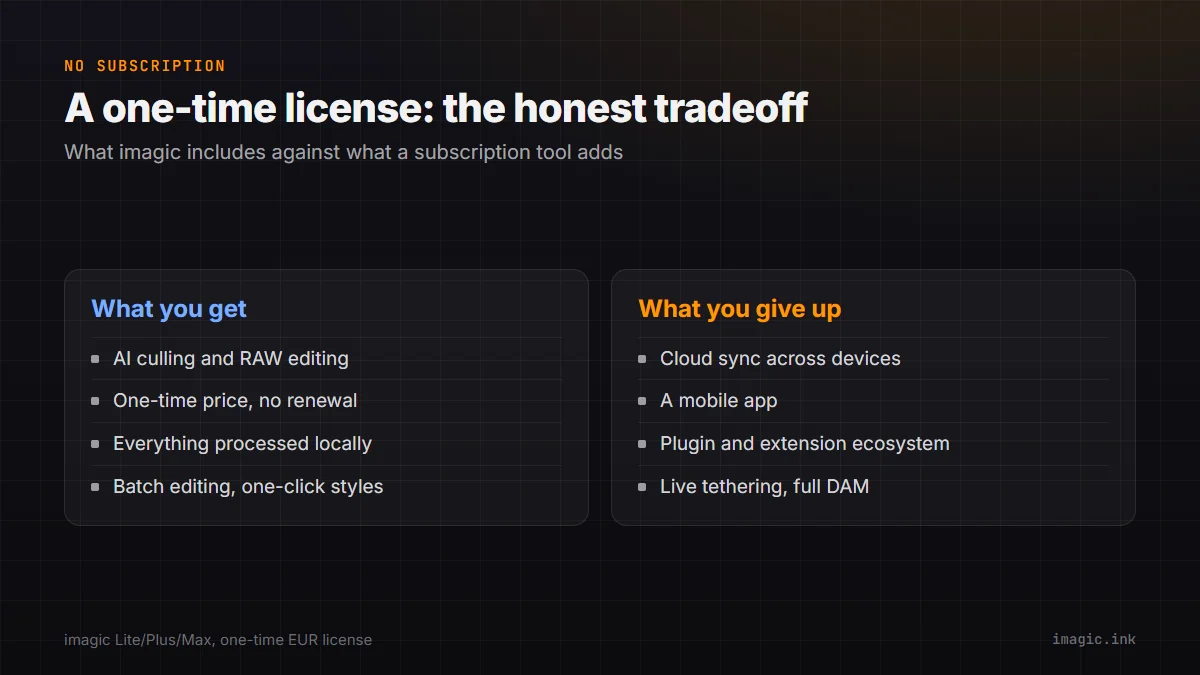
Adobe's Lightroom, Capture One, and most modern AI culling tools all share one structural trait: they are rented, not owned, and the bill renews whether or not your shooting volume did. imagic is one of a smaller group of tools built the other way, a straight one-time purchase, and that tradeoff is worth spelling out honestly rather than as a pure sales pitch.
"No subscription" on its own is not a complete pitch, and treating it as one would be exactly the kind of oversell this piece is trying to avoid. The honest version of this article has two halves: what you actually get for a one-time price, and what specifically gets left out compared to a subscription-based, cloud-connected tool like Lightroom. Both halves matter for deciding whether the tradeoff suits your own workflow.
What "no subscription" actually means here
imagic is sold as a one-time EUR license with three tiers: Lite at 19, Plus at 49, and Max at 99, each a single purchase rather than a recurring charge. There is a free trial covering 500 photos, metered in photos rather than a countdown of days, and no card is required to start it. Once you buy a tier, there is no renewal date, no price-increase notice to watch for, and no risk of losing access to your own edits because a subscription lapsed.
That structure is genuinely unusual in this specific category. Most AI culling tools on the market today, and Lightroom itself, bill monthly or annually, which means the software keeps working only as long as the payments keep coming. A one-time license flips that: the upfront cost is higher than a single month of most subscriptions, but nothing is owed again afterward, and there is no version of "your library still exists but the app stopped opening it" that a lapsed subscription can create.
What that purchase actually includes
All three tiers include AI-assisted culling, quality scoring for sharpness, closed eyes, and composition, plus duplicate and burst grouping so near-identical frames get reviewed together instead of one at a time. RAW processing runs through imagic's own built-in RAW engine, covering CR2, CR3, NEF, ARW, RAF, ORF, RW2, DNG, and PEF files, with batch editing and one-click styles for getting a full shoot to a consistent look quickly. Everything processes locally: photos never leave the machine. The Max tier adds an MCP server and CLI, letting AI agents drive the app directly for scripted or automated workflows, which is a genuinely unusual feature for a desktop photo tool at any price.
What you give up: cloud sync
There is no built-in mechanism to keep a library in sync across two machines or to pick up editing on a phone where you left off on a desktop. If your workflow depends on starting a cull on a laptop in the field and finishing it on a desktop at home through the same synced library, that is a real gap, not a minor one, and it is worth testing during the trial before buying rather than discovering it after. A practical workaround some photographers use with any desktop-only tool is a general-purpose file-sync service pointed at the working folder, which syncs the files themselves without syncing edit state or ratings between machines the way a purpose-built cloud catalog does.
What you give up: a mobile app
imagic is desktop-only, for Windows and macOS. There is a free single-photo web editor at /editor for quick one-off edits from a browser, but nothing resembling a full mobile app for reviewing or editing a shoot from a phone or tablet. Photographers who cull or make client-facing selections on a tablet between locations will not find that workflow here; the review pass has to happen back at a desktop or laptop running Windows or macOS.
What you give up: a plugin and extension ecosystem
Lightroom's decade-plus head start shows up most clearly in third-party plugins: export presets, print services, specialized tethering tools, and niche integrations built by other companies over many years. imagic does not have an equivalent plugin marketplace. What it has instead is direct AI agent control on the Max tier through its MCP server and CLI, which is a different kind of extensibility aimed at automation rather than a plugin-store model, and it will not replace a specific Lightroom plugin your workflow already depends on. If your export pipeline is built around a particular plugin today, confirm during the trial whether imagic's own batch export and one-click styles cover the same end result before assuming the gap is a dealbreaker either way.
What you give up: tethering and full DAM cataloging
imagic does not support live tethered shooting, so a studio workflow that needs images to land on a monitor the instant the shutter fires still needs a dedicated tethering tool alongside it, not instead of it. It is also not a full digital asset management system: there is no long-term multi-shoot cataloging, smart-collection querying across years of a library, or the kind of archive-wide search a dedicated DAM tool like Mylio or Excire Foto is built around. imagic is built for triaging and editing a shoot, not for being the single home for a decade of images. In practice that means a common pairing is imagic for the fast culling-and-edit pass right after a shoot, with a separate cataloging tool handling the long-term archive those finished files eventually land in.
What none of this changes: how the RAW processing itself works
It is worth being clear that none of the gaps above touch the actual editing engine. RAW files are processed through imagic's own built-in engine covering CR2, CR3, NEF, ARW, RAF, ORF, RW2, DNG, and PEF, the same engine whether you bought Lite, Plus, or Max, and whether or not you ever use cloud sync or a mobile app elsewhere in your workflow. The tradeoffs above are about what surrounds the editing, not about whether the editing itself is capable; a one-time-license tool is not a stripped-down version of a "real" editor, it is a complete one that happens not to also be a sync service, a mobile app, and a DAM.
What the three tiers cost
| Tier | Price (one time) | Notable addition |
|---|---|---|
| Lite | 19 EUR | Entry tier |
| Plus | 49 EUR | Mid tier |
| Max | 99 EUR | Adds an MCP server and CLI for AI agent control |
The clearest documented difference between tiers is the Max tier's MCP server and CLI, which lets an AI agent drive the application directly for scripted or automated workflows, a feature most photographers will not need day to day but a genuinely unusual one to find in a desktop photo tool at any price. The 500-photo trial covers the core culling and editing experience regardless of which tier you are evaluating, so it is worth running a real shoot through it before deciding which tier actually matches what you use.
Other roads off a subscription, honestly
imagic is not the only one-time-purchase option worth knowing about, and it would be misleading to imply otherwise. Free, fully open-source tools like darktable ask nothing at all but a steeper learning curve and no AI culling; several established RAW editors also sell perpetual, non-subscription licenses as an alternative to their subscription tier. The imagic vs darktable and imagic vs RawTherapee pages cover the free, fully manual end of that spectrum, and this piece on one-time-price alternatives looks at the broader landscape.
What to actually check during the trial
A trial is only useful if you test the specific things that matter for your own decision, rather than clicking through the interface once and moving on. A few things worth deliberately checking before buying any tier:
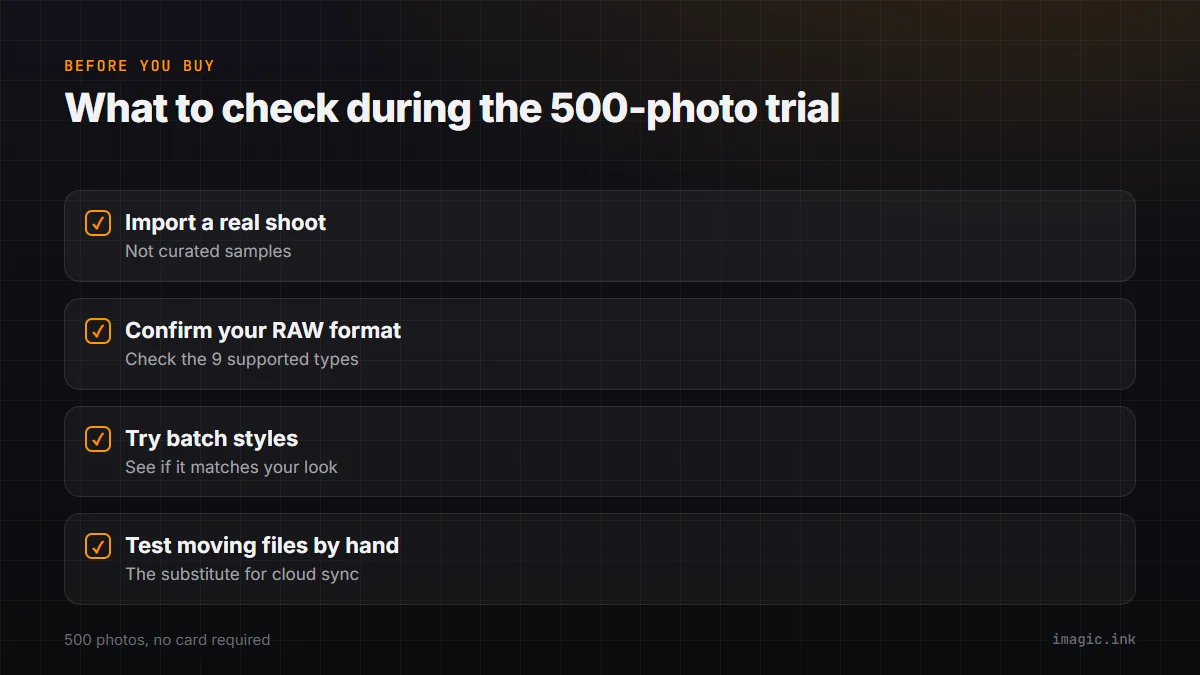
- Import a real memory card from a recent shoot, not a handful of hand-picked sample images, and see how the AI scoring holds up against your own judgment across a full, messy set.
- Confirm your specific camera's RAW format is covered by the nine supported formats (CR2, CR3, NEF, ARW, RAF, ORF, RW2, DNG, PEF) before assuming compatibility.
- Try the batch editing and one-click styles on a full set to see whether they get you close enough to your usual look that the plugin gap from Lightroom stops mattering in practice.
- If cross-device work matters to you, deliberately test what happens moving a project folder between a laptop and desktop by hand, since that is the honest substitute for built-in cloud sync here.
500 photos is enough to surface most of these answers from one real session rather than a curated best-case sample, which is the point of metering the trial in photos instead of a fixed number of days.
Who this tradeoff actually suits
The math favors a one-time license clearly for anyone planning to shoot steadily for more than a year or two: the purchase is a single, known cost that never bills again, however it compares to any specific competitor's monthly rate. It favors an ongoing subscription instead for anyone who genuinely needs cross-device cloud sync, a mobile editing app, or a specific third-party plugin their business depends on, where imagic's gaps above are not minor inconveniences but missing core functionality their workflow cannot run without. It is worth being honest that this is not a universal "better" or "worse," it is a different shape of tool built for a different set of priorities than a subscription-based, cloud-connected ecosystem.
Try the 500-photo trial against your own real shoot before deciding either way; the tradeoffs above read very differently in the abstract than against your own files, and 500 photos is enough to run a genuine session through the full culling-to-export workflow rather than a handful of test images. See imagic's desktop app for the current pricing and download.
The Software Comparisons category has more head-to-head breakdowns if you are still narrowing down options.
Frequently asked questions
Is imagic really a one-time purchase, with no hidden recurring fee?
Yes. Lite, Plus, and Max are each a single EUR purchase (19, 49, and 99 respectively) with no subscription and no renewal billing.
What is the biggest workflow gap compared to Lightroom?
For most photographers it is the missing cloud sync and mobile app: Lightroom's cross-device workflow has no direct equivalent in imagic beyond the free single-photo web editor.
Does the trial let me test this against my own photos before buying?
Yes. The trial covers 500 photos with no card required, which is enough to run a real shoot through the AI culling and editing workflow before deciding on a tier.