Searching for a "Capture One alternative for tethering" usually turns up a contradiction fast: most alternatives to Capture One are weaker at tethering than Capture One itself, because tethered capture is one of the things Capture One is specifically known for. imagic is one of those alternatives, and it is worth saying plainly up front: imagic has no live tethering at all. What follows is an honest look at what tethering actually does for a studio, and which tools genuinely replace it if Capture One's subscription or perpetual-license cost is the actual problem you are trying to solve.
This matters because the search itself is usually a cost question in disguise. Few photographers go looking for a "Capture One alternative" because they dislike tethering; they go looking because Capture One's subscription or perpetual-license price feels heavy for a feature set where tethering is only one part of what they are paying for. Separating the tethering question from the rest of Capture One's feature set, color grading, session management, and its broader editing toolset, is the first useful step before assuming one tool has to replace the whole package.
What tethering actually does for a studio
Tethered capture means the camera is connected, by cable or wirelessly, directly to a computer, with each frame appearing on a large monitor seconds after the shutter fires. For a studio, that solves a specific problem: judging focus, lighting, and composition on a real screen instead of a camera's rear LCD, and letting a client or art director see and react to shots in real time during the session rather than after it. Product photography, catalog work, and any shoot with a client physically in the room lean on this workflow specifically because waiting until after the shoot to see full-resolution results is too slow or too risky to catch a lighting mistake.
Why imagic does not solve this
imagic is built around what happens after a shoot: importing a memory card, running AI quality scoring for sharpness, closed eyes, and composition, grouping duplicate and burst frames, and then batch editing and exporting through its own built-in RAW engine. None of that requires or provides a live connection to the camera during capture, and imagic does not offer one. If tethered, client-facing capture is a hard requirement for your studio's workflow, imagic is not a substitute for that specific step, full stop, and no amount of AI culling downstream changes that.
Capture One's own tethering, for context
Since Capture One is the tool prompting the search in the first place, it is worth being clear about what you would actually be replacing. Capture One's own pricing page lists "industry leading tethering" and "support for 550+ cameras" across every subscription tier and its perpetual Pro license alike, which is a genuinely broad list compared to most alternatives. If cost, not capability, is the reason you are looking elsewhere (see the separate piece on Capture One's pricing shift and its alternatives for more on that angle), the tools below are worth knowing about; if the camera-support breadth itself is the issue, Capture One's own 550-plus-camera list is hard for a smaller tool to match outright.
Lightroom Classic's tethering: real, but narrower than it looks
Lightroom Classic does support tethered capture natively, but it is worth checking your specific camera against Adobe's own supported list rather than assuming coverage. Per Adobe's own list of tethering-supported cameras, last updated 28 August 2026, tethering support is model-specific: current Canon bodies like the EOS R5, R6 Mark II, and R3 are listed, along with Nikon's Z-series from the Z6 onward, several Fujifilm GFX and X-series bodies, a set of Leica SL and Q3 models, and Sony's recent Alpha bodies including the Alpha 1, Alpha 7 IV, and Alpha 9 III. Older or less common models, and some brands not listed at all, are not covered; Adobe's own guidance for anything missing from the list is to check with the camera manufacturer directly. If your specific body is on that list, Lightroom Classic's built-in tethering may already cover you without adding another application.
Dedicated tethering tools, not tied to an editor
For a studio that wants tethering without committing to Capture One or hoping a specific camera made Lightroom's list, two purpose-built tools are worth knowing about. digiCamControl is free and open source under the MIT license, per its own site, and handles remote camera control, Live View preview, and automatic transfer over USB or Wi-Fi for a broad range of Nikon and Canon DSLRs; it is Windows-only. Smart Shooter 5, from Kuvacode and sold through Tether Tools' own product page, is a one-time 99.99 USD license per computer, not per camera, meaning any compatible camera model can be used with a single license as long as only one camera shoots at a time; capturing from multiple cameras simultaneously needs additional per-camera licenses, which matters for a studio running more than one camera on the same set at once but not for a single-camera session. It covers Canon, Nikon, Sony, Fujifilm, and Ricoh cameras and runs on both Windows and macOS. Neither tool does any RAW development or culling on its own; each is strictly a tethering front end that hands finished files to whatever editor you already use afterward.
What "industry leading tethering" actually includes at each Capture One tier
Capture One's own feature comparison breaks "industry leading tethering" into several distinct capabilities rather than one on-off switch, and not every capability sits in every tier. Live View, ReTether, camera controls, and support for the full 550-plus-camera list are confirmed available on the base Pro tier per Capture One's own comparison table. More advanced extras in the same table, Next Capture Backup (automatically writing a backup copy of each tethered capture as it arrives) and Next Capture Metadata and Keywords (applying metadata automatically as images come in), are not included at the Pro level and are reserved for higher tiers. A studio evaluating Capture One purely for core tethering functionality does not need to pay for a higher tier than Pro; a studio that specifically wants automated capture backup or in-flight metadata application during a shoot should check the current feature table directly, since exactly which higher tier includes which extra is worth confirming against Capture One's own site before buying.
Comparing the real tethering options
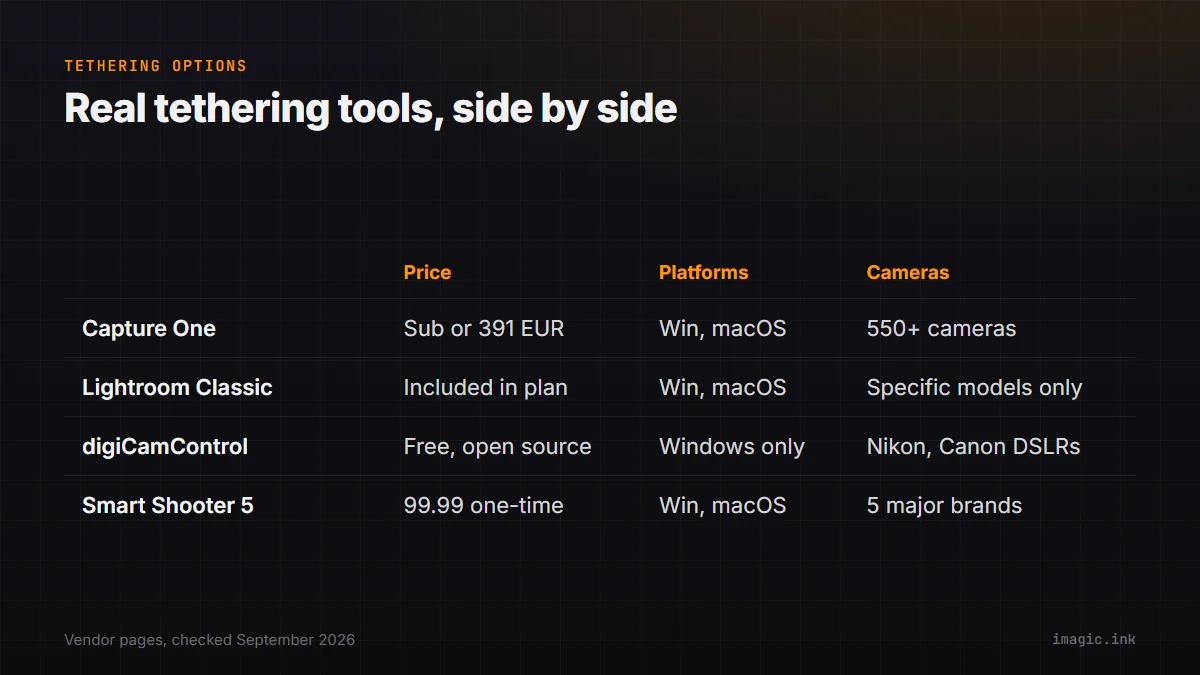
| Tool | Price | Platforms | Camera support |
|---|---|---|---|
| Capture One (Pro tier or higher) | Subscription or 391 EUR perpetual | Windows, macOS | 550+ cameras per vendor |
| Lightroom Classic (built in) | Included in a Lightroom Classic plan | Windows, macOS | Specific Canon, Nikon, Fujifilm, Leica, Sony models only |
| digiCamControl | Free, open source (MIT) | Windows only | Broad Nikon and Canon DSLR range |
| Smart Shooter 5 | 99.99 one-time, per computer | Windows, macOS | Canon, Nikon, Sony, Fujifilm, Ricoh |
What a same-day pairing actually looks like
The realistic answer for a studio that wants to stop paying for Capture One but still needs tethering is not "replace Capture One with imagic." It is pairing a dedicated tethering tool, whichever one matches your budget and camera brand, with a separate fast culling pass once the shoot wraps. Shoot tethered through digiCamControl or Smart Shooter, capture straight to a folder on the same machine, then run that folder through imagic's AI scoring and duplicate grouping the same day, before moving into batch editing and export. That division of labor plays to each tool's actual strength: live capture feedback during the session, automated triage immediately after it, rather than asking one application to do both.
What that pairing actually costs against staying on Capture One
Put a real number on it: digiCamControl costs nothing, and an imagic Plus license is a one-time 49 EUR, for a combined one-time cost of 49 EUR if your camera is Nikon or Canon and Windows-only is acceptable. Smart Shooter 5 plus imagic Plus comes to roughly 149 EUR one time (99.99 USD plus 49 EUR, left unconverted since they are quoted in different currencies by each vendor) if you need Sony, Fujifilm, or Ricoh support, or macOS. Compare that against Capture One Pro's own subscription math from a separate piece on this site: 738.00 EUR over three years, or 1,008.00 EUR over three years on the All in One tier that adds features like cloud shared settings a solo studio may never touch. The gap is real, but so is the reason it exists: Capture One's higher price buys one integrated application instead of two, plus the advanced tethering extras and color-grading depth neither digiCamControl nor Smart Shooter attempts to offer.
Who should not make this switch
If your studio's tethering needs go beyond basic capture, Capture One's own feature comparison lists Live View, camera controls, automatic next-capture backup, and multiple client viewer screens as part of its subscription tiers, none of which a standalone tethering tool or imagic replicates. A studio running client-present sessions with real-time collaboration tools, multiple simultaneous viewers, or automated capture backup built into the workflow is better served staying on Capture One, or evaluating its cost against what those specific features are worth to your business, rather than assembling a lower-cost stack that is missing pieces you actually use.
The same logic applies to camera-support breadth. Capture One's own 550-plus-camera list, and its wireless tethering support that continues to expand to new Canon and Hasselblad bodies through 2026, is genuinely hard for a smaller, single-developer tool to match model for model. If your studio shoots with a wide, changing mix of camera bodies across different jobs, that breadth of guaranteed support has real value beyond what any per-tool feature list captures, since a tethering tool that does not yet support next year's camera purchase is a real risk to a business that depends on it working on day one of a shoot.
For the fuller feature-by-feature breakdown, see imagic vs Capture One. Photographers weighing Lightroom Classic's narrower tethering list against Capture One's broader one can also check imagic vs Lightroom Classic, and studio and product photographers more broadly may find imagic for product photography useful for the post-shoot side of this workflow. The Software Comparisons category has more honest gap-acknowledgment pieces like this one.
Frequently asked questions
Does imagic support tethered shooting?
No. imagic has no live tethering feature. It is built for AI-assisted culling and RAW editing after a shoot, not for a live camera-to-computer connection during capture.
What is the cheapest genuine tethering tool available?
digiCamControl is free and open source under the MIT license, covering a broad range of Nikon and Canon DSLRs on Windows only. Smart Shooter 5 costs 99.99 one-time per computer and adds Sony, Fujifilm, and Ricoh support on both Windows and macOS.
Can Lightroom Classic replace Capture One for tethering?
Only if your specific camera is on Adobe's own supported list, which is narrower than Capture One's 550-plus-camera coverage. Check your exact model against Adobe's published list before assuming it is covered.