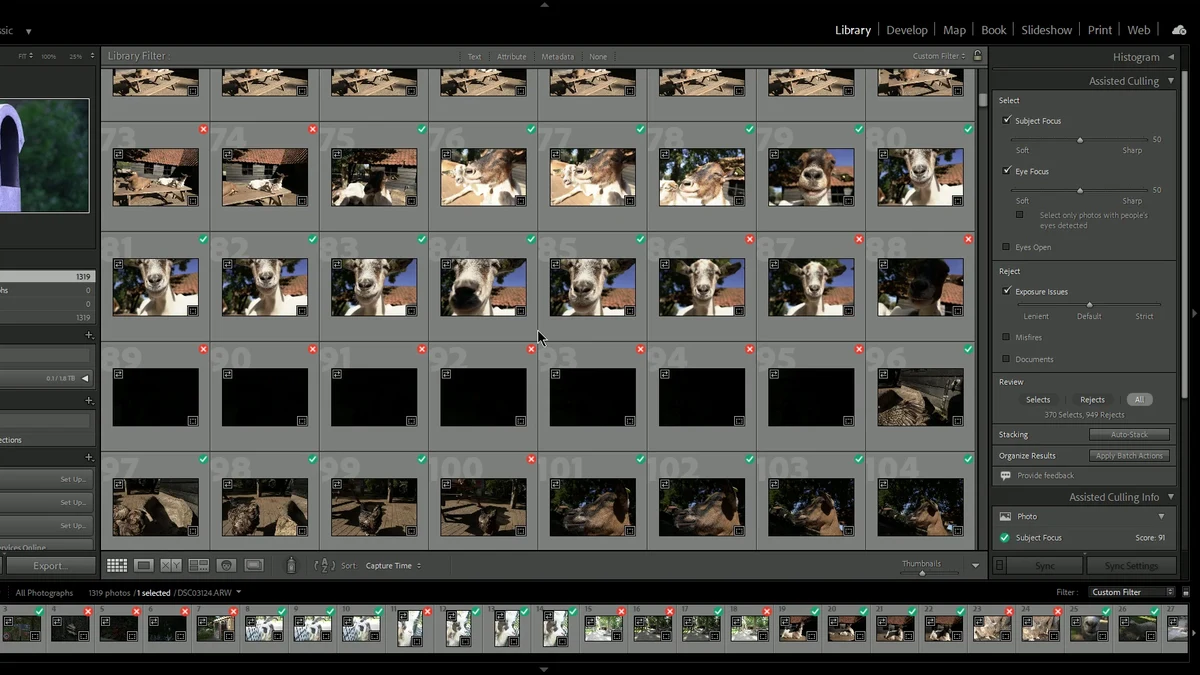
Disclosure: imagic makes this post, and imagic is one of the two tools in it. Photographers keep asking whether Lightroom Classic's Assisted Culling is enough, or whether a separate culling tool earns its place. We ran both on one folder and wrote down what happened, including the parts that do not flatter imagic. This is a count of what each tool produced, not a verdict on which one chose better photos.
What we ran
The test set is 1,319 Sony A7 III ARW files from a personal travel folder, shot by imagic's founder as a hobby. None of the frames contain people: street scenes, buildings, birds, farm animals, roads and sky. That matters, and we come back to it below.
- Lightroom Classic 15.5, Assisted Culling: Subject Focus, Eye Focus and Exposure Issues switched on at their default strength. Misfires and Documents switched off. Adobe's settings change the result, so a different combination gives different counts.
- imagic, build 700f90f: default settings, no tuning.
Both ran on the same Windows PC.
How Lightroom Classic's Assisted Culling works
Assisted Culling sorts every photo into one of two outcomes: Select or Reject. According to Adobe's own walkthrough, you choose what counts as a keeper with Subject Focus and Eye Focus (each with a sensitivity slider) and an Eyes Open option, and you choose what counts as a reject with Exposure Issues, Misfires and Documents. Options can be combined. Afterwards you can review the Selects and Rejects, override single photos, and apply a flag, star rating or colour label to everything in either group.
Adobe describes the feature in an early access thread on its community forum. That thread says it began with individual portraits, was extended to multi-person scenes such as weddings and events, and that those are the cases that work best today. It is included in an existing Lightroom subscription at no extra charge, per the same thread. The Adobe walkthrough also tells you to check the Rejects yourself.
How imagic's culling works
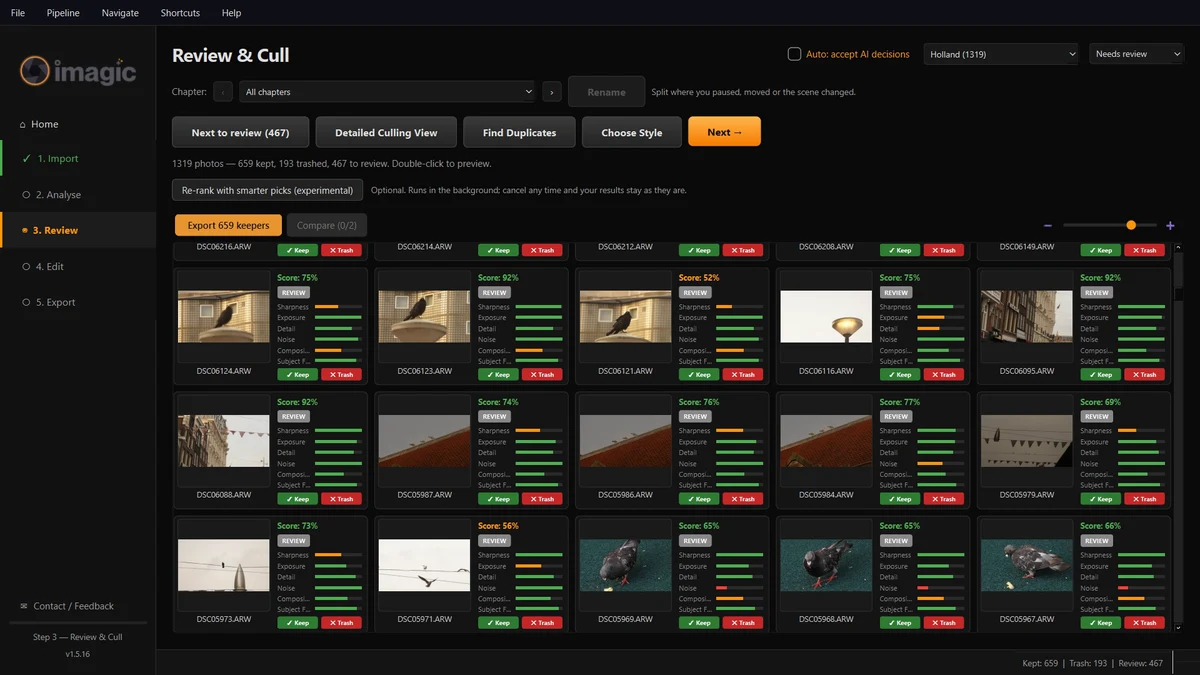
imagic is a desktop app for Windows and macOS. It scores each frame for sharpness, exposure, noise, composition and detail, checks whether the subject is in focus, and detects closed eyes when faces are present. It also groups bursts and near-duplicates into moments and keeps the strongest frame of each one. The result is three piles instead of two: Keep, Review and Trash. Review is the middle pile, for frames that are fine on their own but have a better sibling in the same moment, or that sit close to the line. Each card shows its score and the individual measures behind it.
Photos are processed on your own computer and are not uploaded to imagic.
The numbers
| Tool | Output | Result |
|---|---|---|
| Lightroom Classic 15.5 Assisted Culling | Select / Reject | 370 selects, 949 rejects |
| imagic (build 700f90f, defaults) | Keep / Review / Trash | 659 keep, 467 review, 193 trash |
Both rows add up to 1,319. On speed, imagic took 253 seconds from import to finished results on this PC with CPU boost switched off. We are not giving a Lightroom time, so there is nothing to compare that against and this is not a speed claim.
What these numbers do not tell you
- The counts are not directly comparable. Lightroom answers a yes or no question for every frame. imagic adds a Review pile and keeps the best frame of each moment, so its Keep number and Lightroom's Select number are measuring different things.
- Nobody has compared the two sets photo by photo. Lightroom's per-photo results were not exported, so we cannot say which tool picked better photos, and we are not implying either one did.
- The set has no people. Adobe built Assisted Culling around portraits and groups, and the eye options do nothing on a folder like this. A wedding or portrait folder could behave very differently from this one.
- Settings move the counts. Switching on Misfires, or changing a slider, would give another Lightroom result. We report one configuration.
- One set, one run each. This is one folder from one camera, not a benchmark.
The honest way to use this: treat it as a picture of how the two tools behave on a travel folder, then run your own shoot through both. Our guide to testing AI culling on your own photos shows a fair way to do that.
When Lightroom is the better choice
- Your photos already live in a Lightroom Classic catalog. Assisted Culling writes flags, ratings and labels straight into it. There is no import, export or hand-off step.
- You already pay for Lightroom. Adobe says the feature is included, so trying it costs nothing extra.
- Your work is portraits or people-led events. That is where Adobe says the feature is aimed, and a two-way Select or Reject call is simple to act on.
- You want to stay in one app for culling, editing, keywording and printing.
If that is you, there is little reason to add anything. Our imagic vs Lightroom Classic page covers the wider differences.
When imagic fits instead
- You do not want a catalog. imagic takes a shoot from card to export without one. It is not a long-term archive manager, and it is a new product from a one-person company.
- You like a middle pile. Keep, Review and Trash, with the score and the reasons on each card, suits people who want to see why a frame was parked.
- You shoot bursts and want one frame per moment chosen for you, with the rest grouped behind it.
- You prefer to buy once. imagic is a one-time purchase: Lite 19 EUR, Plus 49 EUR or Max 99 EUR, with no subscription. The free trial covers 500 exports and needs no card; importing and culling never count toward it.
The two are not exclusive. imagic can write Lightroom Classic XMP sidecars on export, so you can cull in one and edit in the other. Prices and the trial are on the download page, and our roundup of culling software sets imagic beside the other options.
Frequently asked questions
Is Lightroom Classic's Assisted Culling free?
Adobe says it is included in an existing Lightroom subscription at no extra charge. You still need the subscription itself, and Adobe labelled the feature early access in the thread linked above.
Did this test show whether imagic or Lightroom picks better photos?
No. The two result sets were never compared photo by photo, and Lightroom's per-photo results were not exported. The counts show how each tool sorted one folder, nothing more.
Why does imagic have three piles when Lightroom has two?
imagic groups similar frames into moments and keeps the strongest of each, so frames with a better sibling, or close to the line, land in Review for a quick look instead of being forced into Select or Reject.