
Photo culling software exists to solve one problem: you shot 2,000 frames and need to find the 300 worth editing, fast. The category has split into two real camps over the last few years, AI-scoring tools that rank and filter automatically, and speed-browsing tools built for a human to flip through frames as quickly as possible. The best photo culling software for you depends on which camp actually matches how you review a shoot, not which tool has the longest feature list. Here is an honest look at eight tools working photographers actually use in 2026: imagic, Aftershoot, Narrative Select, FilterPixel, Photo Mechanic, Lightroom's flag and reject system, Adobe Bridge, and FastRawViewer.
AI Scoring vs Manual Speed Browsing
AI-scoring tools (imagic, Aftershoot, Narrative Select, FilterPixel) analyze sharpness, exposure, closed eyes, and near-duplicate bursts, then rank or filter the shoot for you. You review a shortlist instead of every frame. Speed-browsing tools (Photo Mechanic, Bridge, FastRawViewer) do not score anything; they exist to load and display RAW files as fast as possible so a human can flag, reject, and caption at speed. Lightroom's built-in flag and reject workflow sits in between: it is manual, but it lives inside the editor you are probably already using, so there is no extra app to open. For the mechanics behind AI scoring specifically, see How AI Photo Culling Works.
The Eight Tools, Side by Side
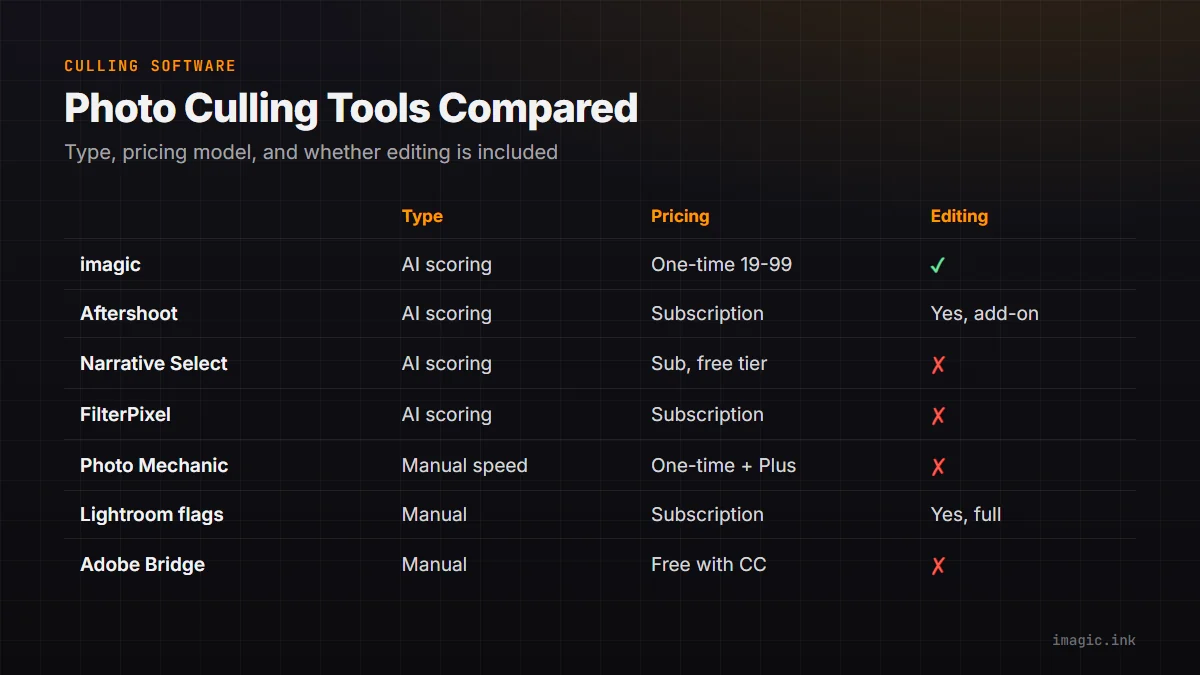
| Tool | Type | Pricing model | Editing included |
|---|---|---|---|
| imagic | AI scoring + duplicates | One-time (Lite 19, Plus 49, Max 99 EUR) | Yes, batch + styles |
| Aftershoot | AI scoring + duplicates | Subscription | Yes, AI editing add-on |
| Narrative Select | AI scoring + duplicates | Subscription, free tier available | No |
| FilterPixel | AI scoring + duplicates | Subscription | No |
| Photo Mechanic | Manual speed browsing | One-time, plus optional Plus subscription | No |
| Lightroom flags | Manual, built into editor | Subscription (Creative Cloud) | Yes, full editor |
| Adobe Bridge | Manual browsing | Free with Creative Cloud | No |
| FastRawViewer | Manual speed browsing | One-time | No |
Who Each Tool Actually Suits
Aftershoot suits studios that want AI culling and are comfortable paying monthly for continuously updated models; its AI editing add-on is a genuine strength worth crediting fairly. Narrative Select suits Mac-based photographers who want a lighter, assessment-focused interface and are willing to try the free tier before committing to a plan. FilterPixel suits photographers who mainly want duplicate and focus detection without touching an editor at all. Photo Mechanic remains the fastest tool built for wire-speed IPTC captioning and browsing, genuinely unmatched at that one job, but it will not score or edit a single frame for you. Bridge is a reasonable free option if you already pay for Creative Cloud and do not need AI scoring. FastRawViewer is a solid one-time-purchase choice for photographers who just want fast, accurate RAW previews for manual review.
Where imagic Fits
imagic combines AI quality scoring, duplicate and burst grouping, and batch editing with one-click styles in a single one-time-purchase app (Lite EUR 19, Plus EUR 49, Max EUR 99), processing everything locally so photos never leave the machine. That makes it a fit for photographers who want culling and editing under one roof without a recurring fee. It is not a fit if you specifically need Photo Mechanic's wire-deadline speed and IPTC workflow, or Aftershoot's AI editing subscription; both of those are genuine strengths of their respective tools. See the fuller imagic vs Aftershoot comparison and imagic vs Narrative Select comparison for feature-by-feature detail, and browse more software comparisons on the blog.
How to Actually Choose
Start with what slows your workflow down today. If it is scrubbing through thousands of frames by eye, an AI-scoring tool will save the most time. If it is captioning and wire deadlines, Photo Mechanic's speed is hard to beat. If budget certainty matters more than the newest model updates, one-time tools such as imagic, Photo Mechanic, or FastRawViewer avoid a recurring line item; if you want continuously improving AI and do not mind paying monthly, a subscription tool like Aftershoot or FilterPixel makes more sense. Most working photographers are well served by trying the free tier or trial of two or three tools on the same real shoot rather than picking from a feature table alone.
Frequently asked questions
Is AI culling accurate enough to trust without review?
It is reliable for clear misses like blur, closed eyes, or blown highlights, but not for subjective calls like composition or expression. Treat any AI-scoring tool's output as a shortlist to review, not a final decision.
Can I use a speed-browsing tool and an AI culling tool together?
Yes, some photographers use Photo Mechanic for immediate wire selects and an AI tool for the full-shoot cull afterward; there is no rule against running both in one workflow.
Does a one-time purchase mean no future updates?
Not necessarily, though it varies by vendor. Check each tool's specific update policy for license holders before assuming either way.
Try imagic free for 500 exports, no card required, to see how AI culling and batch editing compare on your own shoot. Start the free trial.