Photo Mechanic has been the tool photojournalists and wedding shooters reach for when a shoot day ends and a folder of RAW files needs to become a captioned, delivered set fast. Camera Bits confirmed in March 2026 that Photo Mechanic Plus, the higher tier with a built-in catalog, is no longer available for purchase because the catalog feature relied on third-party technology the company could not keep stable across operating system updates. Standard Photo Mechanic is unaffected and continues to be developed and sold. That announcement, combined with photographers simply wanting a faster review step than manual browsing, is why searches for a photo mechanic alternative have picked up. This is not a takedown of Photo Mechanic. It is a straight look at what it still does better than almost anything else, and where five real alternatives, including imagic, actually fit.
What Photo Mechanic still does better than almost anything else
Photo Mechanic's core job is ingest and review at speed: pointing it at a card or folder and getting a fast, responsive contact sheet of thousands of RAW or JPEG files, even on modest hardware, without waiting on full previews to render. Its IPTC and XMP metadata tools, stationery templates for recurring caption fields, and variables for auto-filling job numbers or credit lines, are built specifically for photographers on a deadline who need accurate captions attached before a file goes out the door. For wire photographers and anyone under a strict same-day delivery requirement, that combination of raw ingest speed and captioning has no direct equivalent among the AI-first culling tools below. None of them replace it if captioning speed under deadline is the actual job.
Why photographers are shopping for alternatives right now
Three separate pressures are pushing this search. The Plus discontinuation left some subscribers wondering what happens to their catalog data, even though Camera Bits says existing Plus subscriptions will keep working and receiving support for as long as the software stays stable on the subscriber's operating system, with no forced cutoff date announced. Second, Photo Mechanic's own pricing has shifted toward subscription options alongside its perpetual license, which some longtime users are reconsidering against their actual usage. Third, and most common, is a workflow mismatch: photographers whose real bottleneck is not captioning at all, but deciding which of two thousand nearly identical frames to keep, are discovering Photo Mechanic has no AI quality scoring, no closed-eye detection, and no duplicate or burst grouping. It was never built to do that job, and it does not pretend to.
Aftershoot: local culling and editing, sold in modules
Aftershoot splits its product into separate AI modules, culling (branded Select), editing (Edit), and retouching (Retouch), sold individually or bundled, with local processing on the photographer's own machine and an offline mode for working without a stable connection. That local-first design is the closest philosophical match to Photo Mechanic among the AI tools here: files are not uploaded to run the culling pass. Where it departs from Photo Mechanic entirely is the review model itself, an AI quality and similarity pass instead of a manual contact sheet, and Aftershoot has no IPTC captioning or wire-transmission tooling built for deadline delivery. Current published pricing runs by module rather than one flat tier; check the current breakdown directly before comparing it to a Photo Mechanic subscription, since Aftershoot restructured its plans around separate culling, editing, and retouching purchases.
Narrative Select: subscription-only desktop culling and editing
Narrative Select runs as a native desktop application on both Mac and Windows, with tiers from a basic culling-only Lite plan up through Premium and Ultra tiers that add AI editing presets and multiple user seats. As of September 2026 it is subscription-only, with no perpetual or lifetime license offered, which is worth flagging for anyone specifically leaving Photo Mechanic because they want to stop paying monthly for photo software. It exports directly to Lightroom, Photoshop, and Capture One, which keeps it compatible with an existing edit-and-deliver pipeline built around any of those tools.
FilterPixel: cloud-processed AI culling
FilterPixel takes the opposite architectural approach from Photo Mechanic and Aftershoot: photos are uploaded and the culling pass runs on FilterPixel's own cloud infrastructure rather than the photographer's computer, so turnaround does not depend on local hardware. FilterPixel's own published guide states it processes roughly 1,000 photos in about 60 seconds once uploaded, and the company reports internal accuracy testing on its own standardized gallery at 94.7 percent correctly flagged keepers and 96.1 percent correctly flagged rejects; those are FilterPixel's self-reported figures, not an independent benchmark, so treat them as a starting point for your own evaluation rather than a guarantee. As of September 2026, published plans run from a Standard tier at 14.99 dollars a month billed annually up through a Studio tier for teams at 64.99 dollars a month billed annually, each including a set number of its higher-accuracy DeepCull passes per month plus unlimited basic AI culling. The tradeoff against a local tool is straightforward: upload time depends on your connection, and photos leave the machine during processing, which will matter to anyone shooting under a client contract that restricts where images are transmitted.
digiKam: a free, open-source way to browse and tag
digiKam is free and open source, runs on Windows, macOS, and Linux, and is built around tagging, star ratings, face recognition, and metadata management rather than AI quality scoring. For photographers whose actual need from Photo Mechanic was fast browsing and organized metadata, not captioning under a wire deadline, digiKam covers a meaningful part of that job at no cost. It has no AI-driven culling, no duplicate-burst grouping, and nothing resembling Photo Mechanic's stationery-template captioning workflow, so it suits a slower, more manual review pace better than a deadline newsroom pipeline.
imagic: AI-scored culling at a one-time price
imagic runs locally on Windows and macOS, with sharpness and closed-eye quality scoring plus duplicate and burst grouping handled entirely on the photographer's own machine, nothing uploaded during the culling pass. It is sold as a one-time license (Lite, Plus, or Max in EUR, priced as of September 2026 on the pricing page linked below) rather than a subscription, with a free trial metered by photo count rather than a countdown of days. Being direct about the gap matters here: imagic has no ingest-speed tooling built for wire deadlines, no IPTC stationery templates, and no dedicated captioning workflow, so a photojournalist whose real job is same-day captioned delivery is better served staying on Photo Mechanic for that part of the day. Where imagic fits is the review pass that follows, or replaces, manual browsing: scoring a shoot for sharpness and closed eyes and grouping near-duplicate bursts, which is a different problem than the one Photo Mechanic was built to solve.
What switching actually involves
Moving off Photo Mechanic is rarely a same-day swap, and it is worth planning for that rather than discovering it mid-shoot. Photo Mechanic's stationery templates and IPTC variables, if you have built a captioning routine around them over the years, do not carry over to any of the AI culling tools above; none of them are trying to replicate that workflow. Camera and RAW format compatibility is a separate check worth doing before switching rather than after: Photo Mechanic reads camera RAW formats through its own long-maintained preview engine and generally supports new bodies quickly after release, while AI culling tools each maintain their own list of supported formats and can lag behind a brand-new camera by weeks or months, so it is worth checking a shortlisted tool's supported-camera and RAW-format list against your specific body before committing a workflow to it, rather than assuming coverage matches Photo Mechanic's. The safest migration path for most photographers is running the new tool alongside Photo Mechanic on a couple of real shoots before retiring the old routine entirely, rather than switching cold on a paying job.
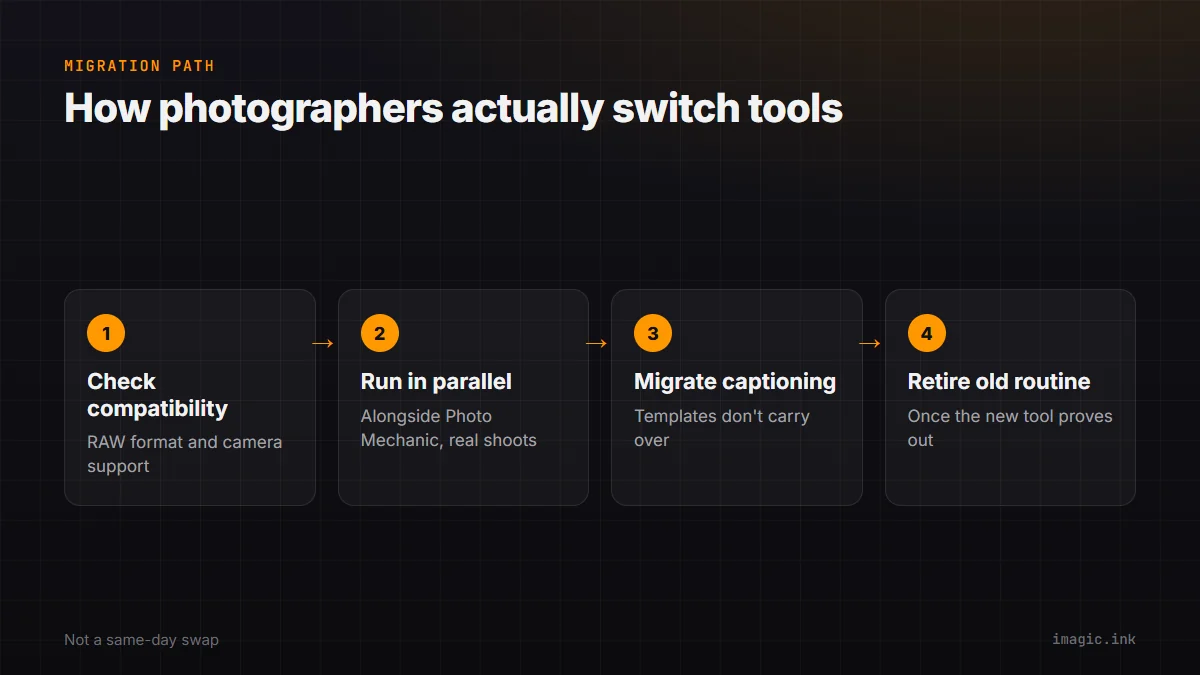
Photo Mechanic alternatives compared
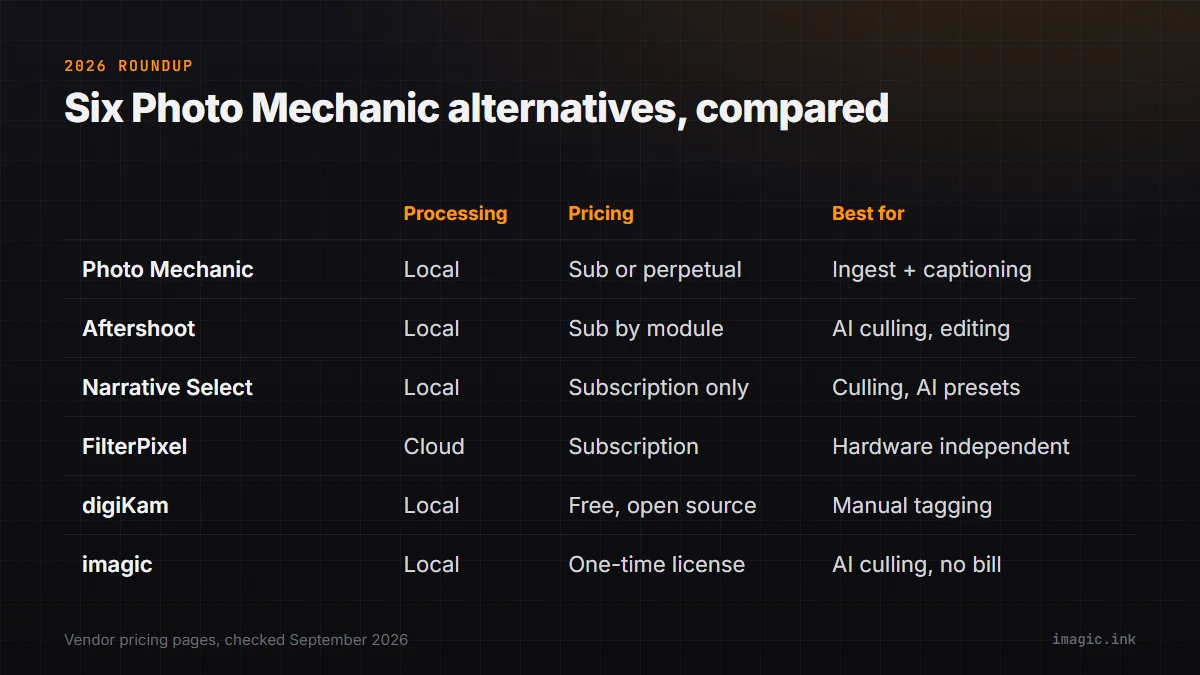
| Tool | Processing | Pricing model | Best for |
|---|---|---|---|
| Photo Mechanic | Local | Subscription or perpetual license | Fast ingest and IPTC captioning under deadline |
| Aftershoot | Local | Subscription, sold by module | Local AI culling bundled with AI editing |
| Narrative Select | Local | Subscription only | Desktop AI culling with editing presets included |
| FilterPixel | Cloud | Subscription | Hardware-independent culling at high volume |
| digiKam | Local | Free, open source | Manual browsing, tagging, and metadata at no cost |
| imagic | Local | One-time license | AI-scored culling without a recurring bill |
Matching the tool to the job you actually have
The honest starting point is timing your own last three shoots: if most of the review time goes to writing captions and getting files transmitted before a deadline, nothing here replaces Photo Mechanic, and switching away from it would be solving the wrong problem. If most of that time goes to scrolling through near-identical frames deciding what is sharp, well-exposed, and not a duplicate of the one next to it, that is the job an AI-scoring tool was built for, and the local-versus-cloud and subscription-versus-one-time choices above become the real decision. Plenty of working photographers reasonably run two tools rather than one, Photo Mechanic for same-day wire captioning and a separate AI-culling pass for the fuller review afterward, since those are genuinely different jobs that happen to both involve looking at photos. A useful gut check before spending money on either: pull up the last shoot you delivered and count minutes, not frames, since a small percentage of a long editing session can still be a large absolute number of hours across a full year of shoots, and that yearly total is what any of these subscriptions or one-time licenses actually need to earn back.
For a full feature-by-feature side-by-side, see the imagic vs Photo Mechanic comparison page, and the Aftershoot comparison covers the closest local-processing alternative in more depth. A broader look at how the scoring pass works is in AI Culling vs Fast Ingest, and the software comparisons section has the rest of the site's tool-by-tool breakdowns. Pricing and the free trial are on the desktop app page.
Frequently asked questions
Is Photo Mechanic Plus completely gone?
Photo Mechanic Plus is no longer available for new purchase as of March 2026, because its catalog feature depended on third-party technology Camera Bits could not keep stable. Standard Photo Mechanic is unaffected, and existing Plus subscribers keep support and access for as long as the software remains stable on their operating system.
Do any of these alternatives also handle IPTC captioning like Photo Mechanic?
Narrative Select and Aftershoot both export to standard editing tools but neither is built around Photo Mechanic's stationery-template captioning and wire-transmission workflow. For deadline captioning specifically, Photo Mechanic remains the tool built for that exact job.
Does imagic replace Photo Mechanic for a working photojournalist?
Not for the ingest and captioning part of the job. imagic handles the review pass, AI quality scoring, closed-eye detection, and duplicate grouping, locally and at a one-time price, but it has no wire-deadline captioning tools, so many photojournalists reasonably keep Photo Mechanic for same-day delivery and use a culling tool separately.