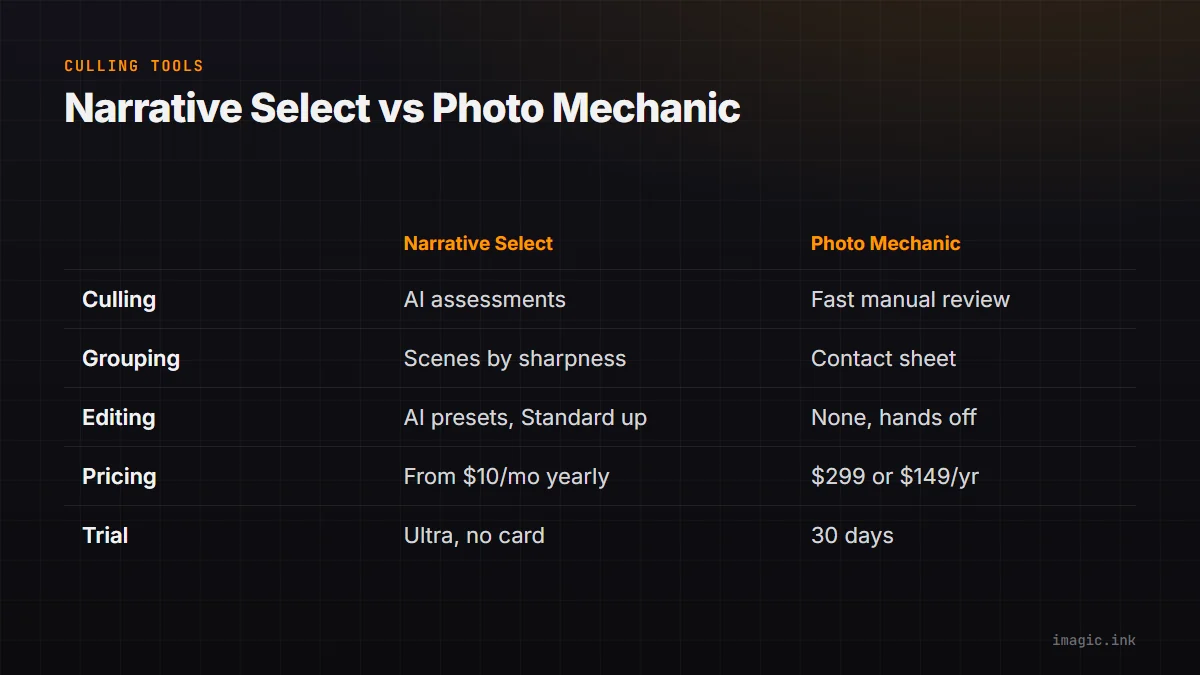
Narrative Select and Photo Mechanic get compared because both sit in the same place in a workflow: between the memory card and the editor, where a few thousand frames have to become a few hundred keepers. They solve that job in opposite ways. Photo Mechanic is built to make a person review every frame as fast as possible. Narrative Select uses AI to tell you which frames are weak before you look. Which one fits depends far more on how you shoot and deliver than on any single feature, so this comparison starts with method, then cost, then who each suits. Prices and features below were checked on each vendor's own site on 25 October 2026.
Two different answers to the same job
Photo Mechanic, from Camera Bits, has been the deadline tool of photojournalists and sports photographers for a long time. Its pitch is speed of display: it reads the preview embedded in each RAW file, so the next frame appears the moment you press a key, and everything else (tagging, ratings, colour classes, captions, IPTC metadata, renaming on ingest) is driven from the keyboard. It does not decide anything for you. You look at every frame, and the software makes looking fast.
Narrative Select starts from the other end. Per Narrative's own Select page, it runs focus and eye assessments on each image, shows a Close-ups panel that zooms to faces (or to a key element when there is no face), and groups frames into Scenes ranked by sharpness with the best one first. It also flags weaker images so you can hide them, which Narrative says means looking at 20 to 30 percent fewer images per shoot. You still make the final call, but you make it on a shorter, pre-sorted list.
So the honest framing is not "which is faster". Photo Mechanic is faster at showing you every frame. Narrative is trying to make sure you do not need to see every frame.
How culling actually feels in each
In Photo Mechanic, a typical pass is: ingest from the card with renaming and metadata applied, then go through the contact sheet with the arrow keys, tagging keepers or assigning star ratings, then filter to the tagged set and hand it to the editor. The speed comes from the preview rendering and from muscle memory. A photographer who has used it for years can move through a card extremely quickly, and nothing in the software slows that down to "think". The trade-off is that the attention cost stays with you: blinks, missed focus and near-duplicates are caught by your eyes, frame by frame.
In Narrative Select, a pass looks more like: import, let the assessments run, then work scene by scene. Within a burst or a group of similar frames, the sharpest is shown first and the close-up panel lets you check eyes and focus on every face without zooming manually. Weak frames can be hidden. The People filter, per Narrative's page, lets you name detected faces and filter a shoot by person, which matters at events where a client wants every frame of particular guests. The trade-off is the opposite one: you rely on the assessments being right for your kind of work, and you should check them on a real shoot of your own before trusting them on a paid job.
What happens after the cull
Neither app is where most photographers finish their images. Photo Mechanic is a viewer, tagger and metadata tool: it does not develop RAW files, so the selects go on to Lightroom, Capture One or another editor. Photo Mechanic Plus adds catalog features for searching across past shoots.
Narrative ships selects to Lightroom Classic and Lightroom in one click, and to Photoshop and Capture One on Mac. Narrative has also grown into editing: from its Standard plan up, it includes AI presets you can apply as you ship to Lightroom, and Premium and Ultra add presets trained on your own past edits. That is a real difference in scope. Photo Mechanic deliberately stays a front-end; Narrative now sells culling and AI-preset editing together.
Both read the common RAW formats. Narrative lists CR2, CR3, NEF, ARW, RAF, ORF, RW2, PEF, DNG and several others plus HEIC from recent bodies, on macOS and Windows.
Cost: subscription against licence
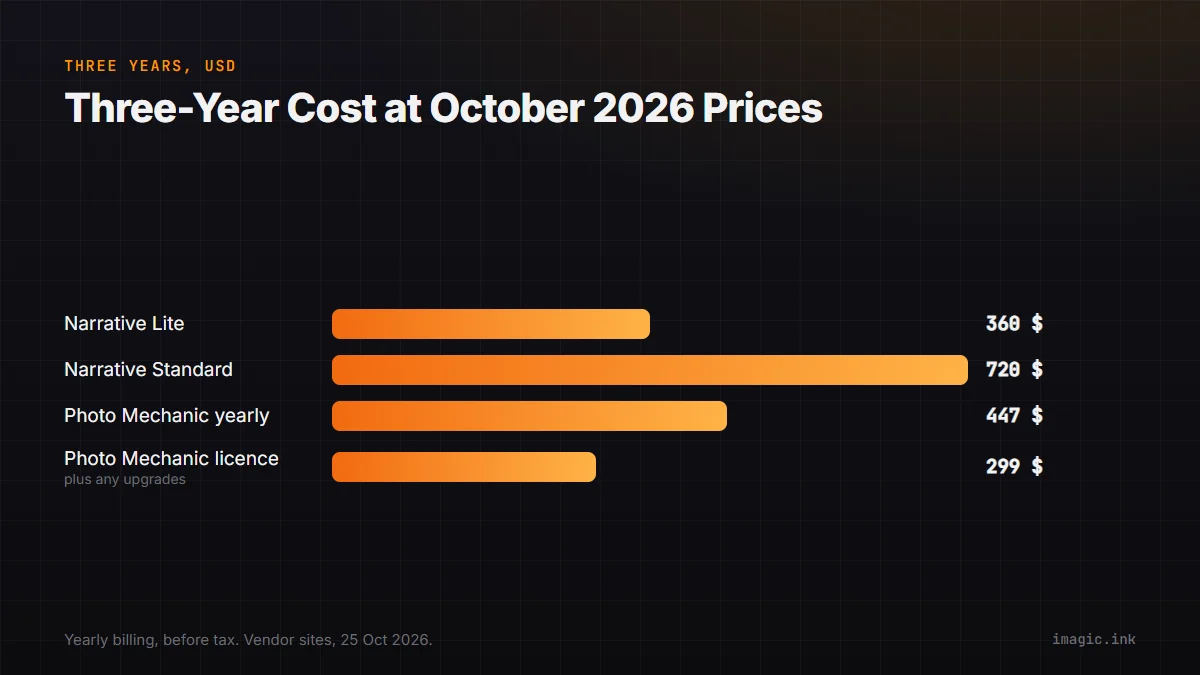
This is where the two differ most, and it is the part most comparisons get out of date. Figures below are USD from Narrative's pricing page and Camera Bits' store page, checked 25 October 2026, before any sales tax or VAT.
| Product and plan | Price | Three years |
|---|---|---|
| Narrative Lite (culling only) | $10/month yearly, $15 monthly | $360 yearly billing |
| Narrative Standard (AI culling, Scenes, Close-ups) | $20/month yearly, $29 monthly | $720 yearly billing |
| Photo Mechanic subscription | $149/year or $14.99/month | $447 yearly billing |
| Photo Mechanic licence | $299, 1 year of updates | $299 plus any later upgrades |
| Photo Mechanic Plus licence | $399, 1 year of updates | $399 plus any later upgrades |
Two details matter when reading that table. First, Narrative's Lite plan is the cheap entry, but the features most people buy Narrative for (the advanced AI culling, Scenes view and Close-ups panel) start at Standard, per Narrative's own FAQ, so Standard is the fair comparison for an AI culling buyer. Second, a Photo Mechanic licence keeps working after the first year; what the year covers is updates and support. Whether you then pay for later upgrades is your choice, which is why the three-year column for the licence says "plus any later upgrades" rather than a number.
Seats differ too. Narrative's Lite and Standard are for one active user; Premium covers up to two and Ultra up to four. Photo Mechanic licences are single user on up to two computers.
Trials
Both can be tried before paying. Narrative starts every new account on a free trial of its top Ultra plan with no card; the pricing page does not state how long the trial lasts. Photo Mechanic offers a 30-day trial, one per customer, and its subscriptions start immediately with no trial. Use the trial on a full real shoot, not a handful of test frames: culling software only shows its strengths or weaknesses at volume.
Privacy and where your images go
Photo Mechanic is desktop software that works on files on your drives. Narrative states in its help centre that culling and AI assessments happen on your computer, and that images are only uploaded for features that need it: training Personal AI Presets uploads your edited images and edit data, and there is an opt-in "Help improve Narrative" setting. If you photograph sensitive work, those two switches are the ones to know about.
Who each one suits
- Photo Mechanic suits photographers on a deadline who want to see every frame, rely on captions and IPTC metadata (press, sports, agencies), and already know its shortcuts. It also suits anyone who prefers paying once for a licence over a plan.
- Narrative Select suits high-volume people photographers (weddings, events, portraits) where faces, blinks and bursts are the bulk of the decisions, and who are already in Lightroom and want culling and preset editing from one vendor on a monthly plan.
If neither fits, because you want AI culling but not a subscription, or you would rather not keep a second editor in the chain at all, there is a third shape. imagic scores sharpness, closed eyes and composition, groups bursts and duplicates, and then develops and exports the RAW files itself, all on your machine, for a one-time EUR 19 to 99 with a free 500-export trial and no card. It is not a Photo Mechanic replacement for metadata-heavy press work; the imagic and Photo Mechanic comparison is explicit about that. Our older imagic vs Narrative Select write-up and whether Photo Mechanic is worth its price go deeper on each side, and the rest of the head-to-heads are in Software Comparisons.
Frequently asked questions
Is Narrative Select faster than Photo Mechanic?
At displaying frames, Photo Mechanic is the benchmark, because it reads the embedded previews and every action is a keystroke. Narrative aims to save time differently, by ranking frames within scenes and hiding weak ones so you review fewer. Which finishes a shoot sooner depends on how many frames you would have rejected anyway.
Does Photo Mechanic have AI culling?
Photo Mechanic is built around fast manual review: previews, tags, ratings, colour classes and metadata, with you making every decision. Narrative Select's focus and eye assessments, close-ups and scene ranking are the kind of automated help Photo Mechanic does not centre its product on. Check Camera Bits' current release notes if a specific feature matters to you.
Which is cheaper over three years?
At October 2026 prices, a Photo Mechanic licence at $299 is cheaper than three years of Narrative Standard on yearly billing ($720), and even Narrative Lite ($360) costs more over three years. Photo Mechanic's $149 yearly subscription comes to $447. The licence includes one year of updates; later upgrades are optional and extra.