Mylio and imagic get compared because both promise to save photographers from Lightroom-style subscription fatigue, but they are built for opposite ends of a photo's life. Mylio's job is holding and syncing an entire photo library, potentially decades of it, across every device you own, with or without the cloud. imagic's job is triaging one shoot's worth of new RAW files fast, right after you take them. Framing this as a straight competition undersells both tools; the more useful question is which one solves the problem you actually have right now. Neither vendor currently publishes a direct comparison against the other, so every claim here is checked against each product's own site rather than either one's marketing about the competition. Here is what each verifiably offers, as of September 2026.
What Mylio Photos is actually built for
Mylio describes itself as privacy-first media library software for organizing and preserving photos, videos, and documents across devices, without requiring a cloud-dependent ecosystem to keep everything in sync. Per Mylio's own site, it runs on Windows, macOS, iOS, and Android, and uses peer-to-peer connections between your own devices so a photo taken on a phone can show up on a home PC as soon as both are on and Mylio is running, without necessarily passing through a cloud server at all. Storage location stays under the user's control: local drives, connected computers, phones, or Mylio's own optional encrypted SecureCloud Vaults. Organization features include offline-capable face recognition, location and date-based sorting, duplicate detection, and full offline library search, all designed to keep working without an internet connection once photos are synced. Mylio also handles video and document files alongside photos in the same library, per its own site, which is a broader scope than a photo-only culling tool attempts.
That combination, local-first sync plus offline search, is the part of Mylio's pitch that sets it apart from a purely cloud-based photo library. A photographer does not need to trust a single company's servers to keep a library available; the library lives on the devices themselves, with cloud storage as an optional backup layer rather than the only copy. Mylio's duplicate detection also overlaps conceptually with a culling tool's job, though it is aimed at removing redundant files that have already accumulated across drives and devices over years, rather than comparing near-identical frames from a single shoot moments after they were taken.
What imagic is actually built for
imagic does not sync, back up, or store a long-term library at all; that is simply outside its scope. It is a desktop app for Windows and macOS that runs locally, scoring a fresh batch of RAW files for technical quality (sharpness, closed eyes, composition), grouping duplicates and bursts, and handling batch editing, one-click styles, and RAW processing through its own built-in engine, with no cloud sync, no mobile app, and no full digital asset management layer once a shoot has been culled and edited. Its job ends where Mylio's real strength begins: what happens to a photo months or years after the shoot.
The duplicate detection each tool does is also worth distinguishing. imagic's duplicate and burst grouping looks at visually similar frames taken moments apart within one shoot, the kind of near-identical sequence a fast shutter or a nervous subject produces. Mylio's duplicate detection is aimed at a different scale entirely: the same photo that ended up copied across an old laptop, a phone backup, and an external drive over several years. Both are legitimately called "duplicate detection," but they are solving different versions of the problem.
imagic's RAW handling is also worth stating plainly here, since Mylio's own materials focus on organization rather than RAW processing depth. imagic runs CR2, CR3, NEF, ARW, RAF, ORF, RW2, DNG, and PEF files through its own built-in RAW engine and exports to JPEG or TIFF; Mylio's job is storing and syncing whatever files exist, RAW or otherwise, without processing or converting them as part of that sync.
Mylio vs imagic at a glance
| Category | Mylio Photos | imagic |
|---|---|---|
| Primary job | Sync, back up, and organize an entire photo library across devices | Cull and RAW-edit a freshly shot set of photos |
| Platforms | Windows, macOS, iOS, Android | Windows and macOS (desktop only, no mobile app) |
| Pricing model (Sept 2026) | Photos+ subscription: Individual USD 25/month or USD 240/year; Pro (single user) USD 40/month or USD 480/year | One-time license: Lite EUR 19 / Plus EUR 49 / Max EUR 99 |
| Sync across devices | Yes, peer-to-peer and optional encrypted cloud vaults | No cloud sync; single-machine desktop app |
| Trial | 7-day free trial, 30-day money-back guarantee | 500-export free trial, no card required |
Source for Mylio pricing and platform details: Mylio's official support article on Photos+ pricing, checked September 2026.
What a Mylio subscription costs over time, compared to a one-time license
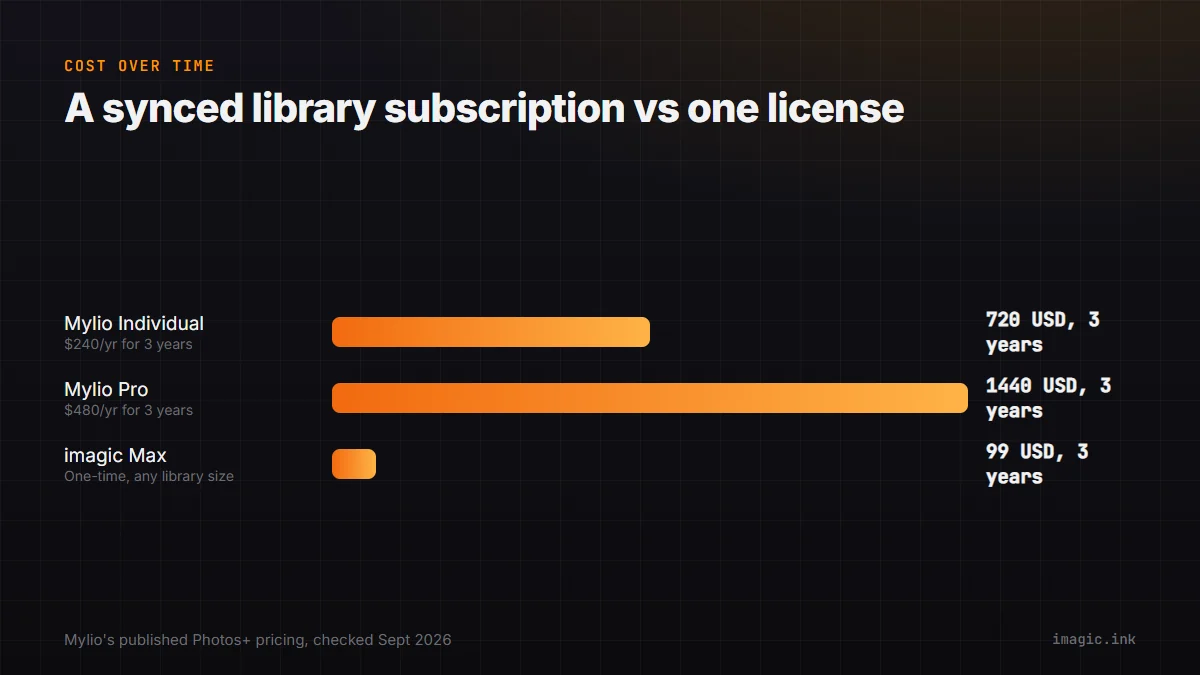
Mylio's Photos+ Individual plan runs USD 25 a month or USD 240 a year, and the Pro single-user plan runs USD 40 a month or USD 480 a year, both billed on an ongoing basis rather than as a one-time purchase. Over three years, the Individual plan alone totals USD 720 at the annual rate; the Pro plan totals USD 1,440. imagic's entire license range, Lite at EUR 19 up to Max at EUR 99, costs less than a single year of Mylio's cheapest paid tier. That is not really an apples-to-apples comparison, since Mylio is charging for ongoing sync infrastructure and cross-device access that imagic does not attempt to provide at all, but it is worth being explicit about what the subscription is actually paying for: continuous service, not a one-time culling and editing pass. The multi-user Duo and Family personal plans, and the custom team pricing above five business users, scale the ongoing cost further for a household or a studio with more than one person accessing the library, which is a cost category imagic simply does not have since its license covers one machine's use of the application rather than a shared, synced service.
What Mylio does that imagic does not
Cross-device sync is the headline gap. Mylio keeps a photo library consistent across a phone, tablet, and multiple computers, with offline access and optional encrypted cloud backup, none of which imagic attempts. imagic has no cloud sync and no mobile app at all; it is explicitly a single-machine desktop tool. If the actual problem is "I have photos scattered across three devices and no consistent way to find them," that is Mylio's job, not imagic's. Mylio's offline-capable face recognition also has no equivalent in imagic, which does not attempt any form of person identification or tagging across a library.
What imagic does that Mylio does not
Mylio is not built to evaluate the technical quality of a fresh shoot. It will organize, tag, and sync photos, but it will not score sharpness or flag closed eyes, will not group a burst of near-identical frames for quick comparison, and will not batch-process RAW files into a finished edit. imagic's local RAW engine and quality scoring are a first pass Mylio is not positioned to replace, and imagic's one-time pricing means there is no ongoing subscription tied to how many photos you store or how many devices you sync across. imagic also has no per-user or per-device pricing tier to think about at all; a solo photographer and a small two-person studio pay the same license price for the same tier, since the product is scoped to one machine's culling and editing work rather than a shared library service.
Trial terms are worth a brief note too, since they reflect how each company expects a prospective buyer to evaluate the product. Mylio's 7-day trial plus a 30-day money-back guarantee is standard subscription software practice: try it, then get a refund window if it does not fit. imagic's trial instead caps at 500 processed photos with no time limit and no card required upfront, which fits a one-time-purchase product better, since the thing being evaluated is the quality scoring itself rather than an ongoing service relationship.
Which tool solves which problem
These are genuinely sequential tools rather than competing ones, and the household use case makes that sequence even clearer than a solo photographer's workflow does. A family managing decades of phone photos, scanned prints, and video clips across parents' and kids' devices has a Mylio-shaped problem almost by definition, since that is precisely the cross-device, multi-decade scenario Mylio's peer-to-peer sync was built around. A shoot happens, gets culled and edited (imagic's job), and then the keepers join a long-term library that needs to survive across devices and years (Mylio's job). Photographers who already have a large, unsynced archive and are drowning in duplicate folders across old hard drives are more likely to feel Mylio's absence first; photographers sitting on a backlog of un-culled shoots are more likely to feel imagic's absence first. For a broader look at organizing software in the same category as Mylio, imagic's guide to backing up and organizing a photo library covers the general problem Mylio is built to solve, and the Software Comparisons category has the rest of imagic's head-to-head breakdowns. Anyone whose immediate problem is an unculled shoot can start with imagic's free 500-export trial.
It is also worth noting where the two tools would actively conflict if used carelessly rather than in sequence. Running a sync tool like Mylio on a folder of freshly imported, un-culled RAW files before a culling pass means every rejected frame still gets synced across every connected device first, wasting sync bandwidth and storage on photos that are about to be discarded. Culling first, with a tool like imagic, and only then letting the keepers join a synced library, keeps Mylio's cross-device sync focused on photos that are actually going to stay in the library long-term. The same logic applies to Mylio's face recognition and tagging: indexing rejected frames along with keepers just adds noise to future searches, so a culling pass first keeps the eventual archive smaller and more useful, not just cheaper to store.
Frequently asked questions
Does Mylio replace a culling tool like imagic?
No. Mylio organizes, syncs, and backs up a photo library across devices, but it does not score technical quality, group bursts, or process RAW files the way a culling tool does. Most photographers with a Mylio library still need a separate first-pass culling step for new shoots.
Does imagic sync photos across my phone and computer like Mylio?
No. imagic has no cloud sync and no mobile app; it is a desktop-only app for Windows and macOS that processes one machine's worth of photos locally.
Is imagic cheaper than Mylio?
As of September 2026, imagic's one-time license (EUR 19 to EUR 99) costs less upfront than even one year of Mylio's cheapest Photos+ plan (USD 240/year), but the two are not paying for the same thing: Mylio's price covers ongoing cross-device sync and storage, which imagic does not provide.