Every AI culling vendor claims high accuracy. Almost none of them say accuracy compared to what, measured how, on whose photos. The only number that actually matters is how the tool performs on your shoots, in your lighting, with your subjects. Fortunately you do not need a data science background to measure it, just one real shoot and about an hour of disciplined comparison.
Set Up the Test: One Real Shoot, 500 Frames
Pick a shoot you already know well, something recent enough that your memory of which frames were sharp or usable is still fresh, but that you have not culled yet. 500 frames is enough to get a meaningful sample without turning the test into a full day of work; a wedding ceremony-and-reception segment, or a couple of hours of any burst-heavy session, is usually about right. Import the full set into your culling tool and let the AI scoring run, but do not look at the results yet.
Cull Manually First, Blind to the AI Scores
Go through the same 500 frames by eye and mark your own keep or reject decision for each one, exactly as you normally would without any AI assistance. This step matters more than it seems: if you look at the AI ranking first, your manual judgment gets anchored to it and the comparison stops being independent. Keep your manual pass and the AI pass in separate lists until both are finished.
Compare and Categorize the Disagreements
Once both passes are done, line them up and count four buckets: frames you both kept, frames you both rejected, frames the AI kept but you rejected, and frames the AI rejected but you kept. The first two buckets are agreement, the last two are where the real information is. In imagic, the AI quality score (built from sharpness, exposure, closed-eye, and duplicate detection) sits alongside each thumbnail, so you can re-sort by score and check your manual marks against it quickly rather than cross-referencing two separate exports.
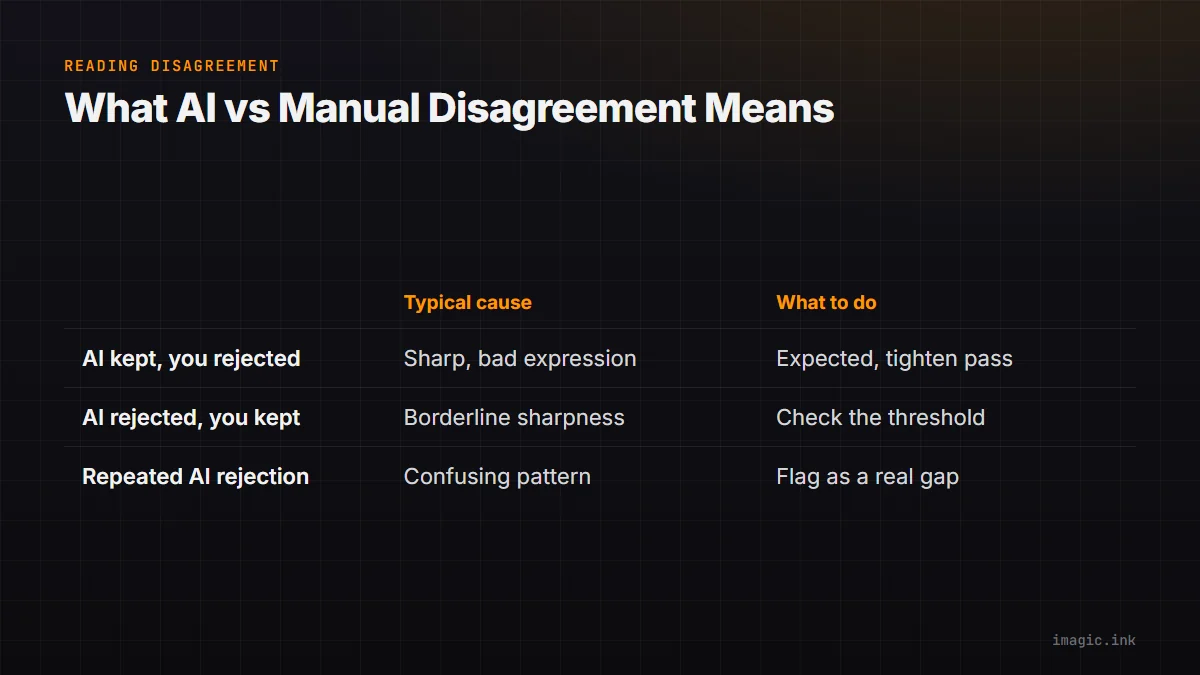
A table like this makes the pattern visible fast:
| Disagreement type | Typical cause | What to do |
|---|---|---|
| AI kept, you rejected | Technically sharp but bad expression or composition | Expected: AI cannot judge expression, tighten your own final pass |
| AI rejected, you kept | Borderline sharpness the AI scored low but you liked the moment | Check the score threshold, it may be set too strict |
| AI rejected, you kept (repeatedly) | A consistent subject or lighting pattern confusing the model | Worth flagging as a real accuracy gap for that shoot type |
What Disagreement Patterns Actually Mean
Not all disagreement is a problem. AI culling scores measurable properties (sharpness, exposure, closed eyes, near-duplicates), not artistic judgment, so a chunk of "AI kept, you rejected" is expected and not a flaw, see how AI photo culling works for the scoring mechanics. What is worth acting on is a repeated pattern: if the AI consistently rejects frames you keep in a specific lighting condition or with a specific subject, that is a real signal to loosen the threshold for that shoot type rather than overriding it frame by frame every time. For a deeper look at where accuracy claims come from industry-wide, see AI photo scoring accuracy, explained.
Turn the Test Into a Habit
Run this comparison once per major shoot type you cover (weddings, portraits, events) rather than once ever. A threshold tuned on a bright outdoor portrait session will not necessarily hold for a dim reception hall. Once you trust the pattern for a given shoot type, you can shorten future manual passes to just the AI's borderline-scored frames, which is where the real editing decisions live anyway. More on this in the AI and technology archive.
Frequently asked questions
How many frames do I need to test to trust the result?
Around 300 to 500 frames from a real shoot is usually enough to see a clear pattern; smaller samples tend to be dominated by a handful of unusual frames rather than the tool's typical behavior.
Should I retest every single shoot?
No, test once per distinct shoot type or lighting condition you regularly work in, then trust the pattern until something changes meaningfully, like a new venue type or a different camera body.
What if the AI and I disagree on almost everything?
That usually points to a threshold that is set too loose or too strict for your standards rather than a broken model; adjust the cutoff first before assuming the scoring itself is wrong.