What Adobe's Lightroom (1TB) Price Notice Actually Says
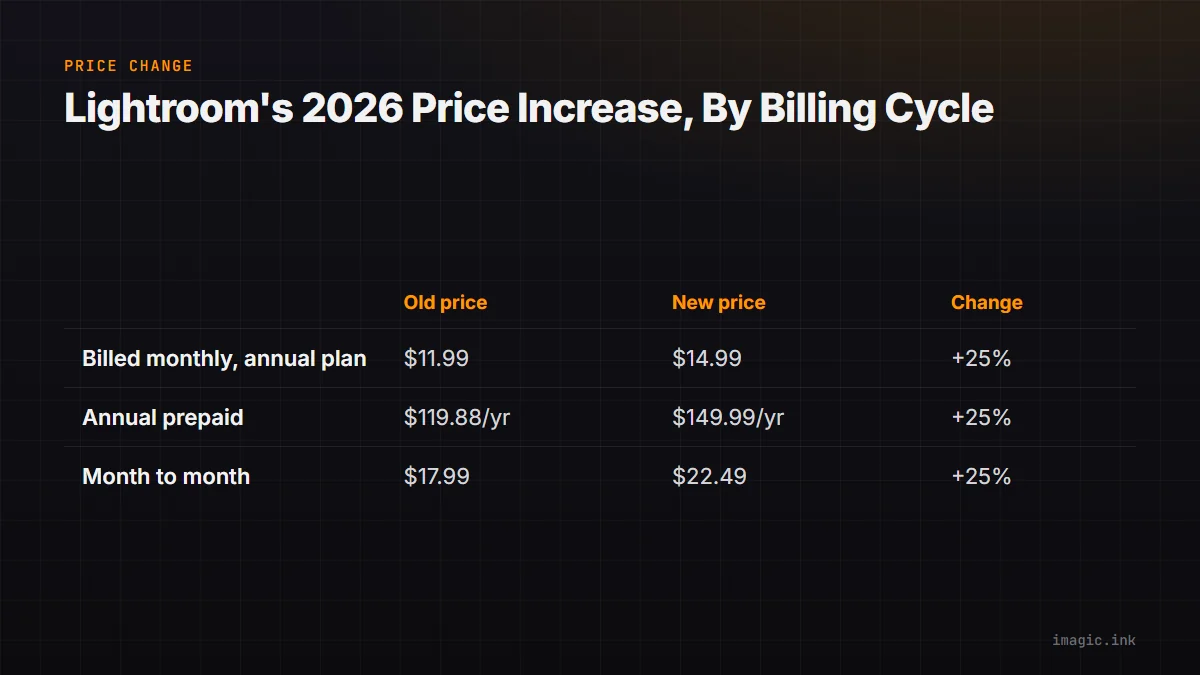
Checked 15 August 2026: Adobe published a dedicated pricing-change notice for the Lightroom plan that includes 1TB of cloud storage, and the numbers are specific rather than vague. According to Adobe's own Lightroom (1TB) pricing FAQ, starting 20 March 2026 the price of the Lightroom plan with 1TB storage, along with the 3TB, 10TB, and 20TB storage bundles built on the same plan, increases for existing subscribers at their next renewal date. The notice states three separate figures depending on how a subscriber pays: an increase of $3 per month on the annual plan billed monthly (from $11.99 to $14.99), an increase of $30 per year on the annual prepaid plan (from $119.88 to $149.99), and an increase of $4.50 per month on the month-to-month plan (from $17.99 to $22.49). All figures on the notice are in US dollars; Adobe states the exact amount varies by storage tier, currency, and country.
The same notice lists which plans are included and excluded. Included are the Lightroom plan with 1TB, 3TB, 10TB, and 20TB storage. Excluded is the Lightroom Premium mobile-only plan, which keeps its existing price under this specific notice. Adobe also confirms the increase applies to new subscribers who sign up on or after 20 March 2026, not only to renewing accounts, and that the listed figures already fold in any foreign-exchange adjustment Adobe applies in a subscriber's country. The rollout is not US-only; the notice lists dozens of countries affected worldwide, from Argentina and Australia through to Vietnam.
The Math Behind Each Billing Cycle
Adobe's own figures make the arithmetic straightforward, and it is worth doing because the three billing options do not move by the same headline number, only by roughly the same rate. On the annual-billed-monthly option, $11.99 rising to $14.99 is a $3.00 increase, which works out to a 25.02% jump on the old price. On the annual prepaid option, $119.88 rising to $149.99 is close to a $30.11 increase using the two published figures directly (Adobe's notice rounds this to "$30"), which is a 25.12% increase. On month-to-month, $17.99 rising to $22.49 is a $4.50 increase, or 25.01%. Every billing cycle lands within a fraction of a percentage point of the others, so switching billing cycles to dodge the increase was never really an option; a subscriber who already picked annual prepaid to save money is still absorbing the same proportional hit as someone paying month to month.
These figures assume the base Lightroom (1TB) plan at the US dollar prices Adobe published, with no promotional discount and no additional storage tier layered on top. A subscriber on the 3TB, 10TB, or 20TB storage add-on should expect the same roughly 25% proportional change on their own current bill, but the exact dollar amount is different because those add-ons started from a higher base price; Adobe's notice does not print each storage tier's dollar figure individually, so the only reliable way to see a specific add-on's new number is the account renewal email or the Adobe account page itself.
Where the 1TB Plan Sits in Adobe's Current Lineup
The price change only makes full sense next to what else Adobe sells at the same time. Adobe's plan-comparison page, checked the same date, lists three photography-adjacent tiers side by side. The Lightroom (1TB) plan, billed annually at a monthly rate, includes Lightroom, Lightroom Classic, Lightroom on mobile and web, Adobe Portfolio, 1TB of cloud storage, and 250 monthly generative-AI credits. One step up, the Photography (1TB) plan adds Photoshop on desktop and Photoshop on mobile and web to the same storage allotment, with 1,000 monthly generative credits, at a listed $19.99 per month on the same annual-billed-monthly basis. Creative Cloud Pro sits above both: 20-plus creative apps including Lightroom, Adobe Firefly generative tools across images, video, and audio, and 4,000 monthly generative credits, listed at $69.99 per month regularly with an introductory rate shown at $34.99 per month, but with only 100GB of cloud photo storage bundled in rather than 1TB.
One inconsistency is worth flagging rather than smoothing over. The comparison page, at the time of this check, still displayed $11.99 per month as the current price for the Lightroom (1TB) plan on annual, billed-monthly terms, the pre-increase figure, even though the separate pricing-change FAQ states that new subscribers signing up on or after 20 March 2026 receive the increased price. The two Adobe-published pages did not visibly agree on this specific date. That is not a claim about which figure is correct; it is a reason to treat any headline number in this article, or anywhere else, as a starting point rather than a checkout-ready price, and to confirm the live figure on Adobe's own site in the subscriber's own country and currency before buying or renewing.
Why a Price Notice Like This Sends People Looking at Alternatives
A subscription price increase changes a familiar calculation. Software billed monthly or annually only keeps working while the payments keep arriving, so a roughly 25% jump on a tool a photographer already depends on is not a one-time inconvenience; it repeats every billing cycle from the increase date forward, indefinitely, unless the subscriber downgrades, cancels, or switches tools entirely. For a solo photographer or a small studio budgeting against day-rate income, that is a real, recurring line-item change rather than a rounding error, which is exactly the kind of moment that sends people searching for what else exists.
It is worth being precise about what "alternative" can mean here, because the options split into two genuinely different categories, and conflating them leads to disappointment. One category is other subscription software, priced differently from Adobe but still billed on a recurring basis. The other category is software sold as a one-time license, where a single purchase, not a recurring charge, is what keeps the tool usable indefinitely.
The distinction matters most for a studio that has already priced its own packages around a fixed software cost per year. A recurring bill that can rise 25% without warning is difficult to plan around precisely because the increase is decided by the vendor, on the vendor's schedule, not by anything the subscriber changed about how much they shoot or edit. A one-time license removes that specific variable from the budget entirely, even though, as the sections below lay out, it also removes some capability that a bundled subscription includes.
Staying Inside a Subscription Model, Just With a Different Vendor
Several AI-assisted culling and editing tools compete for the same "get me out of Lightroom's bill" search traffic without actually leaving the subscription model behind. Aftershoot is one example: in May 2026 the company published a restructured pricing page that lets a photographer subscribe to AI culling, AI editing, and AI retouching separately or bundled, billed monthly or annually, with unlimited processing and offline local processing included in every tier. That local-processing detail is genuinely useful for anyone worried about client photos leaving their machine, but it does not change the underlying billing structure; the software still requires an active subscription to keep functioning, the same structural objection driving the search for a Lightroom alternative in the first place. Aftershoot is not for you if the goal is specifically to stop paying a recurring software fee, regardless of which company collects it.
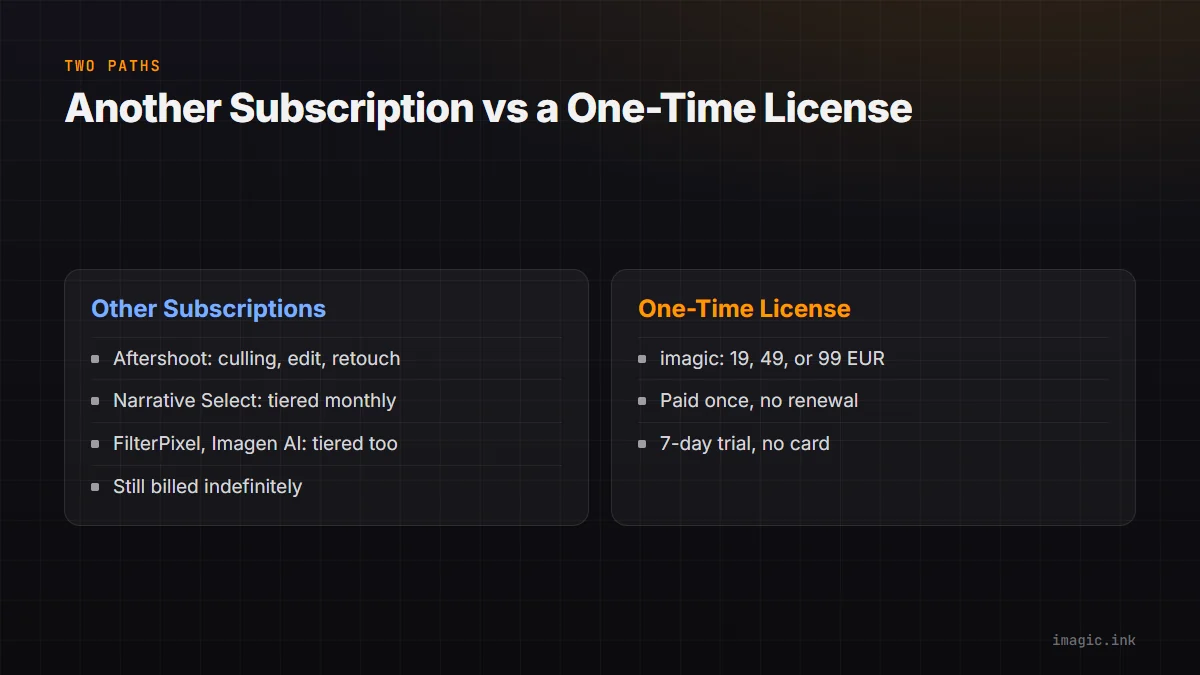
Narrative Select, FilterPixel, and Imagen AI follow the same general pattern of their own tiered monthly or annual pricing, each with a different mix of seats, processing location, and included volume; a fuller side-by-side of those tools next to a one-time-purchase option, including a fair "not for you if" note for each one, is maintained separately in the AI photo culling software comparison, which is the better starting point for anyone specifically choosing between five different AI culling products rather than deciding whether to leave the subscription model altogether.
imagic as a One-Time-Purchase Alternative to a Lightroom Subscription
imagic is a desktop application for Windows and macOS that processes photos locally on the machine it runs on; nothing is uploaded to a server as part of culling or editing. The AI culling pass scores sharpness, flags closed eyes, and evaluates composition, then groups duplicate frames and burst sequences so a shoot narrows down without a manual first pass through every image. From there, batch editing and one-click styles apply consistent adjustments across a selected set, and RAW development runs through its own built-in RAW engine rather than handing files to a separate program. Supported RAW formats are CR2, CR3, NEF, ARW, RAF, ORF, RW2, DNG, and PEF, covering the major camera brands most working photographers shoot. Export targets are JPEG and TIFF.
Pricing is a one-time EUR purchase rather than a subscription: Lite at 19 EUR, Plus at 49 EUR, or Max at 99 EUR, each unlocked with a single payment and no renewal charge in year two, three, or beyond. A 500-export free trial runs without requiring a card. The Max tier adds a local MCP server and command-line interface, documented at imagic's MCP overview page, so a script or an AI agent can trigger culling and export commands through an explicit, logged process running on the same machine; the server does not edit a photograph by itself and does not upload RAW files to any outside model provider automatically, since every action it triggers still runs the same local imagic pipeline and every export writes to a folder the user names.
imagic is not for you if cloud sync across multiple devices, a mobile companion app, tethered shooting, printing integration, layers, generative fill, HDR or panorama merging, or full multi-drive digital-asset-management cataloging are part of a required workflow; none of those exist in imagic today, and none of the plan tiers above add them. Culling and editing are both non-destructive: no command in imagic deletes an original file, a rejected frame stays on disk, and a status can be reversed before export. That is a materially smaller feature set than Lightroom Classic plus Lightroom's cloud sync plus Photoshop, and pretending otherwise would misrepresent both products.
Three-Year and Five-Year Cost Math, With the Assumptions Stated
The figures below are a calculation from the published prices above, not a claim about what any specific photographer will actually pay; the assumptions are stated so the numbers can be substituted with a reader's own tier, currency, and timeline. Using the new annual-prepaid Lightroom (1TB) price of $149.99 per year, three years of that plan totals $449.97, and five years totals $749.95, assuming the price does not rise again in that window, which Adobe's own pricing history over the past several years suggests is an optimistic assumption rather than a safe one. Using the Photography (1TB) plan instead, at $19.99 per month on annual-billed-monthly terms ($239.88 per year), three years totals $719.64 and five years totals $1,199.40; that plan is not the same product as Lightroom (1TB) alone, since it also includes desktop and mobile Photoshop, so this is not a like-for-like swap, only a comparison of what each named plan actually costs over time.
Against either of those totals, an imagic Plus license (49 EUR) or Max license (99 EUR) is paid once. The comparison across currencies is not exact: EUR and USD move against each other, so the real gap in a subscriber's own currency depends on the exchange rate at the time of purchase, not the raw numbers above. It is also not a feature-equivalent comparison in the other direction, since imagic includes no cloud storage, no mobile app, and no Photoshop-equivalent tools, while Lightroom's plans bundle those in. The honest way to use this math is to price out the specific Adobe tier actually in use today, convert the EUR imagic price at a current rate, and decide whether the missing Photoshop, cloud sync, and storage genuinely matter enough to be worth the recurring difference; for a deeper version of this same calculation with more tiers and more currencies laid out, see the three-year photo culling software cost comparison, and for a broader look at total camera-and-software workflow spending, the camera and workflow cost planning guide covers hardware alongside software.
Trying an Alternative Without Cancelling Anything First
Nothing about checking an alternative requires cancelling a live Adobe subscription before comparing results. imagic's 500-export trial installs without a card, so it is reasonable to point it at a recent set of RAW files, run the same culling pass a subscriber's current workflow would have run, and compare the two sets of keepers side by side before any renewal decision gets made. Confirming the camera's RAW format is on imagic's supported list (CR2, CR3, NEF, ARW, RAF, ORF, RW2, DNG, PEF) takes a minute and avoids wasting the trial on an unsupported file type. For a single image that needs a quick adjustment without installing a desktop app at all, imagic's free single-photo web editor is a lighter way to see how the editing tools behave before committing to anything larger.
Lightroom, and the Photography and Creative Cloud Pro plans above it, are not for you if the goal is to stop a recurring software bill altogether; every one of those plans keeps working only as long as the subscription stays active, and this price notice is a reminder that the number on that recurring bill is not fixed. They remain a strong fit for a photographer who genuinely wants cross-device cloud sync, Photoshop's editing depth, or Firefly's generative tools bundled with the culling and RAW-editing workflow, and who has budgeted for a subscription that can rise again.
A practical way to run the comparison without guessing is to treat one full shoot as the test case. Cull and edit the same set of RAW files in the current Lightroom workflow and in the imagic trial, keep notes on where each one saved time or added a step, and only then weigh that against the dollar figures above. Software that is technically cheaper but slower for a particular workflow is not actually a win, so the cost math in this article is a starting filter, not the final word on which tool to keep using.
Frequently Asked Questions
Does the Lightroom price increase apply to me right away, or only at renewal?
Per Adobe's own FAQ, existing subscribers see the new price take effect at their next renewal date on or after 20 March 2026, not immediately on the notice date, and Adobe states it sends a renewal reminder email roughly 30 days ahead of that date. New subscribers signing up on or after 20 March 2026 are stated to receive the new pricing directly, though as noted above, Adobe's own plan-comparison page had not visibly caught up to that figure as of this check, so confirming the price shown at actual checkout is worth the extra minute.
Is a one-time imagic license actually cheaper than a Lightroom subscription?
Over a single month, no; any of Adobe's monthly figures is smaller than a one-time 19, 49, or 99 EUR purchase. Over several years, a one-time purchase can total less than an ongoing subscription, depending on which Adobe tier is actually needed, the current EUR/USD rate, and whether Adobe raises prices again in that window. The three-year and five-year math above shows the calculation with its assumptions stated so it can be rerun with real numbers rather than accepted as a blanket claim.
Does switching away from Lightroom mean giving up cloud storage and mobile access?
With imagic specifically, yes: imagic has no cloud sync and no mobile companion app, so photos stay on the machine they are culled and edited on unless moved manually. That is a real limitation for anyone who relies on editing the same catalog from a phone or a second device, and it is a legitimate reason to stay on a Lightroom plan, or to look at one of the still-subscription AI culling tools instead, rather than switching to a purely local, one-time-purchase tool.
Are Aftershoot, Narrative Select, or similar tools a way to avoid this kind of price increase?
They avoid this specific Adobe notice because they are different companies, but they do not avoid the underlying subscription structure; each bills monthly or annually and can change its own pricing on its own schedule, as Aftershoot did with its own May 2026 pricing restructure. Anyone whose real objection is to recurring software payments in general, rather than to Adobe specifically, is better served comparing those tools against a genuinely one-time-purchase option in the full AI photo culling software comparison than by treating a same-category subscription swap as a permanent fix.