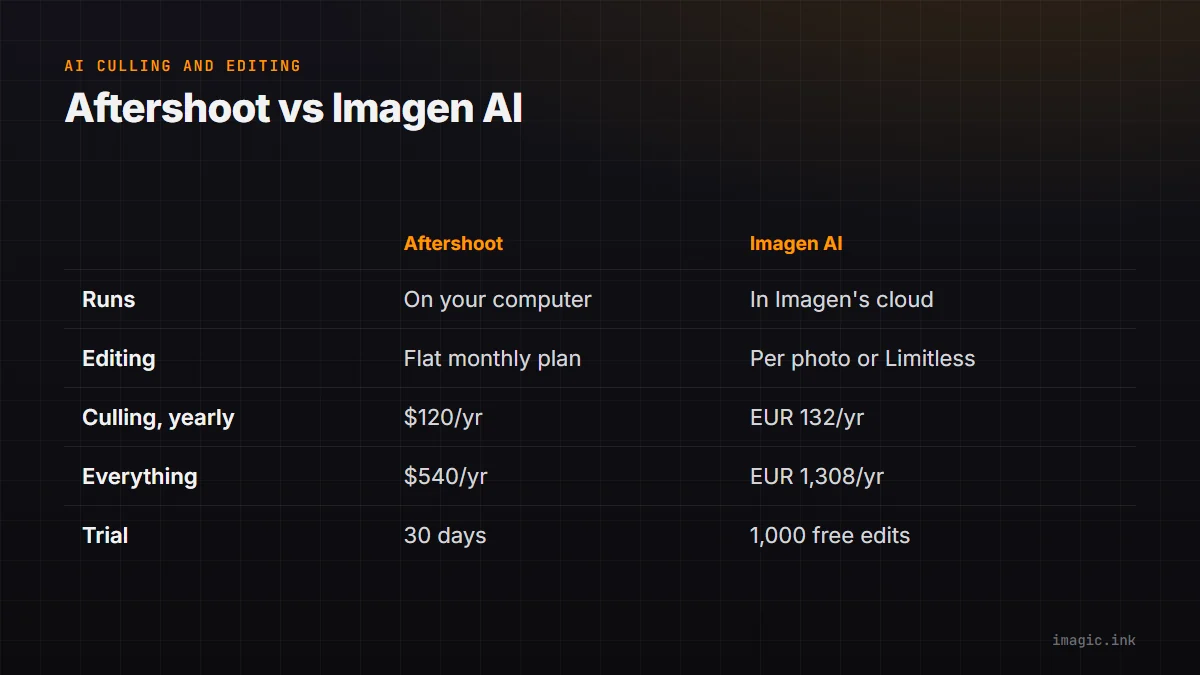
Aftershoot and Imagen AI are the two names wedding and event photographers most often weigh when they want an AI to cull a shoot and then edit it in their own style. Both learn from your past edits, both cull, both work with Lightroom, and both are subscriptions. They differ in two ways that decide most purchases: where the work runs (your computer or the vendor's cloud), and how editing is charged (a flat monthly plan or a price per photo). Everything below was checked on each vendor's own pages on 27 October 2026. Aftershoot lists prices in USD and Imagen in EUR, both before any sales tax or VAT.
What each one is
Aftershoot is a desktop app sold in modules: Select (AI culling, duplicate grouping, key face detection), Edit (marketplace styles, a Personal AI Profile trained on your edits, AI cropping, straightening and masking) and Retouch (portrait retouching in batches). You can buy one module or bundle them. Selections and edits go to Lightroom Classic, Lightroom, Capture One, Bridge and Adobe Camera Raw.
Imagen started as an editing service: it builds a Personal AI Profile from your Lightroom catalogs, or you pick a ready-made style from its Profile Shop, and it applies that look across a shoot. It sells AI culling as well, with blur, closed-eye and face detection, kiss recognition and a "cull to exact number" option. Its new Intelligent Studio, which Imagen says is in beta and rolling out gradually, adds its own editor so a project can be finished inside Imagen.
Where the work happens
This is the clearest difference. Aftershoot's technical answers page says it "works locally on your device" and that you decide how much processing power it can use, with 8 GB of RAM as the minimum. Your speed depends on your computer.
Imagen's culling page says its culling is cloud-based and does not use your computer's CPU or GPU; you need an internet connection, and the workflow starts by uploading the project. Your speed depends on your connection rather than your graphics card. If a client contract limits uploads of their images, that matters; if your laptop is old, it may be the point in Imagen's favour.
How editing is charged
Aftershoot charges a flat monthly price per module, with no per-photo fee. Imagen gives individuals two ways to pay:
- Pay-as-you-go: editing from EUR 0.045 per photo, with a EUR 7 monthly minimum that rolls over as editing credit. AI tools such as straighten, crop, denoise and subject masks add EUR 0.01 per photo each. AI culling is a separate add-on at EUR 11 a month billed yearly (EUR 132) or EUR 16 month to month, and the culling fee covers the monthly minimum.
- Limitless: EUR 109 a month billed annually or EUR 139 month to month, with editing, AI tools and culling all unlimited for a solo photographer.
The per-photo model is cheap for a light year and expensive for a heavy one, so the useful question is how many edited photos you deliver in a year.
Prices side by side
| What you want | Aftershoot | Imagen |
|---|---|---|
| Culling only | Select, $120 ($10/month) | Culling add-on, EUR 132 (EUR 11/month) |
| Culling and editing | Select + Edit, $480 ($40/month) | Culling add-on plus from EUR 0.045 per edited photo, or Limitless EUR 1,308 |
| Culling, editing and retouching | Complete, $540 ($45/month) | Limitless, EUR 1,308 (EUR 109/month) |
| Month to month | Select $15, Select + Edit $50, Complete $55 | Culling EUR 16, Limitless EUR 139 |
Aftershoot also sells an "annually billed monthly" option (Complete at $50 a month, for example), which is a 12-month commitment with a $30 fee if you cancel in the first six months.
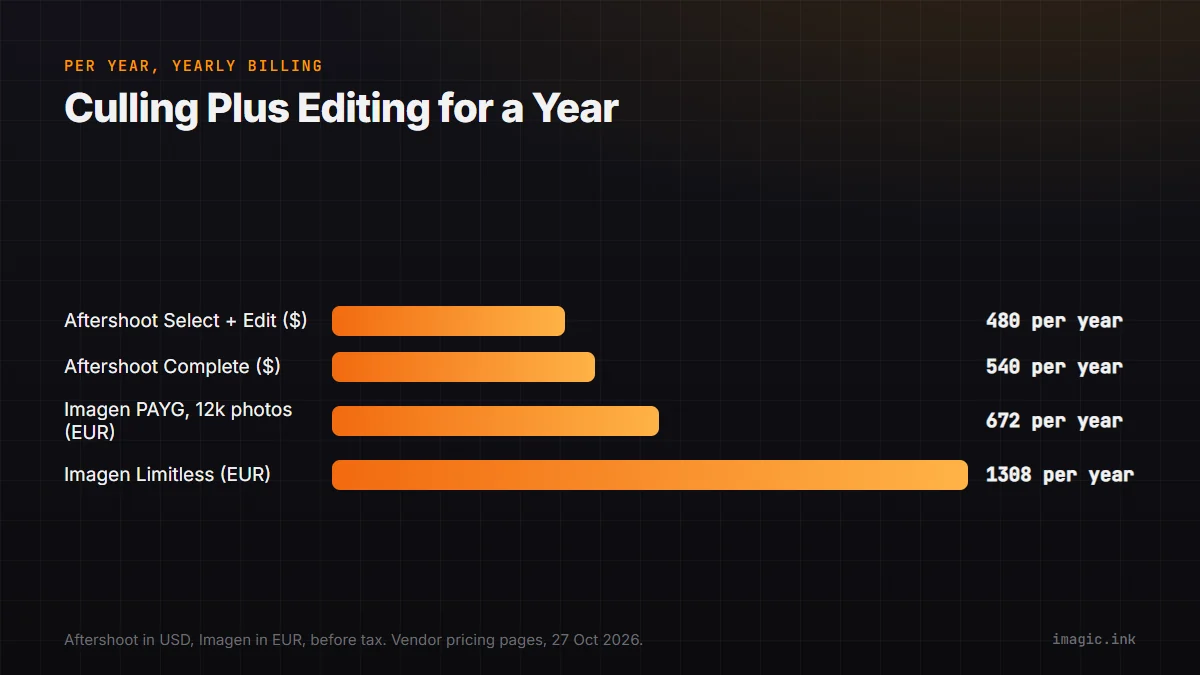
A worked example on Imagen's pay-as-you-go plan: 20 weddings a year with 600 edited photos each is 12,000 photos, which at the entry rate of EUR 0.045 comes to EUR 540 for editing, plus EUR 132 for culling, about EUR 672 a year before any AI tools. At 40 weddings of 800 photos the editing alone passes EUR 1,400, and Limitless becomes the cheaper Imagen option. Aftershoot's price does not move with volume.
Trials
Aftershoot offers a free 30-day trial. Imagen starts new users with 1,000 free edits and no card, and its culling page offers two projects culled for free. Use either trial on a full shoot you have already culled and edited yourself, then compare: that is the only test that shows whether the AI matches your taste.
Which one fits
- Aftershoot fits photographers who want culling and editing to run on their own computer, want a fixed price that does not grow with volume, or want portrait retouching from the same vendor.
- Imagen fits photographers who are happy for shoots to be processed in the cloud, whose computer is the bottleneck, and who either deliver modest volumes (pay-as-you-go) or very high ones (Limitless).
If you would rather not pay every month at all, imagic is a one-time purchase (EUR 19, 49 or 99) that scores sharpness, closed eyes and composition, groups bursts and duplicates, and then develops and exports the RAW files itself, all on your own machine with nothing uploaded. It does not train a profile on your past Lightroom edits the way both of these do, so it is a different trade-off rather than a like-for-like swap; there is a free 500-export trial with no card. Our Imagen AI vs imagic and imagic vs Aftershoot comparisons go into each side, Aftershoot pricing explained covers every Aftershoot plan over five years, and FilterPixel vs Aftershoot covers the other common pairing.
Frequently asked questions
Is Aftershoot or Imagen cheaper?
For culling only they are close: Aftershoot Select is $120 a year and Imagen's culling add-on EUR 132, on yearly billing as of October 2026. For culling plus editing, Aftershoot Select + Edit is $480 a year at any volume, while Imagen's cost depends on how many photos you edit: from EUR 0.045 each on pay-as-you-go, or EUR 1,308 a year for unlimited use on Limitless.
Does Imagen upload my photos?
Imagen describes its culling as cloud-based: it does not use your computer's CPU or GPU and needs an internet connection, and a project starts with an upload. Aftershoot says it works locally on your device.
Do Aftershoot and Imagen work with Lightroom?
Yes. Aftershoot sends selections and edits to Lightroom Classic, Lightroom, Capture One, Bridge and Adobe Camera Raw. Imagen lists Lightroom Classic, Lightroom, Photoshop and Bridge, builds its personal profiles from Lightroom catalogs, and is adding its own editor in a beta rolling out gradually.