Adobe Bridge is free, opens RAW previews fast, and syncs ratings straight into Lightroom. None of that is in question. What is worth putting an actual number on is the part comparisons usually leave vague: how much of a shoot day's review time Bridge's manual, frame-by-frame workflow costs once volume climbs, and at what point that cost stops being free in practice even though the software itself still is.
What Bridge is actually built to do
Per Adobe's own product page, headlined "Download Adobe Bridge for Free," Bridge is a creative asset manager: it organizes files into collections, supports metadata search and filtering, lets you add keywords, labels, and ratings, and opens RAW files directly into Adobe Camera Raw for editing. It is a genuinely capable browser and metadata tool, free to download, and for anyone already paying for Photoshop or Lightroom it slots into that ecosystem with no extra cost. What it does not do, and does not claim to do, is score a photo's sharpness or flag closed eyes automatically. Every rating in Bridge is a human decision, one frame at a time.
The actual mechanics of a Bridge review pass
A Bridge culling session is a loop: open a folder, generate previews, step through with arrow keys, apply a star rating or a color label, move to the next frame. For a small set, a headshot session, a handful of product shots, that loop is fast and the manual nature of it barely registers as a cost. The mechanics do not change as volume grows, though. A two-thousand frame wedding shoot is the same loop run two thousand times, with a human eye required for every single decision, including the easy ones: a blinked frame, a duplicate two shots later, a motion-blurred miss. Bridge has no mechanism to pre-filter any of that before a person looks at it.
What Bridge's collections and filters actually do well
It is worth crediting the part of Bridge that genuinely earns its keep once a review pass is done. Per Adobe's own product page, Bridge lets a user "organize assets using collections, and find assets using powerful filters and advanced metadata search features." In practice that means a shoot can be grouped into a collection once ratings exist, then filtered by star count, color label, camera model, lens, or any other metadata field the camera wrote into the file, without physically moving or duplicating a single image. That is a real, useful layer on top of the manual review step, and it is where Bridge earns comparisons to a lightweight DAM rather than a plain file browser. The filtering and collections layer does not reduce the review cost described above, though; it organizes the output of that manual pass, it does not replace any part of the pass itself.
Why the review step resists automation inside Bridge itself
It is worth being specific about why Bridge cannot simply add a scoring feature and close this gap the way a version update might close a UI complaint. Sharpness scoring, closed-eye detection, and burst grouping are not filter or metadata features bolted onto a file browser; they require running an actual model against pixel data for every frame, a fundamentally different kind of processing than reading EXIF fields and generating thumbnails, which is what a fast, lightweight asset browser like Bridge is architected around. That is not a criticism of Bridge's design, it is a reasonably built tool doing what it was built to do quickly and well. It is simply a different category of software problem than the one an AI-scored culling tool is solving, which is why the gap described here is structural rather than a missing feature Adobe could add in a routine update.
Putting a number on it: what a manual pass at volume costs
The specific number of hours any individual photographer spends on a review pass depends on shooting style, how many frames need a genuine second look, and how fast someone works through a contact sheet, so no single figure applies universally. What is true structurally, and does not depend on anyone's personal speed, is that a fully manual tool applies the same per-frame human decision cost to every image in the set, the obvious rejects included, while an AI-scored tool applies that cost only to the frames its scoring flags as ambiguous. The gap between those two totals grows with shoot volume, not shrinks, which is why the same workflow that feels free at 150 frames starts to feel expensive at 2,000, even though nothing about Bridge itself changed.
Where that manual cost is actually invisible
It is worth being honest about why this cost hides so well: Bridge itself never charges for it, so there is no invoice, no renewal notice, no line item that makes the cost visible the way a subscription price does. The entire cost shows up as time, spread across however many review sessions a photographer runs in a year, which is exactly why "Bridge is free" and "Bridge is the most expensive part of my workflow" can both be true statements about the same tool, just measured in different units.
What actually changes with AI-assisted scoring
An AI quality-scoring pass does not replace human judgment on the frames that genuinely need it; a photographer still makes the final call on close compositional decisions. What it removes is the decision cost on frames that never needed a human look in the first place: the ones with closed eyes, significant motion blur, or an exact duplicate of a better frame taken a fraction of a second later. imagic runs that scoring locally, alongside duplicate and burst grouping so a ten-frame burst gets reviewed as one cluster with a suggested best frame rather than ten separate manual decisions, before RAW development starts through its own built-in engine.
A hybrid workflow: Bridge for what it is good at, AI scoring for the rest
None of this has to be an all-or-nothing choice. A workflow some photographers already run in practice is a two-step one: an AI-assisted culling pass first, to cut a shoot's raw take down to a manageable shortlist by removing the closed-eye frames, the motion blur, and the exact duplicates a burst always produces, then Bridge afterward for the part it is genuinely good at, fine-grained metadata, collections, and keyword work on the shortlist that survived the first pass. That division of labor plays to each tool's actual strength rather than asking either one to do the whole job: automated scoring is fast at bulk elimination and bad at judgment calls that need human taste, while Bridge is the opposite, slow at bulk elimination and genuinely capable once the set is small enough for careful, manual metadata work to be worth the time it takes.
What a DAM adds that neither Bridge nor AI culling does
None of this touches the other half of "image management": long-term, cross-shoot cataloging that persists for years, the kind a dedicated DAM like digiKam or Mylio is built around. Bridge organizes what is currently on disk in front of you; it is not designed as a permanent, searchable archive index the way a DAM is. Neither is imagic. A full workflow that needs both fast review and a durable long-term archive typically pairs a culling step with a separate cataloging tool for exactly that reason, rather than expecting one piece of software to be both.
A rough comparison of the review step itself
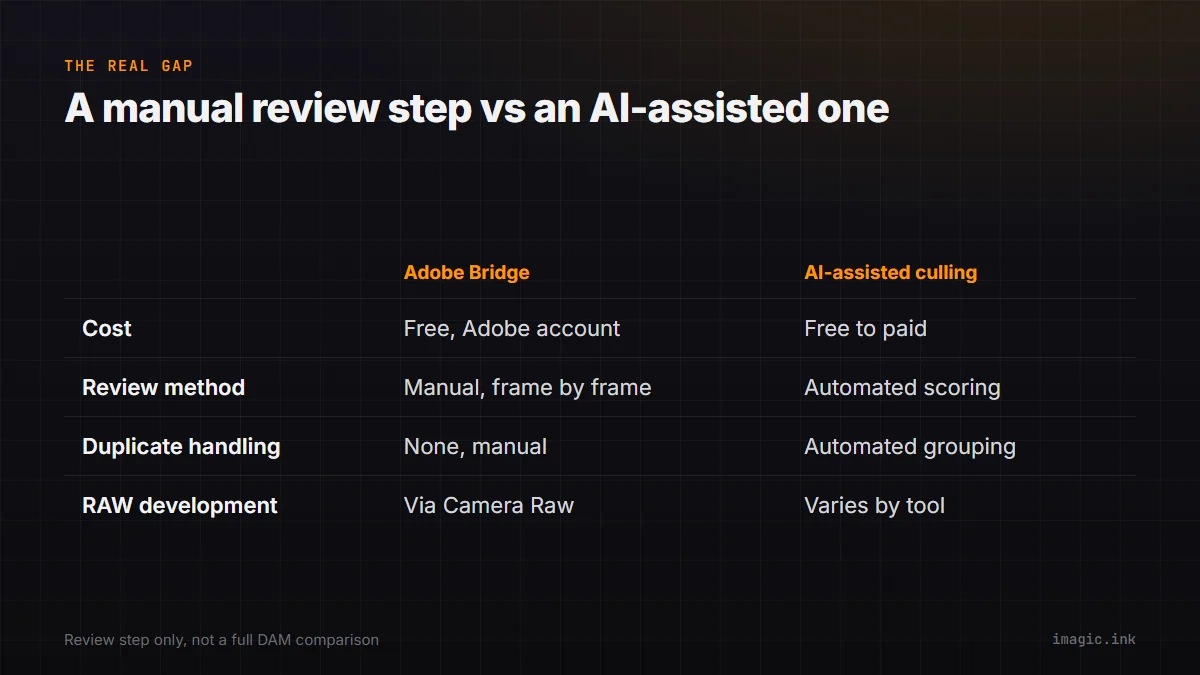
| What you need | Adobe Bridge | AI-assisted culling |
|---|---|---|
| Cost | Free with a free Adobe account | Free to paid depending on tool |
| Review method | Manual, frame by frame | Automated scoring, human review of flagged frames |
| Duplicate/burst handling | None; manual comparison | Automated grouping in tools that support it |
| RAW development | Via Adobe Camera Raw | Varies; imagic includes its own built-in engine |
| Long-term cataloging | Collections and metadata search, not a full DAM | Not included; pair with a dedicated DAM |
Migrating off Bridge without losing your ratings
Because Bridge writes star ratings, color labels, and keywords as standard IPTC or XMP metadata rather than locking them into a private database, that information generally travels with the file itself, either embedded directly or in an accompanying sidecar file depending on the format and the camera's RAW file type. That matters for anyone considering a move away from Bridge: a switch to another tool that also reads XMP metadata, Lightroom, digiKam, and several others among them, should be able to pick up existing ratings and labels rather than starting a library's organization over from zero. The practical step before switching anything is confirming, on the destination tool's own documentation, that it reads existing XMP metadata on import rather than assuming it does; that single check avoids the single most common regret in a DAM or culling-tool migration.
Who Bridge still makes sense for
None of the above is an argument that Bridge is the wrong tool. For small, occasional shoots, or for anyone already deep in the Adobe ecosystem who values Bridge's tight Lightroom and Camera Raw integration over saving review time, the manual cost described above stays small enough not to matter. The honest threshold is volume and frequency: shooting large sets regularly is where a fully manual review step starts costing more time than most photographers realize, simply because that cost never shows up as a bill. A photographer who shoots twenty sessions a year at two hundred frames each is in a very different position than one running fifty weddings a year at two thousand frames each, even though both are, technically, "using Bridge to cull," and the second case is where the invisible time cost this piece opened with actually starts to bite.
For a closer look at where a free, manual DAM-adjacent tool like Bridge sits next to genuine cataloging software, see this roundup of free photo management tools, and imagic vs digiKam covers the free, open-source cataloging alternative in more detail. The Software Comparisons category has more of these breakdowns.
Frequently asked questions
Is Adobe Bridge actually free to use?
Yes. Adobe's own product page is headlined "Download Adobe Bridge for Free," and it is available as a standalone download for organizing and browsing assets, with RAW files opening into Adobe Camera Raw for editing.
Does Bridge do any automatic quality scoring or duplicate detection?
No. Every star rating, label, and RAW pick in Bridge is a manual, human decision made frame by frame. It has no built-in sharpness scoring, closed-eye detection, or burst grouping.
Is Adobe Bridge a full digital asset management system?
It has real DAM-adjacent features, collections, metadata search, and filters, but it is not usually described as a full DAM in the way a dedicated tool like digiKam or Mylio is, since it does not build the kind of persistent, cross-shoot archive index those tools are built around.