
Imagen AI and imagic both get filed under "AI photo editing" in search results, but the resemblance mostly stops at the label. Imagen AI is a cloud service built around a personal AI editing profile trained on your own past edits inside Adobe Lightroom Classic. imagic is a local desktop app that scores and culls a shoot, then applies one-click styles and RAW processing without any of your photos leaving the machine. The real difference is architectural, not cosmetic: one asks you to upload your photos so a trained model can edit like you do, the other keeps everything on the computer in front of you. Neither company currently publishes a direct comparison page between the two, so this piece checks every claim against each vendor's own pricing and product pages rather than relying on either company's framing of the other. Here is what each one verifiably offers, as of September 2026.
How Imagen AI's personal profile actually works
Imagen's core feature is a Personal AI Profile trained on a photographer's own editing history. According to Imagen's own product and support pages, you supply at least roughly 2,000 previously edited photos from your Lightroom Classic catalog, and Imagen's model analyzes how you handle exposure, white balance, HSL adjustments, and tone curves across that body of work. The profile is typically ready within about 24 hours, after which new shoots get edited in your established style at high speed, with every adjustment still landing as ordinary, editable Lightroom metadata you can override slider by slider afterward. Photographers can train more than one profile, for instance a separate profile for weddings versus commercial real estate, if their editing style shifts meaningfully between genres. Because the model is trained on a specific photographer's own history, the output is meant to look like that photographer's established style rather than a generic, one-size-fits-all preset; that is the entire premise of the product, and it depends on already having a large enough body of consistently edited work to train on in the first place.
Imagen also sells AI culling as part of its plan lineup, alongside the AI editing. The mechanics of exactly how its culling model scores frames are not detailed on the pages checked for this piece, so that claim is limited here to "Imagen offers a culling feature," not a description of how it compares technically to any other tool's scoring. What is clear from Imagen's own pricing structure is that culling and editing are treated as related but separately priced parts of the same subscription relationship, rather than a single flat fee covering both indefinitely.
The Lightroom Classic dependency is worth underlining on its own, separate from the pricing question. Imagen's Personal AI Profile is built and applied through Lightroom Classic catalogs specifically, per Imagen's own solution pages; it is not a standalone application in the way imagic is. A photographer who wants Imagen's editing automation has to already be running Lightroom Classic as the base of their workflow, with Imagen layered on top of it as a plugin, rather than replacing it.
How imagic's approach differs at the architecture level
imagic does not train on your past edits, and it does not need a few thousand previously edited photos to get useful before it works. Its quality scoring (sharpness, closed eyes, composition) and duplicate or burst grouping run locally the first time you open a folder of RAW files, with nothing uploaded anywhere in the process. Instead of a personal style model, imagic offers one-click styles you apply directly, plus batch editing tools you control by hand. That is a real tradeoff, not a strict upgrade in either direction: Imagen's trained profile can imitate a specific, established editing style automatically once it exists, while imagic asks you to pick and apply a style yourself, in exchange for never sending a single photo off the machine it is running on.
The starting cost of each approach also differs in kind, not just amount. Imagen's profile needs a real training set, roughly 2,000 edited photos, before it produces anything useful, which effectively means a new Imagen user needs an existing body of consistently edited work before the personal-profile feature pays off. imagic has no equivalent cold-start requirement: install it, open a folder of RAW files, and the quality scoring and one-click styles are usable on the very first shoot, with no training set, no waiting period, and no catalog history required first. For a brand-new photographer, or one switching from a different editing tool entirely, that difference is not minor: there is no Imagen profile to inherit from a Lightroom catalog that does not exist yet, while imagic's scoring works identically on someone's first shoot and their thousandth.
Imagen AI vs imagic at a glance
| Category | Imagen AI | imagic |
|---|---|---|
| Core model | Personal AI Profile trained on your own past Lightroom Classic edits | Built-in quality scoring and one-click styles, no training step |
| Processing location | Cloud (photos/catalog data uploaded for AI processing) | Local only; nothing leaves the machine |
| Integration | Adobe Lightroom Classic plugin/workflow | Standalone desktop app (Windows, macOS) |
| Pricing model (Sept 2026) | Pay-as-you-go from USD 0.05 per photo edited, or a Limitless unlimited plan | One-time license: Lite EUR 19 / Plus EUR 49 / Max EUR 99 |
| Subscription required | Ongoing usage-based billing or subscription | No, one-time purchase |
Source for Imagen pricing: Imagen AI's official pricing and plans article, help center content last updated August 2026, checked September 2026.
What Imagen AI's per-photo pricing actually costs over a season
Imagen's published pay-as-you-go rate is USD 0.05 per photo edited, plus USD 0.01 per edit for each additional AI tool applied on top. That scales directly with volume: a wedding photographer editing 3,000 photos in a season pays roughly USD 150 for editing alone at that base rate, before any additional AI tools, and that cost recurs every season for as long as the photographer keeps shooting. Imagen's Limitless plan removes the per-photo cost in exchange for a flat unlimited-editing subscription, which changes the math for very high-volume shooters but keeps the underlying pricing model ongoing rather than one-time. imagic's license fee is paid once; there is no per-photo charge at any volume, and no recurring bill the following season.
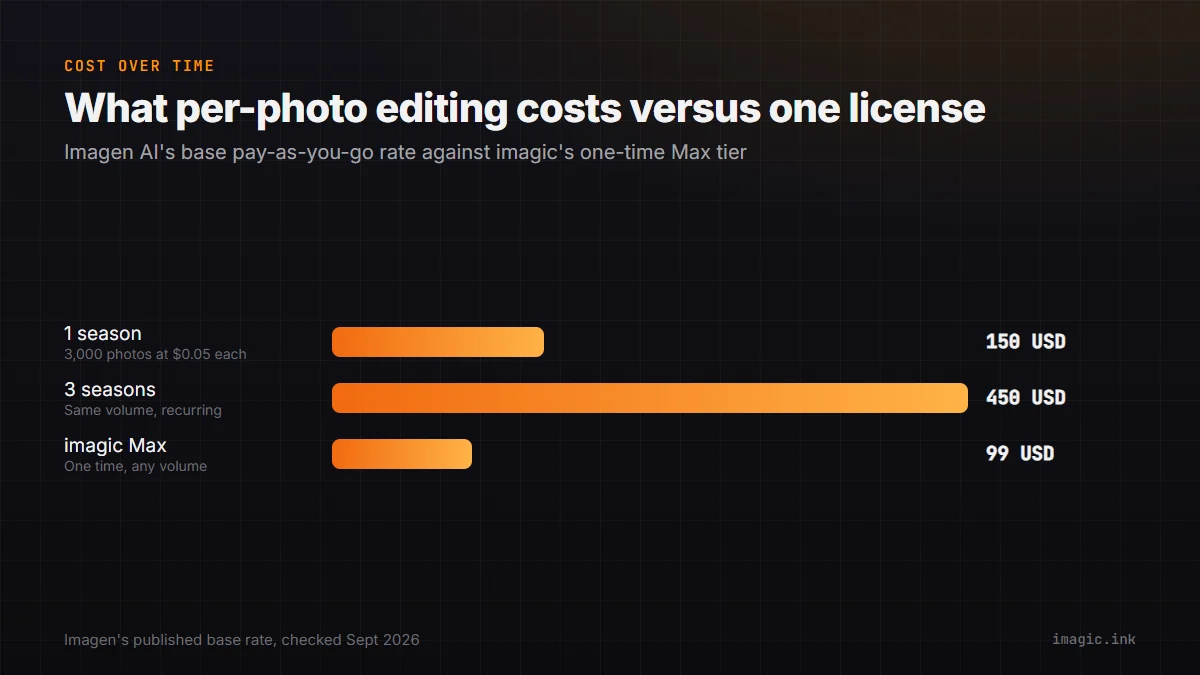
Run that same math over three seasons rather than one. A photographer editing 3,000 photos a season at Imagen's published base pay-as-you-go rate pays roughly USD 450 across three seasons for editing alone, before any additional AI tools are applied, and that total keeps climbing every season after that for as long as the photographer keeps shooting at that volume. imagic's entire license range tops out at EUR 99 for the Max tier, paid once, with no ongoing per-photo or per-season cost regardless of how many shoots follow. The gap only widens the longer someone keeps shooting, which is the basic arithmetic behind any usage-based pricing model compared to a flat one-time fee.
What Imagen AI does that imagic does not
A trained personal style profile that studies thousands of your own past edits and then reproduces that specific look automatically is a genuinely different capability than anything imagic offers. For a photographer with a highly consistent, already-established edit style who shoots enough volume to make the per-photo cost worthwhile, that kind of automation can save real editing time. imagic has no equivalent: its styles are one-click presets you choose, not a model trained on your personal editing history.
What imagic does that Imagen AI does not
Because imagic processes everything locally, no photo, catalog data, or edit history is ever uploaded anywhere, which matters to photographers under contractual or personal privacy obligations around client images. imagic also has no per-photo or subscription cost at any volume: a photographer who shoots 10,000 photos in a season pays the same license fee as one who shoots 500. And because imagic is not built around Adobe Lightroom Classic specifically, it works the same way whether or not you use Lightroom at all.
imagic's duplicate and burst grouping is also worth naming directly as a gap on Imagen's side: Imagen's published materials focus on editing a photo you have already decided to keep, and on culling as a separate paid feature, rather than describing a duplicate-detection step the way imagic's grouping works. For photographers whose actual bottleneck is a memory card full of near-identical burst frames rather than an editing style decision, that is a meaningfully different starting point.
Which approach fits which photographer
The honest split is between photographers who have already settled into one consistent, well-defined edit style and shoot enough volume to justify training and paying for a profile that reproduces it, versus photographers who want a single upfront cost, local-only processing, and direct control over which style gets applied where. Neither is universally better; they are built on different bets about what a photographer wants automated. A newer photographer still developing a personal style, or one who shoots a wide mix of genres with deliberately different looks, gets less out of a trained profile than someone with years of consistent wedding or real estate edits behind them; the profile is only as good as the consistency of what it was trained on.
Data handling is the other real consideration, separate from cost. Uploading original photo files and catalog metadata to a third-party cloud service, however carefully that service handles deletion afterward, is a different privacy posture than a tool that never transmits a file anywhere. For photographers shooting under contracts that restrict where client images can go, or who simply prefer not to route client work through a third party's servers, that architectural difference matters more than any single feature comparison. For a deeper look at the tradeoffs between uploading photos to a cloud AI service and keeping everything local, imagic's local AI vs cloud AI privacy guide and its companion piece on local AI vs cloud AI photo editing both cover the general tradeoff in more depth than pricing alone. Photographers comparing full RAW editors rather than plugins may also want the imagic vs Lightroom Classic comparison, since Imagen AI is built on top of that same application. Anyone who wants to see imagic's local scoring pass on their own files first can start with the free 500-photo trial, no card required.
Frequently asked questions
Does Imagen AI process photos locally or in the cloud?
Imagen AI's editing and culling run as a cloud service: photos and catalog data are uploaded so its trained model can process them, then edits are returned as Lightroom Classic metadata. imagic processes everything locally and never uploads photos anywhere.
Is Imagen AI a one-time purchase like imagic?
No. Imagen AI's published pricing (as of September 2026) is usage-based, starting around USD 0.05 per photo edited, or a flat unlimited subscription plan. imagic is a one-time license with no recurring or per-photo charge.
Do I need Adobe Lightroom Classic to use Imagen AI?
Imagen AI's Personal AI Profile is built around Lightroom Classic catalogs and edits. imagic does not require Lightroom or any other external application; it is a standalone desktop app for Windows and macOS.