Local and cloud AI photo culling can present similar results on screen while creating very different data paths. A local application reads photographs and runs its models on the photographer's computer. A cloud service transfers photographs, previews, metadata, or derived data to remote infrastructure for processing. That architectural choice affects privacy, connectivity, hardware use, update control, failure modes, and cost. It should be evaluated before upload, not after a sensitive shoot has entered a system.
The useful comparison is not that local is always safe and cloud is always unsafe. Security depends on implementation, device protection, access control, retention, encryption, and operator behavior. The practical task is to identify which data crosses which boundary, who can access it, how long it remains, and what happens when the network or vendor is unavailable.
Draw the data path before comparing features
Begin with a simple diagram of the shoot from card to final archive. Mark original RAW files, embedded previews, generated thumbnails, ratings, facial information, captions, and edit instructions. Then ask where each item is stored or transmitted. A service that uploads only previews has a smaller transfer than one that uploads RAW files, but those previews may still reveal identities, locations, private spaces, unreleased products, or confidential events.
Do not rely on phrases such as AI powered or secure processing. Request concrete answers. Does the application work when the network is disconnected? Is image content transmitted for analysis, diagnostics, support, or model improvement? Are files retained after results return? Can the user delete remote data? Are backups covered by the same deletion? Which legal entity operates the service and in which regions can processing occur?
A local tool has a shorter external data path because analysis stays on the machine. That does not remove risk from stolen laptops, shared accounts, malware, unencrypted drives, or poorly handled backups. It changes the security work from vendor and network governance toward endpoint and storage governance.
Match privacy controls to the subject matter
Privacy requirements vary by assignment. Public sports coverage may still include minors and location metadata. A commercial shoot may contain embargoed products. Medical, legal, school, boudoir, and private-event photography can involve particularly sensitive material. The contract, consent terms, organizational policy, and applicable law may limit where files can go even when an upload would be technically convenient.
Create a classification rule before selecting software. A simple scheme can separate public, ordinary client, confidential, and restricted work. For each class, define whether remote processing is allowed, whether previews are allowed, what encryption is required, who may use the workstation, and when temporary data must be removed. This prevents a rushed operator from making a new privacy decision for every card.
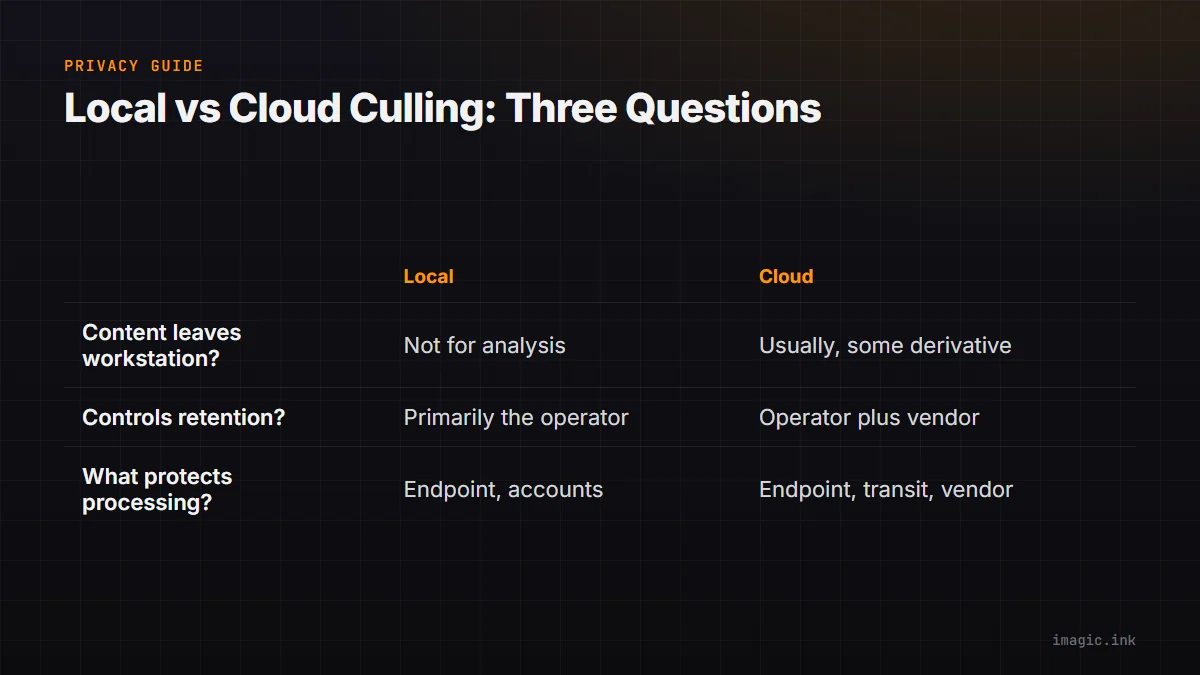
| Question | Local processing | Cloud processing |
|---|---|---|
| Does image content leave the workstation? | Not for analysis when genuinely local | Usually some content or derivative does |
| Who controls retention? | Primarily the operator | Operator plus vendor policy and backups |
| What protects processing? | Endpoint, accounts, and local storage | Endpoint, transit, vendor, and cloud accounts |
| Can policy block certain jobs? | Easy to keep offline | Requires explicit approval or prohibition |
Understand connectivity and latency without invented benchmarks
Cloud culling adds an upload and result-return stage. How long that takes depends on file size, whether originals or previews move, connection upload capacity, contention, distance, vendor load, and retry behavior. A fast download connection does not guarantee fast upload. A hotel, venue, rural studio, or mobile connection may also impose caps or instability that are invisible in an office test.
Local processing avoids that transfer dependency, but it uses the workstation's CPU, GPU, memory, storage bandwidth, and power. Performance varies with hardware, thermal limits, competing applications, model design, and image format. Avoid choosing from a single vendor speed claim. Test a representative batch on the intended machine and record start conditions, file types, whether previews were prebuilt, and what other work remained possible during processing.
The more important question may be availability rather than speed. Can a photographer cull on a flight, at a venue with no reliable connection, or during a provider outage? Can a cloud service move work to stronger remote hardware when the local laptop is modest? Each architecture can remove one bottleneck while creating another.
Compare operating cost as a system
Cloud services commonly tie ongoing operation to a subscription, usage, storage, or account tier. Local applications may involve a license and the cost of capable hardware, storage, electricity, maintenance, and eventual replacement. No universal total is honest because photographers already own different equipment and produce different volumes. Compare costs over the same period and include only resources the workflow actually consumes.
- Software license, subscription, usage, or renewal obligations.
- Upload bandwidth and any metered connection costs.
- Temporary or persistent cloud storage.
- Local compute, memory, and storage upgrades required for acceptable operation.
- Staff time spent waiting, supervising, retrying, or moving results.
- Switching cost if ratings, groups, or edits cannot be exported cleanly.
Do not assign a zero value to existing hardware merely because it has already been purchased. Local processing competes with editing, export, backup, and other tasks for that machine. Likewise, do not treat cloud compute as the only cloud cost when account administration and file transfer affect the working day.
Examine model updates and decision transparency
A cloud service can update models centrally, so all users may receive improvements without installing a new application. The same mechanism can change scoring behavior between jobs. A local application can package models with a versioned release, which may make a workflow easier to reproduce, but updates still need to be installed and validated.
Ask whether the product records the scorer version with results. If an older score looks wrong after a model improvement, re-ranking stored values will not correct it; the image must be analyzed again by the newer scorer. Version awareness matters when a large library mixes old and new analysis. A tool should distinguish score freshness from ranking preference.
Transparency also means understanding what the score represents. Sharpness, exposure, closed eyes, composition, and duplicate similarity are different signals. One combined rank can accelerate review, but it should not conceal why a frame moved. A technically weaker photograph may still be the only important expression or moment, so status must remain reversible and originals must remain intact.
Audit vendor and endpoint security separately
For cloud processing, review encryption in transit and at rest, authentication options, role separation, audit logs, incident communication, subcontractors, retention, deletion, backup handling, and data-use terms. Confirm whether support personnel can access image content and under what controls. Marketing summaries are not substitutes for contractual terms and technical documentation.
For local processing, enable full-disk encryption, strong account authentication, automatic screen locking, supported operating-system updates, malware protection appropriate to the environment, and restricted user privileges. Store client work outside broadly synchronized consumer folders if synchronization is not approved. Protect local backups and removable drives with the same care as the working copy.
Local processing narrows one exposure route, but a poorly secured workstation can still be the weakest point. Cloud processing can have mature infrastructure, but it expands the number of systems and organizations involved. Risk is the combination of likelihood, impact, and available controls, not a slogan attached to the architecture.
Minimize data and verify disposal
Whichever architecture is chosen, send or retain only what the culling task needs. Separate contracts, contact sheets, release forms, and unrelated administrative files from the image directory. Remove unnecessary location metadata from derivatives when the workflow permits it, and avoid granting an application access to a broader drive or account than required. Data that never enters a system does not need to be governed there later.
Deletion must be defined more carefully than removing a visible project. Local applications may retain thumbnails, caches, logs, or temporary exports. Cloud systems may retain active copies, backups, support attachments, and audit records for different periods. Document which of those contain image data, how each is removed, and whether deletion is immediate or scheduled. If a contract requires a specific disposal date, confirm that the product's actual behavior can meet it before the assignment.
Logs deserve attention even when they contain no pixels. Filenames can reveal client names, event locations, medical context, or unpublished product codes. Use neutral job identifiers where practical and keep diagnostics under the same access and retention policy as the rest of the project. A privacy review that examines only the RAW upload can miss these smaller but still meaningful disclosures.
Choose a boundary, including a hybrid one
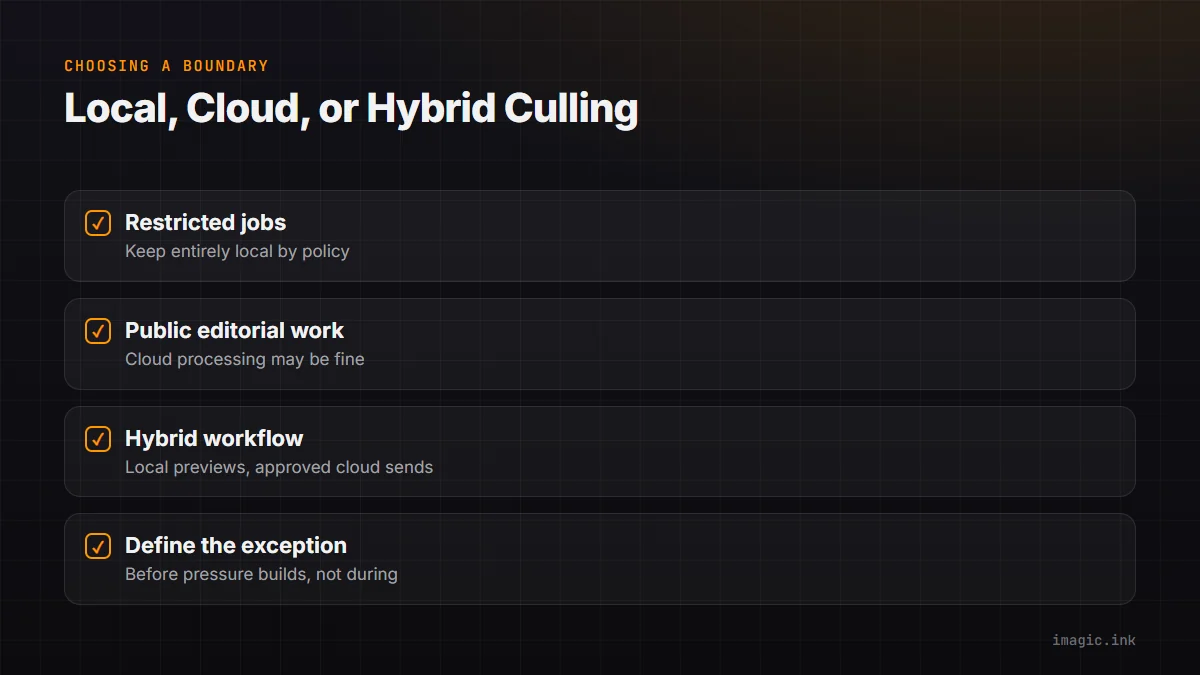
A hybrid workflow can be rational if its boundary is explicit. Restricted jobs might remain entirely local, while public editorial work uses cloud processing. Another workflow might generate approved low-resolution previews locally, strip unnecessary metadata, and send only those previews to a remote service whose terms permit the job. The crucial detail is that the policy defines the exception before pressure builds.
imagic is a Windows and macOS desktop app whose culling runs locally for sharpness, exposure, closed eyes, composition, and duplicate or burst grouping. Photos remain on the machine, and edits are non-destructive. That makes it a candidate when offline operation and a short data path are requirements, not a claim that endpoint security can be ignored. Its Max edition also exposes local CLI and MCP control for approved automation.
Review the desktop workflow for the local application boundary and the AI and Technology section for related evaluation guidance. If automation is involved, document which operator or agent may trigger ingest, analysis, status changes, and export. An automated local command still needs authorization and a verified destination.
Run a representative decision trial
- Select ordinary, non-sensitive files that resemble real RAW formats, resolutions, and burst patterns.
- Document the local hardware, connection, application version, and selected settings.
- Observe what network traffic and remote storage the workflow requires.
- Compare groups, scores, and final keeper decisions rather than trusting one headline rank.
- Interrupt the network or application and confirm recovery behavior.
- Export ratings or results and verify that switching tools would remain possible.
- Review privacy terms with the person responsible for contracts or data policy.
Frequently asked questions
Is local AI photo culling automatically private?
It keeps analysis off remote infrastructure when genuinely local, which reduces external exposure. The workstation, user accounts, drives, and backups still need appropriate security.
Does cloud culling always require RAW uploads?
No. Some services may use previews or other derivatives, but those can still contain sensitive visual and metadata information. Verify the exact data path and retention policy.
Which approach is faster?
There is no universal answer. Local speed depends on the machine and model, while cloud speed also depends on upload, vendor processing, and return time. Test the complete workflow with representative files.
Can a studio use both local and cloud culling?
Yes, if a written classification policy defines which jobs may use each path. The boundary should be based on contracts, sensitivity, connectivity, and operational needs.