
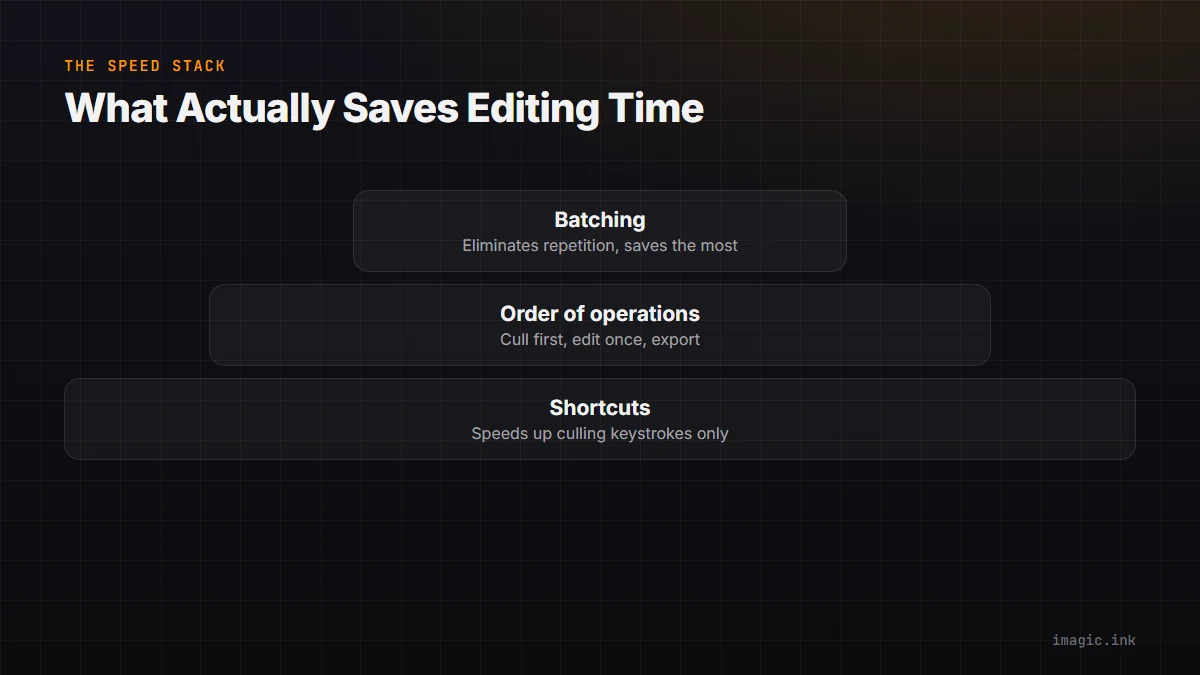
Photographers ask about keyboard shortcuts as if shaving half a second off a keystroke is where the time savings live. It is not. The biggest speed gains come from the order you do things in and how much of the job you batch versus repeat per photo, part of the broader workflow habits that separate fast editors from slow ones. Shortcuts matter, but they are the smallest layer of a three-layer stack.
Layer One: Order of Operations
The fastest workflow follows a strict sequence: cull first, apply global edits second, do local touch-ups third, export last. Photographers who skip this and edit each photo start to finish before moving to the next one pay for it twice, once in the editing itself, and again in the reject rate, because a photo edited before culling is time spent on a frame that might get thrown out anyway. Cull the whole shoot down to keepers before you touch a single slider.
Within the keepers, global edits (exposure, white balance, color grade) should be applied as a batch across similar frames before you zoom in on any individual local fix like a stray hair or a blemish. Local, per-photo work is the slowest category of editing by nature, so it should only ever touch the smallest possible set of frames, the ones that actually need it after the batch pass.
Layer Two: Batching, Not Repeating
Batch editing means applying one adjustment, or one style, to many frames at once instead of rebuilding it photo by photo. In imagic, a style applied to one image in a batch editing session can be copied across the rest of a similar sequence, so a hundred frames shot under the same light get the same base correction in one action rather than a hundred repeated ones. This is where most of the real time comes back, not from typing faster, from typing less overall.
The habit to build is grouping by lighting condition, not by chronological order. Two hundred frames from the same reception under the same bulbs should be batched together even if they are not adjacent in your timeline; splitting a batch by scene rather than by capture order is the single biggest efficiency habit separating fast editors from slow ones.
Layer Three: Shortcuts, Where They Actually Help
Keyboard shortcuts earn their keep at two points: culling (a single key for keep, one for reject, one to flag for a second look) and moving between images without reaching for a mouse. Shortcuts do not meaningfully speed up the batch-edit step itself, since that is one action applied broadly, not many small ones. Where they save real time is in reducing the friction of the highest-repetition task in the whole workflow, which is almost always culling, not editing.
Measuring Your Own Per-Image Seconds
Time yourself honestly on one real shoot: total minutes from import to export, divided by keeper count. Most photographers overestimate their own speed until they actually run the stopwatch. Once you have a real per-image number, the order-of-operations and batching changes above tend to cut it by a wide margin, because the savings compound. If culling drops from 4 seconds to 1.5 seconds per frame across 2,000 frames, that alone is close to an hour and a half back, before batch editing is even factored in. See 10 tips for a faster photo workflow for more habits worth adopting alongside this stack, and try imagic's free trial to test batch editing on a real shoot.
Frequently asked questions
Which matters more, shortcuts or batching?
Batching, by a wide margin. Shortcuts reduce friction on repeated single actions, but batching eliminates the repetition itself, which is where most editing time actually goes.
Should I ever edit a photo before culling it?
Only for the handful of hero shots you already know are keepers and want to check quickly; the bulk of the shoot should be culled to keepers before any editing time is spent.
How do I know if my batching groups are too broad?
If a batch-applied edit clearly overexposes or underexposes a chunk of the frames, the lighting within that group was not consistent enough; split it by scene or light source and reapply.