
"Image management software" is a broader ask than most comparison posts admit. Some people typing that phrase want a faster way to pick the sharp frames from a shoot. Others want a searchable home for a fifteen-year archive across two computers and a phone. Those are different jobs, and the tools built for each of them are not interchangeable, however similar their marketing pages sound. This is a straight look at four real options, Mylio, Excire Foto, digiKam, and Adobe Bridge, plus where imagic fits and does not fit into that picture.
What "DAM" actually means, and why imagic is not one
A digital asset management system is built around long-term cataloging: one searchable index of a library that can span years and multiple shoots, with metadata, keywords, and collections that persist and grow over time, independent of any single editing session. That is a genuinely different piece of software than a culling-and-edit tool, even an AI-assisted one. imagic does not do full DAM cataloging. It has no cross-shoot library index, no long-term archive search, and no smart collections that span years of work. It is built for triaging and editing what just came off a card, not for being the permanent home of a decade of images. Anyone specifically searching for a DAM should know that going in, rather than discovering the gap after buying.
Mylio Photos+: cross-device sync without a central cloud
Mylio's own description of the product centers on a private, peer-to-peer network across a user's own devices, syncing a full library between computers and phones without requiring everything to live on one company's servers. Per its own support article, checked as of September 2026, Mylio's pricing page lists the individual Mylio Photos+ plan at $25 a month or $240 a year, with a separate, higher-priced Pro tier for commercial use. It runs on Mac, Windows, iOS, and Android, and its face recognition, smart search, and offline access are built around having your whole library available on whichever device you are holding, synced or not. Mylio's own site describes an optional encrypted SecureCloud tier for backup alongside the local, device-to-device sync, plus family sharing across a private library and a LifeCalendar view for browsing a life's worth of images by date. That is a genuinely different problem than culling a single shoot, and it is the one Mylio is actually built to solve: keeping one library consistent and reachable across every device a household owns, not triaging what just came off a memory card.
Excire Foto: AI search built for photographers who already have Lightroom fatigue
Excire Foto positions itself specifically as a Lightroom-workflow replacement for search and organization. Per its own product page, it is sold as "a one-time purchase, no subscription" for Windows and macOS, and its AI search reaches further than a keyword index: it can find images by visible text inside the photo itself, street signs, race numbers, storefronts, a genuinely unusual capability for a consumer-facing photo tool. Its own page also lists automatic keywording, duplicate detection, a Map View for browsing by location, a Timeline view, face recognition, and object detection, on top of the culling module scoring sharpness, aesthetics, and eye sharpness with grouping by visual similarity or burst sequence. Excire's own site does not publish a static current price on its product or shop pages, since the figure renders only at a dynamic checkout, so no dollar amount is stated here; check excire.com directly for the number that applies to your region and any active offer.
digiKam: the free, open-source option with a real catalog underneath
digiKam is the DAM option that costs nothing. Per its own site, it is licensed under the GNU General Public License, runs on Linux, Windows, and macOS, and its current stable release, checked on digikam.org in September 2026, is version 9.1.0. It uses the LibRaw library for RAW decoding, which means broad camera-model coverage without a subscription, and its cataloging is genuinely deep: tags, ratings, labels, face recognition, geotagging, and search across EXIF, IPTC, and XMP metadata, plus natural-language querying of a library and a plugin system for batch processing and custom features, all running locally with no telemetry. The tradeoff is the one every serious open-source DAM shares: no AI-assisted culling or quality scoring built in, so picking keepers from a shoot day is still a manual, frame-by-frame decision before digiKam's organization tools ever come into play.
Adobe Bridge: free to open, tied to the Adobe ecosystem
Adobe's own product page for Bridge is headlined "Download Adobe Bridge for Free," and describes it as a creative asset manager: Adobe's Bridge page lists organizing assets into collections, finding assets with filters and advanced metadata search, adding keywords, labels, and ratings, viewing thumbnails and rich previews across "all your creative assets," and opening RAW files directly into Adobe Camera Raw from within Bridge. It is a real, capable browser and metadata tool, and it is free to download. What it is not is a standalone RAW processor or an AI-assisted culling tool: RAW development happens through Camera Raw, a separate Adobe component, and star ratings or labels are entirely manual, the same one-frame-at-a-time review any free browser requires. Bridge's advantage over a niche DAM tool is less about depth of cataloging and more about already living inside the Adobe ecosystem most working photographers already pay for.
What actually happens when you move a library between tools
A question every one of these comparisons skips: what happens to your existing ratings, keywords, and star picks if you switch. The honest answer depends entirely on whether the metadata was written into the files themselves or locked inside one application's private database. Star ratings, labels, and keywords written as IPTC or XMP metadata, an open, widely supported standard rather than any single vendor's format, travel with the image file itself and are readable by most other tools that also support that standard, Bridge and digiKam both do. A library built inside a closed, proprietary catalog database, the kind some DAM tools use for performance or for features like face-recognition indexes, does not travel nearly as cleanly; exporting years of that metadata back out into portable sidecar files is a real, sometimes tedious step, not a given. Before committing years of tagging work to any tool on this list, it is worth confirming, on that vendor's own support pages, exactly how metadata is stored and whether a clean export path back to open standards actually exists.
Side by side
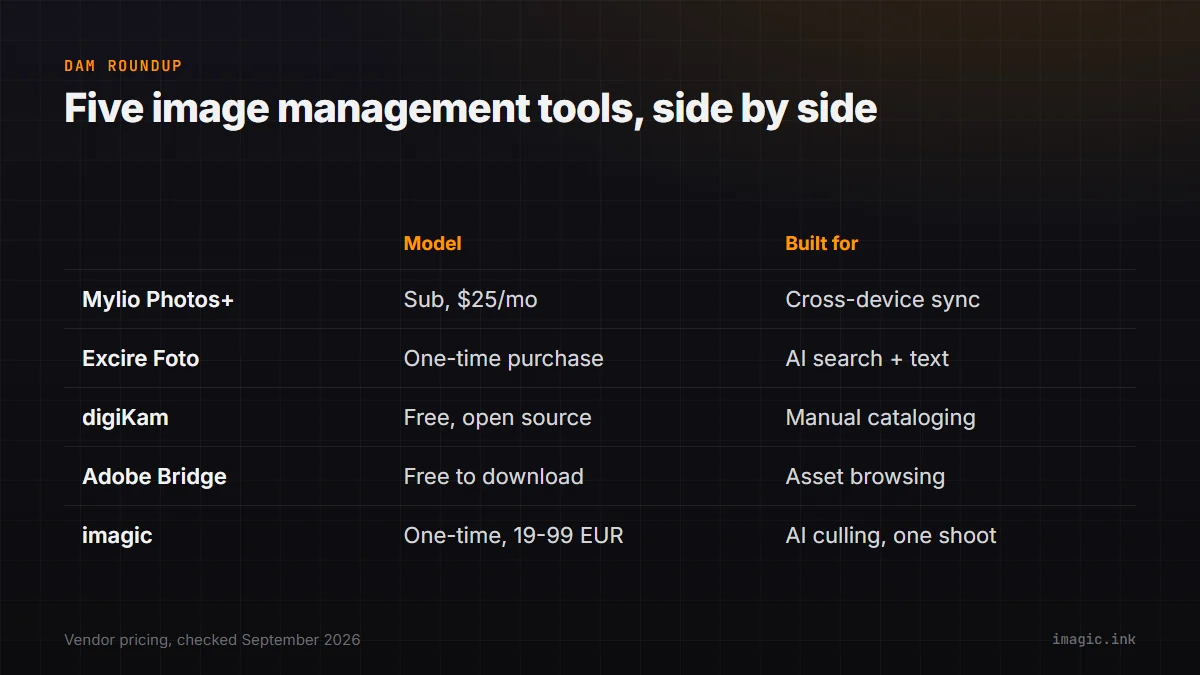
| Tool | Model | Platforms | Built for |
|---|---|---|---|
| Mylio Photos+ | Subscription, from $25/mo or $240/yr | Mac, Windows, iOS, Android | Cross-device library sync and offline access |
| Excire Foto | One-time purchase | Windows, macOS | AI search across an existing library, including visible text |
| digiKam | Free, open source (GPL) | Linux, Windows, macOS | Deep manual cataloging with no subscription |
| Adobe Bridge | Free to download | Windows, macOS | Asset browsing and metadata, paired with Camera Raw for RAW |
| imagic | One-time purchase, EUR 19/49/99 | Windows, macOS | AI-assisted culling and RAW editing for one shoot at a time |
Where AI-assisted culling fits next to a DAM, not instead of one
None of the four tools above run AI quality scoring or duplicate-burst detection to help decide which of two thousand frames are worth keeping in the first place. That is a deliberately different job from cataloging: a DAM organizes what you have already decided to keep, while culling decides what gets kept. imagic runs sharpness, closed-eye, and composition scoring locally, groups visually similar frames so a burst gets reviewed as a set, and develops the RAW files through its own built-in engine covering CR2, CR3, NEF, ARW, RAF, ORF, RW2, DNG, and PEF, all before a single image needs to enter a long-term catalog at all. For a photographer whose actual pain point is the hour spent scrolling a memory card deciding what to keep, that first-pass review is the bottleneck, not the archive search that comes months later.
A workflow that actually uses both
The realistic setup for anyone who needs both fast culling and long-term cataloging is pairing two tools rather than expecting one to do both jobs well. Cull and edit a shoot immediately after it happens, then hand the kept files to a DAM for the long-term archive, tagging, and cross-shoot search that a culling tool was never built to provide. Trying to force a culling-focused tool to also be a fifteen-year archive index, or forcing a DAM to also score sharpness and group bursts, tends to leave both jobs done worse than a tool purpose-built for each half.
Choosing based on what you actually need
If the pain point is searching a library you already trust the organization of, Excire Foto's AI search or digiKam's metadata depth are the right category to be shopping in, not a culling tool. If it is syncing that library across a laptop, a desktop, and a phone, Mylio is built specifically for that. If it is getting through a shoot day's raw take of files fast, with automated scoring doing the first pass instead of a human eye on every frame, that is the culling problem imagic and free browsers like Bridge sit on opposite ends of, manual versus automated. Knowing which of these problems you actually have before buying anything saves the cost of learning it the slow way.
It is also worth being honest that these categories overlap more in practice than a feature-list comparison suggests. A photographer who shoots occasionally and never accumulates more than a few thousand images a year may never feel digiKam's or Mylio's cataloging depth as a need at all, a handful of well-named folders does the same job at that scale. The tools on this page earn their cost, in money or in setup time, specifically at the volume and time horizon where manual folder browsing stops scaling: years of shoots, thousands of images, and a genuine need to find "that one photo" months or years later without remembering which folder it lives in. Below that threshold, the honest recommendation for most of these tools is to wait until the pain is real before adopting one.
For the RAW-editing side of that decision, imagic vs digiKam lays out the AI-culling-versus-free-cataloging tradeoff in more depth, and this earlier roundup of free photo management tools covers more of the no-cost end of this same spectrum. The Software Comparisons category has the rest of these breakdowns.
Frequently asked questions
Is imagic a digital asset management tool?
No. imagic does AI-assisted culling and RAW editing for a shoot at a time; it has no long-term cross-shoot cataloging, smart collections, or archive-wide search the way a dedicated DAM like Mylio, Excire Foto, or digiKam does.
What is the only genuinely free option among these four?
digiKam. It is GPL-licensed open-source software with no purchase price and no subscription, though it has no AI-assisted culling built in, so picking keepers from a shoot stays a manual task.
Which tool actually searches inside a photo for visible text?
Excire Foto. Per its own product page, its AI search can find images containing specific visible text, such as a street sign or a race bib number, which none of the other three tools here advertise as a feature.