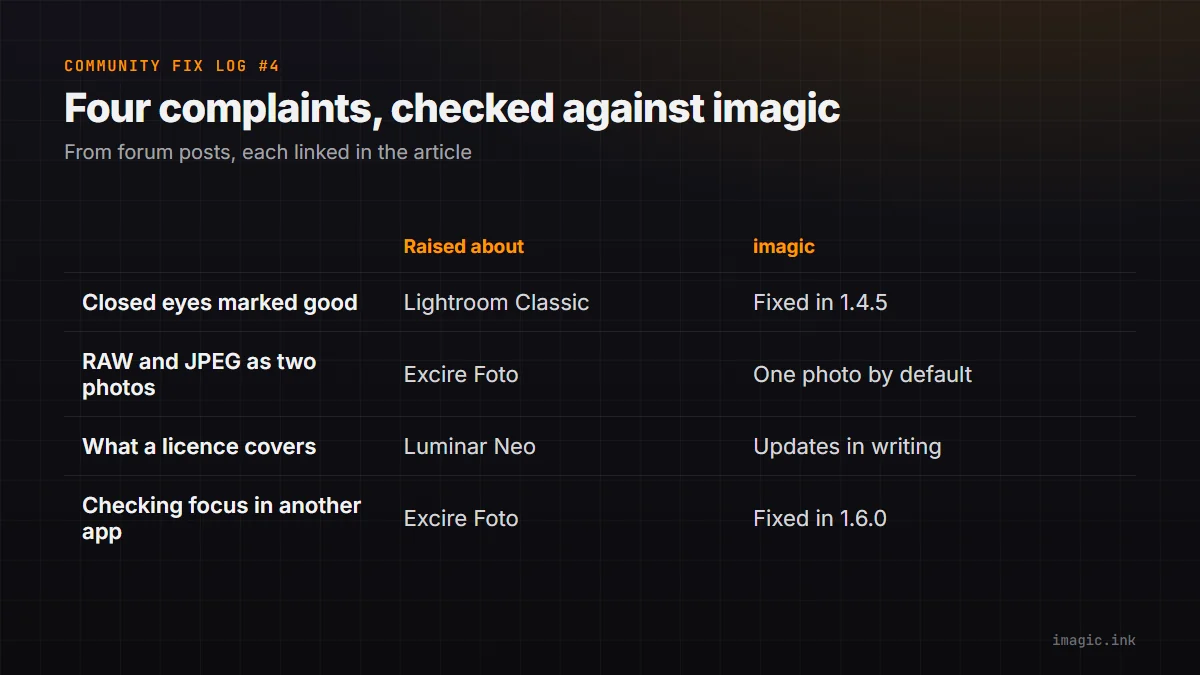
The Community Fix Log reads what photographers post about their software, picks complaints where imagic has something checkable to say, and answers each one with evidence or with an honest "we have this too". Quotes are short, word for word, linked to the original post and credited the way the person named themselves there. Every product here also has plenty of happy users; this is not a ranking. This is the fourth issue, and the earlier ones are in the Community Fix Log category, starting with issue 3. Everything about imagic below was checked against version 1.6.0 on 16 November 2026.
1. Closed eyes marked as good
"half of the images were flagged as “good” while the eyes were clearly closed"
SensationElle, in Adobe's Assisted Culling feedback thread for Lightroom Classic, 22 October 2026 (original thread).
What the poster describes: a set where about half the frames Assisted Culling rated as good had the subject's eyes closed. Adobe's post at the top of the same thread lists Eyes Open scoring as an area it has been improving.
What imagic does: we had this weakness too. The early check could not tell a closed eye from a face turned away. A shipped release replaced it: culling now checks each eye of the main subject and tells you which one is closed or half-closed, and the model ships inside the app, so it works offline. Since version 1.6.0 it also checks every face of a reasonable size in a group shot and tells you how many have their eyes closed, for example "2 of 5 faces have closed eyes". You can read the entries in the changelog.
Where we still fall short: winks are the weak spot, and faces that are small in the frame are not checked, so someone far back in a group can still slip through.
Status: fixed in version 1.4.5, extended to every face in a group shot in version 1.6.0.
2. RAW and JPEG counted as two photos
"Excire can't treat JPG + RAW as one photo when culling"
icue_126, on the Fred Miranda forums, 26 March 2026 (original thread).
What the poster describes: when culling a set shot as RAW plus JPEG in Excire Foto, each shot appears twice, so they ignore the RAWs and clear the leftovers with their own script. This is their report of the 2025 version; we have not tested Excire ourselves, and a newer version has shipped since.
What imagic does: since version 1.5.5, a RAW and a JPEG with the same name import as a single photo. You cull, edit, export and hand off to Lightroom once per shot, and the JPEG stays with the RAW. It is on by default and can be turned off in Settings (changelog).
Where we still fall short: pairing relies on the two files sharing a name, so files renamed separately will not pair.
Status: different today (pairs by default).
3. Not knowing what a licence covers
"What is not clear is whether that price includes all updates and upgrades."
kimlschumann, on the DPReview forums, 8 April 2026 (original post).
What the poster describes: a sale on a perpetual Luminar Neo licence, and no clear answer on which later updates it would cover. Other members explain in the thread how it has worked so far.
What imagic does: the update policy is written down on the imagic fact sheet and in the terms: every licence includes all future imagic versions and new camera support for its tier, with no paid major versions. The imagic and Luminar Neo comparison lays out what each one does.
Where we still fall short: moving up a tier costs the difference, and imagic is a young product from a one-person company, so the written policy has a short track record behind it.
Status: different by design (written update policy).
4. Needing a second app to check focus
"I do find myself keep going back to FastRawViewer to inspect the in-focus area"
icue_126, on the Fred Miranda forums, 26 March 2026 (original thread; the same member later noted a focus peaking mask in Excire Foto 2027).
What the poster describes: liking a culling tool but leaving it for another app whenever they need to see exactly what is sharp.
What imagic does: since version 1.6.0, press F (or the Focus peaking button) in the single-photo or side-by-side view and the sharpest edges light up in red, at any zoom, so you can check focus without opening a second app. Side-by-side compare also gives 1:1 on both photos with Space or Z (changelog).
Where we still fall short: peaking marks the sharpest edges relative to the photo, so it shows where focus landed rather than judging whether it is good enough, and that last call is still yours. We have also not compared it with the peaking in Excire Foto or FastRawViewer.
Status: fixed in version 1.6.0.
What this issue did not answer
Several posts this week were about crashes after updates and graphics drivers in other editors. We have no like-for-like test of those, and imagic has crash reports of its own to work through, so we are not claiming anything there. Complaints we cannot answer with evidence are left out rather than spun.
To check any claim yourself, the free trial on the desktop page is 500 exports with no card, and importing, culling and editing never count against it.
Frequently asked questions
Does imagic detect closed eyes?
Yes. Culling checks each eye and says which one is closed or half-closed. In a group shot it checks every face of a reasonable size and tells you how many have closed eyes. Winks are its weak spot, and very small faces are skipped.
Can imagic treat a RAW and JPEG as one photo?
Yes, when the two files share a name. It is on by default and can be turned off in Settings.
Does imagic have focus peaking?
Yes, since version 1.6.0. Press F in the single-photo or side-by-side view and the sharpest edges light up in red. You can still check sharpness at 1:1 in side-by-side compare.
Why quote people by their usernames?
We credit each post exactly the way the person chose to post it, and link the original so you can read it in full. We never contact reviewers on review sites, and quoting someone does not mean they use or recommend imagic.