
Headless photo editing replaces button-driven steps with explicit commands that can be called from a terminal, script, scheduler, or AI agent. The benefit is repeatability: a job can follow the same ingest, analysis, selection, style, and export sequence with recorded inputs. The risk is also repeatability: an incorrect path or assumption can be applied consistently at scale. Good automation therefore exposes state, limits scope, and pauses before consequential writes.
imagic documents a small command surface for this purpose. imagic tools discovers the installed tool schemas, imagic tools --names-only lists names, and imagic tool <name> calls one operation. Results are JSON on standard output; errors are JSON on standard error with a non-zero exit code. Exact parameters should be discovered from the installed build rather than copied from an article.
Treat the pipeline as a state machine
A reliable automation knows which transitions are valid. A folder outside the library can be scanned. Ingested photographs can be analyzed. Stored scores can be inspected or reselected. Selected photos can receive adjustments or the user's learned style. Edited keepers can be exported to a confirmed destination. Skipping a prerequisite should produce a clear stop, not a guessed recovery.
Represent the states in a run record: discovered, input validated, ingested, analyzed, reviewed, styled, export approved, exported, verified. Store timestamps, tool names, normalized arguments, exit status, and concise returned counts. Do not mark a state complete merely because a process exited; inspect the JSON result and check that it describes the intended job.
State also protects restart behavior. If a scheduler reruns after a workstation reboot, it can query the library and continue from the last confirmed transition. It should not automatically reapply edits or create another export simply because the previous log ended abruptly.
Discover tools once per installed session
The documented tool list is a summary that may lag the installed build. Start by calling discovery and retaining the returned schema with the run metadata. This avoids hard-coding a parameter that was renamed, removed, or constrained. It also lets an AI agent show which operations are actually available before promising an outcome.
imagic tools
imagic tools --names-only
A wrapper should parse the JSON rather than scrape formatted terminal text. Validate that required names are present, then validate every argument against the advertised input. If discovery itself fails, stop and surface the structured error. Substituting a similarly named command is not a safe fallback.
Record the executable path or resolved command used by the automation. On a packaged Windows installation the documented path may be C:\Program Files\imagic\imagic.exe, while another environment may expose imagic on PATH. Resolve deliberately so a scheduler account and an interactive account invoke the same program.
Validate the input directory without changing it
Resolve the shoot folder to an absolute path. Confirm that it exists, is inside the user-authorized scope, and is not the export folder, application directory, or an overly broad drive root. Enumerate supported candidate files only for reporting; do not rename, move, or delete the source during validation. If the folder is a card, copy and verify it through the studio's ingest policy before treating it as the working source.
Use structured JSON so spaces and punctuation are carried as data rather than shell syntax:
imagic tool scan_directory --json '{"path":"D:/Shoots/Job402"}'Shell quoting differs between PowerShell, Command Prompt, bash, and programmatic process APIs. A robust wrapper should pass an argument array directly when its runtime allows it. If a JSON string must cross a shell, test paths containing spaces and non-special punctuation with a disposable folder before production.
Use ingest as the idempotent entry point
scan_directory is documented as safe to rerun because already-known files are skipped. That makes it a useful restart boundary. It does not eliminate the need to verify the selected directory; repeatedly scanning the wrong folder is consistently wrong. Log the resolved path and returned result.
After scanning, query get_library_stats rather than assuming every expected photograph was added. Reconcile the result with the working copy at a level the tool exposes. Unsupported files, inaccessible paths, and duplicates should be visible as exceptions in the operator report.
Do not use ingestion success as permission to erase cards. Card release belongs to a separate backup procedure with at least two verified copies. The headless editor operates on the copied job; it is not the sole evidence that media is protected.
Analyze once, then distinguish re-selection from reanalysis
Call analyze_photos after ingestion. The documented analysis covers sharpness, exposure, closed eyes, composition, and near-duplicate or burst grouping. It changes culling status and does not delete original files. Report the resulting state and expose a review route for exceptional frames.
reselect_photos uses stored scores. It is appropriate when the desired keeper set changes but the underlying analysis remains valid. It does not run the scorer again. An automation that reruns analysis every time the target count changes wastes work and can obscure why the selection moved.
Stored scores can predate an improved scorer. Use check_score_freshness when a verdict looks unexpected or before relying on an older library. If stale results are reported and the user wants updated analysis, call reanalyze_stale_photos. Re-ranking stale numbers cannot fix their origin.
Keep creative automation bounded
Preset and adjustment tools should receive explicit photo IDs or a clearly derived selected set. Before applying them, record the count and the rule that produced it. Query get_photo_edits on representative images when a resume could otherwise double-apply an operation or overwrite a manual change.
apply_my_style uses a profile learned from photographs the user edited. Check get_style_profile first. If there is no profile, stop or enter an approved training flow using learn_style_from_library, match_style_from_examples, or the calibration tools. Do not substitute a generic preset while reporting that the user's style was applied.
Editing is documented as non-destructive: adjustments are stored per photo and rendered at export, while the original RAW is not rewritten. Non-destructive does not mean consequence-free. A broad incorrect adjustment can still create confusing state and require recovery, so preview a representative subset before a large batch.
Make export an explicit approval gate
Export writes files. The imagic agent instructions require confirming a new destination rather than inventing one. A headless job should therefore stop in an "export ready" state with the proposed absolute path, selected count, naming policy, and overwrite behavior visible to the user or supervising system.
imagic tool export_photos --arg dest_dir=D:/Shoots/Job402/ExportOnly run that call after approval. Validate that the destination is inside the intended job or another explicitly authorized location. Refuse a drive root, source directory, or ambiguous relative path. If the folder already contains files, determine whether the application will skip, replace, or rename them from the live schema and current documentation.
After export, verify returned status, expected file count where available, and readability of representative outputs. Do not delete working files or mark delivery complete solely because the destination directory exists.
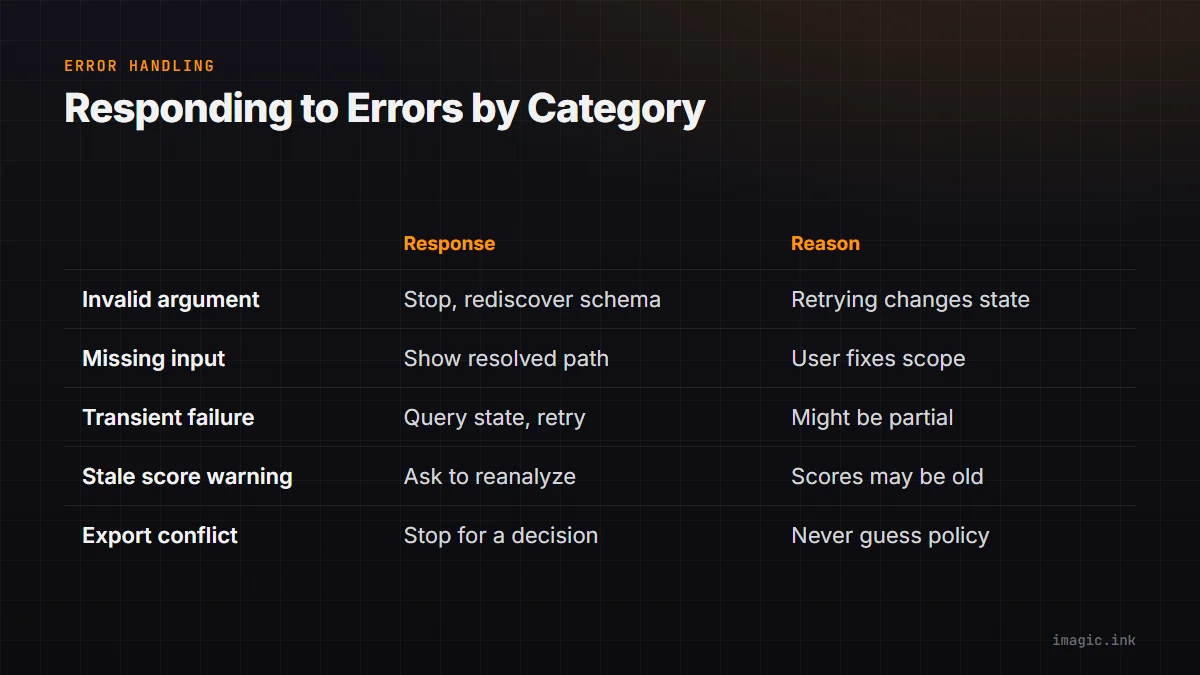
Handle errors by category
| Error class | Automation response | Reason |
|---|---|---|
| Invalid argument | Stop and rediscover schema | Retrying guesses can change the wrong state |
| Missing input | Stop and show resolved path | The user must correct scope or copy state |
| Transient process failure | Query state, then bounded retry | The operation may have partially completed |
| Stale score warning | Ask whether to reanalyze | Re-selection alone is insufficient |
| Export conflict | Stop for destination decision | Writing policy must not be guessed |
Never retry a state-changing operation merely because no output arrived before a wrapper timeout. First query library, edit, or destination state. Use a run identifier so duplicate invocations can be recognized. Keep retry counts bounded and make the final error actionable.
Write logs that are useful but not invasive
A log should contain the job identifier, resolved paths, discovered tool version information where returned, calls, redacted arguments, timestamps, exit codes, and summarized results. It should avoid copying full EXIF, captions, face information, or image content when an ID and count suffice. Protect logs under the same client policy as the photographs because filenames and paths can disclose sensitive information.
Separate machine logs from an operator summary. The machine log supports debugging. The summary states what was ingested, analyzed, statused, edited, approved, exported, and left unresolved. A user should not need to interpret raw JSON to know whether a job is safe to continue.
Rotate or archive logs according to a retention policy. Do not let a hot-folder service accumulate indefinite records for former clients. If credentials or tokens ever appear accidentally, treat that as a security incident rather than merely deleting one line.
Add scheduling only after manual rehearsal
Run the entire workflow manually on a disposable copied shoot before attaching it to a scheduler, file watcher, or AI agent. Test paths with spaces, duplicate ingestion, no style profile, stale scores, an unavailable destination, and an interrupted process. Confirm that each condition stops at the intended boundary.
A watcher should respond to a completion signal from the copy process, not the first file appearing in a folder. Otherwise it can analyze a partial shoot while more files arrive. A scheduler should use a dedicated working account with only the required file access. Parallel jobs need separate input and output paths plus a clear policy for shared library state.
The automation overview can frame broader orchestration, while the MCP route describes an alternative client surface. MCP and CLI expose the same documented imagic tools, so the safety model should remain consistent whichever interface initiates a call.
Use a production readiness checklist
- The live tool schema is discovered and required operations are present.
- The input is an absolute, authorized, verified working-copy directory.
- Every transition queries and records state before continuing.
- Re-selection is not confused with fresh analysis.
- Style application checks that the user's profile exists.
- Status and edits remain reviewable, with original RAW files untouched.
- Export destination and naming are confirmed before files are written.
- Errors stop safely, retries are bounded, and logs avoid excess client data.
Autonomy is useful when it removes repetition while preserving authority. A successful headless pipeline does not make its decisions invisible. It makes every important input, transition, exception, and write easier to inspect.
Add a dry run and a single-job lock
A wrapper can offer a dry-run mode that resolves paths, discovers tools, validates prerequisites, and prints the proposed calls without invoking state-changing operations. The dry run should use the same argument-building code as production so it catches quoting and scope errors. It must be labeled clearly because simulated success does not prove that analysis or export will complete.
Use a per-job lock or another explicit concurrency control before scheduled execution. Two workers scanning the same input, changing the same statuses, or exporting into one destination can produce confusing state even when each command is valid alone. Store the run identifier and release the lock only after success or a documented recovery decision, with stale-lock handling that requires inspecting current state.
Frequently asked questions
Can scan_directory be rerun after an interruption?
Yes. The documented behavior skips files already known to imagic. The wrapper should still verify the resolved folder and inspect library state afterward.
Should a changed keeper target trigger analyze_photos again?
No. Use reselect_photos to re-rank stored scores, unless freshness checking shows that the scores themselves need reanalysis.
Can a scheduled job choose its own export folder?
No. Export writes files, and a new destination should be confirmed rather than invented. Store an approved destination in job configuration or pause for authorization.