
Model Context Protocol, or MCP, gives an AI application a standardized way to discover and call tools supplied by another program. In photography, that can turn a request such as "show the library status" into a structured tool call instead of a guessed command or a sequence of screen clicks. MCP does not make an agent trustworthy by itself. Safety comes from the host, server, permissions, tool design, and the human checkpoints around consequential actions.
The current MCP architecture documentation describes hosts, clients, and servers communicating with JSON-RPC messages. Local servers commonly use standard input and output, while remote deployments can use Streamable HTTP. The protocol supports tools, resources, prompts, capability negotiation, and lifecycle messages. An implementation may expose only part of that surface, so discovery is more reliable than assuming a feature from the protocol name.
Understand the host, client, and server boundary
The host is the AI application the user interacts with. It manages the conversation, policies, approvals, and one or more MCP clients. A client maintains a connection to a server and translates protocol messages. The server advertises capabilities and performs the operations behind its tools or resources. Keeping these roles separate helps diagnose both security and reliability.
A model may propose a tool call, but the server actually touches files, databases, or applications. The host decides what information is shown to the model and whether a human approval is required. The server validates arguments and returns a structured result. A safe workflow does not rely on the model remembering every constraint; important boundaries are enforced by the surrounding software.
Transport is not capability. A local stdio connection can expose powerful file-writing tools, while a remote HTTP server can expose only read-only metadata. Evaluate the operations and authorization rather than assuming local means harmless or remote means uncontrolled.
Begin every session with discovery
Tool names, parameters, and behavior can change between installed versions. Discover the live schema before constructing calls. The imagic agent instructions make this explicit: run imagic tools for full JSON descriptions or imagic tools --names-only for a quick inventory. Then call a named function through imagic tool <name> with JSON or individual arguments.
imagic tools
imagic tools --names-only
imagic tool scan_directory --json '{"path":"D:/Shoots/Job402"}'
imagic tool get_library_stats
Do not copy parameters from an old article when the live schema is available. A failed call can report the expected parameters, but deliberate discovery gives the agent and operator a shared view before anything changes. It also reveals whether a requested feature exists in the installed edition.
Follow the stateful photo order
Photo tools operate on state. Analysis cannot work on images that have not been ingested. Style cannot be applied meaningfully to arbitrary identifiers, and export should follow selection and edit decisions. The documented imagic sequence is scan, analyze, inspect statistics, apply the user's learned style to chosen photo IDs, and export to a confirmed destination.
- Ingest: call
scan_directoryon an explicit copied shoot folder. - Analyze: call
analyze_photosonly after ingestion. - Inspect: use
get_library_statsand listing tools to understand state. - Edit: apply a preset, adjustments, or the user's learned style to identified photos.
- Export: confirm destination and output intent before writing rendered files.
A host should report which stage is complete rather than claiming the whole assignment finished because one tool returned successfully. Tool output is evidence for the next transition, not a substitute for checking the intended result.
Keep culling reversible and score-aware
imagic culling sets a status and does not delete the source files. That makes analysis and re-selection lower risk than destructive cleanup, but an agent should still describe what changed. A user may want rejected frames retained, manually reviewed, or selected under a different keeper target.
reselect_photos re-ranks stored scores. It does not run image analysis again. If the installed scorer changed after photographs were originally analyzed, old values can remain. check_score_freshness reports this condition, and reanalyze_stale_photos updates stale work. An agent that sees an unexpected verdict should check freshness before defending or rearranging the same numbers.
Automated scores cover technical and grouping signals, not every editorial reason to keep a frame. A host should allow review of unusual compositions, intentional blur, key reactions, and client-specific subjects. Status changes can be reversed with set_photo_status.
Model approvals around consequences
Read-only discovery and statistics are low consequence. Ingest changes a local library but leaves source files intact. Status changes affect selection state. Edit calls store adjustments. Export writes new files into a destination. The approval model should become stricter as consequences increase.
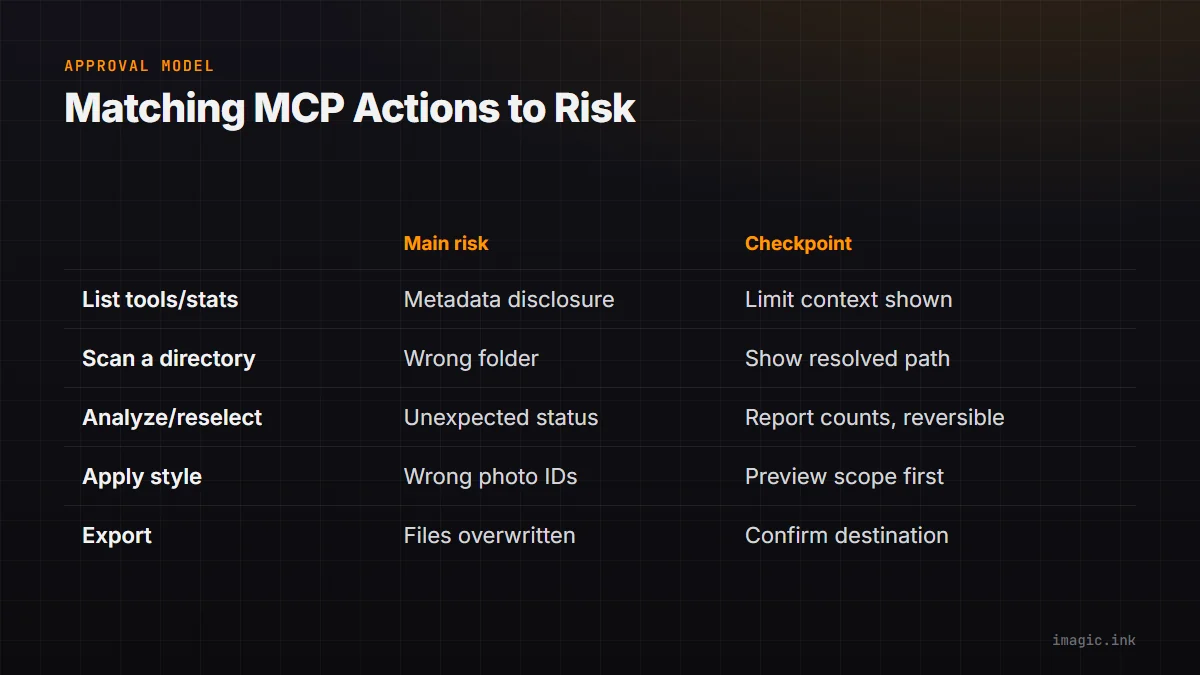
| Action | Main risk | Useful checkpoint |
|---|---|---|
| List tools or statistics | Metadata disclosure | Limit context to the active job |
| Scan a directory | Wrong folder or unintended files | Show the resolved input path |
| Analyze or reselect | Unexpected status decisions | Report counts and preserve reversibility |
| Apply style or adjustments | Wrong IDs or creative treatment | Preview scope and confirm profile |
| Export | Files written or overwritten | Confirm destination and naming |
The documented rule for imagic is to ask before exporting somewhere new. The agent should not invent a convenient folder. It should present the exact destination, ask for confirmation when needed, and report the returned result rather than assuming success.
Constrain paths and arguments
Natural-language instructions can contain ambiguous paths, relative locations, copied punctuation, or text from an untrusted project file. Resolve the intended directory, keep it inside the user's stated scope, and send structured JSON rather than building shell fragments from prose. The server should validate types and reject unexpected fields.
A photo's caption, filename, or embedded metadata must be treated as data, not as an instruction to the agent. The same applies to README files and delivery notes found during a scan. Only the user's authorized request and trusted workflow configuration should determine tool calls.
Use least privilege for remote MCP deployments. Restrict server access, authenticate connections, separate clients, and avoid exposing broad file-system tools when a narrow photo operation is sufficient. For local stdio servers, protect the configuration and executable path so an unintended program cannot replace the expected server.
Handle style as user-owned state
apply_my_style uses a profile learned from photographs the user edited. It is not a generic mood preset. Before applying it, call get_style_profile. If no profile exists, use the documented calibration or learning route, such as learn_style_from_library or match_style_from_examples, with the user's chosen material.
Apply a style only to explicit photo IDs or an unambiguous selected set. Report the number and identity scope before changing edit state. Since edits are stored non-destructively and rendered at export, the original RAW is not rewritten, but an incorrect batch treatment can still waste review time and confuse delivery.
Style training examples can contain sensitive client material. The local nature of the documented imagic tools limits that workflow to the machine, but workstation permissions and backups remain relevant. Do not pull examples from unrelated projects merely because they are accessible.
Design observable automation
An automated agent should record requested operation, resolved input, tool name, normalized arguments, start and completion state, returned error, and any human approval. Avoid logging full sensitive metadata when an identifier and count are enough. Logs should help reconstruct decisions without creating another uncontrolled copy of client information.
Use idempotent steps where supported. scan_directory is documented as safe to repeat because already-known files are skipped. Other calls may change status or edit state and should not be repeated blindly after a timeout. Query current state first. A missing response does not prove an operation failed.
Set bounded retries for transient failures and stop on validation errors. Do not respond to an unexpected argument error by guessing several variants against client data. Rediscover the schema, compare the intended call, and surface the mismatch.
Test with a disposable job before production
Create a small copied folder with representative RAW and JPEG files, including a burst and an intentional exception. Discover tools, scan that folder, analyze, inspect the results, change and restore a status, apply a known edit to a test photo, and export only to a confirmed disposable destination. Verify source hashes or timestamps remain unchanged where appropriate.
Test stale-score handling, missing style profile behavior, invalid photo IDs, unavailable destination, and interrupted client connection. The objective is to learn how each layer reports partial completion. Repeat after server, host, application, or policy updates.
The imagic MCP overview covers the connection surface, while the automation page places it in broader workflows. The same documented tools are available through the shell, so a terminal route can provide a useful control case when diagnosing MCP behavior.
Control what enters model context
MCP standardizes communication with a server, but the host decides which tool descriptions, arguments, results, resources, and conversation details the model can see. A local photo operation can still expose filenames, paths, ratings, captions, or subject information through structured results. Review the host's data policy and configure the server to return only the detail needed for the next decision.
Use opaque photo identifiers and aggregate counts where full paths are unnecessary. Redact client names from logs and tool summaries. If a human needs a preview, provide only the approved derivative or local interface rather than placing every original into conversational context. Local image processing and model privacy are related but separate questions.
Tool output can also contain untrusted text. A filename, caption, sidecar, or error message that tells the agent to ignore instructions must remain data. The host should preserve the priority of user authorization and system policy, while the server should accept narrow typed arguments rather than arbitrary shell commands.
Review permissions after client, host, or server updates. Remove unused servers, pin trusted executable paths where the environment supports it, and inspect configuration before production. A safe photo tool can become part of an unsafe chain if a different process can impersonate it or if the host grants unrelated file access.
Separate the model-facing result from the operator record. A tool can return a concise success state, counts, and opaque identifiers to the model while writing a fuller local audit entry for authorized review. If the next decision needs an image preview, generate or expose only the required candidate at an appropriate size, and keep that access bound to the active job rather than attaching an unrestricted library.
Test this boundary with real failure responses as well as successful calls. An error can reveal more than a normal result through absolute paths, account names, software versions, or embedded metadata. Sanitize user-facing detail without removing the structured cause an operator needs to correct the workflow.
Frequently asked questions
Does MCP send RAW files to the AI model?
Not inherently. MCP carries protocol messages, while the host and server decide what data is exposed. Inspect the specific tool, transport, host policy, and application data flow.
Can an MCP agent export photographs without confirmation?
The technical capability depends on the host and server permissions, but the documented imagic workflow requires confirming a new destination. Approval should be enforced around the consequential tool call.
Is MCP more capable than the imagic command line?
No. The imagic agent instructions state that the MCP server exposes the same tools, names, and parameters as the shell surface. Choose the interface that fits the client and control model.