An open-source RAW editor most photographers had never heard of a year ago is suddenly showing up in search interest around "Lightroom alternative," well ahead of established names like darktable. That tool is RapidRAW, and it is worth a straight explanation of what it actually is before deciding whether it belongs in your workflow.
What RapidRAW actually is
According to its own project page, RapidRAW's GitHub repository describes it as "a beautiful, non-destructive, and GPU-accelerated RAW image editor built with performance in mind." It is a single-developer, actively maintained open-source project, published under the name CyberTimon, built as a modern alternative to tools like Lightroom rather than a fork of an existing editor. Edits are non-destructive: RapidRAW keeps your original RAW file untouched and stores adjustments in a separate sidecar file rather than writing over the source image.
Why it is suddenly showing up in search data
imagic's own keyword research, pulled from Google Trends related-query data around the seed term "Lightroom alternative," shows RapidRAW posting the largest relative rise of any related term tracked in that pull. That is a real, measurable search-interest signal rather than an anecdote, though it describes relative search growth, not an absolute number of users or downloads, which RapidRAW's project page does not publish.
That kind of spike is also, worth saying plainly, exactly the kind of signal that makes a piece like this worth writing in the first place: a sudden jump in "what is this thing" searches usually means real people are encountering the name for the first time, often through a forum post, video, or someone else's recommendation, and want a straight answer before they install anything.
Platform support, size, and installation
RapidRAW runs on Windows 10 and newer, macOS 13 and newer, Linux (Ubuntu 22.04 and newer), and Android, and the project describes itself as a lightweight executable, packaged under 20MB across platforms. Installation options differ by how comfortable you are with developer tooling.
| Option | What it involves | Best for |
|---|---|---|
| Prebuilt installer | Download from the project's GitHub Releases page | Most users on Windows, macOS, or Android |
| Linux package | Flatpak or a .deb package | Linux users who want normal package-manager updates |
| Build from source | Compile with Rust and Node.js toolchains | Developers who want the latest unreleased changes |
The licence, and what it actually means
RapidRAW is released under the GNU Affero General Public License v3.0 (AGPL-3.0), per its repository. In practice, for a photographer just running the editor locally on their own machine, that mostly means the software is free to use and its source code is open for anyone to inspect or modify. The AGPL specifically adds obligations around distributing modified versions or running the software as a network service, which matters far more to developers building on top of RapidRAW than to someone editing their own photos with it. A photographer who just downloads the installer and edits their own RAW files never has to think about any of this; it becomes relevant only if you fork the code, modify it, and either redistribute your version or run it as a hosted service for other people, where AGPL requires making that modified source available too, a stricter condition than the plainer GPL license darktable and RawTherapee both use.
What it can actually do
The processing pipeline is written in Rust with GPU acceleration through WGPU and custom WGSL shaders, which the project credits for keeping the interface responsive even with multiple masks active on an image. Per its own README, current features include AI-assisted subject, sky, and foreground masking, parametric color and luminance masks, lens correction via the Lensfun database, HDR merging, panorama stitching, camera tethering on macOS and Linux, and batch export. That is a genuinely broad feature set for a project without a company behind it.
Development pace and where the project is headed
RapidRAW's GitHub Releases page shows a fast, steady cadence rather than a one-off project that shipped once and stalled. The most recent releases at the time of writing run from v1.5.9 in mid-July 2026 through v1.6.3 in early September 2026, roughly every two to three weeks, adding clone and heal retouch tools, camera tethering, focus stacking, film emulation presets, a side-by-side comparison view, and a library grouping feature for RAW-plus-JPEG pairs along the way. That pace is a genuinely useful signal for anyone weighing whether to invest time learning an unfamiliar tool: an actively maintained solo project with frequent, substantive releases is a different proposition than an abandoned repository with a promising README.
What its newest features do and do not do
Two of the more recent additions are worth being precise about, because their names could suggest more automation than they actually provide. The v1.6.0 release added a "Culling View" that places up to six images side-by-side for comparison, which the release notes describe as making "it incredibly easy to compare similar shots for sharpness and composition." It is a manual comparison layout, not an automated quality score: you still look at each frame and apply a star rating yourself. The same release added a grouping feature that stacks a RAW file together with its paired JPEG in the library view, letting you choose which one displays as the primary file. That is a file-organization feature for cameras that record RAW+JPEG simultaneously, not a near-duplicate or burst detector. Both are useful additions to a manual review workflow, but neither is the AI-scored automated triage that a tool like imagic runs before you ever open a single image.
Who this actually suits, and where it is honest about its own limits
RapidRAW's own README is candid about where it stands: "RapidRAW is still in active development and isn't yet as polished as mature tools like Darktable, RawTherapee, or Adobe Lightroom." That is the project's own self-assessment, not outside criticism, and it is a reasonable framing. Software built by one developer, however capable, has not had years of edge cases, camera-model quirks, and workflow polish worked out the way a decade-old tool has. It suits photographers who are comfortable installing software from a GitHub Releases page, tolerant of rougher edges in exchange for a genuinely modern, fast interface, and specifically interested in trying something new rather than needing a proven daily driver under deadline pressure.
The single-developer model is worth weighing on its own terms too, both ways. On one hand, a single, clearly engaged maintainer shipping a new release every two to three weeks is a healthier sign than plenty of company-backed tools manage. On the other, there is no company behind RapidRAW to guarantee long-term continuity if the maintainer's time or interest changes, no formal support channel beyond GitHub issues, and no service-level commitment the way a paid product typically offers. That is the normal tradeoff of open-source software maintained by one person rather than a criticism specific to this project, and it is worth factoring in before building an entire paid workflow around it, the same way you would for any single-maintainer open-source tool.
What day-to-day editing with sidecar files actually means
Because RapidRAW stores edits in a separate .rrdata sidecar file rather than modifying the RAW file itself, your original camera file never changes. That is the same non-destructive principle Lightroom and darktable both use, just with a different file format for the edit history. Practically, it means the RAW files and their sidecars need to travel together if you move or back up a folder; leaving the sidecar behind loses the edit history, though the original image is always safe either way. For anyone used to Lightroom's catalog-database model, where edits live inside one central catalog file rather than next to each image, this per-file sidecar approach is closer to how darktable and RawTherapee already handle it, and is generally easier to reason about when moving files between folders or drives.
What a RAW editor like this does not do: culling
RapidRAW, like darktable and RawTherapee before it, is built to develop RAW files you have already chosen to keep. None of the open-source RAW editors in this space, RapidRAW included, ship with AI-based quality scoring or duplicate-burst grouping to help you decide which of 2,000 frames from a shoot day are worth developing in the first place. That first-pass review, scrolling a memory card's worth of near-identical frames and throwing out the soft or blinking ones, is a different job from RAW development, and it is the specific job imagic is built around: local, AI-assisted culling with its own built-in RAW engine for the edit and export step after that. The two tools are not really competing for the same minute of your workflow, they sit at different stages of it.
For a more established open-source comparison, the existing darktable vs RawTherapee shootout covers the two names RapidRAW's own README uses as its polish benchmark, and imagic vs darktable lays out the AI-culling versus free-and-manual tradeoff in more detail. The AI & Technology category has more on how AI-assisted review actually works if that is the piece you are missing.
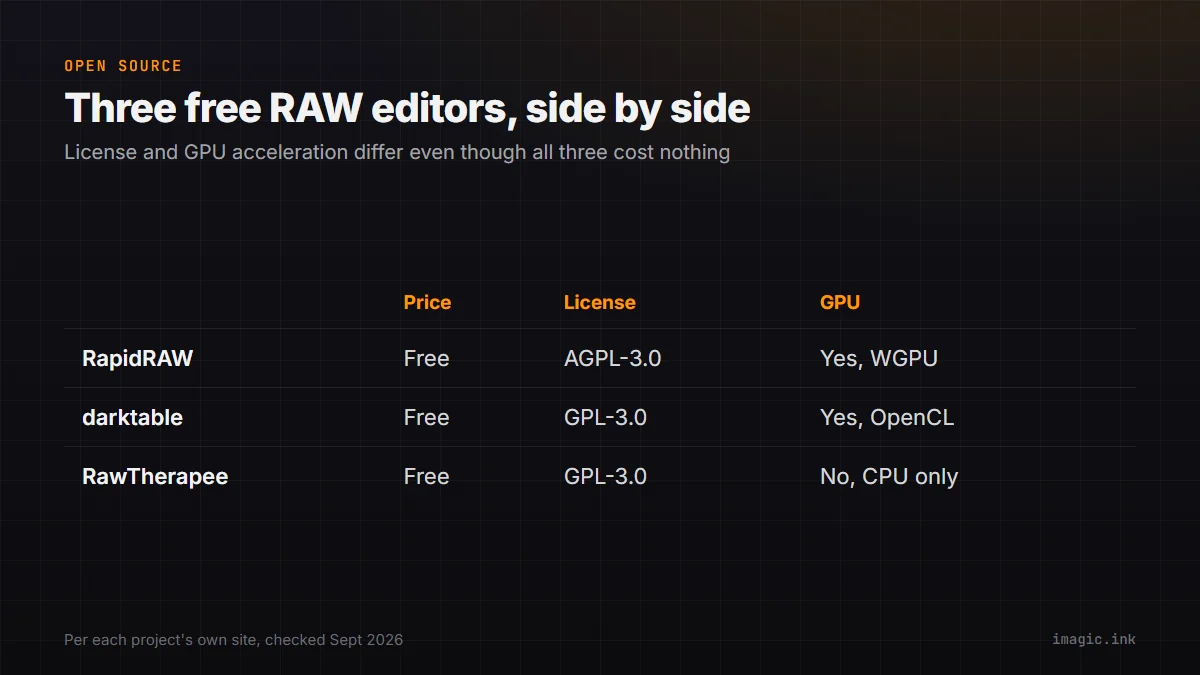
Where RapidRAW sits next to the other free RAW editors
| Tool | Price | Platforms | License | GPU acceleration |
|---|---|---|---|---|
| RapidRAW | Free | Windows, macOS, Linux, Android | AGPL-3.0 | Yes, WGPU-based |
| darktable | Free | Windows, macOS, Linux | GPL-3.0 | Yes, via OpenCL |
| RawTherapee | Free | Windows, macOS, Linux | GPL-3.0 | No, CPU only |
All three are genuinely free, open-source RAW processors with no purchase price, which is exactly why "free RAW editor" search interest spreads across all of them rather than concentrating on one. AI-assisted masking specifically is no longer unique to RapidRAW either: darktable shipped its own AI object-mask tool in version 5.6, released in June 2026, built on Meta's SAM2 model, letting a single click generate a vector mask around a subject. RapidRAW's real point of difference on paper is less "has AI masking" and more its GPU-first architecture built from the ground up around a modern graphics API, versus darktable and RawTherapee's older, more gradually extended codebases, and RawTherapee's continued reliance on CPU-only processing.
Frequently asked questions
Is RapidRAW actually free?
Yes. It is open source under the AGPL-3.0 licence, published on GitHub, with no purchase price for the editor itself.
Does RapidRAW work on Mac and Linux, or only Windows?
All three, plus Android. Per its GitHub page it supports Windows 10 and newer, macOS 13 and newer, and Linux distributions based on Ubuntu 22.04 and newer.
Does RapidRAW cull or organize a full shoot, or only edit individual RAW files?
It is a RAW editor, not a culling tool. Its Culling View gives you a manual side-by-side comparison layout for up to six images at once, and a separate grouping feature stacks RAW and JPEG pairs together in the library, but neither is automated AI quality scoring or duplicate detection, so picking keepers from a full shoot is still a manual, frame-by-frame job.