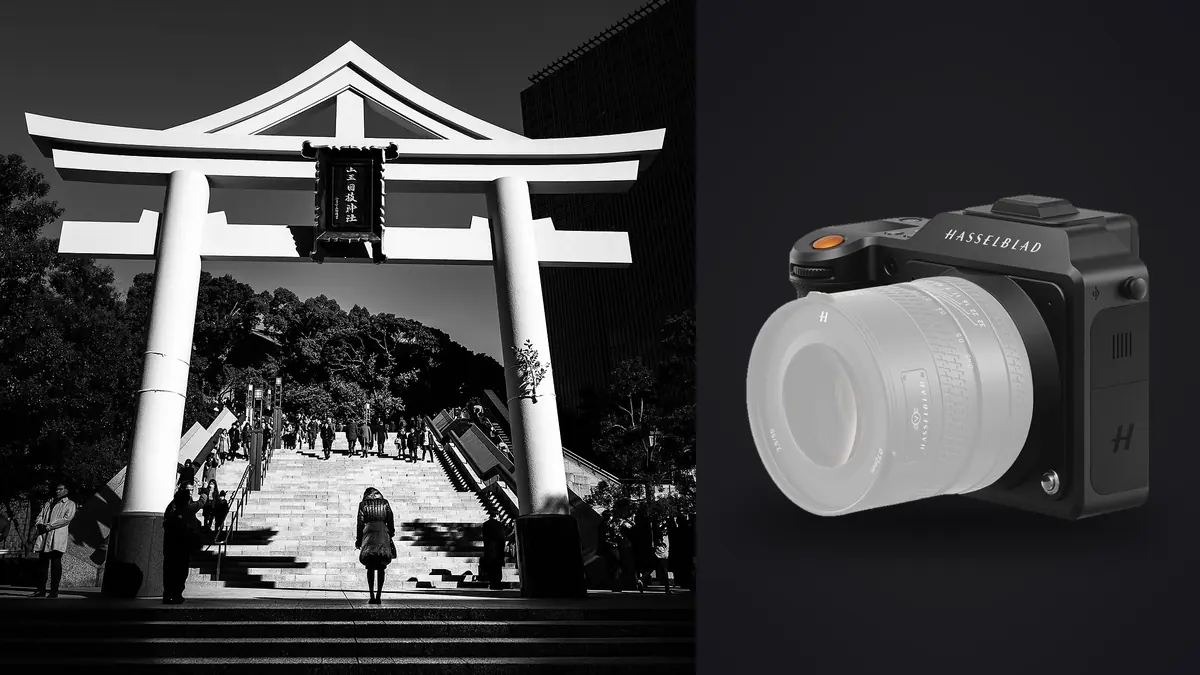
Medium format and street photography are not supposed to mix. The whole tradition of working the street, from Winogrand's motor-drive Leicas to whatever a stringer is carrying today, runs on cameras that disappear: light, fast to focus, cheap enough to risk in a crowd. The Hasselblad X2D 100C is none of those things. It is a nearly 900-gram body before you attach a lens, it costs more than most people's first car payment, and its autofocus was never built to chase a kid running across a plaza. So the honest starting point for this piece is not "how good is the X2D on the street," it's "what kind of street and documentary work actually suits a camera like this," because the answer is narrower than the marketing copy suggests, and more interesting than a straight spec review would let on.
This is not a camera for decisive-moment street photography in the Cartier-Bresson sense. It is a camera for the slower cousin of that tradition: long-form documentary work, environmental portraiture done in public space, and the kind of observational photography where you're willing to wait for a scene to arrange itself rather than sprinting after it. If that's the work you do, or want to do, the X2D earns its weight. If you need six frames a second and instant AF lock on a moving face, it will frustrate you constantly.
A camera built for a slower kind of documentary work
The X2D's 100-megapixel sensor measures 43.8 by 32.9mm, noticeably larger than the full-frame sensors most street and documentary shooters use, and that size is the whole point of the system. Depth of field behaves differently at any given aperture, tonal transitions in skin and sky are smoother, and there's enough resolution to crop hard in post without the file falling apart. None of that matters if you can't get the shot in the first place, and getting the shot with this body means changing how you approach a scene.
Working documentary photographers who've adopted the X2D generally describe a shift in pace rather than a compromise. You stop chasing gestures and start reading a location: where the light falls, where people tend to pause, what the background is doing. Then you wait, sometimes for minutes, for the elements to line up. That's a legitimate documentary method, it's how a lot of large-format and view-camera street work has always been made, but it's a different skill set than the reflexive, high-frame-rate approach most modern street shooters default to.
Handling weight, sound, and pace in the field
Carried on a shoulder strap for a full day, the X2D with a single prime lens sits at roughly 1.1 to 1.3kg depending on which XCD lens you've mounted. That's not brutal, but it's a category above a Fujifilm X100-series body, and after four or five hours of walking a market or a neighborhood, you feel the difference in your neck and shoulder. Photographers who shoot it for extended documentary stretches tend to switch to a cross-body sling rather than a neck strap, and a fair number end up leaving the second lens in the bag rather than carrying a full kit, simply because the body already sets the day's weight budget.
The leaf shutter built into each XCD lens is genuinely one of the camera's best features for this kind of work. There's no mirror slap and no loud focal-plane curtain, just a soft mechanical click that's quiet enough that people a couple of meters away often don't register it at all. That discretion partly offsets the size of the body. Nobody mistakes an X2D for a phone, but the sound signature doesn't announce a photograph the way a DSLR shutter does.
Where the pace really shows up is in continuous shooting. The X2D tops out at roughly 3.3 frames per second, and the buffer clears slowly once you push it with 100MP files. That rules out the spray-and-hope technique a lot of street photographers rely on for fast, chaotic scenes. In practice this becomes a discipline: you fire single frames deliberately rather than bursts, which forces better anticipation but means you will genuinely miss some fast, unrepeatable moments that a Sony or Fujifilm body would have caught mid-burst.
Autofocus on moving subjects
Hasselblad added phase-detection autofocus to the X2D over the older, contrast-only X1D II, and it's a real improvement, but it's still tuned for careful, considered shooting rather than tracking. Subject recognition and continuous tracking are not in the same league as a modern sports-oriented mirrorless system. In dim interiors, cafes, transit stations, evening markets, it hunts more than you'd like.
The practical workaround most people land on is old-fashioned zone focusing. Set an aperture around f/5.6 to f/8, use the lens's distance scale (or a quick manual pre-focus on a spot you expect activity to pass through), and let depth of field do the work autofocus can't do fast enough. It's a technique documentary photographers have used with manual rangefinders for decades, and it maps onto the X2D's strengths better than trying to force it into a role it wasn't designed for.
How it stacks up against the cameras people actually compare it to
Nobody picking a street or documentary camera is choosing between the X2D and, say, a Nikon Z9. The realistic shortlist is other cameras with some claim to discretion or image quality at this level. Here's how they compare on the things that actually matter for this kind of work, not just spec-sheet numbers.
| Camera | Sensor / resolution | Body weight | Shutter | Realistic burst | Where it actually fits |
|---|---|---|---|---|---|
| Hasselblad X2D 100C | 43.8x32.9mm, 100MP | ~895g | Leaf (in-lens) | ~3.3fps | Slow, deliberate documentary and environmental portrait work |
| Fujifilm GFX100S II | 43.8x32.9mm, 102MP | ~883g | Focal-plane | ~7fps | Medium format quality with more usable AF for loose sequences |
| Leica Q3 | Full-frame, 60MP | ~743g | Leaf (fixed 28mm) | ~15fps | Fast, unposed street candids in a fixed-lens body |
| Leica M11 | Full-frame, 60MP | ~640g | Focal-plane, very quiet | ~4.5fps | Classic zone-focus street documentary, smallest kit here |
| Fujifilm X100VI | APS-C, 40MP | ~521g | Leaf (fixed 23mm) | ~11fps | Cheapest, lightest, most disposable-feeling entry point |
The takeaway isn't that the X2D loses this comparison, it's that it's answering a different question. Everything else on that list is optimized to keep up with a scene. The X2D is optimized to render a scene beautifully once you've already decided to commit to the frame. If your documentary work leans toward posed-adjacent portraiture, quiet interiors, and considered composition rather than fast reportage, it's arguably the best tool on this list. If it leans toward chasing unpredictable action, it's near the bottom.
Lens choices that actually suit this kind of shooting
The XCD mount uses a 0.79x crop factor relative to full frame, so focal lengths read wider than the number on the barrel suggests. The XCD 45P (roughly a 35mm-equivalent field of view) is the closest thing to a default documentary lens in the lineup: wide enough to include context and background, tight enough not to distort faces at conversational distance. The 65mm (about a 51mm equivalent) is the classic environmental-portrait choice, close to how most people perceive a scene without any obvious wide-angle stretch.
The P-series lenses (45P, 30P) are worth specifically seeking out for this genre because Hasselblad built them smaller and lighter than the rest of the XCD line, which matters more here than in studio work. A 4/28P or 4/45P keeps the whole rig closer to a "carry it all day" weight than the faster f/1.9 and f/2.5 optics do.
One underused feature for documentary work: several XCD lenses sync flash at shutter speeds up to 1/2000s because of the leaf shutter design, well beyond the 1/200 to 1/250 ceiling most focal-plane shutter cameras allow. For photographers working markets, festivals, or dim interiors where a touch of fill flash helps without blowing out a bright background, that's a genuine practical advantage over almost every full-frame mirrorless competitor.
The 100-megapixel file problem nobody mentions in the reviews
What doesn't show up in a camera review, but shows up immediately on a real documentary assignment, is what 100-megapixel raw files do to your evening. A single day of loose, exploratory street shooting can produce several hundred frames, and at this resolution that's a genuinely heavy folder to review, cull, and back up before you sleep. The camera's internal 1TB SSD is a real convenience in the field (you can shoot without a card at all if you want), but it just delays the reckoning; you still have to get through the files eventually, and scrolling full-resolution 100MP raws one at a time on a laptop screen is slow enough to eat an hour before you've even started editing.
This is where a dedicated culling pass earns its keep rather than being optional. imagic runs its sharpness and focus scoring locally on the machine, which matters specifically for X2D files: because the autofocus hunts more than a fast mirrorless system and you're often zone-focusing by eye, a documentary shoot on this camera tends to produce a wider spread between tack-sharp frames and near-misses than the same day shot on a camera with aggressive subject tracking. Sorting that spread by hand, frame by frame, at full resolution, is exactly the kind of task worth automating first. If you haven't looked at how automated culling actually scores focus and separates near-duplicate frames, this breakdown of how AI photo culling works is a reasonable primer before you build a workflow around it.
The duplicate and burst clustering matters here too, even at a mere 3.3fps. Because you can't spray a fast burst on this body, photographers compensate by taking two or three deliberate frames of the same moment (slightly different framing, waiting for a blink to pass) rather than one continuous run. Those small clusters still need grouping and comparing before you can commit to a final selection, and doing it manually across a few hundred 100MP files is where an evening disappears.
Keeping a consistent look across a long documentary project
Hasselblad's color science, generally marketed as its Natural Colour Solution, is a real reason people choose this system for portrait-adjacent documentary work; skin tones render with less of the punchy, oversaturated look you get out of a lot of consumer mirrorless bodies straight from the sensor. But "nice color out of the camera" and "a consistent look across a six-month project" are two different problems. Documentary work usually spans multiple sessions, sometimes multiple seasons and lighting conditions, and keeping the grade consistent from the first shoot to the last is where a lot of otherwise strong bodies of work fall apart visually.
The practical fix most people land on eventually is grading a representative set of frames once, deliberately, the way you actually want the whole project to look, and then applying that same treatment consistently rather than re-inventing the edit every session. imagic's apply_my_style feature is built for exactly that: it learns from edits you've already made on your own photos and applies that same treatment to new batches, so a look you settled on in month one of a project doesn't quietly drift by month four just because you were tired and rushing the edit. For anyone building out a full color approach for a long project rather than relying on the camera's out-of-box rendering, this guide to color grading a photo series covers the grading fundamentals that a consistent style needs to be built on.
A field-tested starting point for settings
Base ISO on the X2D sits at 64, and image quality holds up well through the mid-range, but dynamic range and noise both degrade faster above ISO 3200 than they do on a full-frame body with smaller pixels working harder to gather light per unit area. For documentary work indoors or at dusk, it's worth capping auto-ISO around 3200 to 6400 and accepting a slower shutter speed instead, leaning on the in-body stabilization (rated for several stops) to cover the gap.
A workable starting point: aperture priority around f/5.6, auto-ISO capped at 3200, shutter speed floor around 1/125 for walking-pace subjects and 1/250 if people are moving quickly toward or across the frame. Zone focus with the lens's distance scale rather than relying on continuous AF for anything faster than a slow walk. And carry a spare battery; the combination of a bright EVF and a large sensor is not gentle on the X2D's battery life across a full day of documentary shooting.
One more practical point that matters more for documentary work than street snapshots: photographing people in vulnerable situations, at protests, in communities wary of cameras, in countries with unreliable networks, means you often don't want anything touching the cloud before you've reviewed and decided what gets kept. imagic processes everything locally with no upload step, which isn't a speed feature so much as a control feature; the photographer decides what leaves the laptop, and nothing does until they choose to export it.
Frequently Asked Questions
Is the Hasselblad X2D 100C fast enough to autofocus on someone walking toward the camera?
It can manage a person approaching at a normal walking pace in decent light, but it will struggle to keep pace with faster or erratic movement, and low light makes the hunting noticeably worse. Most documentary shooters using this body lean on zone focusing for anything faster than a slow walk rather than trusting continuous autofocus.
Do the XCD lenses give a wide enough field of view for environmental documentary shots?
Yes. Because of the 0.79x crop factor, the XCD 45P renders close to a 35mm-equivalent field of view, which is the standard wide-but-not-distorting focal length documentary photographers reach for. The 30P goes wider still, closer to a 24mm equivalent, for tighter interiors or crowded scenes.
How much storage does a multi-day documentary shoot with this camera actually require?
Individual raw files typically run somewhere in the 100 to 200MB range depending on scene complexity, so a heavy shooting day of a few hundred frames can easily total 30 to 50GB. The built-in 1TB SSD covers several days of shooting without a card, but you still need a backup routine once you're off location, since the internal drive isn't a substitute for redundant storage.
Is medium format actually worth it for documentary work compared to a smaller full-frame body?
If the work involves a lot of printing, cropping, or fine tonal work in skin and sky, the sensor size earns its keep. If the work is primarily fast-paced observational photography where you're missing shots because of autofocus or burst rate limits, a full-frame or APS-C body built for speed will likely serve the actual documentary work better than the larger sensor does.