A GPS-tagged photo from a newborn session, posted proudly by a client to a public account, quietly contains the exact coordinates of their home. Most photographers never think about this because the leak happens invisibly, inside metadata nobody looks at, long after the shoot is over.
GPS in Home-Session EXIF Data
Cameras and phones with location services enabled embed GPS coordinates directly into a photo's EXIF metadata at capture. For studio or public-location shoots this is mostly harmless. For newborn, maternity, and other in-home sessions, it means the delivered file can contain the client's home address down to a precise coordinate, readable by anyone with basic metadata-viewing tools, including many social platforms and some photo apps that display it openly. Clients rarely know this metadata exists, let alone think to strip it before posting, which puts the responsibility largely on the photographer delivering the file.
What Actually Survives to a Client's Downloaded File
Not every platform preserves metadata the same way; major social networks typically strip most EXIF data on upload, including GPS, which limits exposure once a photo is posted directly to them. The real risk is the file itself, the one you deliver to the client's device or download link, before it ever reaches a platform that strips it. If a client downloads the original delivered file and shares it directly (a group chat, a personal blog, cloud storage they later make public), whatever metadata was in that file goes with it, GPS included.
A Strip-on-Export Policy
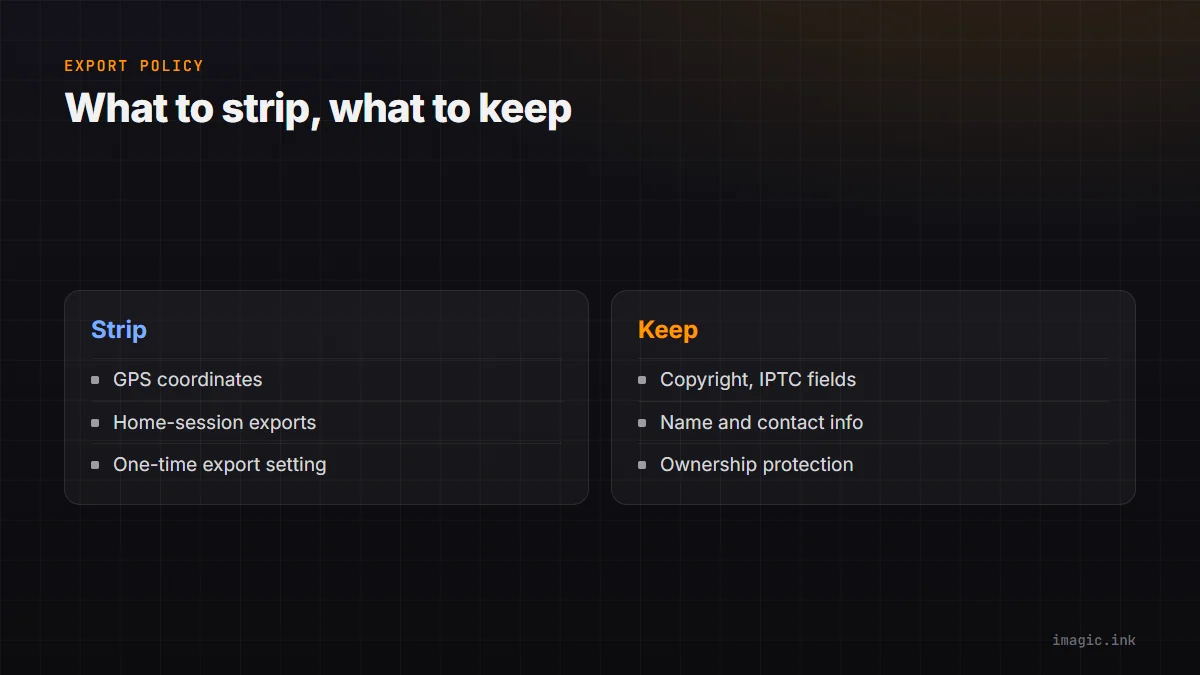
The straightforward fix is deciding, as a standing policy rather than a case-by-case judgment call, that GPS metadata gets stripped from any delivered export for sessions shot at a client's home or another private location. This is a one-time export setting decision, not a per-photo task, so it costs nothing in workflow time once it is set. Studio and public-venue work can keep location data if there is a reason to (some photographers like preserving shoot location for their own records), but home-session deliverables are the category worth defaulting to strip.
What Metadata to Keep for Copyright
Stripping GPS does not mean stripping everything. Copyright and attribution metadata, your name, contact, and copyright notice in the IPTC fields, is worth keeping and is a separate concern entirely from location privacy; it protects your ownership claim on the image rather than exposing a client's information. A sensible export policy strips or reviews GPS specifically while preserving copyright fields, treating the two as unrelated decisions rather than an all-or-nothing metadata wipe.
Frequently asked questions
Do social media platforms remove GPS data automatically?
Most major platforms strip GPS and much other metadata on upload, but this only protects images uploaded directly to them. A downloaded or directly shared original file still carries whatever metadata was embedded when it was delivered.
Should I remove all metadata from delivered photos?
Not all of it. GPS location is the main privacy concern worth stripping by default for private-location sessions, while copyright and attribution metadata is generally worth keeping since it supports your ownership claim on the work.
Which sessions need this the most?
In-home sessions, newborn and maternity photography especially, carry the most risk since the location is the client's actual residence. Studio and public-venue sessions carry far less exposure.
See also photo metadata management tips. This applies directly to newborn and family photography. More in Guides.