Black and White Photography in the Digital Age
Black and white photography has never been more popular — or more technically complex to do well. Converting a digital color photograph to black and white isn't just removing saturation. It requires decisions about how each color channel is mapped to a gray value, how tones are distributed, and what texture and contrast treatment serves the image's mood. AI tools are now contributing to this process in useful ways.
Why Simple Desaturation Fails
If you drag the Saturation slider to zero in any editor, you get a flat, gray result. The problem is that colors with very different visual weight (deep blue and bright green, for example) can convert to nearly identical gray values, losing the separation that made the scene interesting. Professional black and white conversion uses channel mixing to control how each color becomes gray.
Channel Mixing for B&W Conversion
The classic approach is to simulate colored optical filters used in film-era darkrooms:
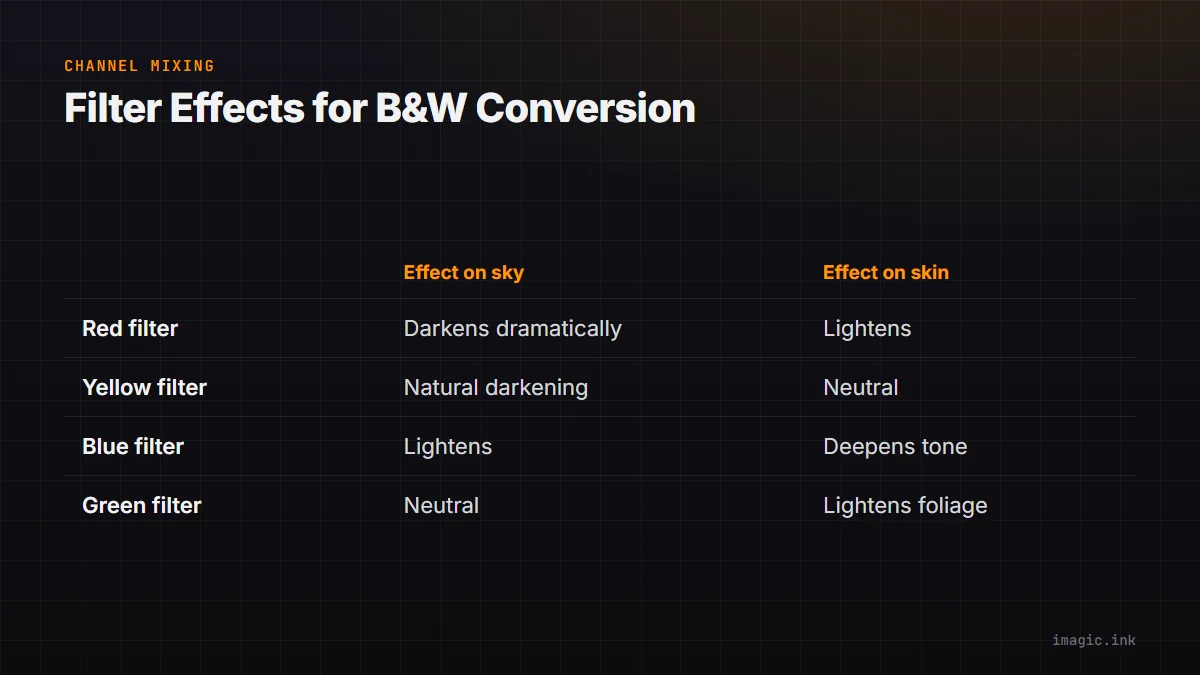
- Red filter effect: Boost Red channel, reduce Blue and Green. Darkens skies dramatically, lightens skin. Classic landscape look.
- Yellow filter effect: Moderate boost to Red and Green, slight reduction in Blue. Natural-looking sky darkening.
- Blue filter effect: Boost Blue channel. Lightens skies, deepens skin tones. Works for artistic, high-contrast portraits.
- Green filter effect: Boost Green channel. Lightens foliage, natural tones for outdoor work.
In RawTherapee, the Black and White tool provides full channel mixing control, allowing you to dial in exactly how each color converts to gray.
AI Culling for Black and White Work
imagic's AI scoring is especially valuable for black and white photography because the same technical factors that matter in color — sharpness, exposure distribution, detail — matter even more in monochrome, where there's no color to distract from technical flaws. A soft portrait in color might still be visually interesting; in black and white, softness is just softness.
The composition score is also useful for B&W culling. Black and white images live or die by their tonal composition — the arrangement of light and dark areas. imagic's composition scoring helps identify frames with stronger tonal architecture.
The Zone System Approach
Ansel Adams' Zone System divides the tonal range into 11 zones from pure black (Zone 0) to pure white (Zone X). A well-composed black and white image uses the full range deliberately, with the darkest shadows in Zone 0-II and the most important highlight detail in Zone VIII-IX. RawTherapee's tone curve lets you assign specific gray values to specific zones, approximating a darkroom-quality tonal distribution.
Grain for Film Character
Black and white photography benefits particularly from film grain. The Acros look from Fujifilm, the Tri-X look from Kodak, the HP5 look from Ilford — these are largely defined by their characteristic grain structures. RawTherapee's grain simulation controls produce convincing monochrome grain when the black and white conversion is applied first. Save a complete B&W profile (conversion + grain + contrast curve + vignette) for batch application via imagic's export workflow.
Summary
Black and white conversion done well requires channel mixing, careful tonal distribution, and intentional grain. imagic handles the cull (selecting the images with the strongest tonal composition and sharpness), and RawTherapee handles the conversion (with full channel mixing and grain tools). The result is a subscription-free B&W workflow with genuine darkroom-quality output.
Frequently asked questions
What's the difference between desaturating a photo and a real black and white conversion?
Dragging saturation to zero just averages the color channels into a single gray value, so a deep blue sky and a bright green lawn can end up looking almost identical. A real conversion uses channel mixing to control how each color becomes gray, similar to shooting through a colored filter in the darkroom. Our guide to HSL and HSV color correction covers the same channel-level thinking applied to color work.
Does imagic help with black and white photography specifically?
imagic scores every frame for sharpness, exposure, and composition before you convert anything, and those technical factors matter more in monochrome because there is no color left to distract from a soft focus or weak composition. See more workflow tips for pairing AI culling with a specific editing style.
Can I add authentic film grain to a black and white conversion for free?
Yes. RawTherapee's grain simulation reproduces looks like Kodak Tri-X or Ilford HP5 once your black and white conversion, contrast curve, and vignette are set, and you can save the whole treatment as one PP3 profile for batch export.