
Affinity Photo and imagic rarely belong in the same sentence as competitors, because they are built for almost opposite jobs. Affinity is a layered, Photoshop-style editor for retouching, compositing, and pixel-level work on individual images. imagic is a batch-first RAW culling and editing tool for getting a whole shoot processed and delivered. The two pair naturally rather than compete, and both happen to share a one-time pricing philosophy that is worth calling out directly for anyone comparing affinity photo raw workflow options.
What Affinity Photo Is Built For
Affinity Photo handles layers, masks, retouching, compositing, and generally the kind of detailed, per-image pixel work that a batch tool is not designed to do. If a single hero image needs a sky replacement, a blemish removed by hand, or elements composited together, Affinity's toolset is the right one for that specific job. imagic does not attempt most of this: no layers, no generative fill, no compositing, by design. Its retouching is limited to the Heal / Remove brush (heal, clone and content-aware remove), red-eye correction and portrait polish, available in Plus and Max.
What imagic Is Built For
imagic is built to get a whole RAW shoot from import to delivery: AI culling to find the keepers, batch editing and one-click styles to process them consistently, and export to JPEG or TIFF. RAW processing runs through its own built-in RAW engine, supporting CR2, CR3, NEF, ARW, RAF, ORF, RW2, DNG, and PEF. None of that involves layers or per-pixel retouching; the entire point is applying consistent, efficient edits across hundreds or thousands of frames at once, not detailed work on one image.
Where They Pair Naturally
A realistic workflow uses both: cull and batch-edit the full shoot in imagic first, applying a consistent look across everything, then pull the handful of hero images that need retouching, compositing, or a sky replacement into Affinity Photo for that specific, per-image work before final delivery. Neither tool tries to replace the other's job, and using both together covers more ground than either alone.
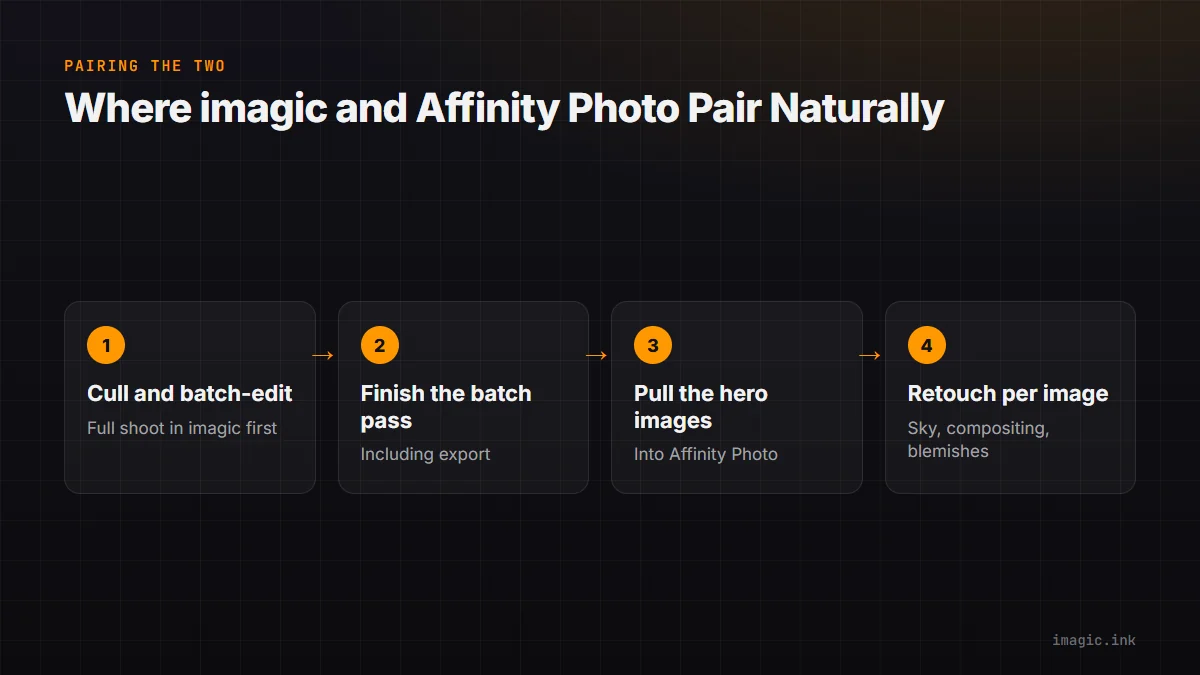
The handoff point is worth deciding deliberately rather than case by case: most photographers find it faster to finish the batch pass completely, including export, before opening anything in Affinity, rather than jumping back and forth mid-shoot. That keeps the bulk of the shoot moving through imagic's faster batch pipeline while reserving Affinity's slower, more deliberate per-image tools for the handful of frames that actually need them.
Shared Ground: One-Time Pricing
Both imagic and Affinity Photo are sold as one-time purchases rather than subscriptions, which puts them in the same budgeting category even though their feature sets barely overlap. imagic's tiers are Lite EUR 19, Plus EUR 49, Max EUR 99, with a free 500-export trial and no card required. Affinity Photo is also a one-time purchase; check its current pricing directly since it has changed structure over time. For photographers actively trying to leave subscription software behind, pairing two one-time tools instead of one subscription suite is a real option worth considering.
Where imagic Cannot Substitute for Affinity
To be direct about the limits: if your workflow depends on layered compositing, detailed retouching, or generative fill, imagic will not cover that job, full stop, and Affinity Photo (or a similar layered editor) remains necessary. See the fuller imagic vs Affinity Photo comparison for the complete feature breakdown, and Best Photo Editing Apps for Professionals for where both fit into a wider toolkit.
Frequently asked questions
Can imagic do retouching or sky replacement like Affinity Photo?
Not like Affinity Photo. imagic has no layers, sky replacement or generative fill. Plus and Max do include the Heal / Remove brush (heal, clone and content-aware remove), red-eye correction and portrait polish for small fixes, but layered, per-image pixel work stays in an editor like Affinity Photo.
Does imagic replace Affinity Photo, or work alongside it?
They work alongside each other for most photographers: imagic handles the batch cull and edit, Affinity Photo handles detailed per-image work on the keepers that need it.
Is Affinity Photo a subscription?
It has historically been a one-time purchase; confirm current pricing on Affinity's site since terms can change.
Try imagic free for 500 exports, no card required, to batch-cull and edit a shoot before your hero images go into detailed retouching. Start the free trial.