
C2PA Content Credentials provide a standardized way to attach cryptographically verifiable provenance information to digital media. For a photographer, that can include claims about capture, editing actions, ingredients, and the organization or device that signed the record. The system can help a publisher inspect where an asset came from and whether bound information has been altered. It does not decide whether the scene or caption is true.
The C2PA specification is evolving. Version 2.2 materials and current conformance resources were checked on 15 August 2026, but an implementation should use the version supported by its camera, software, validator, and recipient. Compatibility should be tested through the complete delivery path. A badge shown in one application is not evidence that every export, messaging service, or publishing platform will preserve the same data.
Learn the four core pieces
An assertion is a structured statement about an asset, such as an action, ingredient, or other provenance property. Assertions are collected into a claim. A signer uses a signing credential to create a digital signature over that claim. The claim, signature, assertions, and bindings form a C2PA Manifest, commonly presented to users as a Content Credential.
A content binding associates the manifest with the asset. A hard binding uses cryptographic hashes that identify the bound content. A soft binding can use a fingerprint or invisible watermark to help locate related credentials if embedded information is stripped or separated. These mechanisms serve different recovery and integrity purposes; they are not interchangeable proof of what happened in front of the camera.
An asset can carry a store containing multiple manifests, and a composed image can reference ingredient assets. This allows provenance to accumulate through supported stages. It also means the reviewer must inspect the chain and validation state rather than looking only for the presence of an icon.
Separate provenance, authenticity, and truth
Provenance is the represented history of an asset. In the C2PA model, authenticity concerns facts and bindings that can be cryptographically checked as untampered under the relevant validation and trust process. Truth is broader. A valid signature can show that a known signer made a claim; it cannot prove the signer described the world accurately.
A staged scene can have valid Content Credentials. A misleading crop can be recorded correctly. A false caption can sit beside an intact manifest. Conversely, a truthful photograph may have no credentials because the camera, editor, publisher, or platform did not support them, or because a creator had a legitimate privacy reason not to attach them.
The C2PA guidance explicitly avoids assigning a good-or-bad value to provenance data. Treat credentials as trust signals that support human judgment. Do not label unsigned material false, and do not label signed material verified truth without examining the claims and context.
Understand what validation checks
A validator locates the active manifest, checks its structure, validates the claim signature, verifies content bindings, examines assertions and ingredients, and reports status. It can also assess whether the signing credential relates to a configured trust list and whether relevant time-stamp and revocation information is valid. The precise statuses depend on specification and implementation version.
Validation success means the technical checks passed for the represented claims. It does not mean every assertion was supplied by a camera sensor or independently observed. Some information can be gathered from hardware, some can be added by software, and some can be asserted by an organization. The displayed signer identity and source of each assertion matter.
Validation failure also needs interpretation. A file may have been recompressed, metadata may have been stripped, a manifest may be unavailable, a certificate may not be trusted by that validator, or the content may have changed after signing. Preserve the original file and detailed status before making an accusation.
Plan credential creation from capture onward
If the camera supports capture-time Content Credentials under the required workflow, configure its time, account, certificate, and signing behavior according to current manufacturer guidance. Make a test photograph and validate the original outside the camera. Confirm what the credential actually asserts. Do not assume the camera identifies a person, location, or editorial truth unless the inspected data says so.
Preserve the camera original exactly. Copy it with a verified ingest process, keep an independent backup, and avoid software that silently rewrites metadata before the first validation. Record card, folder, operator, and transfer time in the job log where custody matters. A conventional chain-of-custody record remains useful even with cryptographic provenance.
If capture signing is unavailable, later software can still create a provenance record for its own actions. That is a different claim. It may establish that a publisher or editor received and processed a file, not that a particular camera captured the original scene.
Carry provenance through editing
At each application boundary, test whether existing credentials remain available and whether the application adds a new manifest, preserves ingredients, exports a sidecar or remote reference, or strips unsupported data. Use representative RAW, rendered TIFF or JPEG, crop, resize, tonal edit, composite, and metadata change. The behavior can vary by format and export option.
An editor should record material actions accurately and at an appropriate level. A provenance history should be useful without exposing every private adjustment or personal detail. For a composite, ingredient relationships can matter. For ordinary tonal work, a concise action history may be sufficient under the publisher's policy.
Keep the non-destructive edit record and final approved master even when credentials are present. Proprietary edit histories and C2PA assertions solve different problems. One supports future re-editing; the other communicates signed provenance claims. Neither replaces backup.
Test export and platform survival
Make a small matrix of final formats and destinations. Validate the file immediately after export, after transfer through the delivery service, after download by another account, and after publication where possible. Test any content-delivery network, newsroom system, social platform, messaging application, or client portal that may recompress or strip metadata.
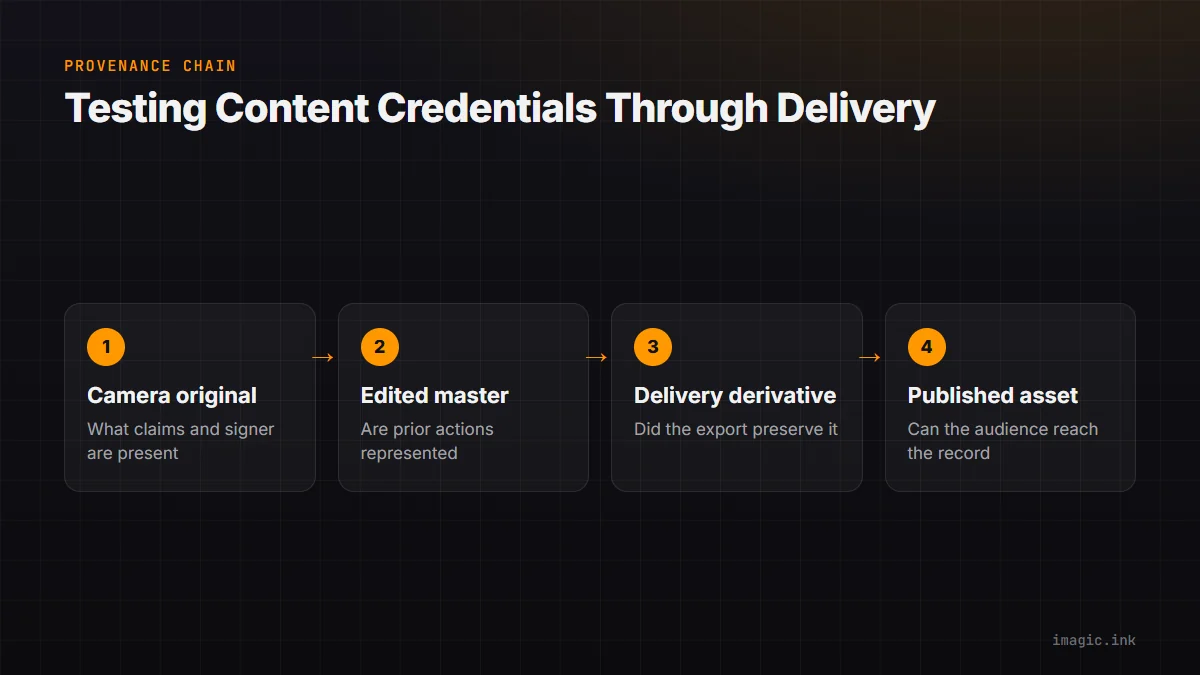
| Stage | Question | Evidence to retain |
|---|---|---|
| Camera original | What claims and signer are present? | Original file and validation report |
| Edited master | Were prior manifests and actions represented? | Master, edit record, validation report |
| Delivery derivative | Did resize or conversion preserve access? | Delivered file and checksum |
| Published asset | Can the audience reach or recover credentials? | URL, capture date, platform behavior |
| Stripped copy | Is a durable recovery mechanism available? | Fingerprint or watermark test result |
A workflow should define what happens when credentials do not survive. Options may include a durable credential mechanism, an alternate download link, a publisher provenance page, or a retained validation report. Do not promise recoverability without testing the exact implementation.
Manage signing keys and organizational identity
The trust model depends substantially on the signer identity associated with a cryptographic key and credential. Signing keys therefore need the same seriousness as other production credentials. Limit access, use appropriate hardware or managed storage where required, rotate and revoke under policy, and separate testing from production identity.
Decide whether the signer should be a camera manufacturer path, individual creator, studio, agency, newsroom, or another organization. That choice affects what a recipient can reasonably infer. A studio signing an edit is not the same as a camera attesting to capture, and a publisher signing distribution is not the same as endorsing every earlier claim.
Document who may sign, which actions require review, and how a compromised or departed user's credential is handled. Test validation with the recipient's trust configuration. A technically valid signature that no delivery system recognizes may not meet the project's communication goal.
Balance transparency with privacy and safety
Provenance can expose camera identity, software, time, location, creator, organization, ingredients, or workflow details depending on included assertions. That information may endanger a source, reveal a sensitive location, identify an equipment owner, or disclose a confidential production. The C2PA design emphasizes creator control and privacy considerations; more metadata is not always better.
Create policy by genre. A public product campaign may include studio and edit information. Wildlife work may omit precise coordinates. Conflict, protest, medical, or intimate material may require strict removal of identity and location signals. The absence of sensitive assertions should be deliberate and documented internally.
Consider the audience interface. A long technical record can confuse a viewer or expose data accidentally. Present a concise disclosure while preserving deeper validated detail for authorized inspection. Accessibility also matters; provenance information should not rely only on a small icon or color.
Use Content Credentials in a newsroom handoff
Agree on accepted formats, validators, trust lists, required assertions, caption fields, and fallback before an assignment. At ingest, preserve and validate the original. Keep the validation result with the asset-management record. During editing, apply the publisher's image policy and create or preserve provenance through supported tools.
Before delivery, validate the exact derivative and reconcile caption, creator, date, and ingredient information. Send through the approved channel and have the desk validate its received copy. If the system strips credentials, follow the agreed fallback rather than adding an unsupported claim to the caption.
imagic's documented local workflow can support ingest-adjacent culling and non-destructive edit status without deleting original photographs. It should not be claimed to create or preserve C2PA data unless the installed product and tested export explicitly demonstrate that behavior. Use the desktop workflow only within its documented scope, and consult the AI and Technology section for related provenance topics.
Audit with failure cases, not only a happy path
- Validate an untouched original and a one-pixel-modified copy.
- Export through every approved format and preset.
- Pass a derivative through each delivery and publication service.
- Test an unknown signer and a trusted signer.
- Inspect behavior after credential stripping or manifest unavailability.
- Confirm that sensitive metadata is absent from public views.
- Retain ordinary custody and approval records as a fallback.
The strongest C2PA workflow does not ask an icon to carry all trust. It connects technical validation with accountable capture, accurate captions, controlled edits, protected keys, privacy choices, and a recipient who knows how to interpret the result.
Write acceptance criteria into the delivery brief
Define which file must validate, which signer or trust configuration the recipient expects, which assertions are required or prohibited, and what fallback is acceptable if a platform removes access. Include the validator and specification version used for acceptance. "Contains Content Credentials" is too vague when a sidecar, remote manifest, untrusted signer, or broken ingredient chain may produce a different operational result.
Have the recipient validate a sample before the assignment. Store the accepted test file and report with the brief, then repeat the same checks on the exact final derivative. This turns provenance from a decorative delivery claim into a requirement both parties can reproduce.
Frequently asked questions
Do Content Credentials prove a photograph is real?
No. They can provide tamper-evident, signed provenance claims, but a valid claim is not independent proof that a scene or caption is true. Evaluate the signer and context.
Does a photograph without Content Credentials have to be fake?
No. Credentials may be absent because of unsupported tools, stripping, privacy choices, or a workflow that never added them. Missing provenance is not a verdict on content.
Can normal editing invalidate a credential?
Editing changes the asset, so unsupported handling can break or remove prior bindings. A compatible workflow can preserve provenance and add a new manifest, but the exact export path must be tested.