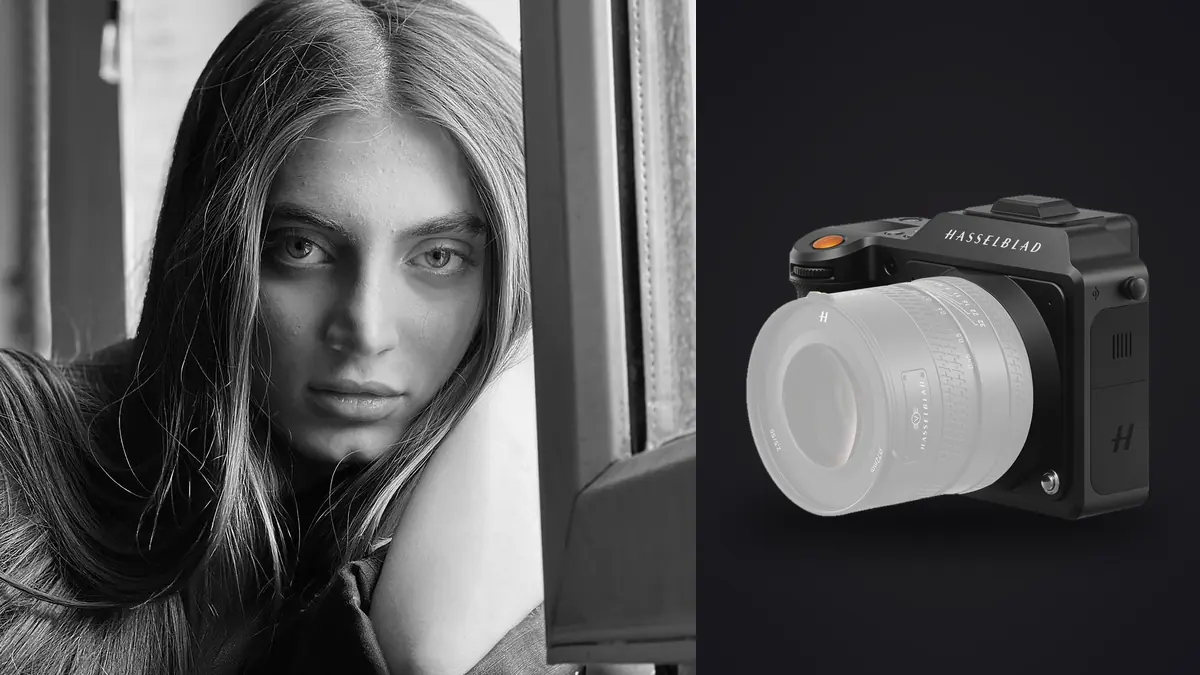
Boudoir work asks something specific of a camera. It needs to feel unobtrusive in a bedroom or hotel suite while still resolving skin, lace, and low window light with enough fidelity that a large print doesn't fall apart under close inspection. I moved a chunk of my own intimate portrait shooting over to the Hasselblad X2D 100C about eight months ago, mostly out of curiosity about whether the resolution and color science justified the price and the extra weight in the bag. Somewhere around forty sessions later, I have opinions, and a few of them contradict what I expected walking in.
Why medium format even gets considered for boudoir
The pitch for medium format in this genre isn't really about pixel count, even though 100 megapixels is the headline number everyone fixates on. It's about how the sensor handles the transition zones: the soft edge where a shadow falls across a collarbone, the gradient inside a sheer robe lit from one side by a window. Full-frame files can do this well too, but the X2D's larger photosites and 16-bit raw output give you more room before you see banding when you push a shadow in post, which matters more in boudoir than in most other portrait work because so much of the genre lives in low-contrast, backlit scenes rather than punchy studio light.
People also can't always articulate why a proof looks better, but they notice it. The result is skin that "looks like skin" rather than looking retouched, even on frames I barely touched. Some of that is lighting discipline on my end, but a chunk of it is genuinely the sensor and Hasselblad's color processing doing less damage to skin tone before it ever reaches my monitor.
Handling the X2D 100C during an actual session
Shutter noise and client comfort
Intimate sessions are emotionally different from a standard portrait booking. A lot of clients are nervous walking in, some are doing this for the first time, and the mood in the room is fragile in a way that a loud, clacking shutter can genuinely break. This is the area where the X2D quietly wins. The mechanical shutter is noticeably softer than what I was used to on a full-frame DSLR body, and switching to the fully electronic shutter drops it to silence. I use electronic shutter for probably 80 percent of a boudoir session now, reserving mechanical only for situations with strong continuous light where I'm worried about banding under certain LED panels.
Autofocus in low, warm light
This is where I have to be honest about the tradeoffs. The X2D's autofocus is contrast-detect, and it is not fast in the way a modern mirrorless full-frame body is fast. In a dim bedroom with warm practical lighting and a diffusion scrim over a window, it hunts more than I'd like, especially wide open. For a genre like sports or events this would be a dealbreaker. For boudoir, honestly, it fits the pace of the work. Sessions are deliberate. I'm not chasing a subject across a field, I'm coaxing a specific expression or a specific hand position, and I have time to lock focus on the eye, check the rear screen at full zoom, and reshoot if needed. If your shooting style depends on fast continuous tracking, this camera will frustrate you.
Lens pairing: what actually earns its place in the bag
The XCD 80mm f/1.9 is the lens I reach for in almost every session. On the X2D's sensor it renders close to what a fast 63mm-equivalent would give you on full frame, and wide open it produces a falloff that flatters skin without going so soft that texture disappears entirely. It's heavy, and it's not cheap, but it's the one lens I'd keep if I had to sell the rest of the kit.
For wider environmental frames, the ones that show the room, the light source, and give a gallery some visual variety beyond tight crops, I carry the XCD 38mm. It's slower and less flattering up close, so it stays in the bag until I need context rather than intimacy. I tried the 55mm for a stretch as a middle ground and ended up selling it. For this genre specifically, I didn't find a use case it covered better than the 80mm or the 38mm already did.
The file weight problem (and how I deal with it)
A compressed 100MP raw off this camera runs somewhere between 100 and 130MB depending on scene complexity. Boudoir sessions generate a lot of frames because subtle shifts in expression, hand placement, and fabric drape matter enormously, so I'm often shooting short bursts to catch the one frame where everything lines up. A two-hour session routinely produces 800 to 1,200 frames, which puts a single shoot well past 100GB before I've even opened an editor.
That used to mean an evening of scrolling through near-identical burst sequences trying to spot which frame actually had the sharpest eye and the least motion blur on a hand or a strand of hair. I now run each card through imagic before I touch Lightroom. It groups the burst sequences and duplicate-adjacent frames together and flags the sharpest one in each cluster using its own local focus scoring, which for boudoir work is genuinely useful because the difference between a usable frame and a soft one is often a fraction of a millimeter of eye movement that's hard to catch by eye at thumbnail size. It also runs entirely on my machine, nothing gets uploaded anywhere, which matters more with this kind of material than with almost any other genre. If you're curious how that clustering approach works under the hood, I wrote up more detail in how AI photo culling actually works.
| Camera | Sensor / Resolution | Shutter Discretion | Avg. RAW File Size | Body Price (2026) | Go-to Lens for Close Work |
|---|---|---|---|---|---|
| Hasselblad X2D 100C | 44x33mm CMOS, 100MP | Fully silent electronic option | ~100-130MB | ~$8,200 | XCD 80mm f/1.9 |
| Fujifilm GFX100S II | 44x33mm CMOS, 102MP | Quiet mechanical, no silent EFCS at full res | ~110-140MB | ~$5,000 | GF 80mm f/1.7 |
| Sony a7R V | Full frame, 61MP | Fully silent electronic option | ~65-85MB | ~$3,900 | 85mm f/1.4 GM |
| Leica SL3 | Full frame, 60MP | Quiet mechanical, silent electronic | ~60-80MB | ~$6,300 | Summilux-SL 75mm f/1.4 |
Color and skin tonality: where the X2D actually separates itself
Hasselblad's color science was built for product and fashion work long before it landed in a body priced for working portrait photographers, and it shows in how skin comes out of camera. Warm tones don't push orange the way some full-frame files do straight out of the raw converter, and I spend noticeably less time correcting blotchiness or uneven tone before I even start a real edit.
That said, out-of-camera color only solves half the problem. A boudoir gallery needs a consistent feel across sixty or eighty final images, not sixty individually pleasing but slightly different edits. I built a grade in imagic using apply_my_style, trained on a batch of my own previously finished edits from past sessions, and it carries that same warm, low-contrast look across a new set of X2D files without me rebuilding the look from scratch in Lightroom every single time. It's not magic and it doesn't replace judgment on the frames that need individual attention, but for the bulk of a gallery it saves real hours.
Where it falls short
The body alone is around $8,200, and that's before you've bought a single XCD lens, which puts this well outside what most photographers starting out in boudoir work should even consider. Battery life is mediocre. I carry three batteries for a long day of shooting and still watch the meter more closely than I'd like. There's no meaningful video mode, which matters if part of your business involves behind-the-scenes reels for marketing, and the buffer runs out faster than you'd expect if you lean on burst shooting the way I do. It's also a heavy camera to hold up at chest height for two straight hours of a session, and by the third session of a day your wrist will know it.
Who this camera actually suits
If you're already charging enough per session to justify an $8,000+ camera body, and your clients are paying for large prints or heavily retouched galleries where tonal quality actually shows, the X2D earns its place. If your business is volume-based, quick-turnaround sessions delivered mostly as web galleries, the file size alone will slow your workflow down more than the image quality gain is worth. I'd point that photographer toward a fast full-frame body instead, and put the savings into lighting or a second lens.
Frequently Asked Questions
Is the X2D 100C too loud or conspicuous for an intimate home shoot?
No, and this was one of the pleasant surprises. The mechanical shutter is quieter than most DSLR bodies I've used, and the electronic shutter mode is completely silent. For sessions where mood matters as much as the images themselves, that silence is genuinely useful, not just a spec sheet line.
Do I actually need 100 megapixels for boudoir images that mostly end up as 8x10 prints or phone galleries?
Honestly, not for resolution's sake. The real benefit isn't print size, it's how much room you have to push shadows and highlights during editing without the file falling apart, plus the cropping flexibility when a composition needs adjusting after the fact. If your clients never print large and you rarely crop hard, the resolution advantage matters less than the tonal one.
What lens should I pair with the X2D 100C for close, intimate portraits?
The XCD 80mm f/1.9 has become my default. It gives a flattering, close-to-63mm-equivalent field of view with enough subject separation to isolate a pose from a busy background, without going so shallow that focus becomes a fight. Keep something wider, like the 38mm, in the bag for environmental frames that need to show the room.
How do I get through the RAW files from a full boudoir session without losing a weekend to culling?
Cull before you edit, not during. I run every card through imagic first, which clusters burst sequences and near-duplicate frames and surfaces the sharpest one in each group using local sharpness scoring, all processed on my own machine rather than a cloud service. For a genre where client trust around image privacy is especially high, keeping that step offline matters as much as the time saved. For more on tightening the rest of the pipeline, see 10 tips for a faster photo workflow.